Windows 7 Enterprise Edition

DocBrown

Crazy Scientific Senior
Guru
Gold Member
VIP
Local time
12:08 PM
Messages
8,613
Location
SomeWhere in the HOT Arizona Desert !
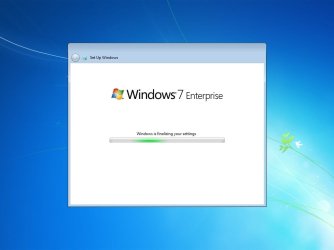
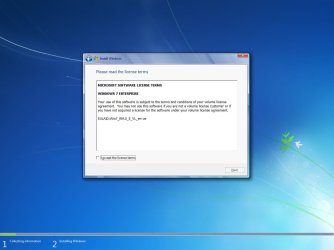
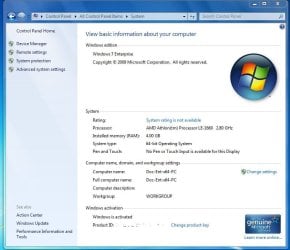
I installed win7 Enterprise x64 yesterday on a 400gb Sata HD in a removable HD mobile rack on one of my computers. Install went pretty normal as most of my win7 installs. Enterprise looks basically like Prof & Ultimate. During install it did not ask for the Key Code at all, just went right through completing the install. Then when I checked system in Control Panel it said 3 days to activate. So I tried to activate online, but got failed. Then I clicked on the box change product key, then the blank
line popped up to type in my TechNet Key Code. Did that & it activated :D
Use Enterprise for about 7 hours without any problems :)

Here are some snips:

:ar:

:orb:
 

Attachments

  • Win7_Ent_x64.jpg
    Win7_Ent_x64.jpg
    30 KB · Views: 23
  • win7_enterprise.jpg
    win7_enterprise.jpg
    60.5 KB · Views: 45
  • Ent_x64_snip.JPG
    Ent_x64_snip.JPG
    67.5 KB · Views: 98

My Computer

Computer type
PC/Desktop
Computer Manufacturer/Model Number
Built them myself, Science Experiments !
OS
Win7 Enterprise, Win7 x86 (Ult 7600), Win7 x64 Ult 7600, TechNet RTM on AMD x64 (2.8Ghz)
CPU
AMD fx8350 4ghz, AMD-32 2400mhz, AMD-64 3200mhz, AMDx64 2.8G
Motherboard
SIS 755, ECS-K8M890M-M (Ult 7600), GigaByte & others
Memory
2gb, 4gb on the Ult 7600, 4gb on Technet RTM, 32gb on FX8350
Graphics Card(s)
Draw my own Graphics, several nVidia cards
Sound Card
on motherboard
Monitor(s) Displays
19" flat scr, 28" I-Inc widescr,22" Emprex Widescr, 23" Acer
Screen Resolution
1280 x 1024, 1440 x 900, 1920 x 1080
Hard Drives
6 pata Ide HD's & 2 Sata HD's
added 80gb external on Ult 7600 computer,
numerous extra 1tb, 2TB, 3Tb SATA HD's
A collection of ext HD Docks w/ HDs
PSU
430w, 550w, 600w, 700, 800, etc
Case
All Generic Full Towers
Cooling
Open Air & a few fans, some w/ colored LEDs
Keyboard
Compaq & Dell recycled from GoodWill
Mouse
Made in China Optical Wired Mouse
Internet Speed
Fast Cable InterNet
Antivirus
AVG Free on 24 different Desktops, NO Problems!
Browser
IE 8 is preferred, but use FireFox sometimes
Other Info
Linksys Routers, switches, & Hubs
Too Many USB Flash Drives to count, Biggest is 64GB !
Eight computers in my home network.
Sixteen computers at my business network.
Linked via TeamViewer !
Lots of old used spare computer parts everywhere!
That looks like the Background I now have and I am using Win 7 RTM 64 bit... I thought each one had a different background?
 

My Computer

Computer type
PC/Desktop
Computer Manufacturer/Model Number
Custom Built... Intel/Nvidia/ASRock
OS
Windows 7 x64 (Ultimate)
CPU
Intel i5-4670K
Motherboard
ASRock Z87 Extreme 6
Memory
8GBs Ripjaws 2133Mhz
Graphics Card(s)
Asus GTX660 (2GBs)
Sound Card
Onboard Realtek HD
Monitor(s) Displays
Acer AL2216W
Screen Resolution
1680 x 1050
Hard Drives
Samsung 840 SSD 120GBs
Samsung 750GB 32MB cache
1.5 TB
PSU
PC Cooling 750w Silencer
Case
Thermaltake Spedo Advance
Cooling
Std Cooler
Keyboard
Logitech G15
Mouse
Logitech G9
Internet Speed
Comcast 20Mbit
Antivirus
Avast
Browser
Firefox
Then when I checked system in Control Panel it said 3 days to activate. So I tried to activate online, but got failed. Then I clicked on the box change product key, then the blank
line popped up to type in my TechNet Key Code. Did that & it activated :D

The reason that the activate online failed, was that the Enterprise version of Windows 7 is expecting to find a KMS (key management server) on your network to activate against. So, when you try to activate, it queries DNS looking for the KMS records and fails when it cannot find them.

The other way to activate Win7 enterprise is with a MAK (multi-activation key). You use the Change Product key feature when you choose to activate this way. That is what you got with Technet and that is why it worked for you :)

The features in Enterprise that are not in Professional are

  • Direct Access
  • BitLocker and BitLocker to go
  • BranchCache
  • Enterprise Search Scopes
  • AppLocker
  • Multi-Lingual User Interface (MUI)
  • VDI Optimzation
  • Subsystem for Unix-based apps

I've been working my way through a Microsoft Enterprise Agreement renewal and the licensing guys went over the features in the enterprise version of the software that we would be missing out on if we decide to not renew our EA. (which it looks like we won't be renewing...it saves us a ton of money and we don't use the above features).
 

My Computer

Computer Manufacturer/Model Number
Self-Built in July 2009
OS
Windows 7 Ultimate x64
CPU
Intel Q9550 2.83Ghz OC'd to 3.40Ghz
Motherboard
Gigabyte GA-EP45-UD3R rev. 1.1, F12 BIOS
Memory
8GB G.Skill PI DDR2-800, 4-4-4-12 timings
Graphics Card(s)
EVGA 1280MB Nvidia GeForce GTX570
Sound Card
Realtek ALC899A 8 channel onboard audio
Monitor(s) Displays
23" Acer x233H
Screen Resolution
1920x1080
Hard Drives
Intel X25-M 80GB Gen 2 SSD
Western Digital 1TB Caviar Black, 32MB cache. WD1001FALS
PSU
Corsair 620HX modular
Case
Antec P182
Cooling
stock
Keyboard
ABS M1 Mechanical
Mouse
Logitech G9 Laser Mouse
Internet Speed
15/2 cable modem
Other Info
Windows and Linux enthusiast. Logitech G35 Headset.
Then when I checked system in Control Panel it said 3 days to activate. So I tried to activate online, but got failed. Then I clicked on the box change product key, then the blank
line popped up to type in my TechNet Key Code. Did that & it activated :D

The reason that the activate online failed, was that the Enterprise version of Windows 7 is expecting to find a KMS (key management server) on your network to activate against. So, when you try to activate, it queries DNS looking for the KMS records and fails when it cannot find them.

The other way to activate Win7 enterprise is with a MAK (multi-activation key). You use the Change Product key feature when you choose to activate this way. That is what you got with Technet and that is why it worked for you :)

The features in Enterprise that are not in Professional are

  • Direct Access
  • BitLocker and BitLocker to go
  • BranchCache
  • Enterprise Search Scopes
  • AppLocker
  • Multi-Lingual User Interface (MUI)
  • VDI Optimzation
  • Subsystem for Unix-based apps
I've been working my way through a Microsoft Enterprise Agreement renewal and the licensing guys went over the features in the enterprise version of the software that we would be missing out on if we decide to not renew our EA. (which it looks like we won't be renewing...it saves us a ton of money and we don't use the above features).


Thanks for that info, as I don't think many will have Enterprise as a normal user.
 

My Computer

Computer type
PC/Desktop
Computer Manufacturer/Model Number
Built them myself, Science Experiments !
OS
Win7 Enterprise, Win7 x86 (Ult 7600), Win7 x64 Ult 7600, TechNet RTM on AMD x64 (2.8Ghz)
CPU
AMD fx8350 4ghz, AMD-32 2400mhz, AMD-64 3200mhz, AMDx64 2.8G
Motherboard
SIS 755, ECS-K8M890M-M (Ult 7600), GigaByte & others
Memory
2gb, 4gb on the Ult 7600, 4gb on Technet RTM, 32gb on FX8350
Graphics Card(s)
Draw my own Graphics, several nVidia cards
Sound Card
on motherboard
Monitor(s) Displays
19" flat scr, 28" I-Inc widescr,22" Emprex Widescr, 23" Acer
Screen Resolution
1280 x 1024, 1440 x 900, 1920 x 1080
Hard Drives
6 pata Ide HD's & 2 Sata HD's
added 80gb external on Ult 7600 computer,
numerous extra 1tb, 2TB, 3Tb SATA HD's
A collection of ext HD Docks w/ HDs
PSU
430w, 550w, 600w, 700, 800, etc
Case
All Generic Full Towers
Cooling
Open Air & a few fans, some w/ colored LEDs
Keyboard
Compaq & Dell recycled from GoodWill
Mouse
Made in China Optical Wired Mouse
Internet Speed
Fast Cable InterNet
Antivirus
AVG Free on 24 different Desktops, NO Problems!
Browser
IE 8 is preferred, but use FireFox sometimes
Other Info
Linksys Routers, switches, & Hubs
Too Many USB Flash Drives to count, Biggest is 64GB !
Eight computers in my home network.
Sixteen computers at my business network.
Linked via TeamViewer !
Lots of old used spare computer parts everywhere!
Thanks for that info, as I don't think many will have Enterprise as a normal user.

That is correct. Enterprise is not even available to retail consumers and is only available to businesses who maintain a Microsoft Enterprise Agreement. Through an OEM vendor, your only purchase options are Professional or Ultimate.

The Enterprise versions are available with Technet or MSDN....however you cannot use the Technet version as your work desktop. I think you could use the MSDN version as long as you had a valid MSDN subscription for that person...since the MDSN license allows for production use.
 

My Computer

Computer Manufacturer/Model Number
Self-Built in July 2009
OS
Windows 7 Ultimate x64
CPU
Intel Q9550 2.83Ghz OC'd to 3.40Ghz
Motherboard
Gigabyte GA-EP45-UD3R rev. 1.1, F12 BIOS
Memory
8GB G.Skill PI DDR2-800, 4-4-4-12 timings
Graphics Card(s)
EVGA 1280MB Nvidia GeForce GTX570
Sound Card
Realtek ALC899A 8 channel onboard audio
Monitor(s) Displays
23" Acer x233H
Screen Resolution
1920x1080
Hard Drives
Intel X25-M 80GB Gen 2 SSD
Western Digital 1TB Caviar Black, 32MB cache. WD1001FALS
PSU
Corsair 620HX modular
Case
Antec P182
Cooling
stock
Keyboard
ABS M1 Mechanical
Mouse
Logitech G9 Laser Mouse
Internet Speed
15/2 cable modem
Other Info
Windows and Linux enthusiast. Logitech G35 Headset.
Back
Top