
i just installed Windows 7 Enterprise x64bit today
and i can not adjust the screen brightness
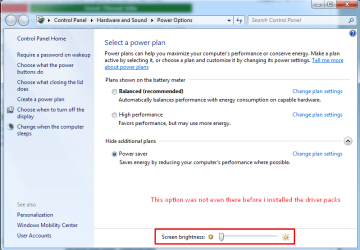
-before i installed the driver pack, it didnt even show this option
http://www.sevenforums.com/attachment.php?attachmentid=321153&stc=1&d=1402424820
and after i installed the driver packs the option is there but its useless
i have put the screen brightness on minimum but the brightness is still maximum and my eyes are about to pop right now
somehow i don't have this problem on the x32bit version.
is there any driver that i have to install or any way to fix this ?
and i can not adjust the screen brightness
-before i installed the driver pack, it didnt even show this option
http://www.sevenforums.com/attachment.php?attachmentid=321153&stc=1&d=1402424820
and after i installed the driver packs the option is there but its useless
i have put the screen brightness on minimum but the brightness is still maximum and my eyes are about to pop right now
somehow i don't have this problem on the x32bit version.
is there any driver that i have to install or any way to fix this ?
Attachments
My Computer
At a glance
Windows 7 EnterPrise x64bitIntel(R) HD Graphics 4000
- Computer type
- PC/Desktop
- Computer Manufacturer/Model Number
- HP
- OS
- Windows 7 EnterPrise x64bit
- Graphics Card(s)
- Intel(R) HD Graphics 4000
- Browser
- Google Chrome


