Windows 7 error reporting

ariespaan

New member
Member
Local time
6:30 PM
Messages
71
The last days, i use the windows-7 program: eventvwr for examening the logbooks
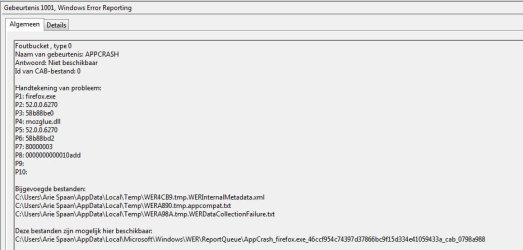
When i start the system there about 12 lines, with Windows 7 error reportings
I dont know wat caused these problems and i wonder if it can hurt my system.
Can somebody explain these errors?

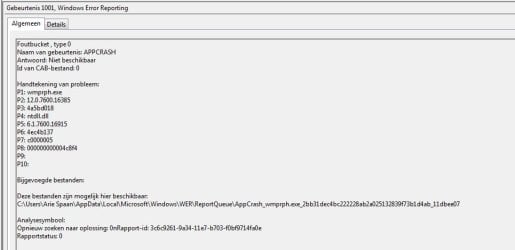
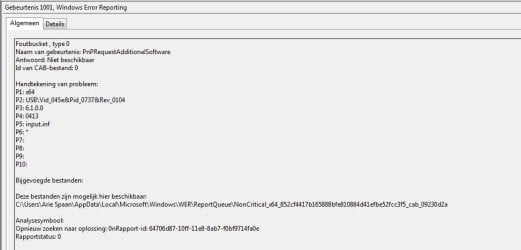
I added some 5 screenshots of de error-reports, all of them have the id=1001
 

Attachments
  • Fs Cap 0118.jpg
    Fs Cap 0118.jpg
    101.1 KB · Views: 0
  • Fs Cap 0119.jpg
    Fs Cap 0119.jpg
    88.6 KB · Views: 0
  • Fs Cap 0120.jpg
    Fs Cap 0120.jpg
    88.4 KB · Views: 0
  • Fs Cap 0121.jpg
    Fs Cap 0121.jpg
    104.8 KB · Views: 0
  • Fs Cap 0122.jpg
    Fs Cap 0122.jpg
    87.7 KB · Views: 0

My Computer

Computer type
Laptop
Computer Manufacturer/Model Number
Sony
OS
Windows-7 64 Bits Home Premium
CPU
Intel I5
On my control panel the icon for my computer shows a yellow triangle. I have tried troubleshooting with no luck. Any ideas?
 

My Computer

Computer type
PC/Desktop
Computer Manufacturer/Model Number
HP
OS
Windows 7 Home Premium 32bit
padams398, your issue is unrelated to ariespaan's post. Please post it as a separate issue, under a new title.

As for Event ID 1001 in itself is not an error but a notice that something has changed in the Event reporting.
\EWR is a Windows Error Reporting folder, and the contents are not legible. My recommended action is to clear all errors from the Event Viewer and reboot the system and immediately check the Event Viewer. In general, most system errors are generated during start up.

Regardless of the two different posts, both of you may benefit from running a system file check and the chkdsk utilities from a command prompt (as administrators) and check the results:
Code:
sfc /scannow
and then run 
chkdsk: C: /v /f
 
Last edited:

My Computer

Computer type
PC/Desktop
Computer Manufacturer/Model Number
Custom built
OS
Microsoft Windows 10 Pro 64-bit
CPU
8th generation Intel(R) Pentium G5600 3.9GHz
Motherboard
ASRock B360 Pro 4 8th Generation
Memory
16 GB DDR4 Kingston HyperX
Graphics Card(s)
On board Intel UHD Graphics 1GB shared
Sound Card
On board Realtek HD ALC892
Monitor(s) Displays
LG 22 in LCD
Screen Resolution
1536 x 864 x 32 bits (4294967296 colors) @ 59 Hz
Hard Drives
(1) SanDisk SDSSDHII120G ATA Device
(2) ST1000DM003-1SB10C ATA Device
(3) ST500DM002-1BD142 ATA Device
PSU
Antec 650 Watt PSU
Case
Antec mid size tower
Cooling
120mm fan
Keyboard
Generic 105 keys
Mouse
Generic JeTech
Internet Speed
50 megabits
Antivirus
Avast and daily Malwarebytes scan
Browser
Cyberfox 52.9.1
I started the post about: windows 7 error reporting
I have now some additional questions
The eventvwr logboek shows for example 3 errors:

1. P1 wmprph.exe 2 p1 wmprph.exe 3 p1 firefox.exe
p2 p2 p2
p3 p3 p3
p4 ntdll.dll p4 jscript.dll p4 mozglue.dll
p5 p5 p5
p6 p6 p6
p7 c0000005 p7 c000041D p7 80000003
p8 p8 08

I asume that field: p7 contains an error-code, and if i am wright: is there somewhere an explantion to find about these error-codes?
 

My Computer

Computer type
Laptop
Computer Manufacturer/Model Number
Sony
OS
Windows-7 64 Bits Home Premium
CPU
Intel I5
Note when i start windows with no internet connection, all error-messages do not appear anymore
However when starting again with internet-connectiion all these error-messages are coming back
So windows and firefox need to do something on internet before starting the system
Remarkable is that for instance the firefox-error is coming, although firefox is not even started by me yet.
 

My Computer

Computer type
Laptop
Computer Manufacturer/Model Number
Sony
OS
Windows-7 64 Bits Home Premium
CPU
Intel I5
Note when i start windows with no internet connection, all error-messages do not appear anymore
However when starting again with internet-connectiion all these error-messages are coming back
So windows and firefox need to do something on internet before starting the system
Remarkable is that for instance the firefox-error is coming, although firefox is not even started by me yet.

Without the Event IDs what you provide is meaningless. It is unlikely that Firefox is the cause. The problem is most likely the Windows internet connection. Please implement the following in the order below.

1. Download this batch file from the forum and clear all events.
Event Viewer One Click Clear
Do not keep old events, they are meaningless. During testing always clear the events before a reboot. Problems occur at the startup of something. Windows or the Internet

2. Reboot and open the Event viewer.

3. On the top left column of the EV, click on Custom Views > Administrative Events, and this will list a summary of problems regardless of their source. (See attached image).

4. List here or upload a screenshot of all the errors with their Event IDs, then close the Viewer. This will us if there is a system problem.

5. Use another browser other than Firefox, open the Event Viewer again and see what errors are generated in the EV. If there are errors, provide the Event ID only.

6. If new errors occurred, open a Command Prompt Window and type:

Code:
ipconfig /all
The more detail you provide about your apps, the easier to find and resolve the issue.
 

Attachments

  • Administrative events.jpg
    Administrative events.jpg
    70.1 KB · Views: 1

My Computer

Computer type
PC/Desktop
Computer Manufacturer/Model Number
Custom built
OS
Microsoft Windows 10 Pro 64-bit
CPU
8th generation Intel(R) Pentium G5600 3.9GHz
Motherboard
ASRock B360 Pro 4 8th Generation
Memory
16 GB DDR4 Kingston HyperX
Graphics Card(s)
On board Intel UHD Graphics 1GB shared
Sound Card
On board Realtek HD ALC892
Monitor(s) Displays
LG 22 in LCD
Screen Resolution
1536 x 864 x 32 bits (4294967296 colors) @ 59 Hz
Hard Drives
(1) SanDisk SDSSDHII120G ATA Device
(2) ST1000DM003-1SB10C ATA Device
(3) ST500DM002-1BD142 ATA Device
PSU
Antec 650 Watt PSU
Case
Antec mid size tower
Cooling
120mm fan
Keyboard
Generic 105 keys
Mouse
Generic JeTech
Internet Speed
50 megabits
Antivirus
Avast and daily Malwarebytes scan
Browser
Cyberfox 52.9.1
Dear user: Ineuw
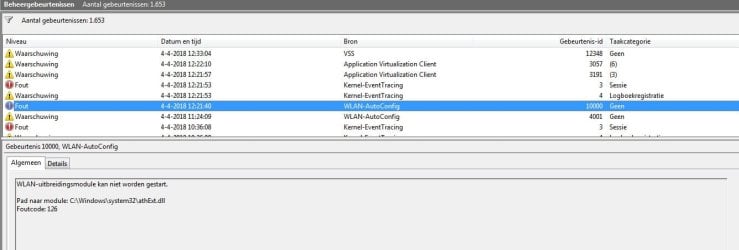
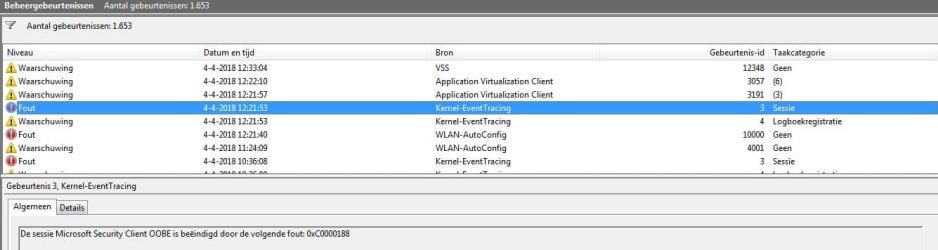
I have done what you ask me to do and i have addes 2 screenshots
I must say that i have an internet-connection via a LAN-connection (wired solution) and i am not using the WLAN-connection (I disabled also Wlan-connection on my router)
Probably could that be the pronblem?

I even discovered that when i start my system en after that i did not start any further application
(So windows is idle for 12 a 15 minutes) these error-messages appear after 15 minutes.
Why did windows come with these error-messages after 15 minutes?
 

My Computer

Computer type
Laptop
Computer Manufacturer/Model Number
Sony
OS
Windows-7 64 Bits Home Premium
CPU
Intel I5
Sorry user: Ineuw i forgot to send 2 screenshots i mentioned in the previous post
Here the are
 

Attachments

  • Fs Cap 0125.jpg
    Fs Cap 0125.jpg
    132.3 KB · Views: 1
  • Fs Cap 0126.jpg
    Fs Cap 0126.jpg
    128.8 KB · Views: 1

My Computer

Computer type
Laptop
Computer Manufacturer/Model Number
Sony
OS
Windows-7 64 Bits Home Premium
CPU
Intel I5
Almost all errors are related to your network, and/or networking card and Firefox is reacting to these problems, as well as others. The messages appearing in the Event Window after some idling time is the server scanning your workstation periodically and has nothing to do Firefox. Since you are on a network and I am on a single user desktop, it is impossible for me to pinpoint exactly what is wrong because I don't know your system, But not every Event ID is an error.

Here are some recommendations. The info below is in the order posted.

  1. You must be an administrator, (and a trusted installer in some cases to make changes).
  2. Cleanup Windows temp files Accessories > System Tools > Disk cleanup. This may help with some of the Event ID errors.
  3. Let me know which version of Firefox are you using? Find this info in Help > About. This is important.
  4. wmprph.exe = Firefox has a problem with a plugin. Are you using Windows Media Player? Is there a plugin for it in Firefox? If it is yes, disable, or uninstall it. You will find it under Tools > Addons > Plugins. I would also uninstall WMP completely and recommend using Videolan (VLC).
  5. jscript.dll is part of Internet Explorer. (which version?) I recommend not to use any version IE, it cannot be uninstalled, only turned turned off in Control Panel > All Control Panel Items > Programs and Features > Turn Windows features on / off.
  6. mozglue.dll indicates that the Firefox version may be out of date.
  7. Event ID 12348:[FONT=&quot] Volume Shadow Copy need access to the volume root directory. For this you need to be an Administrator and with the proper authorization. Usually VSS is needed for backup.[/FONT]
  8. [FONT=&quot] Event ID 3057: Irrelevant but it may also be related to ID:12348[/FONT]
  9. [FONT=&quot] Event ID 3191: Successful completion of ID: 3057[/FONT]
  10. [FONT=&quot] Event ID [FONT=&quot]3[/FONT]: Server related[/FONT]
  11. [FONT=&quot] Event ID [FONT=&quot]4[/FONT]: Server related[/FONT]
  12. [FONT=&quot] Event ID 1000: Successful completion of Security policy.[/FONT]
  13. [FONT=&quot][FONT=&quot]Event ID [FONT=&quot]4[/FONT]00[FONT=&quot]1[/FONT]: Is not an error, it[FONT=&quot] tells you that network connection was successful. (see my screenshot)
    [/FONT][/FONT]
    [/FONT]
  14. [FONT=&quot][FONT=&quot][FONT=&quot][FONT=&quot]P[/FONT]erform whatever corrections possible from the above list, [FONT=&quot]then c[/FONT]lear the events as before with the batch[FONT=&quot] file[/FONT], reboot, [FONT=&quot]expand [FONT=&quot]the Eve[FONT=&quot][FONT=&quot]nt[/FONT] View[FONT=&quot] window[/FONT][/FONT][/FONT] by p[FONT=&quot]ulling down the frame[/FONT][/FONT] at the bo[FONT=&quot]t[/FONT]tom and post a new screenshot[FONT=&quot].[/FONT][/FONT][/FONT][/FONT]
  15. [FONT=&quot]Pull down to [FONT=&quot]e[FONT=&quot][FONT=&quot][FONT=&quot][FONT=&quot][FONT=&quot][FONT=&quot][FONT=&quot][FONT=&quot][FONT=&quot]xtend the bottom frame of the command prompt window [/FONT][/FONT][/FONT][/FONT]and post a screenshot of your network configuration "i[FONT=&quot]pconfig /all[/FONT][/FONT][/FONT][/FONT]" [FONT=&quot]- so that everything is visib[FONT=&quot]l[/FONT]e.[/FONT][/FONT][/FONT][/FONT][/FONT]
 

My Computer

Computer type
PC/Desktop
Computer Manufacturer/Model Number
Custom built
OS
Microsoft Windows 10 Pro 64-bit
CPU
8th generation Intel(R) Pentium G5600 3.9GHz
Motherboard
ASRock B360 Pro 4 8th Generation
Memory
16 GB DDR4 Kingston HyperX
Graphics Card(s)
On board Intel UHD Graphics 1GB shared
Sound Card
On board Realtek HD ALC892
Monitor(s) Displays
LG 22 in LCD
Screen Resolution
1536 x 864 x 32 bits (4294967296 colors) @ 59 Hz
Hard Drives
(1) SanDisk SDSSDHII120G ATA Device
(2) ST1000DM003-1SB10C ATA Device
(3) ST500DM002-1BD142 ATA Device
PSU
Antec 650 Watt PSU
Case
Antec mid size tower
Cooling
120mm fan
Keyboard
Generic 105 keys
Mouse
Generic JeTech
Internet Speed
50 megabits
Antivirus
Avast and daily Malwarebytes scan
Browser
Cyberfox 52.9.1
Dear Ineuw,

Thanks for your excellent report. Here are my answers:

1. I Am logged in as Administrator
2. Clean-up Is done
3. I Use Firefox 43.0.1 (Shame for me) and also 57.0.2 (As a Portable App)
4. The Firefox-messages appear almost when i not had even started FF!!)
I don not use WMP only sometimes VLC and mostly Light Alloy
I see my Firefox uses indeed the Plugin-Container
5. I don not use I.E. only FF, but i shall disable it as you suggested
6. Mozgue.dll, Yes I know probably FF is out of date (At least 43.0.1)
7 till 15 I understand these answers

I must say at last, that all these messages mostly appear when i am connected to the Internet,
When i start the system, without an Internet-connection all these messages (at least the most) do not appear.

So i think that most of these messages appear do tue the problem of out-of-date's of some applications
 

My Computer

Computer type
Laptop
Computer Manufacturer/Model Number
Sony
OS
Windows-7 64 Bits Home Premium
CPU
Intel I5
Internet Explorer cannot be uninstalled because it shares or provides some code with Windows, but it can and should be "muted". Windows Media Player is nowhere as sophisticated as VLC, takes up a lot of space and may generate some unnecessary and confusing Windows events in the Viewer.

There are two very good options to replace FF 43 and not lose preferred features. One option is Pale Moon based on legacy Firefox and is faster, and the other option is Firefox ESR. (Extended Support Release) current release is 52.7.3. Both are up to date with the latest changes and still use legacy extensions. You find all Firefox versions for all operating systems 32 & 64 bits, and all languages here.

In the Google Chromium family of browsers, Vivaldi is very fast and very nice, but is still in the process of adding some finishing touches.

Try a new browser, clear the old Event Viewer events, reboot and then post the remaining errors.

As for the Event Viewer warnings (yellow) not all are errors.
 

My Computer

Computer type
PC/Desktop
Computer Manufacturer/Model Number
Custom built
OS
Microsoft Windows 10 Pro 64-bit
CPU
8th generation Intel(R) Pentium G5600 3.9GHz
Motherboard
ASRock B360 Pro 4 8th Generation
Memory
16 GB DDR4 Kingston HyperX
Graphics Card(s)
On board Intel UHD Graphics 1GB shared
Sound Card
On board Realtek HD ALC892
Monitor(s) Displays
LG 22 in LCD
Screen Resolution
1536 x 864 x 32 bits (4294967296 colors) @ 59 Hz
Hard Drives
(1) SanDisk SDSSDHII120G ATA Device
(2) ST1000DM003-1SB10C ATA Device
(3) ST500DM002-1BD142 ATA Device
PSU
Antec 650 Watt PSU
Case
Antec mid size tower
Cooling
120mm fan
Keyboard
Generic 105 keys
Mouse
Generic JeTech
Internet Speed
50 megabits
Antivirus
Avast and daily Malwarebytes scan
Browser
Cyberfox 52.9.1
Thanks for all your advices.
I first start deleting the old Firefox 43 and install completely new version 59.0.2 (i did several tests on this version and works OK)
Eventualy switching to another browser, is very tricky, for i dont know about all these other ones, so i think i leave it at that part.
 

My Computer

Computer type
Laptop
Computer Manufacturer/Model Number
Sony
OS
Windows-7 64 Bits Home Premium
CPU
Intel I5
That is an excellent choice. It is a very good and fast browser. I should have made it clearer in my previous post that the reason I recommended alternatives, was because Firefox 57 and greater (aka Quantum) does not meet my needs. When they are met, I will be using it as well. Sorry.
 

My Computer

Computer type
PC/Desktop
Computer Manufacturer/Model Number
Custom built
OS
Microsoft Windows 10 Pro 64-bit
CPU
8th generation Intel(R) Pentium G5600 3.9GHz
Motherboard
ASRock B360 Pro 4 8th Generation
Memory
16 GB DDR4 Kingston HyperX
Graphics Card(s)
On board Intel UHD Graphics 1GB shared
Sound Card
On board Realtek HD ALC892
Monitor(s) Displays
LG 22 in LCD
Screen Resolution
1536 x 864 x 32 bits (4294967296 colors) @ 59 Hz
Hard Drives
(1) SanDisk SDSSDHII120G ATA Device
(2) ST1000DM003-1SB10C ATA Device
(3) ST500DM002-1BD142 ATA Device
PSU
Antec 650 Watt PSU
Case
Antec mid size tower
Cooling
120mm fan
Keyboard
Generic 105 keys
Mouse
Generic JeTech
Internet Speed
50 megabits
Antivirus
Avast and daily Malwarebytes scan
Browser
Cyberfox 52.9.1
Dear Ineuw,

Thanks for all your tips and advices, i started already with Firefox 59.0.2 and at this moment all is working fine.

My early concerns was that there was an Firefox-service or so, which was connected to the Internet for looking if i was using an old Firefox-version.
Despite this service was executed before i even started the Firefox-browser

It would be better to understand for me, if i had known the name of that service, what looked at Internet
I did some research for that service-name with the application: autoruns.exe but i did not find it at all
I think you also could not tell met that service-name?
It would have cost me not so much trouble to find out wat the problems where of the events

Best recards.
 

My Computer

Computer type
Laptop
Computer Manufacturer/Model Number
Sony
OS
Windows-7 64 Bits Home Premium
CPU
Intel I5
Dear Ineuw,

My early concerns was that there was an Firefox-service or so, which was connected to the Internet for looking if i was using an old Firefox-version. Despite this service was executed before i even started the Firefox-browser.

ariespaan, you are welcome and glad that I was able to help.

There is no "autorun.exe" or "autoruns.exe" as a part of the Windows OS, but check the folder C:\Windows\Prefetch and you may find a FIREFOX.EXE-XXXXXXXX.pf file. Move it to a \temp folder (or delete it) and I recommend to disable Windows Superfetch and Prefetch, even if you have no SSD. This link gives information as to how to disable both, and they can be re-enabled whenever you think it affects performance. http://www.thewindowsclub.com/disable-superfetch-prefetch-ssd

Also recommend to download and install the "Search Everything" file explorer from https://www.voidtools.com/ This software has it's own file indexing system, does not rely on Windows Explorer file index, lists every object and type on the computer very fast! Look at their "Search" menu option how to find what you would be looking for.
 

My Computer

Computer type
PC/Desktop
Computer Manufacturer/Model Number
Custom built
OS
Microsoft Windows 10 Pro 64-bit
CPU
8th generation Intel(R) Pentium G5600 3.9GHz
Motherboard
ASRock B360 Pro 4 8th Generation
Memory
16 GB DDR4 Kingston HyperX
Graphics Card(s)
On board Intel UHD Graphics 1GB shared
Sound Card
On board Realtek HD ALC892
Monitor(s) Displays
LG 22 in LCD
Screen Resolution
1536 x 864 x 32 bits (4294967296 colors) @ 59 Hz
Hard Drives
(1) SanDisk SDSSDHII120G ATA Device
(2) ST1000DM003-1SB10C ATA Device
(3) ST500DM002-1BD142 ATA Device
PSU
Antec 650 Watt PSU
Case
Antec mid size tower
Cooling
120mm fan
Keyboard
Generic 105 keys
Mouse
Generic JeTech
Internet Speed
50 megabits
Antivirus
Avast and daily Malwarebytes scan
Browser
Cyberfox 52.9.1
Back
Top