
Windows 7 failed updates error code 800B0003

Caramelo

New member
Member
Local time
5:18 PM
Messages
81
Several failed Windows 7x64 updates (see attachements)

error code 800B0003
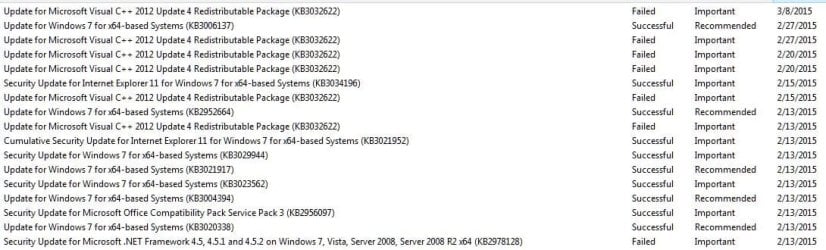
Failed windows updates.JPG

failed updates error code.JPG

View attachment 352135

Ran SURT
Ran sfc/scannow in elevated prompt. It found errors that it could not fix.
Note: I could not upload the entire CBS folder as a rar or a zip,( I kept getting a 505 error) so I uploaded the cbs log file.
 

My Computer

Computer type
PC/Desktop
Computer Manufacturer/Model Number
Home built
OS
Windows Home Premium 64- bit(6.1,Build 7600) SP1
CPU
AMD PhenomIIx4 945 3.0Ghz
Motherboard
MS-7577
Memory
8GB (Mushkin DDR3 2gb x 4)
Graphics Card(s)
ASUS VH232H (1920x1080@60Hz) 2048MB ATI AMD Radeon HD 7800 S
Sound Card
On board
Monitor(s) Displays
Asus 22"
Screen Resolution
1920x1080
Hard Drives
2 WD 500gb SATA
1 WD 200gb ATA
1 WD 120gb ATA
PSU
Corsair TX 850w
Case
Antec tower
Cooling
Multiple fan.
Keyboard
Logitech USB
Mouse
Logitech G9 laser mouse
Internet Speed
Cable
Antivirus
AVG free
Browser
Firefox, Chrome, IE
Other Info
CH Joystick, Nostromo N50 game pad, USB headset, Canon Printer
I need tha CheckSUR.log file as well please... and the c:\windows\windowsupdate.log file
 

My Computer

Computer type
Laptop
Computer Manufacturer/Model Number
Asus K52F or Lenovo B51-80
OS
Win 7 x64 Home Premium (and x86 VirtualBox VM)/Win10
CPU
i3 370M/i7 6500U
Motherboard
Asus/Lenovo
Memory
8GB - finally :)/8GB
Graphics Card(s)
it's an i3, dude!/dual Intel&nVidia
Sound Card
onboard
Monitor(s) Displays
15.6" built-in
Screen Resolution
1366x768/1920x1080
Hard Drives
750GB Seagate internal
Sundry external drives attached to other computers on the local network
1TB SSD on the Lenovo
PSU
n/a
Internet Speed
as much as I can get - usually on a dongle/phone, so <1MB/s
Antivirus
MSE/Defender
Browser
IE11/12/Edge/Chrome/FF(if I must)
Here they are.
 

Attachments

My Computer

Computer type
PC/Desktop
Computer Manufacturer/Model Number
Home built
OS
Windows Home Premium 64- bit(6.1,Build 7600) SP1
CPU
AMD PhenomIIx4 945 3.0Ghz
Motherboard
MS-7577
Memory
8GB (Mushkin DDR3 2gb x 4)
Graphics Card(s)
ASUS VH232H (1920x1080@60Hz) 2048MB ATI AMD Radeon HD 7800 S
Sound Card
On board
Monitor(s) Displays
Asus 22"
Screen Resolution
1920x1080
Hard Drives
2 WD 500gb SATA
1 WD 200gb ATA
1 WD 120gb ATA
PSU
Corsair TX 850w
Case
Antec tower
Cooling
Multiple fan.
Keyboard
Logitech USB
Mouse
Logitech G9 laser mouse
Internet Speed
Cable
Antivirus
AVG free
Browser
Firefox, Chrome, IE
Other Info
CH Joystick, Nostromo N50 game pad, USB headset, Canon Printer
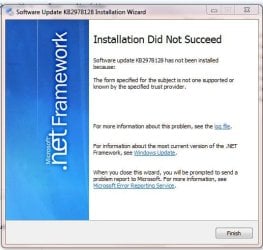
Interesting - the only 0x800b0003 errors in the Windowsupdate log are paired with -643 ones - which usually indicate a problem with the base install of the component involved.
In your case, I suspect that the issue may simply be a bad download (despite the checking that WU does).

Try installing the .NET update from the standalone download...
https://www.microsoft.com/en-gb/download/details.aspx?id=44686
 

My Computer

Computer type
Laptop
Computer Manufacturer/Model Number
Asus K52F or Lenovo B51-80
OS
Win 7 x64 Home Premium (and x86 VirtualBox VM)/Win10
CPU
i3 370M/i7 6500U
Motherboard
Asus/Lenovo
Memory
8GB - finally :)/8GB
Graphics Card(s)
it's an i3, dude!/dual Intel&nVidia
Sound Card
onboard
Monitor(s) Displays
15.6" built-in
Screen Resolution
1366x768/1920x1080
Hard Drives
750GB Seagate internal
Sundry external drives attached to other computers on the local network
1TB SSD on the Lenovo
PSU
n/a
Internet Speed
as much as I can get - usually on a dongle/phone, so <1MB/s
Antivirus
MSE/Defender
Browser
IE11/12/Edge/Chrome/FF(if I must)
Hi,
There are 2 files listed for down load. A x64.exe and a x86.exe. Which is the appropriate one?
 

My Computer

Computer type
PC/Desktop
Computer Manufacturer/Model Number
Home built
OS
Windows Home Premium 64- bit(6.1,Build 7600) SP1
CPU
AMD PhenomIIx4 945 3.0Ghz
Motherboard
MS-7577
Memory
8GB (Mushkin DDR3 2gb x 4)
Graphics Card(s)
ASUS VH232H (1920x1080@60Hz) 2048MB ATI AMD Radeon HD 7800 S
Sound Card
On board
Monitor(s) Displays
Asus 22"
Screen Resolution
1920x1080
Hard Drives
2 WD 500gb SATA
1 WD 200gb ATA
1 WD 120gb ATA
PSU
Corsair TX 850w
Case
Antec tower
Cooling
Multiple fan.
Keyboard
Logitech USB
Mouse
Logitech G9 laser mouse
Internet Speed
Cable
Antivirus
AVG free
Browser
Firefox, Chrome, IE
Other Info
CH Joystick, Nostromo N50 game pad, USB headset, Canon Printer
X64 ... the 64-bit version
 

My Computer

Computer type
Laptop
Computer Manufacturer/Model Number
Asus K52F or Lenovo B51-80
OS
Win 7 x64 Home Premium (and x86 VirtualBox VM)/Win10
CPU
i3 370M/i7 6500U
Motherboard
Asus/Lenovo
Memory
8GB - finally :)/8GB
Graphics Card(s)
it's an i3, dude!/dual Intel&nVidia
Sound Card
onboard
Monitor(s) Displays
15.6" built-in
Screen Resolution
1366x768/1920x1080
Hard Drives
750GB Seagate internal
Sundry external drives attached to other computers on the local network
1TB SSD on the Lenovo
PSU
n/a
Internet Speed
as much as I can get - usually on a dongle/phone, so <1MB/s
Antivirus
MSE/Defender
Browser
IE11/12/Edge/Chrome/FF(if I must)
Thanks. That didn't work. I seem to remember trying it a while ago when I was trouble shooting on my own.
netframework installation fail.JPG

netframework install log.JPG

Sorry, that log file screen shot is unreadable. Here is a copy and paste.

View attachment netframework log file text.txt
 

My Computer

Computer type
PC/Desktop
Computer Manufacturer/Model Number
Home built
OS
Windows Home Premium 64- bit(6.1,Build 7600) SP1
CPU
AMD PhenomIIx4 945 3.0Ghz
Motherboard
MS-7577
Memory
8GB (Mushkin DDR3 2gb x 4)
Graphics Card(s)
ASUS VH232H (1920x1080@60Hz) 2048MB ATI AMD Radeon HD 7800 S
Sound Card
On board
Monitor(s) Displays
Asus 22"
Screen Resolution
1920x1080
Hard Drives
2 WD 500gb SATA
1 WD 200gb ATA
1 WD 120gb ATA
PSU
Corsair TX 850w
Case
Antec tower
Cooling
Multiple fan.
Keyboard
Logitech USB
Mouse
Logitech G9 laser mouse
Internet Speed
Cable
Antivirus
AVG free
Browser
Firefox, Chrome, IE
Other Info
CH Joystick, Nostromo N50 game pad, USB headset, Canon Printer
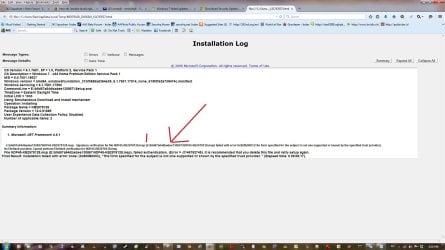
I've just noticed in the error log a line that refers to my E/:HDD, I've pointed to it with a red arrow. I believe that I may have had Win XP installed on this HD at one point. For some reason it seems that some Win 7 update files are being put on the E drive (see second screen shot) I'd noticed these files before but I had no idea what the gibberish meant. I have no idea why these files would be directed to my E: drive. Win 7 is installed on C: and most of the Win updates are successful. It's just the netframework and the MS Visual C++ that have failed.

netframeword install error location picture.jpg

E.HDD. contents.JPG
 

My Computer

Computer type
PC/Desktop
Computer Manufacturer/Model Number
Home built
OS
Windows Home Premium 64- bit(6.1,Build 7600) SP1
CPU
AMD PhenomIIx4 945 3.0Ghz
Motherboard
MS-7577
Memory
8GB (Mushkin DDR3 2gb x 4)
Graphics Card(s)
ASUS VH232H (1920x1080@60Hz) 2048MB ATI AMD Radeon HD 7800 S
Sound Card
On board
Monitor(s) Displays
Asus 22"
Screen Resolution
1920x1080
Hard Drives
2 WD 500gb SATA
1 WD 200gb ATA
1 WD 120gb ATA
PSU
Corsair TX 850w
Case
Antec tower
Cooling
Multiple fan.
Keyboard
Logitech USB
Mouse
Logitech G9 laser mouse
Internet Speed
Cable
Antivirus
AVG free
Browser
Firefox, Chrome, IE
Other Info
CH Joystick, Nostromo N50 game pad, USB headset, Canon Printer
The problem appears to be this...
Code:
E:\b9d67a64dbadee130867\NDP45-KB2978128.msp - Signature verification for file NDP45-KB2978128.msp (E:\b9d67a64dbadee130867\NDP45-KB2978128.msp) failed with error 0x800b0003 (The form specified for the subject is not one supported or known by the specified trust provider.)
... which is indeed with the installed certificates.
I have no real idea how to go about patching this, so I suspect that your best option for a quick solution is going to be uninstalling .NET 4.5.x, running the cleanup tool, and then reinstalling it...

.NET Framework Cleanup Tool User's Guide - Aaron Stebner's WebLog - Site Home - MSDN Blogs should assist

You may need to do similar things with the other update.
 

My Computer

Computer type
Laptop
Computer Manufacturer/Model Number
Asus K52F or Lenovo B51-80
OS
Win 7 x64 Home Premium (and x86 VirtualBox VM)/Win10
CPU
i3 370M/i7 6500U
Motherboard
Asus/Lenovo
Memory
8GB - finally :)/8GB
Graphics Card(s)
it's an i3, dude!/dual Intel&nVidia
Sound Card
onboard
Monitor(s) Displays
15.6" built-in
Screen Resolution
1366x768/1920x1080
Hard Drives
750GB Seagate internal
Sundry external drives attached to other computers on the local network
1TB SSD on the Lenovo
PSU
n/a
Internet Speed
as much as I can get - usually on a dongle/phone, so <1MB/s
Antivirus
MSE/Defender
Browser
IE11/12/Edge/Chrome/FF(if I must)
I'm concerned that if I uninstall Net 4.5 and then have trouble reinstalling like I have now that I'll really have problems having programs run.

The only versions that I see when I go to add/remove programs are 1.1 and 4.51. Should there also be 2.x and 3.x in a Win 7 install?
 

My Computer

Computer type
PC/Desktop
Computer Manufacturer/Model Number
Home built
OS
Windows Home Premium 64- bit(6.1,Build 7600) SP1
CPU
AMD PhenomIIx4 945 3.0Ghz
Motherboard
MS-7577
Memory
8GB (Mushkin DDR3 2gb x 4)
Graphics Card(s)
ASUS VH232H (1920x1080@60Hz) 2048MB ATI AMD Radeon HD 7800 S
Sound Card
On board
Monitor(s) Displays
Asus 22"
Screen Resolution
1920x1080
Hard Drives
2 WD 500gb SATA
1 WD 200gb ATA
1 WD 120gb ATA
PSU
Corsair TX 850w
Case
Antec tower
Cooling
Multiple fan.
Keyboard
Logitech USB
Mouse
Logitech G9 laser mouse
Internet Speed
Cable
Antivirus
AVG free
Browser
Firefox, Chrome, IE
Other Info
CH Joystick, Nostromo N50 game pad, USB headset, Canon Printer
Version 3.5 is part of Windows 7, and cannot be uninstalled as such. Version 2.x is part of v3.5.

There should be no problem about uninstalling and reinstalling v4.5.2 - even if the result still doesn't update properly.
 

My Computer

Computer type
Laptop
Computer Manufacturer/Model Number
Asus K52F or Lenovo B51-80
OS
Win 7 x64 Home Premium (and x86 VirtualBox VM)/Win10
CPU
i3 370M/i7 6500U
Motherboard
Asus/Lenovo
Memory
8GB - finally :)/8GB
Graphics Card(s)
it's an i3, dude!/dual Intel&nVidia
Sound Card
onboard
Monitor(s) Displays
15.6" built-in
Screen Resolution
1366x768/1920x1080
Hard Drives
750GB Seagate internal
Sundry external drives attached to other computers on the local network
1TB SSD on the Lenovo
PSU
n/a
Internet Speed
as much as I can get - usually on a dongle/phone, so <1MB/s
Antivirus
MSE/Defender
Browser
IE11/12/Edge/Chrome/FF(if I must)
I uninstalled 4.5.1 and 1.1 (which was for xp only).
I ran the clean up tool you referenced.
I downloaded 4.5.1
It failed to install-same error code 800B00003

I don't understand why the command line specifies E/:
So as of now I can't get Netframework installed.
Here is the log.

View attachment netframework log file 2.txt

Here is the clean up tool log (ran twice)

View attachment 352307
 
Last edited:

My Computer

Computer type
PC/Desktop
Computer Manufacturer/Model Number
Home built
OS
Windows Home Premium 64- bit(6.1,Build 7600) SP1
CPU
AMD PhenomIIx4 945 3.0Ghz
Motherboard
MS-7577
Memory
8GB (Mushkin DDR3 2gb x 4)
Graphics Card(s)
ASUS VH232H (1920x1080@60Hz) 2048MB ATI AMD Radeon HD 7800 S
Sound Card
On board
Monitor(s) Displays
Asus 22"
Screen Resolution
1920x1080
Hard Drives
2 WD 500gb SATA
1 WD 200gb ATA
1 WD 120gb ATA
PSU
Corsair TX 850w
Case
Antec tower
Cooling
Multiple fan.
Keyboard
Logitech USB
Mouse
Logitech G9 laser mouse
Internet Speed
Cable
Antivirus
AVG free
Browser
Firefox, Chrome, IE
Other Info
CH Joystick, Nostromo N50 game pad, USB headset, Canon Printer
Back
Top