
Solved Windows 7 Firewall Error 0x80070424

cdeas15

New member
Member
Local time
9:27 AM
Messages
26
Recently I have decided to check up on my firewall and I noticed an error message 0x80070424 if I try to start it. I have run malwarebytes and Microsoft Security Essential scans and there were no signs of any viruses. I have no idea when this happened, but any information on how to fix this problem would be greatly appreciated. In the attachment I uploaded is what the error message looks like.
 

Attachments
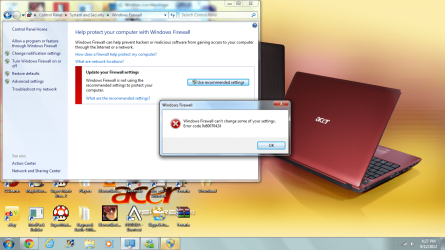
  • ERROR.png
    ERROR.png
    239 KB · Views: 53

My Computer

OS
MS Windows 7 Home Premium 64-bit SP1
CPU
Intel Pentium P6100 @ 2.00GH 65 °C Arrandale 32nm Technology
Motherboard
Acer Aspire 5742Z (CPU)
Graphics Card(s)
Generic PnP Monitor (1366x768@60Hz) Intel(R) HD Graphics
Sound Card
Intel(R) Display Audio Realtek High Definition Audio
Monitor(s) Displays
Generic PnP Monitor
Screen Resolution
Generic PnP Monitor (1366x768@60Hz)
Hard Drives
298GB Western Digital WDC WD3200BEVT-22A23T0 (SATA)
You should only run one anti-virus per a computer.

Uninstall Malwarebytes and keep the Microsoft Security Essentials installed, as two AV programs can cause conflicts and problems between each other.
 

My Computer

Computer type
Laptop
Now with the 0x80070424 error code; your registry may have become damaged by a form of malware like a rootkit (not all AV programs are perfect) and therefore you may need to repair your registry.

Read this tutorial to help you: 0x80070424 Solution

Hope this helps,

Harry

Backup and System Restore beforehand.

Please post back your results.

EDIT - Were the two AV programs from trusted sources? The offical Microsoft website and Malwarebytes website?
 

My Computer

Computer type
Laptop
Yeah, I downloaded them awhile ago before this even happened. I'm 100% sure it was from a reliable source. I'll try this solution out, and hope this fixes my problem.
 

My Computer

OS
MS Windows 7 Home Premium 64-bit SP1
CPU
Intel Pentium P6100 @ 2.00GH 65 °C Arrandale 32nm Technology
Motherboard
Acer Aspire 5742Z (CPU)
Graphics Card(s)
Generic PnP Monitor (1366x768@60Hz) Intel(R) HD Graphics
Sound Card
Intel(R) Display Audio Realtek High Definition Audio
Monitor(s) Displays
Generic PnP Monitor
Screen Resolution
Generic PnP Monitor (1366x768@60Hz)
Hard Drives
298GB Western Digital WDC WD3200BEVT-22A23T0 (SATA)
Okay, please post back your results.

Hope this helps,

Harry
 

My Computer

Computer type
Laptop
The tutorial helped. I am now able to access my firewall. Thanks for the help.
 

My Computer

OS
MS Windows 7 Home Premium 64-bit SP1
CPU
Intel Pentium P6100 @ 2.00GH 65 °C Arrandale 32nm Technology
Motherboard
Acer Aspire 5742Z (CPU)
Graphics Card(s)
Generic PnP Monitor (1366x768@60Hz) Intel(R) HD Graphics
Sound Card
Intel(R) Display Audio Realtek High Definition Audio
Monitor(s) Displays
Generic PnP Monitor
Screen Resolution
Generic PnP Monitor (1366x768@60Hz)
Hard Drives
298GB Western Digital WDC WD3200BEVT-22A23T0 (SATA)
Back
Top