Windows 7 folder is huge

Kermunos

New member
Local time
7:14 PM
Messages
1
Hey

So I checked today why i have so little space on my drive and it turns out my windows folder is almost 16 GB. Is that normal? How can I shrink it.

I tried already Advance Clean-up but nothing has changed. Any suggestions?

Thanks
 

My Computer My Computer

At a glance

Windows 7 Ultimate 32 bit
OS
Windows 7 Ultimate 32 bit
the winsxs folder may seem to be large, but it's mostly hard linked files (ie. if you hard link to a 2gb file, system reports 4gb used tho it's really only the one file and a virtual link to the same file), it appears to take up a lot of room, but it's effectively counting the space twice. do not delete anything in the winsxs directory. try searching microsoft's site for winsxs if you get tempted. the free space is more than reported.

you can try running ccleaner from piriform, it'll clear out a lot more junk than microsofts cleaner & is relatively safe.

be careful tho.
 

My Computer My Computer

At a glance

Win 7 ultimate x64 sp1Intel i7 4 core 3770k ivy bridge o/c to 4.2ghz16 GBNvidia geforce GTX650
Computer type
PC/Desktop
Computer Manufacturer/Model Number
Custom build Nanu by 3SX
OS
Win 7 ultimate x64 sp1
CPU
Intel i7 4 core 3770k ivy bridge o/c to 4.2ghz
Motherboard
Asus p8z77-i Deluxe
Memory
16 GB
Graphics Card(s)
Nvidia geforce GTX650
Sound Card
Realtek on mb
Monitor(s) Displays
24in. lcd/led
Screen Resolution
1920x1080
Hard Drives
128GB Kingston SSD
500GB seagate maximus xt hybrid
500GB hitachi HD
500GB external WD Passport usb3
PSU
Silverstone 450 watt
Case
Silverstone FT03 Black Fortress
Cooling
Water cooler
Keyboard
Logitech wireless kbd/mouse mk300
Mouse
Logitech wireless kbd/mouse mk300
Internet Speed
8mb adsl (actuall speed is around 6mb)
Other Info
Asus DSL-N55U wireless router
SONY BC-5850H 6X BLURAY writer
OUTPOST Security Suite
Hey

So I checked today why i have so little space on my drive and it turns out my windows folder is almost 16 GB. Is that normal? How can I shrink it.

I tried already Advance Clean-up but nothing has changed. Any suggestions?

Thanks


Yes your windows folder size is perfectly normal.Mine is around 18 GB.

And you can't and should not shrink your windows folder.It would make your system unusable.

Installing windows 7 on 60-90 GB partition is enough in my opinion.Whats the size of your C drive anyway?
 

My Computer My Computer

At a glance

Windows 8 Prointel i3 2.40 Ghz6 GB RAMIntegrated Intel HD
Computer Manufacturer/Model Number
DELL
OS
Windows 8 Pro
CPU
intel i3 2.40 Ghz
Motherboard
DELL inc
Memory
6 GB RAM
Graphics Card(s)
Integrated Intel HD
Sound Card
Realtek high definition SRS surround sound
Screen Resolution
1366*768
Hard Drives
320 GB
Internet Speed
1Mbps
Welcome to Windows Seven Forums.

Out of curiosity, I checked my Windows folder and it currently sits at 23.5 GB.

Of that the WinSXS folder accounts for 9.5 GB.

In my view you've got nothing to be overly concerned about.


That said, you can:
  1. Run Disk Cleanup
  2. Delete the Windows.old folder if you have one and there is nothing you need in it
  3. Reduce the size of your shadow storage space
  4. Invest in a bigger hard drive
  5. Uninstall any software you don't use
Whatever you do, don't try and compress your Windows folder. Also, leave the WinSXS folder as it is or you may encounter instability problems.

Check out this excellent tutorial by Brink: http://www.sevenforums.com/tutorials/11728-optimize-windows-7-a.html
 

My Computer My Computer

At a glance

Windows 7 Ultimate SP1 64-BitIntel Core i7 870 @ 2.93GHz8Gb Dual-Channel DDR3 @ 664MHznVidia GeForce GTX 460 1024MB dedicated RAM
Computer Manufacturer/Model Number
HP Pavilion Elite 495UK
OS
Windows 7 Ultimate SP1 64-Bit
CPU
Intel Core i7 870 @ 2.93GHz
Motherboard
MSI 2A9C (CPU1)
Memory
8Gb Dual-Channel DDR3 @ 664MHz
Graphics Card(s)
nVidia GeForce GTX 460 1024MB dedicated RAM
Sound Card
Realtek HD Audio
Monitor(s) Displays
HP2310i
Screen Resolution
1920 x 1080
Hard Drives
1x1954GB Hitachi HDS22020ALA 330 (RAID), 1x1954GB Hitachi External for backup and storage
PSU
460W
Case
HP Elite
Cooling
Air cooled
Keyboard
Logitech K750 solar-powered keyboard
Mouse
Logitech Wireless M180 mouse
Internet Speed
2Mb
Other Info
Pure Avanti Flow Internet Radio with iPod Dock, 64Gb iPod, HP USB Speakers, Sony MDR-V500 Headphones, Sony Vaio F-Series Laptop
Hi Kermunos

More
If you often use third party downloader program to download large files sized to gigabyte, if any, try to set the temp folder other then C. In case it fail to complete it won't leave big size trash on it. :)
 

My Computers My Computers

  • At a glance

    Windows 11 PrereleaseCORE i5 1040016GBGTX 750Ti
    Computer type
    PC/Desktop
    Computer Manufacturer/Model Number
    MSI
    OS
    Windows 11 Prerelease
    CPU
    CORE i5 10400
    Motherboard
    MSI H510M Pro
    Memory
    16GB
    Graphics Card(s)
    GTX 750Ti
    Sound Card
    Realtek HD Integrated
    Monitor(s) Displays
    Samsung Curved 24"; Samsung TV 50"
    Screen Resolution
    1920 x 1080
    Hard Drives
    Vi-Gen NVMe 256GB
    WD 3 TB
    Seagate 2 TB
    Seagate 4TB
    PSU
    Power Striker
    Case
    VBR
    Cooling
    Conventional
    Keyboard
    Logitech Wireless
    Mouse
    Logitech Wireless
    Internet Speed
    2MBPs
  • At a glance

    BigSurCore i58 GB
    Computer type
    Laptop
    System Manufacturer/Model Number
    Apple MacBook
    OS
    BigSur
    CPU
    Core i5
    Memory
    8 GB
    Monitor(s) Displays
    13 "
    Screen Resolution
    1366 x 768
    Hard Drives
    SSD 256 GB

My Computer My Computer

At a glance

Windows 7 Ultimate x64Intel7 4790K8 GB DDR3GTX 980Ti G1
Computer type
PC/Desktop
OS
Windows 7 Ultimate x64
CPU
Intel7 4790K
Motherboard
Gigabyte GA-Z97X UD5H
Memory
8 GB DDR3
Graphics Card(s)
GTX 980Ti G1
Sound Card
SoundBlaster X-FI XtremeGamer
Monitor(s) Displays
Samsung UE40JU6550 UHD
Screen Resolution
3840 X 2160
Hard Drives
1 SSD Intel 330
2 x Western Digital 6400 AAKS
1 x Western Digital 3200 AAKS
PSU
Corsair 750W
Case
Cooler Master HAF 922
Welcome to Windows Seven Forums.


  1. Reduce the size of your shadow storage space
Can you explain how to do that, please ?
Thanks

Click Start and type cmd in the Search field.

Right-click cmd under the Programs list and choose Run as Administrator.

Accept the UAC prompt then type the following command and press Enter to run it:

Vssadmin Resize ShadowStorage /For=C: /On=C: /MaxSize=2GB

Next, type Exit then press Enter to close the command window.

Pay particular attention to the spaces in the command line. Note the drive letter of the drive you want reduce the shadow storage on and the MaxSize, which can be any size you want, but be aware that by reducing the size allocated for shadow storage you also reduce the number of restore points available.

Once your restore points have filled the allocated drive space, Windows will start to delete the oldest ones.
 

My Computer My Computer

At a glance

Windows 7 Ultimate SP1 64-BitIntel Core i7 870 @ 2.93GHz8Gb Dual-Channel DDR3 @ 664MHznVidia GeForce GTX 460 1024MB dedicated RAM
Computer Manufacturer/Model Number
HP Pavilion Elite 495UK
OS
Windows 7 Ultimate SP1 64-Bit
CPU
Intel Core i7 870 @ 2.93GHz
Motherboard
MSI 2A9C (CPU1)
Memory
8Gb Dual-Channel DDR3 @ 664MHz
Graphics Card(s)
nVidia GeForce GTX 460 1024MB dedicated RAM
Sound Card
Realtek HD Audio
Monitor(s) Displays
HP2310i
Screen Resolution
1920 x 1080
Hard Drives
1x1954GB Hitachi HDS22020ALA 330 (RAID), 1x1954GB Hitachi External for backup and storage
PSU
460W
Case
HP Elite
Cooling
Air cooled
Keyboard
Logitech K750 solar-powered keyboard
Mouse
Logitech Wireless M180 mouse
Internet Speed
2Mb
Other Info
Pure Avanti Flow Internet Radio with iPod Dock, 64Gb iPod, HP USB Speakers, Sony MDR-V500 Headphones, Sony Vaio F-Series Laptop
I never use Windows backup- restore, only Acronis.
So, in this case, cand i do
Vssadmin Resize ShadowStorage /For=C: /On=C: /MaxSize=0GB
?


My Computer My Computer

At a glance

Windows 7 Ultimate x64Intel7 4790K8 GB DDR3GTX 980Ti G1
Computer type
PC/Desktop
OS
Windows 7 Ultimate x64
CPU
Intel7 4790K
Motherboard
Gigabyte GA-Z97X UD5H
Memory
8 GB DDR3
Graphics Card(s)
GTX 980Ti G1
Sound Card
SoundBlaster X-FI XtremeGamer
Monitor(s) Displays
Samsung UE40JU6550 UHD
Screen Resolution
3840 X 2160
Hard Drives
1 SSD Intel 330
2 x Western Digital 6400 AAKS
1 x Western Digital 3200 AAKS
PSU
Corsair 750W
Case
Cooler Master HAF 922
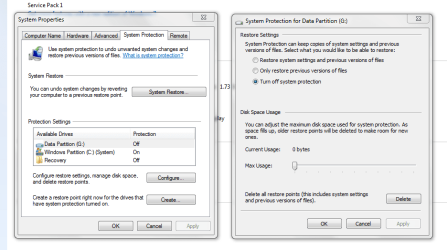
You could, but it's just as easy to go into System Properties and turn System Restore off.

SysRes.PNG
 

My Computer My Computer

At a glance

Windows 7 Ultimate SP1 64-BitIntel Core i7 870 @ 2.93GHz8Gb Dual-Channel DDR3 @ 664MHznVidia GeForce GTX 460 1024MB dedicated RAM
Computer Manufacturer/Model Number
HP Pavilion Elite 495UK
OS
Windows 7 Ultimate SP1 64-Bit
CPU
Intel Core i7 870 @ 2.93GHz
Motherboard
MSI 2A9C (CPU1)
Memory
8Gb Dual-Channel DDR3 @ 664MHz
Graphics Card(s)
nVidia GeForce GTX 460 1024MB dedicated RAM
Sound Card
Realtek HD Audio
Monitor(s) Displays
HP2310i
Screen Resolution
1920 x 1080
Hard Drives
1x1954GB Hitachi HDS22020ALA 330 (RAID), 1x1954GB Hitachi External for backup and storage
PSU
460W
Case
HP Elite
Cooling
Air cooled
Keyboard
Logitech K750 solar-powered keyboard
Mouse
Logitech Wireless M180 mouse
Internet Speed
2Mb
Other Info
Pure Avanti Flow Internet Radio with iPod Dock, 64Gb iPod, HP USB Speakers, Sony MDR-V500 Headphones, Sony Vaio F-Series Laptop
16GB isnt much when compared to today's hard disk sizes. But the principle is that we are "doing less with more". Win7 doesnt have that many more features than Win XP. Yet the install is 10 times the size! Tens of thousands of files. The .Net content of Win7 alone is larger than a full XP install. It strikes me as being laziness on Microsoft's part. However they dont have a monopoly on promoting bloat, it seems to be the norm with all modern commercial software houses.
 

My Computer My Computer

At a glance

XP
OS
XP
I have a Windows 7 machine with a 64 GB c: partition and it shows as 1 GB free, but properties of everything shows 40 GB used. The swap is on another drive and there is nothing in recycling and the shadow stuff is turned off. Ran cleaner and it indicated deleting 2 GB, but the space did not go to the free pool...

WinDirStat of c: reports:
.dll Application 14.8G
.sys System files 6.4G
.exe Application 4.6G
.cab Archives 3.6G
.h .h files 2.7G
.a .a files 2.6G
.msi Instailler 2.6G
. local disk 2.2G
.log text files 2.1G
.msp MS patches 1.8G
.vhd VM files 1.4G
.ci CI files 1.2G
.edb EDB files 1.1G
.txt Test files 1.0G
....
1) Were is the other 24 GByte?
2) Why is windows 40 GB - so HUGE?
3) Is there a way to make the c: drive read only?
(Enable for upgrades, but otherwise read only - no user space, no temp files)
 
Last edited:

My Computer My Computer

At a glance

Windows 7, XP, LinuxAtom, i5, Celeron2G, 8G, 4Gstock
Computer type
Laptop
Computer Manufacturer/Model Number
MSI, Lenovo, Generic,
OS
Windows 7, XP, Linux
CPU
Atom, i5, Celeron
Motherboard
MSI, Lenovo, Generic
Memory
2G, 8G, 4G
Graphics Card(s)
stock
Hard Drives
750G Hitachi, 500G Hitachi & 128G SSD, 250G & 4 x 3T
Browser
Chrome, Mozilla, Safari & Explorer
You should start your own thread, you will get more help that way :)

System Restore takes up space, the page file takes up space, and windows takes up about 16 to 20 GBs
 

My Computer My Computer

At a glance

Windows 10 Pro x64Intel Core i7 6700KGSkill TridentZ RGB 16GB 3600 16-16-16-36EVGA GTX 980 Ti SC x2
Computer type
PC/Desktop
Computer Manufacturer/Model Number
Skylake Special #666
OS
Windows 10 Pro x64
CPU
Intel Core i7 6700K
Motherboard
Asus Sabertooth Z170 Mark 1
Memory
GSkill TridentZ RGB 16GB 3600 16-16-16-36
Graphics Card(s)
EVGA GTX 980 Ti SC x2
Sound Card
Realtek High Definition
Monitor(s) Displays
AOC G2460PG
Screen Resolution
1920 x 1080 144Hz
Hard Drives
Samsung 860 Pro 256GB, Seagate Barracuda 4TB x2
PSU
EVGA 1000 P2, EVGA White Custom Braided Cables
Case
Corsair Vengeance C70 Gunmetal Black
Cooling
Corsair H100i v2, Corsair ML120 x2, Thermal Grizzly Kryonaut
Keyboard
Logitech G910 Orion Spectrum
Mouse
Logitech G700s
Internet Speed
Verizon Fios Quantum Gateway 75/75
Antivirus
Windows Defender, Malwarebytes Free 3.8.3
Browser
Chrome
Other Info
Corsair SP120 x4, LG Blu-ray Drive, Durabrand HT-395 100 Watt Dolby Digital Amp, Corsair H2100 Wireless 7.1 Headset
16gb is a small Windows folder, mine is 23gb and I have User, temp and swap on the spinner. Another box with a fresh install of 7 shows 15.8gb.
 

My Computer My Computer

At a glance

Win8/8.1,Win7-U64, Vista U64, uncounted Linux...AMD and Intell, 9590, 8350, i5 3570kCorsair G SkillCrossfired Sapphire HD 7950 Vapor-X, ASUS R9 ...
Computer type
PC/Desktop
Computer Manufacturer/Model Number
Custom, Dell and Lenono LT's
OS
Win8/8.1,Win7-U64, Vista U64, uncounted Linux distor's
CPU
AMD and Intell, 9590, 8350, i5 3570k
Motherboard
CFVFZ, GA990FXA, Z77e-itx
Memory
Corsair G Skill
Graphics Card(s)
Crossfired Sapphire HD 7950 Vapor-X, ASUS R9 280X TOP
Sound Card
Realtek ALC889
Monitor(s) Displays
ViewSonic VX2770SMH 27" / ViewSonic VX2433 LCD 24"
Screen Resolution
1080i HD
Hard Drives
Samsung SSD 840 Pro
OCZ Agility 3's
OCZ Vector's
WD's Blue, red, green, Velociraptors
Seagate USB3 & Hybrid's
ASUS Blu-Ray
ASUS DVD
PSU
Corsair AX1200i, Seasonice 850 Gold
Case
Cooler Master HAF 922 & HAF 932, Lian Li Train case.
Cooling
Air, Glacer 240L expanded, custom EK loop with duel D5's
Keyboard
Microsoft SideWinder X4 USB Keyboard / Logitech 250 PS2
Mouse
Logitech G500 / MS wireless 5000
Internet Speed
Best of 5ms / 75+ dn / 12+ up More or less.
Antivirus
MS esentials-MalwareBytes
Browser
Firefox Chromebook
Mine is 20 GB, with all my apps. I don`t use a page file, and I don`t use system restore.
 

My Computer My Computer

At a glance

Windows 10 Pro x64Intel Core i7 6700KGSkill TridentZ RGB 16GB 3600 16-16-16-36EVGA GTX 980 Ti SC x2
Computer type
PC/Desktop
Computer Manufacturer/Model Number
Skylake Special #666
OS
Windows 10 Pro x64
CPU
Intel Core i7 6700K
Motherboard
Asus Sabertooth Z170 Mark 1
Memory
GSkill TridentZ RGB 16GB 3600 16-16-16-36
Graphics Card(s)
EVGA GTX 980 Ti SC x2
Sound Card
Realtek High Definition
Monitor(s) Displays
AOC G2460PG
Screen Resolution
1920 x 1080 144Hz
Hard Drives
Samsung 860 Pro 256GB, Seagate Barracuda 4TB x2
PSU
EVGA 1000 P2, EVGA White Custom Braided Cables
Case
Corsair Vengeance C70 Gunmetal Black
Cooling
Corsair H100i v2, Corsair ML120 x2, Thermal Grizzly Kryonaut
Keyboard
Logitech G910 Orion Spectrum
Mouse
Logitech G700s
Internet Speed
Verizon Fios Quantum Gateway 75/75
Antivirus
Windows Defender, Malwarebytes Free 3.8.3
Browser
Chrome
Other Info
Corsair SP120 x4, LG Blu-ray Drive, Durabrand HT-395 100 Watt Dolby Digital Amp, Corsair H2100 Wireless 7.1 Headset
Another tip is to disable hibernation. Open a command prompt as Admin, then type powercfg -h off .
 

My Computer My Computer

At a glance

Windows 7 Professional x64
Computer type
PC/Desktop
OS
Windows 7 Professional x64
> Mine is 20 GB, with all my apps. I don`t use a page file, and I don`t use system restore.
> Another tip is to disable hibernation. Open a command prompt as Admin, then type powercfg -h off .

All of the large system files are on other drives, swap, hiber, et cetera...

It looks like there are tons of OS, update and applications files...
Plus some good sized logs...

If it matters, the machine has 8GB of RAM, a 128 GB SSD, 1TB hard drive and an i5 CPU.

Having a 40 GB OS is mind boggling and loosing 24 GB of storage on the c: drive seems... wrong...
 

My Computer My Computer

At a glance

Windows 7, XP, LinuxAtom, i5, Celeron2G, 8G, 4Gstock
Computer type
Laptop
Computer Manufacturer/Model Number
MSI, Lenovo, Generic,
OS
Windows 7, XP, Linux
CPU
Atom, i5, Celeron
Motherboard
MSI, Lenovo, Generic
Memory
2G, 8G, 4G
Graphics Card(s)
stock
Hard Drives
750G Hitachi, 500G Hitachi & 128G SSD, 250G & 4 x 3T
Browser
Chrome, Mozilla, Safari & Explorer
It is important t understand that the reported 16 GB in the Windows folder is actually larger than reality. This is largely due to the use of hard links. Hard links have been a part of the NTFS file system since Windows 2000 but weren't used in Windows until Vista. I won't go into the details but they allow one copy of a file to appear in multiple folders. This provides a number of important advantages, one being that it saves disk space. Windows determines the space used by a folder by going through each folder and adding up the sizes of each file. But when hard links are used that means a great deal of double counting. It is not that Windows is lying about the space used, it is that there are multiple truths, all different , and all equally valid. Determining the disk usage of a folder is actually very complex. Many arbitrary decisions must be made with no clear way to determine which is better.

Windows 7 is actually doing a great deal more than XP. It is just that much of this is not readily apparent to the user.

There are many trade offs in the design of complex software. Over the years due to changing technology the priorities have shifted. Many XP systems were installed on 20 GB hard disks and some even smaller. And that space had to be shared by all of the applications and data. Today most members of this forum would consider a 500 GB drive as rather small. This means that disk usage is less important and priorities can shift to other things.
 

My Computer My Computer

At a glance

Windows 7 Pro 64 bitXeon W35208 GBNvidia Geforce 210
Computer type
PC/Desktop
Computer Manufacturer/Model Number
HP
OS
Windows 7 Pro 64 bit
CPU
Xeon W3520
Memory
8 GB
Graphics Card(s)
Nvidia Geforce 210
For comparison here is a snip of my OS partition.
no system restore
no hibernation
2GB pagefile.sys (it's on an SSD)
My winsxs reports 10GB which is a bit larger than normal for some reason.
OS Partition.JPG

Windows disk properties reports 47.9GB.

Your issue is still a bit of a puzzle.
 

My Computer My Computer

At a glance

Windows 7x64 Home Premium SP1Intel i7 2600kG.Skill Ripjaws (DDR3-1600) 2x4GBNvidia GeForce GTS 450; Intel HD Graphics 300...
Computer type
PC/Desktop
Computer Manufacturer/Model Number
Own build
OS
Windows 7x64 Home Premium SP1
CPU
Intel i7 2600k
Motherboard
ASUS P8Z68 Deluxe
Memory
G.Skill Ripjaws (DDR3-1600) 2x4GB
Graphics Card(s)
Nvidia GeForce GTS 450; Intel HD Graphics 3000(GT2+)
Monitor(s) Displays
Dell Ultrasharp IPS panel U2311H, Samsung SyncMaster P2350
Screen Resolution
1920x1080
Hard Drives
Samsung 850 Pro SSD 256GB, Samsung SSD 840 120GB, Seagates 1TB Barracuda ST31000528AS x2
PSU
Seasonic M12II 520W
Case
Lian Li Lancool PC-K60
Cooling
Case: 1x120mm, 3x140mm CPU: Hyper 212+
Keyboard
Logitech MK520 (wireless)
Mouse
Logitech MK520
Internet Speed
6-7 Mbps
Antivirus
Norton Security Premium, Malwarebytes on 2 (MSE on 3rd PC)
Browser
FireFox
Other Info
Audio: Logitech Z523 2.1
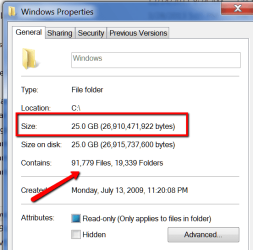
25GB for more than 91 thousand files is actually a good deal, LOL.
 

Attachments

  • 2014-04-30_1958.png
    2014-04-30_1958.png
    18.6 KB · Views: 25

My Computer My Computer

At a glance

Vista, Windows7, Mint Mate, Zorin, Windows 8from 1.6GHz Duo to i7
Computer Manufacturer/Model Number
HP, Dell, Gateway, Toshiba - 4 laptops and 2 desktops
OS
Vista, Windows7, Mint Mate, Zorin, Windows 8
CPU
from 1.6GHz Duo to i7
Monitor(s) Displays
2x HP w2207
Hard Drives
5x HDD, 7x SSD, 12x Externals
Keyboard
with trackball - no mices
Mouse
Trackball mice
Internet Speed
DSL 6000
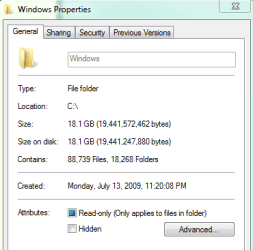
My Windows folder was 22.5GB with over 100k files until I used Disk Cleanup a few minutes ago. First use of cleanup since re-installing everything a week ago with a new SSD. Big chunk was the Service Pack backup. Real "lean" now with less than 89k files. ;)
 

Attachments

  • Windows folder.PNG
    Windows folder.PNG
    7.9 KB · Views: 18

My Computer My Computer

At a glance

Windows 10 Pro 64 bitCore i7 6700K Skylake 4.0GHzCorsair Vengeance LPX DDR4 32GB 3000MHzAsus Radeon RX480 Strix 8GB
Computer type
PC/Desktop
Computer Manufacturer/Model Number
Wordsworth 5000
OS
Windows 10 Pro 64 bit
CPU
Core i7 6700K Skylake 4.0GHz
Motherboard
Asus Z170 Pro
Memory
Corsair Vengeance LPX DDR4 32GB 3000MHz
Graphics Card(s)
Asus Radeon RX480 Strix 8GB
Sound Card
Asus Xonar DSX
Monitor(s) Displays
HP 2709m
Screen Resolution
1920x1080
Hard Drives
Intel 600p M.2 PCIe NVMe SSD 512GB; Intel 335 SSD 240GB ;Western Digital Caviar Black 1TB
PSU
Thermaltake Toughpower Grand Platinum 850W
Case
Lian Li PC-B70
Cooling
CPU-Noctua NH D15, GPU-Stock, Case-Noctua 2x140, 2x120
Keyboard
Microsoft Natural Ergo 4000
Mouse
Microsoft Wireless Optical 1000
Internet Speed
Cable
Other Info
HP bd 340,
HP bd 240,
Klipsch Promedia 5.1 THX
Back
Top