Windows 7 Format

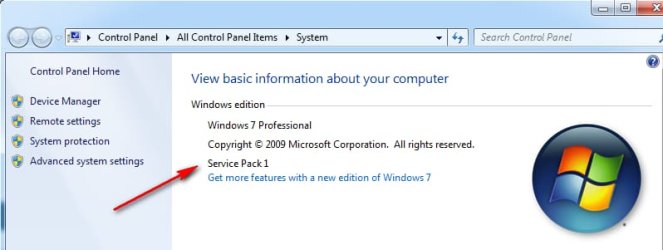
Open Control Panel and select System or All Control Panel.............., System. If Service Pack 1 is installed, it will show it.
 

My Computer

Computer type
Laptop
Computer Manufacturer/Model Number
Dell M6500 Precision Work Station
OS
Windows 7 Pro SP1 64 bit
Memory
8 GB
Screen Resolution
1920x
Internet Speed
30 Mbps
Antivirus
Norton Security
Browser
IE 11
Do your Win 7 install and then see it SP1 is installed. If not, download it from Microsoft Update Catalog.

Simplix better and is much faster than WU.
WU will install on a release sequence. Many updates has been updated so you will install useless updates.
WU also install a lot of telemetry.


ok cool that sounds like the way I want to go.

1) Will do clean instal with media and see if it does SP1, if not get SP1 from M$. (SP1 does not appear in Installed updates List in Properties)


2) Download and run SIMPLIX to update.


Yes that's what I'm trying to avoid all TELEMETRY crap and WINX update nags.


Thanks
 

My Computers

System One System Two

  • Computer type
    Laptop
    Computer Manufacturer/Model Number
    Toshiba Satellite P750 series
    OS
    Windows 7 Home Premium 64 bit
  • Computer type
    Laptop
    System Manufacturer/Model Number
    Hewlett Packard 15-BW0XX
    OS
    Windows 10 Home
Open Control Panel and select System or All Control Panel.............., System. If Service Pack 1 is installed, it will show it.


Yeah I've been to INSTALLED UPDATES page in system and there is no SP1 update entry, so I assume recovery media is with SP1 package.
 

My Computers

System One System Two

  • Computer type
    Laptop
    Computer Manufacturer/Model Number
    Toshiba Satellite P750 series
    OS
    Windows 7 Home Premium 64 bit
  • Computer type
    Laptop
    System Manufacturer/Model Number
    Hewlett Packard 15-BW0XX
    OS
    Windows 10 Home
press windows key and pause/break together. The system window will pop up.

That will show SP1`

sp1.jpg
 

My Computers

System One System Two

  • Computer type
    PC/Desktop
    OS
    7 X64
    CPU
    i5 8400
    Motherboard
    gigabyte b365m ds3h
    Memory
    2x8gb 3200mhz
    Hard Drives
    various
    PSU
    pure power 11 400w cm
    Case
    Coolermaster
    Cooling
    cryorig m9i
  • Computer type
    PC/Desktop
    OS
    7x64
    CPU
    g5400
    Motherboard
    ga b365m ds3h
    Memory
    8gb ddr4 2400
    PSU
    xfx pro 450w

My Computers

System One System Two

  • Computer type
    Laptop
    Computer Manufacturer/Model Number
    Toshiba Satellite P750 series
    OS
    Windows 7 Home Premium 64 bit
  • Computer type
    Laptop
    System Manufacturer/Model Number
    Hewlett Packard 15-BW0XX
    OS
    Windows 10 Home
Now it has SP1. What we don't know is if it was installed by WU.


If you don't set WU to never check, soon or later it will install all the crap.
Read my post about MS releases SP2 for Windows 7
 
Last edited:

My Computers

System One System Two

  • Computer type
    PC/Desktop
    Computer Manufacturer/Model Number
    custom build
    OS
    Windows 7 HP 64
    CPU
    i5 6600K - 800MHz to 4200MHz
    Motherboard
    GA-Z170-HD3P
    Memory
    4+4G GSkill DDR4 3000
    Graphics Card(s)
    IG - Intel 530
    Monitor(s) Displays
    Samsung 226BW
    Screen Resolution
    1680x1050
    Hard Drives
    (1) -1 SM951 – 128GB M.2 AHCI PCIe SSD drive for Windows 7 and Lubuntu
    (2) -1 WD SATA 3 - 1T for Data
    (3) -1 WD SATA 3 - 1T for backup
    PSU
    Thermaltake 450W TR2 gold
    Keyboard
    Old and good Chicony mechanical keyboard
    Mouse
    Logitech mX performance - 9 buttons (had to disable some)
    Internet Speed
    500Mb/s
    Browser
    Firefox 64
    Other Info
    TinyWall firewall
  • Computer type
    Laptop
    System Manufacturer/Model Number
    Asus Q550LF
    OS
    Windows 7 Pro
    CPU
    i7-4500U 800MHz to 3.0GHz
    Motherboard
    Asus Q550LF
    Memory
    (4+4)G DDR3 1600
    Graphics Card(s)
    IG intel 4400 + NVIDIA GeForce GT 745M
    Sound Card
    Realtek
    Monitor(s) Displays
    LG Display LP156WF4-SPH1
    Screen Resolution
    1920 x 1080
    Hard Drives
    BX500 120G SSD for Windows and programs +
    1T HDD for data
    Internet Speed
    500 Mb/s
    Browser
    Firefox
    Other Info
    TinyWall firewall
Mow it has SP1. What we don't know is if it was installed by WU.


If you don't set WU to never check, soon or later it will install all the crap.
Read my post about MS releases SP2 for Windows 7

post#23

Open Control Panel and select System or All Control Panel.............., System. If Service Pack 1 is installed, it will show it

Yeah I've been to INSTALLED UPDATES page in system and there is no SP1 update entry, so I assume recovery media is with SP1 package.
 

My Computers

System One System Two

  • Computer type
    Laptop
    Computer Manufacturer/Model Number
    Toshiba Satellite P750 series
    OS
    Windows 7 Home Premium 64 bit
  • Computer type
    Laptop
    System Manufacturer/Model Number
    Hewlett Packard 15-BW0XX
    OS
    Windows 10 Home
Your screenshot clearly shows that SP1 is installed. You might not be able to see the actual update that installed it in the list of installed updates (KB976932).
 

My Computer

Computer type
Laptop
Computer Manufacturer/Model Number
Dell M6500 Precision Work Station
OS
Windows 7 Pro SP1 64 bit
Memory
8 GB
Screen Resolution
1920x
Internet Speed
30 Mbps
Antivirus
Norton Security
Browser
IE 11
Your screenshot clearly shows that SP1 is installed. You might not be able to see the actual update that installed it in the list of installed updates (KB976932).
thanks for the clarification withers 2

I went through the update list and that (KB976932) is not there.
I'll do the format and see what version it comes back as, I downloaded the (KB976932) from the WUC just in case I need it. Have also downloaded SIMPLIX to run afterwards, saved to USB.

Thanks to everyone and their assistance

RESOLVED
 

My Computers

System One System Two

  • Computer type
    Laptop
    Computer Manufacturer/Model Number
    Toshiba Satellite P750 series
    OS
    Windows 7 Home Premium 64 bit
  • Computer type
    Laptop
    System Manufacturer/Model Number
    Hewlett Packard 15-BW0XX
    OS
    Windows 10 Home
Let us know how it turns out.
 

My Computer

Computer type
Laptop
Computer Manufacturer/Model Number
Dell M6500 Precision Work Station
OS
Windows 7 Pro SP1 64 bit
Memory
8 GB
Screen Resolution
1920x
Internet Speed
30 Mbps
Antivirus
Norton Security
Browser
IE 11
ok, have found the source of the problem i was having re mystery sound notification.


i have decided not to do a format of HDD but would like to enquire more as far as the SIMPLIX update.


can i go ahead and run this update over my functioning system as is ??
 

My Computers

System One System Two

  • Computer type
    Laptop
    Computer Manufacturer/Model Number
    Toshiba Satellite P750 series
    OS
    Windows 7 Home Premium 64 bit
  • Computer type
    Laptop
    System Manufacturer/Model Number
    Hewlett Packard 15-BW0XX
    OS
    Windows 10 Home
yes
 

My Computers

System One System Two

  • Computer type
    PC/Desktop
    OS
    7 X64
    CPU
    i5 8400
    Motherboard
    gigabyte b365m ds3h
    Memory
    2x8gb 3200mhz
    Hard Drives
    various
    PSU
    pure power 11 400w cm
    Case
    Coolermaster
    Cooling
    cryorig m9i
  • Computer type
    PC/Desktop
    OS
    7x64
    CPU
    g5400
    Motherboard
    ga b365m ds3h
    Memory
    8gb ddr4 2400
    PSU
    xfx pro 450w
thanks for quick response your a legend :thumbsup:
 

My Computers

System One System Two

  • Computer type
    Laptop
    Computer Manufacturer/Model Number
    Toshiba Satellite P750 series
    OS
    Windows 7 Home Premium 64 bit
  • Computer type
    Laptop
    System Manufacturer/Model Number
    Hewlett Packard 15-BW0XX
    OS
    Windows 10 Home


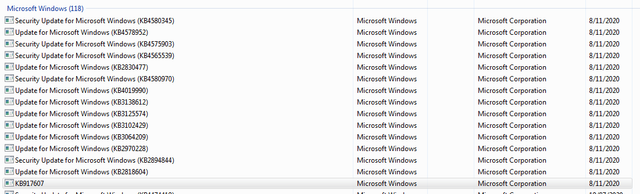
ok, just spent the last 3 hours running SIMPLIX


rebooted about 3 - 4 times


after first stage of 12 updates and a long time it appeared the update failed, "FAILURE CONFIGURING WINDOWS UPDATE" appeared on reboot screen then changed to "rRETRYING" and went through again this time with success.


at second stage of 4 updates ran fine rebooted and went to next process


at third stage of 7 updates ran fine rebooted and went to next process


at fourth stage of 1 update ran fine rebooted and came back with cleanup process


after rebooting again it came back with disk cleanup finished that then rebooted again to welcome page and off we go.


checked installed updates found 15 new updates installed today but no idea of how many were superseded or removed


thanks everyone for the assistance


Roo

kb.png
[
 

My Computers

System One System Two

  • Computer type
    Laptop
    Computer Manufacturer/Model Number
    Toshiba Satellite P750 series
    OS
    Windows 7 Home Premium 64 bit
  • Computer type
    Laptop
    System Manufacturer/Model Number
    Hewlett Packard 15-BW0XX
    OS
    Windows 10 Home
Back
Top