Windows 7 & Game Issue

antz28

New member
Local time
7:03 PM
Messages
10
Hi every 1.
I Have a question and hopefully i can get this game working doing my head in trying to get it to work but everything I try can`t get the thing going.

This is the first game i have had an issue with downloaded 4 other games with no issues world golf tour , Aces High & World of tanks & Quake Live. (it`s a game called horse racing fantasy)

My system is only basic nothing to special Hp running on 64bit windows 7.
I did Google search windows 7 compatibility and a few other searches and tried all the trouble shoot options but did not work.
A list of things i have tried.

Run as Administrator
Gone into proprieties and run the game on all options widows xp service pack 2 , 3 and all other options.
Troubleshoot options tried it on every 1
I though maybe my firewall was blocking the game check that, that is fine also antivirus.
I did a system restore then reinstaled the game after the restore.

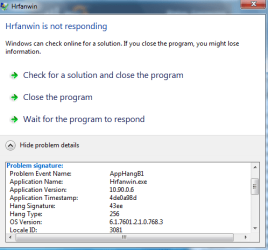
When ever i try to open the game under normal settings I get Hrfanwin is not responding. Problem signature:
Problem Event Name: AppHangB1
Application Name: Hrfanwin.exe
Application Version: 10.90.0.6
Application Timestamp: 4de0a98d
Hang Signature: 43ee
Hang Type: 256
OS Version: 6.1.7600.2.0.0.768.3
Locale ID: 3081
Additional Hang Signature 1: 43ee64bf484e8031f57faea78de6293d
Additional Hang Signature 2: 5cec
Additional Hang Signature 3: 5cec303873e0153986f54e8046c5fb3d
Additional Hang Signature 4: 43ee
Additional Hang Signature 5: 43ee64bf484e8031f57faea78de6293d
Additional Hang Signature 6: 5cec
Additional Hang Signature 7: 5cec303873e0153986f54e8046c5fb3d
I downloaded PC repair to fix Apphangb1 but did not do anything

When ever i try to run the game as administration on windows xp service pack it is like the game just gets jammed on the loading page and does not progress.

I have winrar downloaded but my knowledge of that software is limited at best.
Any1 got any good idea`s what i should try.
Maybe something i can get around the loading screen.
Or anything i can get it to work.

Would appreciate the help
Regards Anthony
 

My Computer

OS
Windows 7
If you got the games legit, you wouldn't need winrar.

Where did you get the PC Repair, since there's sketchy programs. I'd say re-run an antivirus scan.

Also, how old is the game? Do you meet the minimum requirements (enough RAM)?
 

My Computer

Computer Manufacturer/Model Number
Dell Inspiron 15R N5110
OS
Windows 7 Professional 64bit
CPU
i7-2670QM CPU @ 2.20GHz, 4 Cores, 8 Logical Processors
Motherboard
Dell 0HVRTT
Memory
8GB DDR3
Graphics Card(s)
NVIDIA GeForce GT 525M
Monitor(s) Displays
15.6" Monitor
Screen Resolution
1366 x 768
Hard Drives
500 GB
Mouse
Razer Deathadder
Hi.
I downloaded the game the same way as i downloaded the other 3.
The game is a legit game thank you for providing the info on winrar.
I do meet the min requirements to play that game.
The game has been a around for awhile and has been updated.

The game use to run on my really old computer a couple of years back that computer was on windows Xp.
 

My Computer

OS
Windows 7
how you downloaded the games? with what program?

please post your pc specs...
 

My Computer

Computer type
PC/Desktop
The games are not cd`s.
I downloaded the games via there websites with firfox click and install.

System:
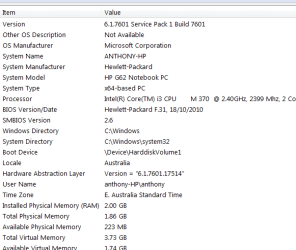
Windows 7 Home Premium service pack 1 64bit
Hp G62 notebook
Intel core tm i3 cpu m 2.4 ghz
Installed memory 2gb 1.6gb usable

I added an attachment of full system specs s-shot
 

Attachments

  • s-shotcomputer.PNG
    s-shotcomputer.PNG
    10.7 KB · Views: 2

My Computer

OS
Windows 7
The games are not cd`s.
I downloaded the games via there websites with firfox click and install.

sorry, but if you downloaded games like "Aces High" which are NOT freeware, you are committing piracy.
Piracy is not admitted in Windows 7 Forums, i can't help you anymore.
 

My Computer

Computer type
PC/Desktop
The games are not cd`s.
I downloaded the games via there websites with firfox click and install.

sorry, but if you downloaded games like "Aces High" which are NOT freeware, you are committing piracy.
Piracy is not admitted in Windows 7 Forums, i can't help you anymore.


Aces high has a trial and all the rest are free.
 

My Computer

Computer type
PC/Desktop
OS
Windows 11
Aces high does have a free trial but this topic is not about Aces high, world golf tour is free and Quake is free and horse racing fantasy 3 is free.

This topic is only about the last game (Horse racing fantasy 3) all the other games work fine no issues with those games on my computer i was using them as examples of games i had downloaded on this system and my question/ Opening topic is not regarding those 3 games.

The issues i have been experiencing is for the last game and it not beaning able to open.
 

My Computer

OS
Windows 7
Aces high does have a free trial but this topic is not about Aces high, world golf tour is free and Quake is free and horse racing fantasy 3 is free.

This topic is only about the last game (Horse racing fantasy 3) all the other games work fine no issues with those games on my computer i was using them as examples of games i had downloaded on this system and my question/ Opening topic is not regarding those 3 games.

The issues i have been experiencing is for the last game and it not beaning able to open.

in this case, sorry, i didn't understand it.

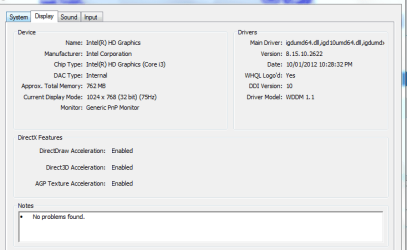
Ok, what GPU do you have?
 

My Computer

Computer type
PC/Desktop
I got the stock standard
Intel HD Graphics
 

Attachments

  • cpu.PNG
    cpu.PNG
    10.9 KB · Views: 4

My Computer

OS
Windows 7
sorry 2 posts the same.
 

Attachments

  • cpu.PNG
    cpu.PNG
    10.9 KB · Views: 4

My Computer

OS
Windows 7
this is very strange...
You meet the minimum requirements.

Try this: when you launch the game, open immedialty the Task Manager, click on "show all process" in bottom-left, then search the process of the game, right click on it, go to "set affinity". A window will open, now leave selectet only "CPU 0". Then close the process and restart the game. In this way the program will use only 1 core of your CPU, and this could solve this issue.
I used this tweak several times to solve some applications loading issues...

Another way to solve this could be creating a virtual machine and installing Windows XP on it...

Try also to turn off anti-virus programs and to defrag your Hard Drive.
 

My Computer

Computer type
PC/Desktop
I gave that a try a few times
Started the game up open task manager set affinity selected CPU 0 i also tried CPU 1, 2 and 3 close then restarted the game. But still the same issue i tried that on all the compatibility settings.
 

My Computer

OS
Windows 7
Just gave that a go as well no luck.
Also tried it under repair or maintain.

I use to play this game awhile back on my old laptop but the laptop no longer works was an old model had windows xp on it.
 

My Computer

OS
Windows 7
Do you think it may have something to do with my internet connection or ISP.
According there game support they think it maybe the reason.
Game requires internet connection to run.
 

My Computer

OS
Windows 7
probably yes, it could be.

turn off firewall/anti-virus or any other program which uses or block internet connection.
 

My Computer

Computer type
PC/Desktop
Ok.
Turned of firewall.
turned of Antivirus
Also did a disk frag.
Tried running it again all the compatibility settings no joy :o(
I am still getting this error coming up "s-shot" only on one of the compatibility setting and that is the standard settings also comes up in run as administration.
I talked to a few others what play the game via there forums who have the similar set up as i do windows 7 they have had no issue`s just download click on the icon and play so this is very strange. I thought there may have been a corrupted file , but the download comes with a repair option in case that happens downloaded the game a few times. tried repairing option under compatibility. I am using the same connection as i use to use with that game only difference beaning different computer.

Also the last few times I have tried starting the game i have had task manger open CPU for the game goes from 0 to 25.
 

Attachments

  • hrwin.PNG
    hrwin.PNG
    14.2 KB · Views: 3

My Computer

OS
Windows 7
Back
Top