Windows 7 going to "Switch user" screen by itself

JohnDohe

Banned
Local time
5:09 AM
Messages
60
My PC: Acer Windows 7 Pro 64-bit

Lately when I leave my pc alone for awhile, the screen
turns off in 15 min's, which is the setting I chose.

However, when I press any key, or click the mouse
to turn back on the screen, I'm taken to the "Switch user"
screen with my user ID and those of others:
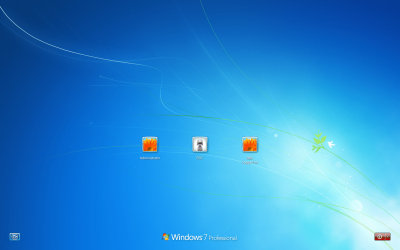
Switch user screenshot.png

I have to click on my user ID icon, enter my password,
press enter, and then I'm taken to where I left off:
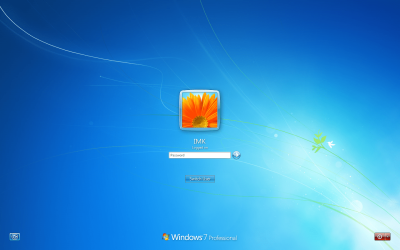
Switch user login screenshot.png

This is tedious.

I've checked all the display settings I can but I can't find
the setting I need to stop this behavior.

Under
Control Panel\Hardware and Sound\Power Options\Edit Plan Settings
I've got "Turn off display" set to "15 minutes" and
"Put the computer to sleep" set to "Never".

I DO want the screen to turn off after 15 min's when
I've left the pc, but I DON'T want to have to keep
clicking my user ID and entering my password to
resume where I left off! I just want to come back,
click any key or the mouse, turn on the screen and
continue where I left off.

What controls this behavior and how do I change it?

HALP! :p
 

My Computer My Computer

Computer type
PC/Desktop
Computer Manufacturer/Model Number
Acer
OS
Windows 7 Pro 64 bit
Control panel, power options, require a password when computer wakes. Check that setting!
 

My Computer My Computer

Computer type
PC/Desktop
Computer Manufacturer/Model Number
custom build
OS
Microsoft Windows 7 Ultimate 64-bit 7601 Multiprocessor Free Service Pack 1
CPU
AMD FX(tm)-6100 Six-Core Processor
Motherboard
ASUSTeK Computer INC. M5A78L-M LX PLUS
Memory
4.00 GB
Graphics Card(s)
AMD Radeon HD 6450
Sound Card
(1) AMD High Definition Audio Device (2) Realtek High Defi
Monitor(s) Displays
Toshiba 47ZV650U 47" LCD 240Hz
Screen Resolution
1920 x 1080 x 32 bits (4294967296 colors) @ 60 Hz
Hard Drives
(1) HDT722516DLA380 ATA Device (2) Hitachi HDS721025CLA382 ATA Device (3) ST4000VN000-1H4168 ATA Device (4) Generic STORAGE DEVICE USB Device (5) Generic STORAGE DEVICE USB Device (6) Generic STORAGE DEVICE USB Device (7) Generic STORAGE
PSU
Corsair CX430M
Case
WMI (Waste Management Incorporated)
Cooling
Yes, it's very cool.
Keyboard
Bluetooth KB & Mousepad
Internet Speed
Fios 15/5 and it sucks when Verizon is throttling it down
Antivirus
Avast, MSE and Malwarebytes
Browser
Firefox v.41.0.2 and IE 11
Other Info
2 years old and so far this rig still kicks butt
Thank you for your suggestion!

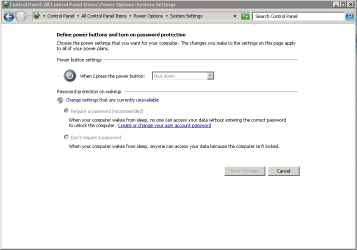
However ... here are my settings:

Control Panel-All Control Panel Items-Power Options-System Settings.PNG

Can you think of anything else?
 

My Computer My Computer

Computer type
PC/Desktop
Computer Manufacturer/Model Number
Acer
OS
Windows 7 Pro 64 bit
Yeah, select don't require a password

Dohe!
Sorry had to throw that in there.
 

My Computer My Computer

Computer type
PC/Desktop
Computer Manufacturer/Model Number
custom build
OS
Microsoft Windows 7 Ultimate 64-bit 7601 Multiprocessor Free Service Pack 1
CPU
AMD FX(tm)-6100 Six-Core Processor
Motherboard
ASUSTeK Computer INC. M5A78L-M LX PLUS
Memory
4.00 GB
Graphics Card(s)
AMD Radeon HD 6450
Sound Card
(1) AMD High Definition Audio Device (2) Realtek High Defi
Monitor(s) Displays
Toshiba 47ZV650U 47" LCD 240Hz
Screen Resolution
1920 x 1080 x 32 bits (4294967296 colors) @ 60 Hz
Hard Drives
(1) HDT722516DLA380 ATA Device (2) Hitachi HDS721025CLA382 ATA Device (3) ST4000VN000-1H4168 ATA Device (4) Generic STORAGE DEVICE USB Device (5) Generic STORAGE DEVICE USB Device (6) Generic STORAGE DEVICE USB Device (7) Generic STORAGE
PSU
Corsair CX430M
Case
WMI (Waste Management Incorporated)
Cooling
Yes, it's very cool.
Keyboard
Bluetooth KB & Mousepad
Internet Speed
Fios 15/5 and it sucks when Verizon is throttling it down
Antivirus
Avast, MSE and Malwarebytes
Browser
Firefox v.41.0.2 and IE 11
Other Info
2 years old and so far this rig still kicks butt
@ cyclops:

I feel like such a "duh"!

Thanks!

The setting is now obvious.

However, when I checked it just now,
"Don't require a password" is the current
option (must've changed it when I read
your note, but took the screenshot
before I made the setting change).

Even though "Don't require a password"
is checked, the system is still asking me
for a password when I wake it up.

Any other ideas?

:huh:
 

My Computer My Computer

Computer type
PC/Desktop
Computer Manufacturer/Model Number
Acer
OS
Windows 7 Pro 64 bit
I've seen updates mess up that setting in the past. The solution was to change the settings so that it DOES require a password, reboot, change the settings so that it does NOT require a password and reboot again. (You might have already done that - I can't tell for sure.)
 

My Computer My Computer

Computer type
Laptop
Computer Manufacturer/Model Number
Employer provided Dell Latitude
OS
W7 Pro SP1 64bit
CPU
i7
Memory
8GB
Graphics Card(s)
Intel HD Graphics
Hard Drives
crappy SSD
Antivirus
Employer mandated Symantec Endpoint Protection
Browser
Pale Moon 64bit, IE11 64bit & Chrome 64bit
Back
Top