Windows 7 High Ping Fix

I found it after remembering back when I was on vista

netsh interface tcp set global autotuning=disabled

Go into the command prompt under administrator (Right click, run as Administrator) and right click and paste. Finaly I dont need to go BACK to vista or XP :)

Sticky of you wish.

I don't notice any difference after doing this. Does this need done every time the computer is restarted or is it permanent until you re-enable it again?

Also if it does remain disabled does it also require a reboot to take effect or does it take effect immediately?

I may not have had any issues with ping but I feel like my ping in COD4 is a bit high compared to the last time I had it installed so this not working may be because I had no issue in the first place. Still If I think I can lower my ping I am willing to try.

EDIT:
After flipping around through my bookmarks I did notice that all of the pages loaded noticeably faster. I browse these same pages multiple times a day and I know which ones load slower. I notice that they all load pretty much instantly now and they all load with the same speed. This side effect is positive by all means and actually makes this worth doing in and of it's self. I really like the fact that I no longer have to wait around for certain sites to load so +1 for that :)
 

My Computer

Computer Manufacturer/Model Number
Custom
OS
Win7 64bit Ultimate
CPU
AMD Phenom II X6 1100T Black Edition Thuban 3.3GHz, 3.7GHz
Motherboard
Gigabyte GA-890FXA-UD5
Memory
CORSAIR DOMINATOR GT 8GB (2 x 4GB) 1866 DDR3
Graphics Card(s)
XFX HD-697A-CNDC Radeon HD6970 2GB 256-bit
Sound Card
Creative SoundBlaster X-Fi Platinum Fatal1ty Edition
Monitor(s) Displays
Dual 25 Inch Hanns-G HZ251
Screen Resolution
1920x1080 X 2
PSU
Corsair 850W Single Rail
Case
Thermaltake V9 BlacX w/ Dual HDD Docking Station
Cooling
Air lots and lots of air and copper...
Keyboard
Kensington (Low-Profile)
Mouse
Creative Fatal1ty
Internet Speed
15Gbit (15 Down 5 Up)
Other Info
XIGMATEK HDT-S1284F 120mm HYPRO Bearing CPU Cooler, LG Blu-Ray Burner.
"Multimedia Class Scheduller" service is what caused me my lag.

Just disable the service.
windows sound is dependent on this service so you will then need to;
run regedit,
then find HKEY_LOCAL_MACHINE\SYSTEM\CurrentControlSet\Services\Audiosrv\DependOnService
double click on it and remove MMCSS from the list

reboot and play lagfree.

I searched for HOURS and HOURS and HOURS to fix my lag issues;

This fixed it for me and dropped my ping in fear combat from 180 to a solid 50 :D

I have just tried this one we will see how I went
Cheers
 

My Computer

Computer Manufacturer/Model Number
Gigabyte Asus
OS
,Windows 7-64.7600.16385 Ultimate
CPU
AMD Athlon(tm) 64 X2 Dual Core Processor 4800+, 2500
Motherboard
GA-MA78G-DS3H
Memory
Geil 4 Gig DDR2 800 PC2-6400 (400 MHz)
Graphics Card(s)
ATI Onboard 3200
Sound Card
ATI High Definition Audio Device
Monitor(s) Displays
Acer 22"
Screen Resolution
1680x1050
Hard Drives
1 x120 Gig
1 X 80 Gig
PSU
550 watt
Case
Cooler Master
Keyboard
Wireless Microsoft
Mouse
Wireless Microsoft
Internet Speed
3 Meg down .5 up
Other Info
BIOS Version/Date Award Software International, Inc. F8, 12/08/2009
whats your ping times now?
have you rum a tracerote on the game server?

Ken
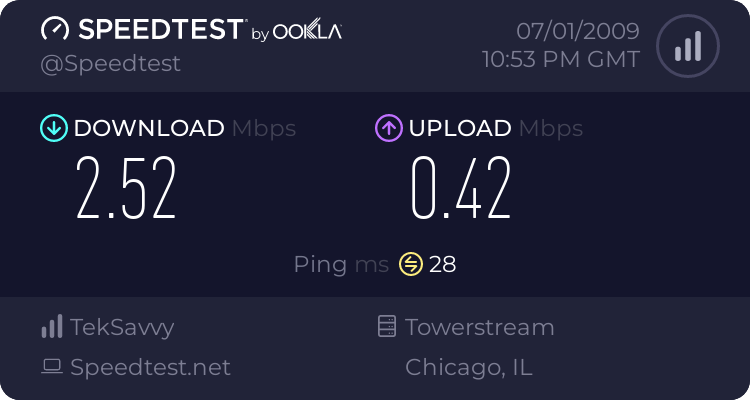
Here's the speedtest results to a chicago server. (i live in around Toronto)


But even when i ping the server i usually play on i get decent ping. This is what a traceroute is right?

Hell, i can even spec people and then get a good ping and no stuttery movements. It's once i actually start playing that my ping goes nuts.

Ill try turning off the 1 other computer in the house.

you can actually use tracert <host address / domain> in cmd instead of using a ping probe lol.. no Download needed ;P!
 

My Computer

OS
Windows 7 32bit RTM
I found it after remembering back when I was on vista

netsh interface tcp set global autotuning=disabled

Go into the command prompt under administrator (Right click, run as Administrator) and right click and paste. Finaly I dont need to go BACK to vista or XP :)

Sticky of you wish.


Thanks! =D²²²²²
what this command do?
 

My Computer

OS
Windows 7 Build 7100
CPU
AMD64 3000+ [email protected]
Motherboard
DFI LanParty Ultra-D
Memory
GSkill (2x1Gb)
Graphics Card(s)
Geforce 7200GS
Sound Card
None
Monitor(s) Displays
LG 23' W2353V FullHD
Screen Resolution
1920 x 1080
Hard Drives
HD Seagate 500Gb 32mb buffer
PSU
Seventeam 500w
Case
Casemall IMT 4000
Keyboard
Logitech Media Keyboard
Mouse
Dr. Hank XD
Internet Speed
NET Virtua 3Mb
As far as I understand this

netsh interface tcp set global autotuning=disabled

Puts it back to the default

My pings are much better now
 

My Computer

Computer Manufacturer/Model Number
Gigabyte Asus
OS
,Windows 7-64.7600.16385 Ultimate
CPU
AMD Athlon(tm) 64 X2 Dual Core Processor 4800+, 2500
Motherboard
GA-MA78G-DS3H
Memory
Geil 4 Gig DDR2 800 PC2-6400 (400 MHz)
Graphics Card(s)
ATI Onboard 3200
Sound Card
ATI High Definition Audio Device
Monitor(s) Displays
Acer 22"
Screen Resolution
1680x1050
Hard Drives
1 x120 Gig
1 X 80 Gig
PSU
550 watt
Case
Cooler Master
Keyboard
Wireless Microsoft
Mouse
Wireless Microsoft
Internet Speed
3 Meg down .5 up
Other Info
BIOS Version/Date Award Software International, Inc. F8, 12/08/2009
Why would the "Multimedia Class Scheduller" service be causing Lag???
 

My Computer

Computer Manufacturer/Model Number
Custom Built and Maintained...by Me
OS
Windows 7 Ultimate x64
CPU
AMD Phenome x4 965 Black Ed (Lovingly OverClocked.a tad)
Motherboard
Gigabyte GA 890GPA-UD3H
Memory
6 Gb (3 x 2 Gb GSKILL 16000CL9 )
Graphics Card(s)
ASUS EAH5850/2DIS/1GD5 Radeon HD 5850 1GB
Sound Card
Creative SB X-Fi
Monitor(s) Displays
Dual 24" Samsung Wide-Sceens
Screen Resolution
Good Enough.
Hard Drives
5x SATA Seagates (in assorted sizes, shapes, and colors--Variety is the spice of Life)
PSU
790 Watt Enermax Modular
Case
Lian-Li Black Mesh (Love that Mesh !!)
Cooling
Pure Air Baby..Flowin Freely
Keyboard
Microsoft 4000 Natural Ergonomic
Mouse
Multiple Logitech Laser mice....each has its specific use
Internet Speed
Not Fast Enough, it's probably never going to be fast enough
Other Info
This Computer building crap started out years ago as a simple hobby..that has now gotten completely out of hand !!
(It does come in handy though, when everyone in the family wants their own computer)
Well It definetly is driver issues. I just recieved an express card gig ethernet card, I needed it for my gig network. Well guess what, it works perfectly. The Realtek built in ethernet didnt work right nor did the mini PCIE Intel 3945 abg WIFI card, they both gave me the high pings. But the Belkin express card gig ethernet with the Marvel chip worked fine with the built in driver in 7. IT detected it flawlessly. Well I hope that settles it, its the drivers and incompatabilties. These issues should have been addressed already by Microsoft though....no excuse especially with the Intel wifi card.


This is my last post guys...peace
 

My Computer

Computer Manufacturer/Model Number
Gateway T6815
OS
Windows 7
CPU
1.5 Core2duo
Motherboard
Intel
Memory
Corsair 2 gigs
Graphics Card(s)
x3100
Sound Card
sigmatel
Monitor(s) Displays
lappy
Hard Drives
Fujitsu 250 gig
PSU
lappy
Case
lappy
Cooling
lappy
Here's the speedtest results to a chicago server. (i live in around Toronto)

Kinda slow upload you have for online gaming. Online gaming takes upload into account more so then download. That could be one of your problems.

here are mine


My Computer

Computer type
PC/Desktop
Computer Manufacturer/Model Number
Custom
OS
Windows 7 64bit
CPU
Intel I7 4770k @4.5
Motherboard
Asus z87-pro
Memory
16GB corsair Vengence
Graphics Card(s)
EVGA GTX 980 TI SC acx2.0
Sound Card
XFI fatality gamer
Monitor(s) Displays
Samsung
Screen Resolution
1920 x 1080
Hard Drives
OCZ ssd Baracuda 1tb x2
PSU
Corsair 1200 watt
Case
NZXT Noctis 450
Cooling
Kraken X61
Keyboard
Logitech G510
Mouse
Razer naga
Internet Speed
100 down 25 up
Other Info
Nzxt Hue +
Here's the speedtest results to a chicago server. (i live in around Toronto)

Kinda slow upload you have for online gaming. Online gaming takes upload into account more so then download. That could be one of your problems.

here are mine


I would love to see those results from my speed test. I am waiting on cable internet but surpisingly I can game over 3G, only had 1 server ask me to leave because of ping.
 

My Computer

Computer Manufacturer/Model Number
Alienware M17x R3
OS
Windows 7 Ultimate x64
CPU
Intel Core i7 2670QM 2.2GHz 3.3GHz Turbo Mode
Memory
12GB Dual Channel DDR3 at 1333MHz
Graphics Card(s)
2GB GDDR5 AMD Radeon 6990M
Sound Card
Audio Powered by Klipsch
Monitor(s) Displays
17.3-inch WideFHD 1920 x 1080 60Hz WLED
Screen Resolution
1920x1080
Hard Drives
120GB SSD slot 1
1TB HDD slot 2
Case
alienware laptop case
Cooling
Dual heatsink and fans
Keyboard
Alienware multi color keyboard
Mouse
logitech G300 gaming mouse
Other Info
Intel® Centrino Advanced-N 6230 2x2 agn+ Bluetooth

finally got it!!!
Why would the "Multimedia Class Scheduller" service be causing Lag???
It doesn't unless you are running Windows Media Player or Center while you are playing your game.

As for the autotunning command, read this for information.
Windows Core Networking : Receive Window Auto-Tuning on Vista.

And you know what, this problem has long existed since 2004, routers/firewalls are not being fixed! This involves Linux and its own means of scalling the TCP window: http://lwn.net/Articles/92727/

Its sad really, Microsoft is trying to give you better performance out of your high-speed network by increasing the size of the window (aka send more data per packet). But not everyone is on board (btw Window Scaling is an RFC standard!) and yet Microsoft is blamed. *headhskakes*
 

My Computer

Computer type
PC/Desktop
Computer Manufacturer/Model Number
Alienware Aurora ALX R4
OS
Windows 10 Pro (x64)
CPU
Intel Core i7-3930K (3.2GHz - 4.5GHz)
Motherboard
Alienware Aurora-R4 x79
Memory
4x Samsung 4GB PC3-12800 DDR3 (16GB 1600MHz)
Graphics Card(s)
Nvidia Geforce GTX 690
Sound Card
SteelSeries Siberia Elite
Monitor(s) Displays
Dell UltraSharp U3011
Screen Resolution
2560x1600
Hard Drives
Samsung 850 Pro 256 GB, Seagate 1TB Desktop Hybrid HDD, 2x Western Digital 4TB Green HDD
PSU
875W Some Dell PSU <.<
Case
Alienware Aurora ALX
Cooling
Custom Liquid Cooling (EK CPU & GPU blocks) dual EK 480RAD
Keyboard
Logitech G710+ Mechanical
Mouse
Logitech G700s
Internet Speed
Verizon Fios (50 mbps average)
Other Info
Server: Intel NUC D54250WYK: i5-4250U, 16GB, 256 GB mSATA, Windows Server 2012 R2
As for the autotunning command, read this for information.
Windows Core Networking : Receive Window Auto-Tuning on Vista.

And you know what, this problem has long existed since 2004, routers/firewalls are not being fixed! This involves Linux and its own means of scalling the TCP window: TCP window scaling and broken routers [LWN.net]

Personally, I'm not entirely clear on why disabling TCP window scaling would have the slightest effect on ICMP echo response times.

(Perhaps some of these games and link test utilities are instead basing their "ping" results on TCP throughput stats, and the packets dropped by routers which can't do window scaling are having very negative consequences for the TCP sessions in question? That would seem like a very silly way to measure link latency though.)

You seem very knowledgeable (and probably well connected) so I'm curious to hear your take on these reports of supposed "slower game pings" in win7. In your personal opinion, is each of these reports caused by entirely environmental factors, or is win7 in some way different in the relevant code?
 

My Computer

Computer Manufacturer/Model Number
Multiple machines in various stages of decomposition.
OS
Win7x64
Has anyone got any before and after result to see just how effective this really is?
 

My Computer

Computer Manufacturer/Model Number
Desktop
OS
Windows 7 Professional x64
CPU
Intel i5-2500k @ 3.3Ghz
Motherboard
Gigabyte GA-Z77X-UD5H
Memory
4GB DDR3
Graphics Card(s)
Nvidia GTS250 1GB
Monitor(s) Displays
Sony SDM S95A
Screen Resolution
1280x1024
Hard Drives
1x 1TB, 2x 250GB HDDs
PSU
Corsair HX850W
Case
Cooler Master 690 II
Cooling
Thermalright True Spirit 140mm & 3x 120mm & 3x 140mm Fans
Keyboard
Logitech Media Keyboard
Mouse
Microsoft Intellimouse
Internet Speed
8MB
Has anyone got any before and after result to see just how effective this really is?

I'm going to go out on a limb (it's a hulking thick one) and say that the original proposed solution has absolutely nothing to do with high ping times, although it may slow down your general internet experience.

"Ping" in the ping.exe sense issues an ICMP "echo" command to the target, then times how long it takes for the target to respond with an "echo response". ICMP is a network-layer entity. There is no handshake, no session, no transport protocol anywhere in that interaction.

TCP (Transport Control Protocol) includes the concept of a window size - how much data the sender can fire off before it must pause and wait for ACKs from the receiver. Large window sizes mean better throughput (faster transfers), especially on higher latency links. The problem is that the TCP "window size" parameter is a 16-bit field, thus making 0xFFFF (64KB) the largest possible window size. "Window Scaling" is the practice of using a different field in the TCP options header to specify a multiplier for the nominated window size. For example, 4 times WS equals 256KB effective window size.

Some routers are still too #####y to deal with TCP window scaling, as logicearth pointed out, so they either drop scaled TCP packets or generally misbehave in their presence. However, that should not impact ICMP (ping) in the slightest, given ICMP does not ride a TCP session.
 

My Computer

Computer Manufacturer/Model Number
Multiple machines in various stages of decomposition.
OS
Win7x64
This did solve my ping problems.

My ping was fine for all my games except Left 4 Dead, which I always had over 800 - 1500 ping, other games, CS:S etc were fine but Left 4 Dead was awful.

Tried this command line and its fine, back to normal completely.

Worked for me and its easily reversible if it doesn't!

Oh hello, first post here, used this forum many times already, just thought I'd say that this did work!

I only disabled it, not restricted or normal options so idk.
 

My Computer

OS
Windows 7
CPU
AMD Phenom 9750 Quad-Core Proces
Motherboard
Gigabyte GA-MA790X-DS4
Memory
1 GB Ballistix 1066MHz
Graphics Card(s)
Asus HD 4850
Sound Card
N/A
Monitor(s) Displays
Acer P223w
Hard Drives
Seagate Hard Drive 500 GB (ST3500320AS)
Cooling
Fans
Hello guys, i cant fix this problem, i tryed all things who can lower ping, but nothing helps me, still my ping in my country 110ms~ in other countrys 170ms~, what should i do? Should i back to Windows Vista or Windows XP?
 

My Computer

OS
Windows 7
APCY... With many of my games I end up with pretty much DOUBLE the ping I had with XP. Tried pretty much everything too.
My suggestion to you....DUAL BOOT with XP for your games--for now. I have no doubt that within the next 6 months or so things will get ironed out and lots of new drivers and windows 7 "fixes" will be forthcoming,... it is just going to take some time.
 

My Computer

Computer Manufacturer/Model Number
Custom Built and Maintained...by Me
OS
Windows 7 Ultimate x64
CPU
AMD Phenome x4 965 Black Ed (Lovingly OverClocked.a tad)
Motherboard
Gigabyte GA 890GPA-UD3H
Memory
6 Gb (3 x 2 Gb GSKILL 16000CL9 )
Graphics Card(s)
ASUS EAH5850/2DIS/1GD5 Radeon HD 5850 1GB
Sound Card
Creative SB X-Fi
Monitor(s) Displays
Dual 24" Samsung Wide-Sceens
Screen Resolution
Good Enough.
Hard Drives
5x SATA Seagates (in assorted sizes, shapes, and colors--Variety is the spice of Life)
PSU
790 Watt Enermax Modular
Case
Lian-Li Black Mesh (Love that Mesh !!)
Cooling
Pure Air Baby..Flowin Freely
Keyboard
Microsoft 4000 Natural Ergonomic
Mouse
Multiple Logitech Laser mice....each has its specific use
Internet Speed
Not Fast Enough, it's probably never going to be fast enough
Other Info
This Computer building crap started out years ago as a simple hobby..that has now gotten completely out of hand !!
(It does come in handy though, when everyone in the family wants their own computer)
Ok guys, now i back to XP BUT WTF!!!!!!!!!!!!!? I GOT HIGH PING TOO!, after w7 instaling i never had this problem just in w7 i had this problem, but now than i tryed to back in windows XP, i have same problem omgmgmg what happened. STUPID winodws 7!
 

My Computer

OS
Windows 7
Ok guys, now i back to XP BUT WTF!!!!!!!!!!!!!? I GOT HIGH PING TOO!, after w7 instaling i never had this problem just in w7 i had this problem, but now than i tryed to back in windows XP, i have same problem omgmgmg what happened. STUPID winodws 7!

That is pretty easy to answer. It is not Windows it is your connection. Talk to your Internet Service Provider.
 

My Computer

Computer type
PC/Desktop
Computer Manufacturer/Model Number
Alienware Aurora ALX R4
OS
Windows 10 Pro (x64)
CPU
Intel Core i7-3930K (3.2GHz - 4.5GHz)
Motherboard
Alienware Aurora-R4 x79
Memory
4x Samsung 4GB PC3-12800 DDR3 (16GB 1600MHz)
Graphics Card(s)
Nvidia Geforce GTX 690
Sound Card
SteelSeries Siberia Elite
Monitor(s) Displays
Dell UltraSharp U3011
Screen Resolution
2560x1600
Hard Drives
Samsung 850 Pro 256 GB, Seagate 1TB Desktop Hybrid HDD, 2x Western Digital 4TB Green HDD
PSU
875W Some Dell PSU <.<
Case
Alienware Aurora ALX
Cooling
Custom Liquid Cooling (EK CPU & GPU blocks) dual EK 480RAD
Keyboard
Logitech G710+ Mechanical
Mouse
Logitech G700s
Internet Speed
Verizon Fios (50 mbps average)
Other Info
Server: Intel NUC D54250WYK: i5-4250U, 16GB, 256 GB mSATA, Windows Server 2012 R2
High ping times during upload activity

Ah, the agony of invisible Operating System behaviours! I noticed my browser experience slowing down. After running a gamut of tests, the cause seemed to be a slow ping time. Ping times seem fine until I ran Dropbox [note: I do NOT think Dropbox v0.6.557 is to blame].

Reply from 66.102.9.105: bytes=32 time=29ms TTL=54
Reply from 66.102.9.105: bytes=32 time=31ms TTL=54
>> Dropbox status 'Uploading 3 files'
Reply from 66.102.9.105: bytes=32 time=644ms TTL=54
Reply from 66.102.9.105: bytes=32 time=996ms TTL=54
Reply from 66.102.9.105: bytes=32 time=1620ms TTL=54
Reply from 66.102.9.105: bytes=32 time=2047ms TTL=54
Reply from 66.102.9.105: bytes=32 time=3375ms TTL=54

Have found some of the recommendations here at Windows Seven Forums and Computing Forums but nothing to restore balance to my network connections. I tried:

netsh interface tcp set global autotuning=disabled
netsh interface tcp set global autotuninglevel=disabled

but ping times were unaffected. I then restored those settings to their default with:

netsh interface tcp set global autotuning=normal
netsh interface tcp set global autotuninglevel=normal

I've written up my problem on my blog:
Windows 7 high ping times | alex stanhope

Any advice would be appreciated.
 

My Computer

Computer Manufacturer/Model Number
Custom
OS
Windows 7 (2 machines, 32 bit and 64 bit)
CPU
Intel Quad-core Q6600
Motherboard
Gigabyte P35C-DS3R
Memory
2x1GB Corsair 1066Mhz
Graphics Card(s)
Nvidia 880GTS 320MB
Monitor(s) Displays
Dell/Philips
Hard Drives
WD Raptor 150GB
Case
Antec P180
Back
Top