P prabhath New member Local time 7:05 AM Messages 1 Jul 31, 2011 #1 Im using a HP notebook with Windows 7 Home Premium 64bit. Gadgets are not working. When me add them they don't display. My Computer My Computer At a glance Windows 7 Home Premium 64bitOSWindows 7 Home Premium 64bit
Im using a HP notebook with Windows 7 Home Premium 64bit. Gadgets are not working. When me add them they don't display.
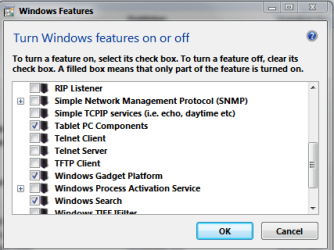
xxxdannyxxx Do You Believe Guru Gold Member VIP Local time 2:35 AM Messages 2,615 Location England Jul 31, 2011 #2 Hi prabhath and Welcome Firstly make sure the gadget platform is enabled in control panel\programs and features\windows features. Also have a look here - http://www.sevenforums.com/tutorials/140358-gadgets-not-displaying-correctly-windows-7-fix.html Its not quite the same problem as yours but the reset may help. Also this may be of help - http://www.sevenforums.com/tutorials/10215-gadgets-restore-default-gadgets.html Danny My Computer My Computer At a glance Windows 7 Home Premium x64 SP1intel(R)core(TM)2 duo CPU T6600 @ 2.20GHz3 gb ddr3ati radeon hd4570/512mbComputer Manufacturer/Model Numberacer aspire 5935gOSWindows 7 Home Premium x64 SP1CPUintel(R)core(TM)2 duo CPU T6600 @ 2.20GHzMotherboardintel gm45/gm47 revision 07Memory3 gb ddr3Graphics Card(s)ati radeon hd4570/512mbMonitor(s) Displayslop156wh2-tle1 15.3 flatScreen Resolution1366x768Hard DrivesOCZ-Agility3 60gig ssd 320gig external hdd 500gig external hddMouseOpticalInternet Speed30Mbps Down/30Mbps Up
Hi prabhath and Welcome Firstly make sure the gadget platform is enabled in control panel\programs and features\windows features. Also have a look here - http://www.sevenforums.com/tutorials/140358-gadgets-not-displaying-correctly-windows-7-fix.html Its not quite the same problem as yours but the reset may help. Also this may be of help - http://www.sevenforums.com/tutorials/10215-gadgets-restore-default-gadgets.html Danny