Windows 7 "Incompatible" Driver Blocking

My fault or not?

  • Is it the computers stupidity?

    Votes: 1 33.3%
  • Or is it me being stupid again?

    Votes: 2 66.7%

  • Total voters
    3

My Computer

Computer Manufacturer/Model Number
Custom
OS
Windows 7 Professional x64
CPU
Intel i7 2600K OC'd @ 4620 MHz
Motherboard
Asus P8Z68-V Pro
Memory
16GB GSkill Sniper 2133 Mhz (4x4GB)
Graphics Card(s)
EVGA GeForce GTX 480 SuperClocked+
Sound Card
Realtek High Definition Audio
Monitor(s) Displays
2x Acer S273HLbmii 27"
Screen Resolution
2 x 1920x1080
Hard Drives
64GB Crucial M4 SSD

Storage: Hitachi 1TB 5400RPM, Samsung 1.5TB 5400RPM
PSU
Corsair HW Series 750w (modular)
Case
Cooler Master HAF 932 Advanced Blue Edition
Cooling
CM Hyper 212+ CPU cooler, 3x 230mm + 1x 140mm case fans
Keyboard
Logitech MK320 (wireless)
Mouse
Logitech MK320 (wireless)
Internet Speed
30 Mb/s : 2 Mb/s
Hi Halfdemon,

I have a few thoughts.
  • Do a search for libusb0.sys in your system, check the version of all installed that you find. You may have more than one. If you find more, remove all but one version to a usb stick. Reboot, test, swap if necessary. Remember to do an entire system wide search especially looking in SYSWOW64 drivers folder.
  • You siad that you've installed twice, is this with a standard Windows 7 Disk (i.e. not a slipstreamed disk or anything non-MSfactory
  • have you updated any other drivers recently, if they are faulty and sharing memory addresses Win7 will choose which one it thinks he issue is with and block it.
  • Is there anything in your event log that could help us?
  • What firewall / antivirus are you using, these can sometimes effect drivers.
  • A final thought, your Certificate database may be damaged and perhaps windows can no longer find the certificate for the driver. I'll come back to this if all other angles fail.

- Timo
 
Last edited:

My Computer

Computer Manufacturer/Model Number
Custom Hack job
OS
Windows 7 Ultimate 64 bit
CPU
Intel(R) Core(TM)2 Quad CPU Q8200 @ 2.33GHz
Motherboard
GigaByte EP45-UD3
Memory
8 GB Kingston
Graphics Card(s)
Nvidia GeForce 9600GT
Sound Card
Soundblaster Audigy
Monitor(s) Displays
AOC x2 22"
Hard Drives
2 x Samsung 500GB (RAID)
2 x Samsung 2TB
1 x WD Green 2TB
1 x Seagate 1TB
1 x Samsung 500GB
PSU
Thermaltake QFan 750W
Case
CM Scout Gaming
Cooling
Coolermaster V10
Keyboard
Microsoft Wireless Keyboard 1000
Mouse
Microsoft Wireless Optical 2000
Internet Speed
320
Other Info
Winfast PVR2000CP
LG DVD-RAM DVD/RW/DL Super Multi
Linksys WMP300Nx2 Wireless Adapter
Would it help to know that i occurred after a rather short sleep cycle(maybe 20 secs) and a bsod following wake?
 

My Computer

Computer Manufacturer/Model Number
Dell Inspiron 1525
OS
Windows 7
CPU
Intel Pentium Dual Core 1.73 Ghz
Memory
3 GB
Graphics Card(s)
Intel 965 GMA
Screen Resolution
1280x800
Hard Drives
WD3200BEVT
Case
Laptop
Keyboard
Laptop
Mouse
Touchpad
Internet Speed
http://www.speedtest.net/result/882461994.png
All the entries in my event logs relating to drivers not loading all point to the same sys file. The disc is straight from ms no slipstreams. I am using avg free latest version and updates. And how would i go about repairing the certificate database?
 

My Computer

Computer Manufacturer/Model Number
Dell Inspiron 1525
OS
Windows 7
CPU
Intel Pentium Dual Core 1.73 Ghz
Memory
3 GB
Graphics Card(s)
Intel 965 GMA
Screen Resolution
1280x800
Hard Drives
WD3200BEVT
Case
Laptop
Keyboard
Laptop
Mouse
Touchpad
Internet Speed
http://www.speedtest.net/result/882461994.png
Would it help to know that i occurred after a rather short sleep cycle(maybe 20 secs) and a bsod following wake?

Every little bit of info helps :D

That's why I asked you the below info and Jonathan_King asked about the upgrade advisor........I'm going to add and remove some of my questions based on your update. thanks.
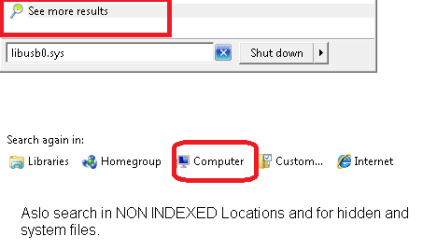
  • Do a search for libusb0.sys in your system, check the version of all installed that you find. You may have more than one. If you find more, remove all but one version to a usb stick. Reboot, test, swap if necessary. Remember to do an entire system wide search especially looking in SYSWOW64 drivers folder.
    search.png
  • Have you updated any other drivers recently? If they are faulty and sharing memory addresses Win7 will choose which one it thinks he issue is with and block it.
  • Your Certificate database may be damaged and perhaps windows can no longer find the certificate for the driver.
    Here's the official Microsoft Fix . The CRL may have become corrupt during a BSOD.
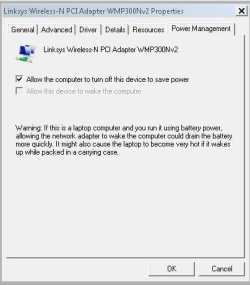
  • Temporarily turn off sleep mode, there have been a number of drivers that have failed because they have not been written well to handle hit.
    There are two things here to turn off here:
  1. Open Device Manager
  2. Find your device/s with the issue and right click on it./them.
  3. Select properties and see if your selcted device has a POWER MANAGEMENT tab.
  4. If so, Untick the Allow the computer to turn off this device check box
    network adapter.JPG
  5. Test for your issue
  6. If the problem does not occur then go no further, if it still occurs
    Continue to step 7.....
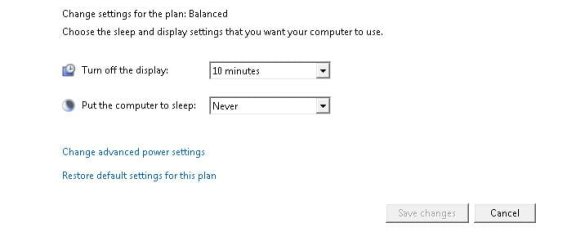
  7. Open control panel
  8. Open Power Options
  9. Change yoru Current Plan Settings
  10. In the 'Put the computer to sleep' box, choose NEVER from the drop down.
    sleep.JPG
  11. Save Changes


-Timo
 
Last edited:

My Computer

Computer Manufacturer/Model Number
Custom Hack job
OS
Windows 7 Ultimate 64 bit
CPU
Intel(R) Core(TM)2 Quad CPU Q8200 @ 2.33GHz
Motherboard
GigaByte EP45-UD3
Memory
8 GB Kingston
Graphics Card(s)
Nvidia GeForce 9600GT
Sound Card
Soundblaster Audigy
Monitor(s) Displays
AOC x2 22"
Hard Drives
2 x Samsung 500GB (RAID)
2 x Samsung 2TB
1 x WD Green 2TB
1 x Seagate 1TB
1 x Samsung 500GB
PSU
Thermaltake QFan 750W
Case
CM Scout Gaming
Cooling
Coolermaster V10
Keyboard
Microsoft Wireless Keyboard 1000
Mouse
Microsoft Wireless Optical 2000
Internet Speed
320
Other Info
Winfast PVR2000CP
LG DVD-RAM DVD/RW/DL Super Multi
Linksys WMP300Nx2 Wireless Adapter
Found the real culprit by mistake. I had looked over at one of my projects that had special software that required libusb win32 to be installed, unistalled it and fixed it. Thanks for all the help though. Hopefully this will eventually help someone else.
 

My Computer

Computer Manufacturer/Model Number
Dell Inspiron 1525
OS
Windows 7
CPU
Intel Pentium Dual Core 1.73 Ghz
Memory
3 GB
Graphics Card(s)
Intel 965 GMA
Screen Resolution
1280x800
Hard Drives
WD3200BEVT
Case
Laptop
Keyboard
Laptop
Mouse
Touchpad
Internet Speed
http://www.speedtest.net/result/882461994.png
Found the real culprit by mistake. I had looked over at one of my projects that had special software that required libusb win32 to be installed, unistalled it and fixed it. Thanks for all the help though. Hopefully this will eventually help someone else.

Thanks for coming back to post that and you'r right it will help someone else. :D

From a technical perspective - the other driver likely shares the same memory allocation.

It's great to hear that your issue is resolved. :party:
 

My Computer

Computer Manufacturer/Model Number
Custom Hack job
OS
Windows 7 Ultimate 64 bit
CPU
Intel(R) Core(TM)2 Quad CPU Q8200 @ 2.33GHz
Motherboard
GigaByte EP45-UD3
Memory
8 GB Kingston
Graphics Card(s)
Nvidia GeForce 9600GT
Sound Card
Soundblaster Audigy
Monitor(s) Displays
AOC x2 22"
Hard Drives
2 x Samsung 500GB (RAID)
2 x Samsung 2TB
1 x WD Green 2TB
1 x Seagate 1TB
1 x Samsung 500GB
PSU
Thermaltake QFan 750W
Case
CM Scout Gaming
Cooling
Coolermaster V10
Keyboard
Microsoft Wireless Keyboard 1000
Mouse
Microsoft Wireless Optical 2000
Internet Speed
320
Other Info
Winfast PVR2000CP
LG DVD-RAM DVD/RW/DL Super Multi
Linksys WMP300Nx2 Wireless Adapter
Back
Top