Windows 7 install requires BIOS update, no operating system to boot

Ranger619

New member
Local time
4:53 PM
Messages
7
Location
San Diego, CA
I have searched and been unable to find the information.

Specs are HP G60-445DX
3GB RAM
AMD Turion X2, 64 bit
Etc.

Upgrading from Vista Home Premium that was reset to factory specs in hopes of repairing "local only" issue on network.

Here's what is happening, booted from Windows 7 Ultimate burned ISO image on DVD RW, followed the instructions on this site for a clean install. Performed clean all on disk 0, set a partition and followed the install instructions. Expansion of Windows remained at 0% for 2 hours, I understood there were known issues however I have retried to do another clean install but am unable to boot from DVD although everything is set to do so including resetting CMOS battery.

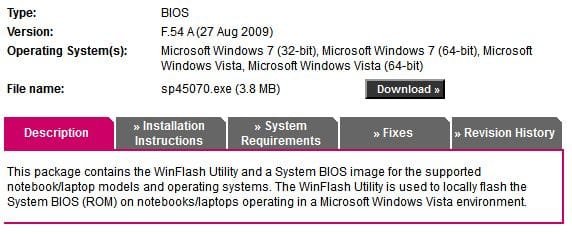
It has come to my attention that I am required to update my BIOS from f3c to f54 to install W7, unfortunatly I have no idea how to do so now that I have no operating system on this HDD.

When trying to boot from DVD I am now getting the status of: 0xc00000e9.
Prior to this, the system would boot and freeze when loading files, now the system either promts with this message or will inform me bootmgr is missing or worse, shut down.

I'm doing this all from my phone and am at a loss as to what the proper step would be to get on the right track or if I am SOL.
 
Last edited:

My Computer My Computer

At a glance

Vista 64
OS
Vista 64
You should be able to find a DOS version of your BIOS and flash it from a bootable thumbdrive or disc.

Never mind. I thought I'd help you out by linking to the DOS flash utility but apparently there isn't one... :confused:

Hopefully someone will have a better solution. :)
 

Attachments

  • HPhosedtheguy.JPG
    HPhosedtheguy.JPG
    33.9 KB · Views: 50

My Computer My Computer

At a glance

Main - Windows 7 Pro SP1 64-Bit; 2nd - Window...Main - Core i7 2600K; 2nd - Core i7 920Main - 16GB Corsair Vengeance; 2nd - 12GB Cor...Main - XFX Radeon 6870 1GB; 2nd - XFX Radeon ...
Computer Manufacturer/Model Number
Self
OS
Main - Windows 7 Pro SP1 64-Bit; 2nd - Windows Server 2008 R2
CPU
Main - Core i7 2600K; 2nd - Core i7 920
Motherboard
Main - Asus P8Z68-V Pro/Gen3; 2nd - Gigabyte GA-EX58-UDR3
Memory
Main - 16GB Corsair Vengeance; 2nd - 12GB Corsair Vengeance
Graphics Card(s)
Main - XFX Radeon 6870 1GB; 2nd - XFX Radeon 4870 1GB
Sound Card
Both: Onboard Realtek Azalia
Monitor(s) Displays
Main - Hann 25" + I-INC 25" + Acer 23"; 2nd - Upgrading Soon
Screen Resolution
Main - 1920x1080 (All Three Monitors); 2nd - Upgrading Soon
Hard Drives
Main - (1) Crucial M4 128GB (Boot)
Main - (1) Seagate 2TB 64MB Cache (Data)
Main - (1) Seagate 2TB 64MB Cache (Data Backup)
2nd - (1) Intel X25-M SSD 80GB (Boot)
2nd - (3) Seagate 1TB 32MB Cache (Data Backup)
2nd - (1) Seagate 320GB (Because)
PSU
Main - OCZ 600W Modular; 2nd - OCZ 600W
Case
Main - Thermaltake Element G; 2nd - NZXT something or other
Cooling
Main - Corsair H80; 2nd - Prolimatech Megahalems
Keyboard
Main - Razer Reclusa; 2nd - Old MS Keyboard
Mouse
Main - Logitech MX Revolution; 2nd - Old MS Mouse
Internet Speed
20Mbps Time-Warner Cable
Do you have the original installation disks for the OS that shipped with your system. It appears that with HP you have to have an OS to update bios. These are their instructions. If you can reinstall Vista, update the bios and then install Windows 7. You should be able to boot from the DVD, but you can make a bootable USB installation drive to install windows. The bootable USB should work for Vista also.
 

My Computers My Computers

  • At a glance

    Windows 11 ProRyzen 9 5900X32GB G Skill DDR4-3600EVGA RTX 3080 FTW 3 Ultra
    Computer type
    PC/Desktop
    Computer Manufacturer/Model Number
    ALWAYS UNDER CONSTRUCTION
    OS
    Windows 11 Pro
    CPU
    Ryzen 9 5900X
    Motherboard
    Asus X570 Crosshair Viii Hero
    Memory
    32GB G Skill DDR4-3600
    Graphics Card(s)
    EVGA RTX 3080 FTW 3 Ultra
    Sound Card
    On Board/Sennheiser PC37X Headset
    Monitor(s) Displays
    3 X Asus 27"
    Screen Resolution
    2560x1440
    Hard Drives
    2 X 1 TB NVME drives
    PSU
    EVGA 850
    Case
    Phanteks Eclipse P400A
    Cooling
    EVGA 280 AIO
    Keyboard
    Logitech G510s/ Logitech G13
    Mouse
    Logitech G502
    Internet Speed
    24/1
    Antivirus
    ESET/MBAM Pro/SAS Pro
    Browser
    Chrome/ Firefox/ Edge
  • At a glance

    Windows 11 ProIntel Ultra 9 288V32 GB LPDDR5X 8533
    Computer type
    Laptop
    System Manufacturer/Model Number
    Dell 16 Plus
    OS
    Windows 11 Pro
    CPU
    Intel Ultra 9 288V
    Memory
    32 GB LPDDR5X 8533
    Monitor(s) Displays
    16" Mini-LED HDR600 Touch 90 Hz
    Screen Resolution
    2560X1600
    Hard Drives
    1 TB NVME
I was thinking the same thing however as with most HP products from my experience, and I have had 3 different machines; I have never had the discs come with the computer. I do know that somewhere I have a very old version of XP but it is unlikely I will be able to find it.


I may try using my girlfriends computer to download Vista from a torrent site and recovering that way as I cannot even acess recovery mode now via F11. Would I even be able to boot from a disk regardless of the OS image burned in it with this current situation?

Also why would everything have worked the first time without an update in my BIOS or is that the probable reason for the hang up. I wish there was a disclaimer or warning that informs of this possible mistake as it isn't obvious until the damage is done.
 

My Computer My Computer

At a glance

Vista 64
OS
Vista 64
Try burning the Win 7 disc again at the slowest possible speed. Lots of times it's the media itself that is the problem.
 

My Computer My Computer

At a glance

Main - Windows 7 Pro SP1 64-Bit; 2nd - Window...Main - Core i7 2600K; 2nd - Core i7 920Main - 16GB Corsair Vengeance; 2nd - 12GB Cor...Main - XFX Radeon 6870 1GB; 2nd - XFX Radeon ...
Computer Manufacturer/Model Number
Self
OS
Main - Windows 7 Pro SP1 64-Bit; 2nd - Windows Server 2008 R2
CPU
Main - Core i7 2600K; 2nd - Core i7 920
Motherboard
Main - Asus P8Z68-V Pro/Gen3; 2nd - Gigabyte GA-EX58-UDR3
Memory
Main - 16GB Corsair Vengeance; 2nd - 12GB Corsair Vengeance
Graphics Card(s)
Main - XFX Radeon 6870 1GB; 2nd - XFX Radeon 4870 1GB
Sound Card
Both: Onboard Realtek Azalia
Monitor(s) Displays
Main - Hann 25" + I-INC 25" + Acer 23"; 2nd - Upgrading Soon
Screen Resolution
Main - 1920x1080 (All Three Monitors); 2nd - Upgrading Soon
Hard Drives
Main - (1) Crucial M4 128GB (Boot)
Main - (1) Seagate 2TB 64MB Cache (Data)
Main - (1) Seagate 2TB 64MB Cache (Data Backup)
2nd - (1) Intel X25-M SSD 80GB (Boot)
2nd - (3) Seagate 1TB 32MB Cache (Data Backup)
2nd - (1) Seagate 320GB (Because)
PSU
Main - OCZ 600W Modular; 2nd - OCZ 600W
Case
Main - Thermaltake Element G; 2nd - NZXT something or other
Cooling
Main - Corsair H80; 2nd - Prolimatech Megahalems
Keyboard
Main - Razer Reclusa; 2nd - Old MS Keyboard
Mouse
Main - Logitech MX Revolution; 2nd - Old MS Mouse
Internet Speed
20Mbps Time-Warner Cable
Try burning the Win 7 disc again at the slowest possible speed. Lots of times it's the media itself that is the problem.

I burned it twice, on a dual layer and regular RW incase their was an issue since I only have 1 computer. It was burned at 2x to insure there wasn't a problem. I'm 100% sure it is still the BIOS since the version I have does not support 7 according to the HP website.
 

My Computer My Computer

At a glance

Vista 64
OS
Vista 64
...I'm 100% sure it is still the BIOS since the version I have does not support 7 according to the HP website.
I wouldn't disagree, especially after reading that one of the features of the new BIOS was "added OS support".

Can you try the bootable USB method that essenbe suggested? I had a computer with no DVD drive and that did the trick just fine.

If that doesn't work, see if you can copy the contents of the WIN 7 DVD straight to the hard drive and install from there, even if you have to transfer it to the thumbdrive via another computer. I haven't done that for years, but it used to be a great way to set up multiple identical machines.
 

My Computer My Computer

At a glance

Main - Windows 7 Pro SP1 64-Bit; 2nd - Window...Main - Core i7 2600K; 2nd - Core i7 920Main - 16GB Corsair Vengeance; 2nd - 12GB Cor...Main - XFX Radeon 6870 1GB; 2nd - XFX Radeon ...
Computer Manufacturer/Model Number
Self
OS
Main - Windows 7 Pro SP1 64-Bit; 2nd - Windows Server 2008 R2
CPU
Main - Core i7 2600K; 2nd - Core i7 920
Motherboard
Main - Asus P8Z68-V Pro/Gen3; 2nd - Gigabyte GA-EX58-UDR3
Memory
Main - 16GB Corsair Vengeance; 2nd - 12GB Corsair Vengeance
Graphics Card(s)
Main - XFX Radeon 6870 1GB; 2nd - XFX Radeon 4870 1GB
Sound Card
Both: Onboard Realtek Azalia
Monitor(s) Displays
Main - Hann 25" + I-INC 25" + Acer 23"; 2nd - Upgrading Soon
Screen Resolution
Main - 1920x1080 (All Three Monitors); 2nd - Upgrading Soon
Hard Drives
Main - (1) Crucial M4 128GB (Boot)
Main - (1) Seagate 2TB 64MB Cache (Data)
Main - (1) Seagate 2TB 64MB Cache (Data Backup)
2nd - (1) Intel X25-M SSD 80GB (Boot)
2nd - (3) Seagate 1TB 32MB Cache (Data Backup)
2nd - (1) Seagate 320GB (Because)
PSU
Main - OCZ 600W Modular; 2nd - OCZ 600W
Case
Main - Thermaltake Element G; 2nd - NZXT something or other
Cooling
Main - Corsair H80; 2nd - Prolimatech Megahalems
Keyboard
Main - Razer Reclusa; 2nd - Old MS Keyboard
Mouse
Main - Logitech MX Revolution; 2nd - Old MS Mouse
Internet Speed
20Mbps Time-Warner Cable
...I'm 100% sure it is still the BIOS since the version I have does not support 7 according to the HP website.
I wouldn't disagree, especially after reading that one of the features of the new BIOS was "added OS support".

Can you try the bootable USB method that essenbe suggested? I had a computer with no DVD drive and that did the trick just fine.

If that doesn't work, see if you can copy the contents of the WIN 7 DVD straight to the hard drive and install from there, even if you have to transfer it to the thumbdrive via another computer. I haven't done that for years, but it used to be a great way to set up multiple identical machines.

I'm not sure I follow what you mean by copying the contents straight to the HD, I wouldn't know the first step since to my knowledge I would need some kind of installer? I can try the USB method, would I basically be copy paste the iso file to the USB or would I have to find a way to "burn" the image to it... but wouldn't the problem still persist with the bios version or is it some kind of workaround.


EDIT: Never mind, I read the how to on a bootable usb but I still am unsure if this will work over the DVD boot without an update?
 

My Computer My Computer

At a glance

Vista 64
OS
Vista 64
You'd need some sort of bootable disc (such as a Linux distro) to manage the copying method if you went the "disc-to-drive and then install from there" route.

...I read the how to on a bootable usb but I still am unsure if this will work over the DVD boot without an update?
Looking at your first post, the DVD drive and/or disc seems to be the problem. It either can't decompress the files from the disc or can't boot at all. Taking the drive and disc out of the equation via USB might do it. :)
 

My Computer My Computer

At a glance

Main - Windows 7 Pro SP1 64-Bit; 2nd - Window...Main - Core i7 2600K; 2nd - Core i7 920Main - 16GB Corsair Vengeance; 2nd - 12GB Cor...Main - XFX Radeon 6870 1GB; 2nd - XFX Radeon ...
Computer Manufacturer/Model Number
Self
OS
Main - Windows 7 Pro SP1 64-Bit; 2nd - Windows Server 2008 R2
CPU
Main - Core i7 2600K; 2nd - Core i7 920
Motherboard
Main - Asus P8Z68-V Pro/Gen3; 2nd - Gigabyte GA-EX58-UDR3
Memory
Main - 16GB Corsair Vengeance; 2nd - 12GB Corsair Vengeance
Graphics Card(s)
Main - XFX Radeon 6870 1GB; 2nd - XFX Radeon 4870 1GB
Sound Card
Both: Onboard Realtek Azalia
Monitor(s) Displays
Main - Hann 25" + I-INC 25" + Acer 23"; 2nd - Upgrading Soon
Screen Resolution
Main - 1920x1080 (All Three Monitors); 2nd - Upgrading Soon
Hard Drives
Main - (1) Crucial M4 128GB (Boot)
Main - (1) Seagate 2TB 64MB Cache (Data)
Main - (1) Seagate 2TB 64MB Cache (Data Backup)
2nd - (1) Intel X25-M SSD 80GB (Boot)
2nd - (3) Seagate 1TB 32MB Cache (Data Backup)
2nd - (1) Seagate 320GB (Because)
PSU
Main - OCZ 600W Modular; 2nd - OCZ 600W
Case
Main - Thermaltake Element G; 2nd - NZXT something or other
Cooling
Main - Corsair H80; 2nd - Prolimatech Megahalems
Keyboard
Main - Razer Reclusa; 2nd - Old MS Keyboard
Mouse
Main - Logitech MX Revolution; 2nd - Old MS Mouse
Internet Speed
20Mbps Time-Warner Cable
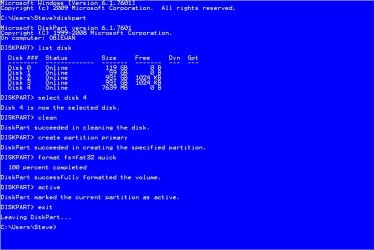
You can make the USB by hand , using diskpart. We can tell you the commands if you need them. First you are going to need a computer with a DVD drive and at least a 4Gb USB.

Here is how you do it by hand. Put the Instal disk in the drive. If autorun starts close it. Put the usb in the computer. Click start, type cmd in the search box, in the cmd that appears, right click it and select run as administrator. In the window that opens type these commands exactly as you see them. You will notice the size of the drives and which is your USB. use the number assigned to your USB.and press enter after each one.

format USB.JPG

Type exit again and press enter.

Open computer and take note of the drive letter of the USB, Open the DVD drive, don't run it, just open it to see the files. Highlight and copy each one. Open the USB drive and click paste.

You now have a USB installation media.
 

My Computers My Computers

  • At a glance

    Windows 11 ProRyzen 9 5900X32GB G Skill DDR4-3600EVGA RTX 3080 FTW 3 Ultra
    Computer type
    PC/Desktop
    Computer Manufacturer/Model Number
    ALWAYS UNDER CONSTRUCTION
    OS
    Windows 11 Pro
    CPU
    Ryzen 9 5900X
    Motherboard
    Asus X570 Crosshair Viii Hero
    Memory
    32GB G Skill DDR4-3600
    Graphics Card(s)
    EVGA RTX 3080 FTW 3 Ultra
    Sound Card
    On Board/Sennheiser PC37X Headset
    Monitor(s) Displays
    3 X Asus 27"
    Screen Resolution
    2560x1440
    Hard Drives
    2 X 1 TB NVME drives
    PSU
    EVGA 850
    Case
    Phanteks Eclipse P400A
    Cooling
    EVGA 280 AIO
    Keyboard
    Logitech G510s/ Logitech G13
    Mouse
    Logitech G502
    Internet Speed
    24/1
    Antivirus
    ESET/MBAM Pro/SAS Pro
    Browser
    Chrome/ Firefox/ Edge
  • At a glance

    Windows 11 ProIntel Ultra 9 288V32 GB LPDDR5X 8533
    Computer type
    Laptop
    System Manufacturer/Model Number
    Dell 16 Plus
    OS
    Windows 11 Pro
    CPU
    Intel Ultra 9 288V
    Memory
    32 GB LPDDR5X 8533
    Monitor(s) Displays
    16" Mini-LED HDR600 Touch 90 Hz
    Screen Resolution
    2560X1600
    Hard Drives
    1 TB NVME

My Computer My Computer

At a glance

Windows 7 64 Bit Home Premium SP1i7-3820GSkill F3-14900CL9Q - 16GBEVGA GeForce GTX660 - Driver 352.86
Computer type
PC/Desktop
Computer Manufacturer/Model Number
Home Built - Jan 2013
OS
Windows 7 64 Bit Home Premium SP1
CPU
i7-3820
Motherboard
Asus P9X79-PRO - Bios 4608
Memory
GSkill F3-14900CL9Q - 16GB
Graphics Card(s)
EVGA GeForce GTX660 - Driver 352.86
Sound Card
On board Realtek ALC898
Monitor(s) Displays
Acer S271HL
Screen Resolution
1920 x 1080
Hard Drives
#1- Samsung 840 Pro Series
#2- Western Digital WD1002FAEX Sata3 Black
#3- Western Digital WD1002FAEX Sata3 Black
PSU
Corsair CMPSU-850TX-V2 - 850 watt (by Seasonic)
Case
Corsair Obsidian 550D
Cooling
Standard 3 120mm case fans, Cooler Master Hyper 212 EVO
Keyboard
MS KC-0405
Mouse
Intellimouse 5-button
Internet Speed
56 Mbits/Sec (on a good day)
Antivirus
Avast & Malwarebytes
Browser
Firefox
Other Info
Asus DVD - DRW-24B1ST 24X
BIOSAgent

I've used BIOSAgentPlus. They are the official BIOS update and support center for Phoenix BIOS. And i believe your notebook uses Phoenix. BIOS Agent also supports AMI BIOS. It's a pretty cool service....
 

My Computer My Computer

At a glance

win7 64bit
OS
win7 64bit
So you guys are saying its possible to update my BIOS via USB without an operating system by loading the drivers onto the drive and booting from it?
 

My Computer My Computer

At a glance

Vista 64
OS
Vista 64
I just tried the steps on that website minus renaming the files as I am unsure of what to name them, however my computer doesnt even begin to read the USB to flash the BIOS. I think I might not be doing something right...

The DVD When trying to open it so I can copy the files just prompts me to name the blank CD prior to format, it does not open any of the files that are on there...
 

My Computer My Computer

At a glance

Vista 64
OS
Vista 64
They usually come in a zip file. Unzip the file to the USB. Format it first, FAT32. Is that close to what the instructions say? If not, do it their way.
 

My Computers My Computers

  • At a glance

    Windows 11 ProRyzen 9 5900X32GB G Skill DDR4-3600EVGA RTX 3080 FTW 3 Ultra
    Computer type
    PC/Desktop
    Computer Manufacturer/Model Number
    ALWAYS UNDER CONSTRUCTION
    OS
    Windows 11 Pro
    CPU
    Ryzen 9 5900X
    Motherboard
    Asus X570 Crosshair Viii Hero
    Memory
    32GB G Skill DDR4-3600
    Graphics Card(s)
    EVGA RTX 3080 FTW 3 Ultra
    Sound Card
    On Board/Sennheiser PC37X Headset
    Monitor(s) Displays
    3 X Asus 27"
    Screen Resolution
    2560x1440
    Hard Drives
    2 X 1 TB NVME drives
    PSU
    EVGA 850
    Case
    Phanteks Eclipse P400A
    Cooling
    EVGA 280 AIO
    Keyboard
    Logitech G510s/ Logitech G13
    Mouse
    Logitech G502
    Internet Speed
    24/1
    Antivirus
    ESET/MBAM Pro/SAS Pro
    Browser
    Chrome/ Firefox/ Edge
  • At a glance

    Windows 11 ProIntel Ultra 9 288V32 GB LPDDR5X 8533
    Computer type
    Laptop
    System Manufacturer/Model Number
    Dell 16 Plus
    OS
    Windows 11 Pro
    CPU
    Intel Ultra 9 288V
    Memory
    32 GB LPDDR5X 8533
    Monitor(s) Displays
    16" Mini-LED HDR600 Touch 90 Hz
    Screen Resolution
    2560X1600
    Hard Drives
    1 TB NVME
It is very important when flashing a BIOS to follow the instructions exactly, step by step. If you are unsure of what you are doing then don't do it at all! A bad BIOS flash could make your problems even worse.

Have you tried a W7 installation disk burned to a DVD-R?
 

My Computer My Computer

At a glance

Windows 7 64 Bit Home Premium SP1i7-3820GSkill F3-14900CL9Q - 16GBEVGA GeForce GTX660 - Driver 352.86
Computer type
PC/Desktop
Computer Manufacturer/Model Number
Home Built - Jan 2013
OS
Windows 7 64 Bit Home Premium SP1
CPU
i7-3820
Motherboard
Asus P9X79-PRO - Bios 4608
Memory
GSkill F3-14900CL9Q - 16GB
Graphics Card(s)
EVGA GeForce GTX660 - Driver 352.86
Sound Card
On board Realtek ALC898
Monitor(s) Displays
Acer S271HL
Screen Resolution
1920 x 1080
Hard Drives
#1- Samsung 840 Pro Series
#2- Western Digital WD1002FAEX Sata3 Black
#3- Western Digital WD1002FAEX Sata3 Black
PSU
Corsair CMPSU-850TX-V2 - 850 watt (by Seasonic)
Case
Corsair Obsidian 550D
Cooling
Standard 3 120mm case fans, Cooler Master Hyper 212 EVO
Keyboard
MS KC-0405
Mouse
Intellimouse 5-button
Internet Speed
56 Mbits/Sec (on a good day)
Antivirus
Avast & Malwarebytes
Browser
Firefox
Other Info
Asus DVD - DRW-24B1ST 24X
I have just tried with DVD R and still no change. I sat on HP customer support with no help of getting disks. My cousin is downloading vista via torrent but who knows.

I wish I could figure out this flashing but according to the instructions it notes I should take a FD file extension and rename it with a BIN, the problem is no where in the files after extracted do I find a FD file extension.
 

My Computer My Computer

At a glance

Vista 64
OS
Vista 64
Yes, I have seen this also, unfortunately. No .fd file in the zip.

If the .fd file is not there in the package then that method will not work. It seems that these companies are abandoning the legacy methods of BIOS flashing in favor of a "flashing for dummies" method (from the OS with a pretty graphical interface). That is convenient for the manufacturer, but we have seen many problems with flashing from the OS over the years. It is an unfortunate trend.

EDIT: Where did you get the ISO to burn to disk? It is also possible the the ISO is bad or the download was corrupted. You might try re-downloading the ISO, or borrow a retail installation disk.

Another thing: Reset your BIOS. Turn off the laptop, remove the power cord, remove the battery, then press and hold the POWER button for 15 seconds or so. Put everything back together and power on. That may clear up any drive recognition problems. Note: if the reset works you will need to re-enter the date and time in the BIOS settings.

I am skeptical that you need a BIOS update to install W7 on a computer designed for VISTA. I suspect the problem lies elsewhere.
 

My Computer My Computer

At a glance

Windows 7 64 Bit Home Premium SP1i7-3820GSkill F3-14900CL9Q - 16GBEVGA GeForce GTX660 - Driver 352.86
Computer type
PC/Desktop
Computer Manufacturer/Model Number
Home Built - Jan 2013
OS
Windows 7 64 Bit Home Premium SP1
CPU
i7-3820
Motherboard
Asus P9X79-PRO - Bios 4608
Memory
GSkill F3-14900CL9Q - 16GB
Graphics Card(s)
EVGA GeForce GTX660 - Driver 352.86
Sound Card
On board Realtek ALC898
Monitor(s) Displays
Acer S271HL
Screen Resolution
1920 x 1080
Hard Drives
#1- Samsung 840 Pro Series
#2- Western Digital WD1002FAEX Sata3 Black
#3- Western Digital WD1002FAEX Sata3 Black
PSU
Corsair CMPSU-850TX-V2 - 850 watt (by Seasonic)
Case
Corsair Obsidian 550D
Cooling
Standard 3 120mm case fans, Cooler Master Hyper 212 EVO
Keyboard
MS KC-0405
Mouse
Intellimouse 5-button
Internet Speed
56 Mbits/Sec (on a good day)
Antivirus
Avast & Malwarebytes
Browser
Firefox
Other Info
Asus DVD - DRW-24B1ST 24X
Back
Top