
Windows 7 Installation problems...

Bling35

New member
Local time
3:05 PM
Messages
26
Location
North Shields
I really need help. :cry:

I can pretty much stumble my way through problems but this is a puzzler.

I purchased a new Wester Digital HDD 1TB, to use to install the complete Windows 7 package on a new drive. I do not mind which one 32 or 64bit, I have tried both.

I have spent over 25 hours trying to get this installation to work without any success. I am quite a novice and dont understand most of the jargon so if you can reply in plain English I would really appreciate it.

The error messages I have received have been varied from corrupt sectors to windows will not install on this drive. My first install seemed to go fine but when I turned my PC on the next day all broke loose. I got stuck in a loop between starting windows and chkdsk (which was deleting files and sectors all over the place).

Since then I have been trying over and over again to install and each time have a different error message.

When starting from CD/DVD sometimes Win 7 recognises the 1TB HDD, some times it doesn't; at one point it said it was only 8GB, whats going on I ask you?

The new drive has two partitions one at 100mb and another at 931GB does this have any influence on the error messages?

I have been told that windows 7 is better than Vista, well that I am yet to see.

I have browsed forums all night and after reading Brinks' post on how to, I thought it looks like these guys know what they are talking about and thought I would give you a try. Please note though the How To I read here didn't show the problems that I have experienced.

Please help me....

Thank you all.
 

My Computer

Computer Manufacturer/Model Number
Home Build
OS
Windows 7 Home Premium 64 Bit
CPU
Core 2 Due E4500
Motherboard
Number on board GA-T671MG
Memory
4gb
Graphics Card(s)
Asus EN GTS250
Sound Card
Motherboard
Monitor(s) Displays
Samsung Syncmaster T220
Screen Resolution
1680 by 1050 32bit
Hard Drives
1 WDC WD10EARS-22Y5B! ATA (to install Win 7 HP)
2nd WD with XP Pro, Does not boot
PSU
Cooler master 520W Moduler
Case
Antec 1200
Cooling
Std with Imedia System and Antec 1200
Keyboard
Wireless microsoft 3000 v2.0
Mouse
wireless laser mouse 5000
Internet Speed
8500kb +
Other Info
Trying to build myself a decent system bit by bit. (Only motherboard and chip need to be replaced now.) Upgraded to overclocked i5.
Unplug all other HD's to try install.

Format the 100gb partition again to try install.

Remove all but 2gb of RAM to try install, remove and reseat RAM, test RAM using memtest86 for 5-6 passes.

Test HD using WD Lifeguard full CD diag/repair scan. Here is the best version: http://support.gateway.com/support/drivers/getFile.asp?id=21280&dscr=GWSCAN%205.12&uid=27543171 Unzips to c:cabs where you'll find ISO to burn to CD.

Then try zeroing the HD using same CD to try install to raw HD, then after partitioning and formatting again.

Run http://www.sevenforums.com/tutorials/433-disk-check.html

Make sure you have latest BIOS version update, set SATA controller to AHCI first, then IDE.
 
Hello Bling35, welcome to Seven forums!


The first thing I would try is to create a 100GB partition to install Windows 7 to, sometime Windows has a hard time installing to such a large space.

1024MB = 1GB - 102400MB = 100GB

Have a look at step seven of this tutorial at the link below for when to do it.

How to Do a Clean Installation with Windows 7


Be sure to post back with any questions you may have and keep us updated.
 

My Computer

Computer Manufacturer/Model Number
* BFK Customs *
OS
W 7 64-bit Ultimate
CPU
Intel Q9550 Yorkfield
Motherboard
ASUS P5Q Pro
Memory
8GB Dominator 8500C5D
Graphics Card(s)
ATI : XFX 5870
Sound Card
Realtek HD Audio 7-1
Monitor(s) Displays
1x 47" LCD HDMI & 3x 26" LCD HDMI
Screen Resolution
1920x1080P & 1920x1200
Hard Drives
1x 80GB Intel X25-M G2 SSD : 1x 500GB & 1x 640GB WD Caviar Black(s)
PSU
Corsair 620HX
Case
Cooler Master RC-690
Cooling
Tuniq Tower 120, 2x 140mm and 3x 120mm case fans
Keyboard
Microsoft 500
Mouse
Razer Diamondback 3G
Internet Speed
14 Mb/s
Other Info
1x Koutech 3Gb/s SATA HDD Hot Swap Rack
Hi Barefoot Kid and gregrocker

I have tried installing without the second "Vista" HDD plugged in and that didn't work.

I tried looking through the link you gave before I joined.

I will set up a new 100GB partition and will reduce my RAM to leave only 2GB before I try again.

Gregrocker I will remove and reseat the RAM but what is "test RAM using memtest86 for 5-6 passes" What do I do here? I am a novice remember.

Test HD using WD Lifeguard full CD diag/repair scan. Here is the best version: http://support.gateway.com/support/d...2&uid=27543171 Unzips to c:cabs where you'll find ISO to burn to CD.........I will try this but what is ISO? Why burn to CD?...Did you know I have the Windows 7 Disc and also if I do need it can I put it on a USB Disk?

Then try zeroing the HD using same CD to try install to raw HD, then after partitioning and formatting again. "What is Zeroing the HDD using the same CD?"

FINALLY
Thank you for your help everyone. I think some of my questions are pretty basic to you but this will be until I get used of messing around with this kind of thing.

If and when I get this sorted I will let you know what worked and what didn't.

Thanks again.
 

My Computer

Computer Manufacturer/Model Number
Home Build
OS
Windows 7 Home Premium 64 Bit
CPU
Core 2 Due E4500
Motherboard
Number on board GA-T671MG
Memory
4gb
Graphics Card(s)
Asus EN GTS250
Sound Card
Motherboard
Monitor(s) Displays
Samsung Syncmaster T220
Screen Resolution
1680 by 1050 32bit
Hard Drives
1 WDC WD10EARS-22Y5B! ATA (to install Win 7 HP)
2nd WD with XP Pro, Does not boot
PSU
Cooler master 520W Moduler
Case
Antec 1200
Cooling
Std with Imedia System and Antec 1200
Keyboard
Wireless microsoft 3000 v2.0
Mouse
wireless laser mouse 5000
Internet Speed
8500kb +
Other Info
Trying to build myself a decent system bit by bit. (Only motherboard and chip need to be replaced now.) Upgraded to overclocked i5.
OK let's start here, leave only the new 1TB Hard Disk Drive (HDD) connected and do the wipe "clean all" that was mentioned earlier, it will take close to 4 hours to complete and diskpart will tell you when it has finished.

Create the 100GB partition shown in the tutorial and then do the install to that partition, sometime Windows chokes installing to so large a space as 1TB.


SSD / HDD : Optimize for Windows Reinstallation
 

My Computer

Computer Manufacturer/Model Number
* BFK Customs *
OS
W 7 64-bit Ultimate
CPU
Intel Q9550 Yorkfield
Motherboard
ASUS P5Q Pro
Memory
8GB Dominator 8500C5D
Graphics Card(s)
ATI : XFX 5870
Sound Card
Realtek HD Audio 7-1
Monitor(s) Displays
1x 47" LCD HDMI & 3x 26" LCD HDMI
Screen Resolution
1920x1080P & 1920x1200
Hard Drives
1x 80GB Intel X25-M G2 SSD : 1x 500GB & 1x 640GB WD Caviar Black(s)
PSU
Corsair 620HX
Case
Cooler Master RC-690
Cooling
Tuniq Tower 120, 2x 140mm and 3x 120mm case fans
Keyboard
Microsoft 500
Mouse
Razer Diamondback 3G
Internet Speed
14 Mb/s
Other Info
1x Koutech 3Gb/s SATA HDD Hot Swap Rack
Testing the hardware during a new install is always useful, however you might want to save these steps for after you wipe the HD to see if that solves your problem.

The best test for your RAM is to burn memtest86 to CD then boot it and let it run for 5-6 passes or overnight. Download the image file which is burned to CD here: Memtest86 - Download Page

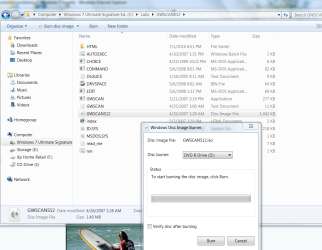
Once you download and unzip the GWSCAN Hard Drive diagnostics file, it needs to be burned to a CD so you can boot it and run the full scan. The only way a CD will boot is if an image file is burned onto it correctly, thus you'll need to browse to C:Cabs and look for the GWScan ISO file, click on it to bring up the WIn7 burner to burn to CD.
 

Attachments

  • Capture.PNG
    Capture.PNG
    92.5 KB · Views: 49
Hi Bling -- Let me ask a new question. Where did you buy the Win 7 CD? Was it from an online store, a local store or a site like Ebay? Is it a full version, an upgrade or an OEM? Thanks,
 

My Computer

Computer type
PC/Desktop
Computer Manufacturer/Model Number
Custom Build
OS
Windows 7 Home Premium 32-Bit - Build 7600 SP1
CPU
Intel Core i3-2120 3.30Ghz
Motherboard
Asus P8Z68-V LX Intel Z68 Socket H2 ATX
Memory
Kingston 4 GB DDR3 1333 mhz
Graphics Card(s)
AMD Radeon HD6670
Sound Card
Sound Blaster Audigy SE 24-Bit
Monitor(s) Displays
Asus VE228
Screen Resolution
1440 X 900
Hard Drives
OCZ Vertex 3 120 GB Sata 3 SSD ==
Kingston SH103/S3 120 G Hyper X 120 GB SSD ==
Western Digital 500 GB Caviar Green 7200 RPM ==
PSU
Corsair CX600M == 600 Watt
Case
NZXT Apollo - Silver with Clear Side Panel
Cooling
Three 120 mm Fans
Keyboard
Microsoft Natural 4000
Mouse
Microsoft Custom Optical 3000
Internet Speed
AT&T Fiber Optic Wireless Network
Antivirus
Microsoft Security Essentials
Browser
Chrome
Other Info
120 mm Blue LED Fan -- Three Blue LED Lazer Light Sticks
Hi Bling -- Let me ask a new question. Where did you buy the Win 7 CD? Was it from an online store, a local store or a site like Ebay? Is it a full version, an upgrade or an OEM? Thanks,

Bought it from Amazon.co.uk Full package 32 and 64bit.
 

My Computer

Computer Manufacturer/Model Number
Home Build
OS
Windows 7 Home Premium 64 Bit
CPU
Core 2 Due E4500
Motherboard
Number on board GA-T671MG
Memory
4gb
Graphics Card(s)
Asus EN GTS250
Sound Card
Motherboard
Monitor(s) Displays
Samsung Syncmaster T220
Screen Resolution
1680 by 1050 32bit
Hard Drives
1 WDC WD10EARS-22Y5B! ATA (to install Win 7 HP)
2nd WD with XP Pro, Does not boot
PSU
Cooler master 520W Moduler
Case
Antec 1200
Cooling
Std with Imedia System and Antec 1200
Keyboard
Wireless microsoft 3000 v2.0
Mouse
wireless laser mouse 5000
Internet Speed
8500kb +
Other Info
Trying to build myself a decent system bit by bit. (Only motherboard and chip need to be replaced now.) Upgraded to overclocked i5.

My Computer

Computer Manufacturer/Model Number
* BFK Customs *
OS
W 7 64-bit Ultimate
CPU
Intel Q9550 Yorkfield
Motherboard
ASUS P5Q Pro
Memory
8GB Dominator 8500C5D
Graphics Card(s)
ATI : XFX 5870
Sound Card
Realtek HD Audio 7-1
Monitor(s) Displays
1x 47" LCD HDMI & 3x 26" LCD HDMI
Screen Resolution
1920x1080P & 1920x1200
Hard Drives
1x 80GB Intel X25-M G2 SSD : 1x 500GB & 1x 640GB WD Caviar Black(s)
PSU
Corsair 620HX
Case
Cooler Master RC-690
Cooling
Tuniq Tower 120, 2x 140mm and 3x 120mm case fans
Keyboard
Microsoft 500
Mouse
Razer Diamondback 3G
Internet Speed
14 Mb/s
Other Info
1x Koutech 3Gb/s SATA HDD Hot Swap Rack
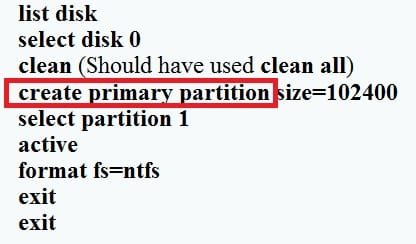
With only the 1TB HDD installed and the Windows 7 DVD in the optical try I have done the following:-
shift+F10 (at Windows 7 Install now screen à )
diskpart
list disk
select disk 0
clean (Should have used clean all)
create primary partition size=102400
select partition 1
active
format fs=ntfs
exit
exit

Started the installation of windows 7 and then I got these messages.

Windows 7 64bit installation
C:\windows\winsxs\msil_microsoft.applicationframework_
31bf3856ad364e35_6.1.7600.16385_none_4f9b5c1281bb9284 is corrupt and unreadable.
Please run chkdsk utility.

Windows cannot install required files. The file may be corrupt or missing. Make sure all files required for installation are available and restart the installation. Error code: 0x80070570

The installation was cancelled.

Back at Windows 7 Install now screen à
The file or directory c:\$mft is corrupt and unreadable.
Please run the chkdsk utility.

Windows 7 32bit installation
C:\windows\winsxs\x86_microsoft-|..omebacise.resources_ 31bf3856ad364e35_6.1.7600.16385_en_us_35033bacs8cae48e is corrupt and unreadable.
Please run chkdsk utility.

Windows cannot install required files. The file may be corrupt or missing. Make sure all files required for installation are available and restart the installation. Error code: 0x80070570

The installation was cancelled.

Back at Windows 7 Install now screen à
The file or directory c:\$mft is corrupt and unreadable.
Please run the chkdsk utility.


My next action tonight will be to "Clean All" and try again.

Thanks for all your help so for guys.
 

My Computer

Computer Manufacturer/Model Number
Home Build
OS
Windows 7 Home Premium 64 Bit
CPU
Core 2 Due E4500
Motherboard
Number on board GA-T671MG
Memory
4gb
Graphics Card(s)
Asus EN GTS250
Sound Card
Motherboard
Monitor(s) Displays
Samsung Syncmaster T220
Screen Resolution
1680 by 1050 32bit
Hard Drives
1 WDC WD10EARS-22Y5B! ATA (to install Win 7 HP)
2nd WD with XP Pro, Does not boot
PSU
Cooler master 520W Moduler
Case
Antec 1200
Cooling
Std with Imedia System and Antec 1200
Keyboard
Wireless microsoft 3000 v2.0
Mouse
wireless laser mouse 5000
Internet Speed
8500kb +
Other Info
Trying to build myself a decent system bit by bit. (Only motherboard and chip need to be replaced now.) Upgraded to overclocked i5.
This command is the wrong order and there should be no space between "primary=102400" and "size" isn't needed and when I've tried it that way it didn't work, did you get a conformation that the partition was created in diskpart?


Here is how it should be typed.

create partition primary=102400MB

save.jpg
 

My Computer

Computer Manufacturer/Model Number
* BFK Customs *
OS
W 7 64-bit Ultimate
CPU
Intel Q9550 Yorkfield
Motherboard
ASUS P5Q Pro
Memory
8GB Dominator 8500C5D
Graphics Card(s)
ATI : XFX 5870
Sound Card
Realtek HD Audio 7-1
Monitor(s) Displays
1x 47" LCD HDMI & 3x 26" LCD HDMI
Screen Resolution
1920x1080P & 1920x1200
Hard Drives
1x 80GB Intel X25-M G2 SSD : 1x 500GB & 1x 640GB WD Caviar Black(s)
PSU
Corsair 620HX
Case
Cooler Master RC-690
Cooling
Tuniq Tower 120, 2x 140mm and 3x 120mm case fans
Keyboard
Microsoft 500
Mouse
Razer Diamondback 3G
Internet Speed
14 Mb/s
Other Info
1x Koutech 3Gb/s SATA HDD Hot Swap Rack
It isn't necessary to Clean a new HD. You want to get a smaller (than 1tb) partition formatted and marked Active to try install.

You may need to Format before marking Active.

You can check that it is correctly applied by Select Partition 1 on disk in focus, then Detail Partition.
 
I really need help. :cry:

I can pretty much stumble my way through problems but this is a puzzler.

I purchased a new Wester Digital HDD 1TB, to use to install the complete Windows 7 package on a new drive. I do not mind which one 32 or 64bit, I have tried both.

I have spent over 25 hours trying to get this installation to work without any success. I am quite a novice and dont understand most of the jargon so if you can reply in plain English I would really appreciate it.

The error messages I have received have been varied from corrupt sectors to windows will not install on this drive. My first install seemed to go fine but when I turned my PC on the next day all broke loose. I got stuck in a loop between starting windows and chkdsk (which was deleting files and sectors all over the place).

Since then I have been trying over and over again to install and each time have a different error message.

When starting from CD/DVD sometimes Win 7 recognises the 1TB HDD, some times it doesn't; at one point it said it was only 8GB, whats going on I ask you?

The new drive has two partitions one at 100mb and another at 931GB does this have any influence on the error messages?

I have been told that windows 7 is better than Vista, well that I am yet to see.

I have browsed forums all night and after reading Brinks' post on how to, I thought it looks like these guys know what they are talking about and thought I would give you a try. Please note though the How To I read here didn't show the problems that I have experienced.

Please help me....

Thank you all.


Hello Greg.

This is the reason I suggested a "Clean all", the bolded text above.

Isn't it a possibility that the HDD is bad?
 

My Computer

Computer Manufacturer/Model Number
* BFK Customs *
OS
W 7 64-bit Ultimate
CPU
Intel Q9550 Yorkfield
Motherboard
ASUS P5Q Pro
Memory
8GB Dominator 8500C5D
Graphics Card(s)
ATI : XFX 5870
Sound Card
Realtek HD Audio 7-1
Monitor(s) Displays
1x 47" LCD HDMI & 3x 26" LCD HDMI
Screen Resolution
1920x1080P & 1920x1200
Hard Drives
1x 80GB Intel X25-M G2 SSD : 1x 500GB & 1x 640GB WD Caviar Black(s)
PSU
Corsair 620HX
Case
Cooler Master RC-690
Cooling
Tuniq Tower 120, 2x 140mm and 3x 120mm case fans
Keyboard
Microsoft 500
Mouse
Razer Diamondback 3G
Internet Speed
14 Mb/s
Other Info
1x Koutech 3Gb/s SATA HDD Hot Swap Rack
If Format doesn't work, then run the WD full HD diag/repair CD scan. The best version is GW Scan which I've uploaded - unzips to C:cabs, double click on Image file to burn to CD, run full scan.

Then run http://www.sevenforums.com/tutorials/433-disk-check.html from Install DVD Command Line.

The File System Check and Surface Scan on free Partition Wizard bootable CD are slightly weaker versions of the above tests.

Clean and Clean All overwrite possibly bad code which shouldn't exist on a new HD, unless he wrote something else besides what he was given here. Format, chkdsk and Diagnostics deal in their own ways with disk problems.
 
Last edited by a moderator:
Hi Guys

I have tried again and used "Clean All" in the process.
I used the create command which worked but i did have to use size otherwise it didnt work, yesterday's entry was just a typo in my post. I checked to see that a partition was created, selected it and activated it.

Last nights attempt as with others failed at the first restart, windows wouldnt load and the pc restarts, opens chkdsk and starts deleting sectors, tried starting windows again then chkdsk etc until it finally says the error messages I wrote about yesterday.

I am happy with all of the diskpart commands, happy that they are working as they should but I think that I could have a bad HDD. Windows just doesnt appear to want to install on this drive.

Last night I also saw a blue screen flash up (blue with white writing), but it disappeared just as quickly so I could not read it.

I have left the PC running today, the "clean all" command as it took over 4 hours last night. Tonight I will try yet again but this time i will format using diskpart and not the windows disk selection advanced features screen.

If you have any other ideas then please let me know.

Thank you.:confused:
 

My Computer

Computer Manufacturer/Model Number
Home Build
OS
Windows 7 Home Premium 64 Bit
CPU
Core 2 Due E4500
Motherboard
Number on board GA-T671MG
Memory
4gb
Graphics Card(s)
Asus EN GTS250
Sound Card
Motherboard
Monitor(s) Displays
Samsung Syncmaster T220
Screen Resolution
1680 by 1050 32bit
Hard Drives
1 WDC WD10EARS-22Y5B! ATA (to install Win 7 HP)
2nd WD with XP Pro, Does not boot
PSU
Cooler master 520W Moduler
Case
Antec 1200
Cooling
Std with Imedia System and Antec 1200
Keyboard
Wireless microsoft 3000 v2.0
Mouse
wireless laser mouse 5000
Internet Speed
8500kb +
Other Info
Trying to build myself a decent system bit by bit. (Only motherboard and chip need to be replaced now.) Upgraded to overclocked i5.
Go back to Posts 2 & 6 to test hardware. Swap RAM, remove all but 2gb to try install.

Update BIOS version from PB Support Downloads webpage for your model, or clear the CMOS:
Clear CMOS - 3 Ways to Clear the CMOS - Reset BIOS

Then set SATA controller to AHCI to start, then IDE if necessary.

Did you run the Win7 Upgrade Advisor to know whether it can run on this machine? If necessary do you have a backup image of old OS so you could run Advisor and update BIOS?

Do you have onboard graphics chip you can default to in BIOS to remove video card if necessary?
 
Unplug all other HD's to try install.

Format the 100gb partition again to try install.

Remove all but 2gb of RAM to try install, remove and reseat RAM, test RAM using memtest86 for 5-6 passes.

Test HD using WD Lifeguard full CD diag/repair scan. Here is the best version: http://support.gateway.com/support/drivers/getFile.asp?id=21280&dscr=GWSCAN 5.12&uid=27543171 Unzips to c:cabs where you'll find ISO to burn to CD.

Then try zeroing the HD using same CD to try install to raw HD, then after partitioning and formatting again.

Run http://www.sevenforums.com/tutorials/433-disk-check.html

Make sure you have latest BIOS version update, set SATA controller to AHCI first, then IDE.

The first link takes me to gateway support and I dont have a serial number so I cannot advance.

Your second link is "How to run check disk in windows 7" I cannot get windows 7 installed lol.
 

My Computer

Computer Manufacturer/Model Number
Home Build
OS
Windows 7 Home Premium 64 Bit
CPU
Core 2 Due E4500
Motherboard
Number on board GA-T671MG
Memory
4gb
Graphics Card(s)
Asus EN GTS250
Sound Card
Motherboard
Monitor(s) Displays
Samsung Syncmaster T220
Screen Resolution
1680 by 1050 32bit
Hard Drives
1 WDC WD10EARS-22Y5B! ATA (to install Win 7 HP)
2nd WD with XP Pro, Does not boot
PSU
Cooler master 520W Moduler
Case
Antec 1200
Cooling
Std with Imedia System and Antec 1200
Keyboard
Wireless microsoft 3000 v2.0
Mouse
wireless laser mouse 5000
Internet Speed
8500kb +
Other Info
Trying to build myself a decent system bit by bit. (Only motherboard and chip need to be replaced now.) Upgraded to overclocked i5.
I have formatted the disk several times.
I have run chkdsk serveral times.
I have flashed the BIOS, reset the CMOS. run the PC with the original 2GB of memory using the onboard graphics, (no graphics card).
I have run a memory test. I have run the windows 7 upgrade advisor and all is fine. The only item that was brought up was the graphics crad had compatability issues, but this has now been removed and the onboard graphics connection has no issues.

I have tried installing twice this morning and came up with an error whilst the installation was expanding the files. at the 28% point I got the error as below:

The file or directory
E:\ windows\System32\DriverStore\FileRepository\prnhp004.inf_x86_neutral_95288ae6f32f1fe7 is corrupt and unreadable. Please run the Chkdsk utility.

Windows cannot install required files. The file may be corrupt or missing. Make sure all files required... as before.

But... the one thing I didnt do this morning is to create a 100GB partition, I am not doing a full format and will then create this partition and try again.

Really getting annoyed with this "($*&%* PC now.
Why can Windows not just install on a perfectly good brand new HDD? I find this very annoying and very stupid.

:sarc:
 

My Computer

Computer Manufacturer/Model Number
Home Build
OS
Windows 7 Home Premium 64 Bit
CPU
Core 2 Due E4500
Motherboard
Number on board GA-T671MG
Memory
4gb
Graphics Card(s)
Asus EN GTS250
Sound Card
Motherboard
Monitor(s) Displays
Samsung Syncmaster T220
Screen Resolution
1680 by 1050 32bit
Hard Drives
1 WDC WD10EARS-22Y5B! ATA (to install Win 7 HP)
2nd WD with XP Pro, Does not boot
PSU
Cooler master 520W Moduler
Case
Antec 1200
Cooling
Std with Imedia System and Antec 1200
Keyboard
Wireless microsoft 3000 v2.0
Mouse
wireless laser mouse 5000
Internet Speed
8500kb +
Other Info
Trying to build myself a decent system bit by bit. (Only motherboard and chip need to be replaced now.) Upgraded to overclocked i5.
Hello again, I haven't looked back through this thread to see if this has been asked so ...


If the Windows 7 install disk is one you burned yourself it may be a bad burn and needs to be done again, if so this would be the first thing to try.

Use the free ISO burner at the link below to burn another at a speed of now more than 4x and select to let the program to verify the disk before it finishes.

ImgBurn Free ISO Burner
 

My Computer

Computer Manufacturer/Model Number
* BFK Customs *
OS
W 7 64-bit Ultimate
CPU
Intel Q9550 Yorkfield
Motherboard
ASUS P5Q Pro
Memory
8GB Dominator 8500C5D
Graphics Card(s)
ATI : XFX 5870
Sound Card
Realtek HD Audio 7-1
Monitor(s) Displays
1x 47" LCD HDMI & 3x 26" LCD HDMI
Screen Resolution
1920x1080P & 1920x1200
Hard Drives
1x 80GB Intel X25-M G2 SSD : 1x 500GB & 1x 640GB WD Caviar Black(s)
PSU
Corsair 620HX
Case
Cooler Master RC-690
Cooling
Tuniq Tower 120, 2x 140mm and 3x 120mm case fans
Keyboard
Microsoft 500
Mouse
Razer Diamondback 3G
Internet Speed
14 Mb/s
Other Info
1x Koutech 3Gb/s SATA HDD Hot Swap Rack
Hi again

This is an original disk. I bought the full home premium package, 32bit and 64 bit.
 

My Computer

Computer Manufacturer/Model Number
Home Build
OS
Windows 7 Home Premium 64 Bit
CPU
Core 2 Due E4500
Motherboard
Number on board GA-T671MG
Memory
4gb
Graphics Card(s)
Asus EN GTS250
Sound Card
Motherboard
Monitor(s) Displays
Samsung Syncmaster T220
Screen Resolution
1680 by 1050 32bit
Hard Drives
1 WDC WD10EARS-22Y5B! ATA (to install Win 7 HP)
2nd WD with XP Pro, Does not boot
PSU
Cooler master 520W Moduler
Case
Antec 1200
Cooling
Std with Imedia System and Antec 1200
Keyboard
Wireless microsoft 3000 v2.0
Mouse
wireless laser mouse 5000
Internet Speed
8500kb +
Other Info
Trying to build myself a decent system bit by bit. (Only motherboard and chip need to be replaced now.) Upgraded to overclocked i5.
Back
Top