WIndows 7 is unable to format rewritable CD

ubose

New member
Local time
8:16 PM
Messages
26
My Windows 7 64-bit Home Premium PC is unable to format rewritable CDs. It appears to be starting the formatting process, but after about 30 minutes it ends saying Windows was unable to format it. I tried the Disk Management console and it stopped responding after some time. A rewritable CD that it failed to format, I could format it in the Live File System on another computer running Windows 7 32-bit Enterprise.Any help will be appreciated.
 

My Computer

OS
Windows 7 Home Premium 64bit
RW CD's only need formatting after adding files, use erase button instead.
 

My Computer

Computer Manufacturer/Model Number
Look in my Signature.
OS
Win7 H.Prem. 32bit+SP1
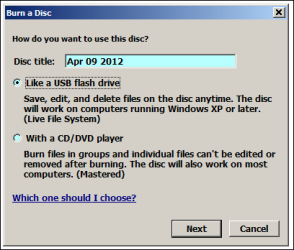
I tried to add a file to the disc by dragging and dropping it in Windows Explorer. It gave me the following prompt.

"Please insert a writable disc into drive. "

But, after I format the disc on another Windows 7 computer where the disc does get formatted, I can drag and drop files to it and they get saved.
 

My Computer

OS
Windows 7 Home Premium 64bit
Is this what your attempting ???

Capture.PNG
 

My Computer

Computer Manufacturer/Model Number
Look in my Signature.
OS
Win7 H.Prem. 32bit+SP1
The built-in utility is complete and utter crap. Use CDBurnerXP or ImgBurn, both of which are free, to handle your disc burning needs. You'll have many more features and options that way.
 

My Computer

OS
Windows 7 Ultimate x64 SP1
CPU
Intel Core i7-2600
Motherboard
Gigabyte GA-P67A-UD3P-B3
Memory
12 GB Patriot Extreme DDR3-1333
Graphics Card(s)
Nvidia GTX 470
Monitor(s) Displays
Dell UltraSharp 2209WA
Hard Drives
OCZ Agility3 240 GB, WD5001AALS, WD7501AALS
PSU
OCZ ModStream 700W
Case
CoolerMaster HAF 912 Advanced
Cooling
CoolerMaster Hyper 212 Plus
Roadrunner - Yes, that is what I am trying. Thanks for responding.
 

My Computer

OS
Windows 7 Home Premium 64bit
The built-in utility is complete and utter crap. Use CDBurnerXP or ImgBurn, both of which are free, to handle your disc burning needs. You'll have many more features and options that way.

I have to clarify that I am trying to reuse rewritable CDs that I had used with Roxio Creator 9 Drag-to-disc on a Windows XP PC. If I format the used rewritable CDs with either of the above applications, will I be able to burn and delete files to them in Windows Explorer on computers that don't have these apps installed?

Thank you.
 

My Computer

OS
Windows 7 Home Premium 64bit
ubose,
what are you trying to put on the disks ? film, picture, audio or data files.
 

My Computer

Computer Manufacturer/Model Number
Look in my Signature.
OS
Win7 H.Prem. 32bit+SP1
ubose,
what are you trying to put on the disks ? film, picture, audio or data files.

Mostly data files such as Word, Excel, PDFs, but also some pictures and MP3s.
 

My Computer

OS
Windows 7 Home Premium 64bit
Often it comes down to the make of the CDRW\DVDRW you are using, do have the opportunity to try a different make. Any with the name ritec on the inner circle of the disc are pretty much infallable.
 

My Computer

Computer Manufacturer/Model Number
DIY
OS
Windows 7 home premium x64
CPU
AMD FX-4100 AM3+ 3.6GHz 12MB Black Edition
Motherboard
Asus M5A97 Pro
Memory
Crsair vengeance 12Gb DDR3 1600MHz CL9
Graphics Card(s)
Asus GTX 560 1GB
Sound Card
Realtek onboard
Monitor(s) Displays
Hanns G 1680x1050 native
Hard Drives
OCZ 128Gb Petrol ssd
2x500 Gb Samsung
PSU
OCZ StealthXstream II 500W
Internet Speed
8Mb or better
The built-in utility is complete and utter crap. Use CDBurnerXP or ImgBurn, both of which are free, to handle your disc burning needs. You'll have many more features and options that way.

If I use these programs to format the rewritable discs which were used in the past with Roxio's Creator 9 Drag-to-disc, will I be able to burn and erase files in Windows Explorer? That's because I shall be using the discs on other computers not owned by me and therefore those computers may not have these programs installed. Windows 7, I learnt, uses the Live File System format to write/erase files on rewritable CDs.
 

My Computer

OS
Windows 7 Home Premium 64bit
The whole purpose of using actual programs to burn is so you create discs that are standard, and any computer can read them. The built-in burner isn't reliable, and doesn't give you any features or control over the discs. The Drag-to-disc feature you mention was one of the most unreliable pieces of software to ever be created.
 

My Computer

OS
Windows 7 Ultimate x64 SP1
CPU
Intel Core i7-2600
Motherboard
Gigabyte GA-P67A-UD3P-B3
Memory
12 GB Patriot Extreme DDR3-1333
Graphics Card(s)
Nvidia GTX 470
Monitor(s) Displays
Dell UltraSharp 2209WA
Hard Drives
OCZ Agility3 240 GB, WD5001AALS, WD7501AALS
PSU
OCZ ModStream 700W
Case
CoolerMaster HAF 912 Advanced
Cooling
CoolerMaster Hyper 212 Plus
Back
Top