Windows 7 isn't recognizing my mic..

Artigo

New member
Local time
7:07 AM
Messages
13
I just bought a non-usb gaming headset that I want to use for both games and skype. The problem is, that speakers on the headset work fine, but for some reason windows doesn't detect a mic. The mic is plugged and seated, its unmuted on the headset, but when I speak, say on skype, in game, or on the speech recognition program for windows there is no sound level.

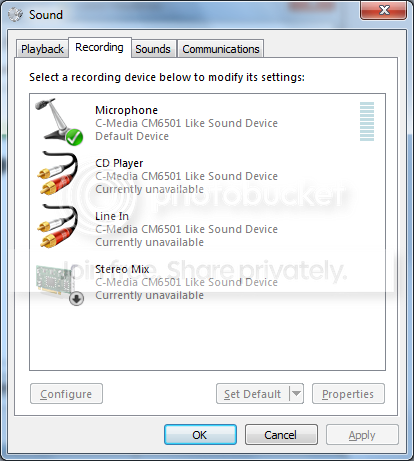
Now, I have mic set to default device and default communication device, as you can see here
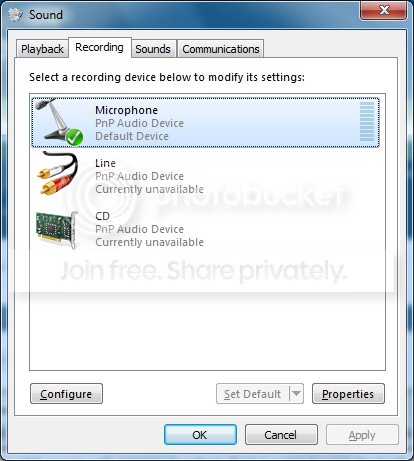
mic1.png


I've also used 3 different headset attempting to see if I was sent a defective one. The original, I was using before I bought (which worked until recently) this one to replace it. My set of astro a30's (brand new) and also my brother's headset which he uses daily. None of them got any sort of acknowledgment from the speech recognition.


I have no idea what I need to check or unmute if for some reason its muting my mic.

Thanks
 

My Computer

OS
Windows 7 Professional x64
CPU
AMD Phenom 9850
Motherboard
ASUS M2n-SLI
Graphics Card(s)
nVidia 8800 GTS 512
bump
 

My Computer

OS
Windows 7 Professional x64
CPU
AMD Phenom 9850
Motherboard
ASUS M2n-SLI
Graphics Card(s)
nVidia 8800 GTS 512
ttt
 

My Computer

OS
Windows 7 Professional x64
CPU
AMD Phenom 9850
Motherboard
ASUS M2n-SLI
Graphics Card(s)
nVidia 8800 GTS 512
Can no one help me?
 

My Computer

OS
Windows 7 Professional x64
CPU
AMD Phenom 9850
Motherboard
ASUS M2n-SLI
Graphics Card(s)
nVidia 8800 GTS 512
Artigo, welcome to the forums.

Sorry that no one has responded yet.

Anyway first things first, is the drivers for the onboard (assuming that is what you are using) sound installed? If not go here,

ASUSTeK Computer Inc. - Motherboards - ASUS M2N-SLI

and get the Vista driver for it as Asus doesn't have a Windows 7 driver for it, and pretty sure C-Media (maker of the audio chip on the motherboard) has dropped support for it. It may require installing using compatibility mode,

http://www.sevenforums.com/tutorials/316-compatibility-mode.html
 

My Computer

Computer type
PC/Desktop
Computer Manufacturer/Model Number
Me
OS
Win 7 Ultimate x64
CPU
FX-8350 @ 4.6 GHz so far
Motherboard
Asus M5A97 EVO
Memory
ADATA XPG V1 Series Black 8GB DDR3 1600
Graphics Card(s)
Sapphire R9 270x Dual-X
Sound Card
Xonar DGX w/ Corsair Vengence 1300
Monitor(s) Displays
Acer S232HL Abid
Screen Resolution
1920x1080
Hard Drives
120 GB OCZ Vertex 3
500 GB Seagate 7200.12
PSU
Antec Earthwatts 650W Green
Case
Antec Three Hundred
Cooling
Cooler Master 212 EVO
Keyboard
Logitech G510
Mouse
Logitech G500s
Internet Speed
35000/3000
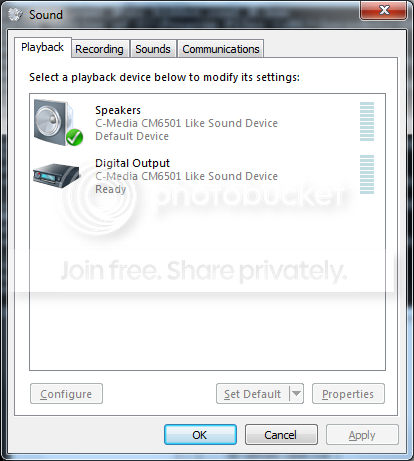
Ok installed with Vista 64 service pack 2 compatibility. What do I need to do now? New devices appeared it seems "Digital Output" and "CD player"
 

My Computer

OS
Windows 7 Professional x64
CPU
AMD Phenom 9850
Motherboard
ASUS M2n-SLI
Graphics Card(s)
nVidia 8800 GTS 512
Digital outpout and CD player are both new. Now what?
help2.png


help1.png
 

My Computer

OS
Windows 7 Professional x64
CPU
AMD Phenom 9850
Motherboard
ASUS M2n-SLI
Graphics Card(s)
nVidia 8800 GTS 512
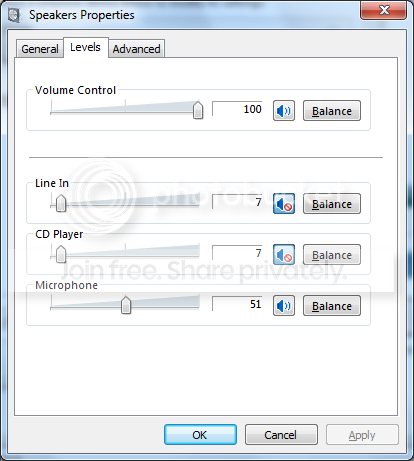
On the Playback tab click on the speakers and then click on Properties, next click on Levels and mute all input sources (you may mute it, but make sure the Mic level is at least 50%).

On the Recording tab do the same with the microphone and on the Custom tab, make sure that the mic boost is enabled. Then test the mic, may need to increase the volume of it on the Levels tab.
 

My Computer

Computer type
PC/Desktop
Computer Manufacturer/Model Number
Me
OS
Win 7 Ultimate x64
CPU
FX-8350 @ 4.6 GHz so far
Motherboard
Asus M5A97 EVO
Memory
ADATA XPG V1 Series Black 8GB DDR3 1600
Graphics Card(s)
Sapphire R9 270x Dual-X
Sound Card
Xonar DGX w/ Corsair Vengence 1300
Monitor(s) Displays
Acer S232HL Abid
Screen Resolution
1920x1080
Hard Drives
120 GB OCZ Vertex 3
500 GB Seagate 7200.12
PSU
Antec Earthwatts 650W Green
Case
Antec Three Hundred
Cooling
Cooler Master 212 EVO
Keyboard
Logitech G510
Mouse
Logitech G500s
Internet Speed
35000/3000
So I unmuted microphone under playback>speakers>properties>levels, and I can hear myself! So that's an improvement I think, at least it means that my mic isn't defective. However, when I look at the recording tab, when I talk the sound bar levels don't go up.

-Mic boost is checked
-Mic levels is above 50
 

My Computer

OS
Windows 7 Professional x64
CPU
AMD Phenom 9850
Motherboard
ASUS M2n-SLI
Graphics Card(s)
nVidia 8800 GTS 512
You using the jack at the back or the front panel?
 

My Computer

Computer type
PC/Desktop
Computer Manufacturer/Model Number
Me
OS
Win 7 Ultimate x64
CPU
FX-8350 @ 4.6 GHz so far
Motherboard
Asus M5A97 EVO
Memory
ADATA XPG V1 Series Black 8GB DDR3 1600
Graphics Card(s)
Sapphire R9 270x Dual-X
Sound Card
Xonar DGX w/ Corsair Vengence 1300
Monitor(s) Displays
Acer S232HL Abid
Screen Resolution
1920x1080
Hard Drives
120 GB OCZ Vertex 3
500 GB Seagate 7200.12
PSU
Antec Earthwatts 650W Green
Case
Antec Three Hundred
Cooling
Cooler Master 212 EVO
Keyboard
Logitech G510
Mouse
Logitech G500s
Internet Speed
35000/3000
Try it in the back to rule out a problem with the front panel jack.
 

My Computer

Computer type
PC/Desktop
Computer Manufacturer/Model Number
Me
OS
Win 7 Ultimate x64
CPU
FX-8350 @ 4.6 GHz so far
Motherboard
Asus M5A97 EVO
Memory
ADATA XPG V1 Series Black 8GB DDR3 1600
Graphics Card(s)
Sapphire R9 270x Dual-X
Sound Card
Xonar DGX w/ Corsair Vengence 1300
Monitor(s) Displays
Acer S232HL Abid
Screen Resolution
1920x1080
Hard Drives
120 GB OCZ Vertex 3
500 GB Seagate 7200.12
PSU
Antec Earthwatts 650W Green
Case
Antec Three Hundred
Cooling
Cooler Master 212 EVO
Keyboard
Logitech G510
Mouse
Logitech G500s
Internet Speed
35000/3000
I can hear sound through both front and rear, the mic level doesn't move on either front or rear.

When I unmute the mic under speakers
help3.png


Can hear myself on both front and back. When muted, no acknowledgment from the mic at all.
 

My Computer

OS
Windows 7 Professional x64
CPU
AMD Phenom 9850
Motherboard
ASUS M2n-SLI
Graphics Card(s)
nVidia 8800 GTS 512
run the mic level all the way up. Problem solved?
 

My Computer

Computer Manufacturer/Model Number
Toshiba Satellite S875D-S7239 laptop
OS
MS Windows 7 Ultimate SP1 64-bit
CPU
AMD A10-4600M
Motherboard
AMD Pumori (Socket FT1)
Memory
6.00 GB Dual-Channel DDR3 @ 798MHz (11-11-12-28)
Graphics Card(s)
AMD Radeon HD 7660G
Sound Card
High Definition Audio Device
Monitor(s) Displays
Generic PnP Monitor (1600x900@60Hz)
Screen Resolution
1600x900@60Hz
Hard Drives
SSD 119GB Corsair CSSD-V128GB2 ATA Device
Keyboard
Standard PS/2 Keyboard
Mouse
HP Wireless Optical Mobile Mouse Model FHA-3410
Internet Speed
What the local pub, local coffee shop offers.
Other Info
Optical Drive:MATSHITA BD-CMB UJ160B ATA Device


Also have an Asus ha1002xp netbook with Win 7 Ultimate installed.

My Computer

OS
Windows 7 Professional x64
CPU
AMD Phenom 9850
Motherboard
ASUS M2n-SLI
Graphics Card(s)
nVidia 8800 GTS 512
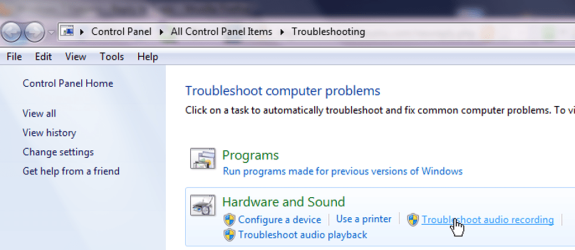
WIN | type troubleshooting | ENTER

WIN is the key with the wavy flag.

Troubleshoot sound problems.png
 

My Computer

Computer Manufacturer/Model Number
Toshiba Satellite S875D-S7239 laptop
OS
MS Windows 7 Ultimate SP1 64-bit
CPU
AMD A10-4600M
Motherboard
AMD Pumori (Socket FT1)
Memory
6.00 GB Dual-Channel DDR3 @ 798MHz (11-11-12-28)
Graphics Card(s)
AMD Radeon HD 7660G
Sound Card
High Definition Audio Device
Monitor(s) Displays
Generic PnP Monitor (1600x900@60Hz)
Screen Resolution
1600x900@60Hz
Hard Drives
SSD 119GB Corsair CSSD-V128GB2 ATA Device
Keyboard
Standard PS/2 Keyboard
Mouse
HP Wireless Optical Mobile Mouse Model FHA-3410
Internet Speed
What the local pub, local coffee shop offers.
Other Info
Optical Drive:MATSHITA BD-CMB UJ160B ATA Device


Also have an Asus ha1002xp netbook with Win 7 Ultimate installed.
Mute it again under Playback unless you want to hear yourself and any other sound in the room.
 

My Computer

Computer type
PC/Desktop
Computer Manufacturer/Model Number
Me
OS
Win 7 Ultimate x64
CPU
FX-8350 @ 4.6 GHz so far
Motherboard
Asus M5A97 EVO
Memory
ADATA XPG V1 Series Black 8GB DDR3 1600
Graphics Card(s)
Sapphire R9 270x Dual-X
Sound Card
Xonar DGX w/ Corsair Vengence 1300
Monitor(s) Displays
Acer S232HL Abid
Screen Resolution
1920x1080
Hard Drives
120 GB OCZ Vertex 3
500 GB Seagate 7200.12
PSU
Antec Earthwatts 650W Green
Case
Antec Three Hundred
Cooling
Cooler Master 212 EVO
Keyboard
Logitech G510
Mouse
Logitech G500s
Internet Speed
35000/3000
Mute it again under Playback unless you want to hear yourself and any other sound in the room.

I did. I also ran the troubleshoot for audio recording and it says it could not detect a problem
 

My Computer

OS
Windows 7 Professional x64
CPU
AMD Phenom 9850
Motherboard
ASUS M2n-SLI
Graphics Card(s)
nVidia 8800 GTS 512
have you ruled out the mic itself as a problem? Try a different mic or a different computer?
 

My Computer

OS
Windows 7 Professional x64
CPU
AMD Phenom 9850
Motherboard
ASUS M2n-SLI
Graphics Card(s)
nVidia 8800 GTS 512
Back
Top