Windows 7, iTunes and iPhone

brewerma

New member
Local time
9:21 PM
Messages
11
Big suprise after backing up iPhone and attempt to restore.
iTunes 64-bit could not restore properly and I lost a generation of backups
Backup in iTunes64 in Vista
Any other experiences?
 

My Computer

Computer Manufacturer/Model Number
ACER AX1700
OS
Vista 64
CPU
Intel Dual Core
Memory
4 Gb
Graphics Card(s)
Ni
Monitor(s) Displays
21 Ultra Sharp Dell
Hard Drives
650 Mb
Big suprise after backing up iPhone and attempt to restore.
iTunes 64-bit could not restore properly and I lost a generation of backups
Backup in iTunes64 in Vista
Any other experiences?


sure where would you like to start. itunes 9.01 crashes in abt 1/3 of users. uninstalling doesnt work. re-installing doesnt help. Only thing that seems to help is to re-install older version of itunes. 9.01 also has problems sync'ing.

Ken
 

My Computer

Computer Manufacturer/Model Number
HP Pavillion dv-7 1005 Tx
OS
Win 8 Release candidate 8400
CPU
[email protected]
Memory
4 gigs
Graphics Card(s)
Nvidia 9600M
Sound Card
HD built-in
Monitor(s) Displays
17" Wxga
Screen Resolution
1440x900
Cooling
none
Internet Speed
45Mb down 5Mb up
Big suprise after backing up iPhone and attempt to restore.
iTunes 64-bit could not restore properly and I lost a generation of backups
Backup in iTunes64 in Vista
Any other experiences?
Welcome to Windows 7 Brewerma,
Please state the nature of your issue with ITunes.
Is this an install issue?
A sync issue?
Did you back up your ITunes Library?
Provide us with more information so that we provide you with adequate support.
Regards,
Adrian
 

My Computer

Computer Manufacturer/Model Number
Custom Build
OS
Windows 7 7600 1 X64
CPU
AMD PHENOM II X 550 PROCESSOR 3.1 ghz
Motherboard
ASUS M4A78-TE
Memory
Corsair 4 gig ddr 3
Graphics Card(s)
ati radeon 3300
Sound Card
ati hd
Monitor(s) Displays
syncmaster 2033sw
Screen Resolution
1600X900 60 hz refresh
Hard Drives
twin_seagates SATA's 1 TB & 500 Gig, hitachi_slimline 160 gig
PSU
antec_550 watt
Case
cooler master GLite
Cooling
stock_heat sink
Internet Speed
20mbs up/ 1.5mbs down
Other Info
favorite child "stewie"
favorite dog "brian"
Adrian.....
I want iTunes to work..
Backed up iPhone on iTunes 9.0.1.8 64 bit on Windows 7
Backed up iPhone on iTunes 9.0.1.8 64 bit on Vista
Win7 restore did not work; hung and locked iPhoner to be restored
Vista restore worked
No problem with other mainstream apps on Win7, only iTunes
I want Win7 iTunes to work..
Any suggestions...
 

My Computer

Computer Manufacturer/Model Number
ACER AX1700
OS
Vista 64
CPU
Intel Dual Core
Memory
4 Gb
Graphics Card(s)
Ni
Monitor(s) Displays
21 Ultra Sharp Dell
Hard Drives
650 Mb
Adrian.....
I want iTunes to work..
Backed up iPhone on iTunes 9.0.1.8 64 bit on Windows 7
Backed up iPhone on iTunes 9.0.1.8 64 bit on Vista
Win7 restore did not work; hung and locked iPhoner to be restored
Vista restore worked
No problem with other mainstream apps on Win7, only iTunes
I want Win7 iTunes to work..
Any suggestions...
Hello Brewerma, I do empathise with you, believe me when I say there have been an exceptional amount of users who are having serious issues.
I along with more senior and experienced members will help to resolve your issue. First things first:
  1. What was the outcome of your ITunes Install?
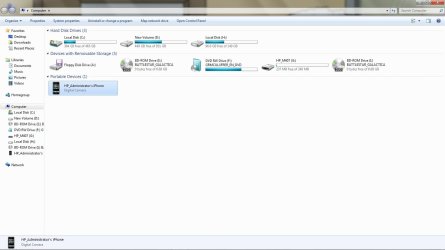
  2. Is the IPhone recognised by your computer "MY COMPUTER"
  3. Do you hear the connection when you dock/connect your IPhone?
  4. Are you capable of making screen shots?
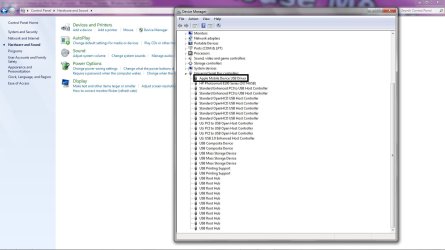
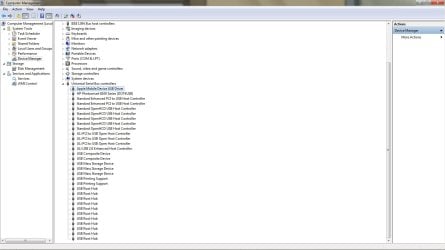
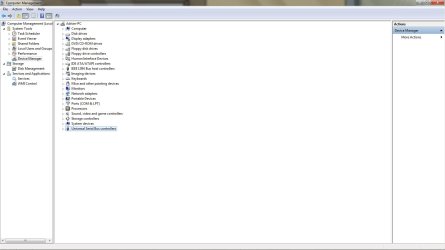
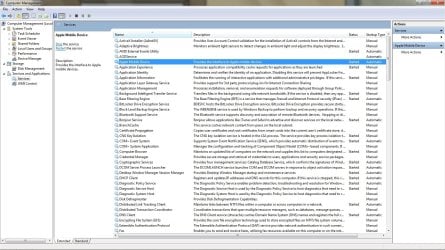
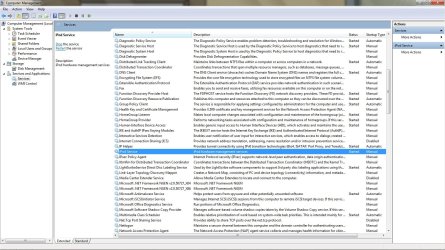
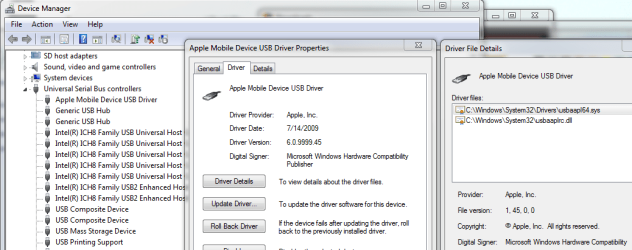
I'm uploading some images that you can see what we are looking to confirm, I'm mainly interested in seeing if ITunes installed the mobile device driver, and if ITunes installed and is running the proper services.
So we have some work ahead of us

Regards,
Adrian
 

Attachments

  • apple.jpg
    apple.jpg
    112.5 KB · Views: 332
  • Apple_Driver.jpg
    Apple_Driver.jpg
    93.5 KB · Views: 192
  • device_mgr.jpg
    device_mgr.jpg
    61.9 KB · Views: 149
  • Mobil.jpg
    Mobil.jpg
    232.2 KB · Views: 186
  • My_PC.jpg
    My_PC.jpg
    72.3 KB · Views: 201
  • ipod_service.jpg
    ipod_service.jpg
    234.6 KB · Views: 314

My Computer

Computer Manufacturer/Model Number
Custom Build
OS
Windows 7 7600 1 X64
CPU
AMD PHENOM II X 550 PROCESSOR 3.1 ghz
Motherboard
ASUS M4A78-TE
Memory
Corsair 4 gig ddr 3
Graphics Card(s)
ati radeon 3300
Sound Card
ati hd
Monitor(s) Displays
syncmaster 2033sw
Screen Resolution
1600X900 60 hz refresh
Hard Drives
twin_seagates SATA's 1 TB & 500 Gig, hitachi_slimline 160 gig
PSU
antec_550 watt
Case
cooler master GLite
Cooling
stock_heat sink
Internet Speed
20mbs up/ 1.5mbs down
Other Info
favorite child "stewie"
favorite dog "brian"
iTunes installs Win7x64; Does not work

I was gaining confidence in Apple with the iPhone and iTunes synch.
Quickly losing ground with their inability to provide software that works
Recent version 9.1.0.25 does not work on Vistax64 or Win7x64
i.e. Can not synch the apps

Any success stories out there?
 

My Computer

Computer Manufacturer/Model Number
ACER AX1700
OS
Vista 64
CPU
Intel Dual Core
Memory
4 Gb
Graphics Card(s)
Ni
Monitor(s) Displays
21 Ultra Sharp Dell
Hard Drives
650 Mb
Hi brewerma,

I've used/using the 9.1 driver under Vista x64 without any problems. I see you have a 64-bit OS, did you download the 64-bit version of iTunes? Also 9.2 just came out try those, but again, make sure you grab the 64-bit version. I'm using them now on Windows 7 Ultimate x64 without issue.

Good luck.

Edit - I don't have an iPhone, just an iPod classic, so...
 

My Computer

Computer type
PC/Desktop
Computer Manufacturer/Model Number
Custom built by me.
OS
Windows 10 Pro
CPU
Intel Core i7-4770K (3.5Ghz)
Motherboard
Gigabyte G1 Sniper 5 (F10 Bios)
Memory
32 gig Corsair Dominator Platinum (4x8Gig)
Graphics Card(s)
Sapphire Tri-X R9 Fury
Sound Card
Soundblaster ZXR
Monitor(s) Displays
NEC PA242W 24" LCD Monitor
Screen Resolution
1920 x 1200
Hard Drives
Primary - Samsung 850 Pro (512gig), Samsung 840 Pro (256gig), 2TB WD Caviar Black.
PSU
EVGA Supernova 1000 G2
Case
Cooler Master HAF X
Cooling
Corsair H100i with Corsair Air Series SP120 Quiet Fans
Keyboard
Logitech Wireless Wave
Mouse
Logitech Performance MX
Internet Speed
High Speed Cable
Antivirus
Norton Security
Browser
IE11
Other Info
Memory Timings - 1866MHz @ 9-9-9-27-1T @ 1.5 volts
I was gaining confidence in Apple with the iPhone and iTunes synch.
Quickly losing ground with their inability to provide software that works
Recent version 9.1.0.25 does not work on Vistax64 or Win7x64
i.e. Can not synch the apps

Any success stories out there?
Hello there, you started another thread earlier to which I gave a detailed response.
Follow the attached link for resolution of your issue: http://www.sevenforums.com/software/32549-windows-7-itunes-iphone.html
 
Last edited:

My Computer

Computer Manufacturer/Model Number
Custom Build
OS
Windows 7 7600 1 X64
CPU
AMD PHENOM II X 550 PROCESSOR 3.1 ghz
Motherboard
ASUS M4A78-TE
Memory
Corsair 4 gig ddr 3
Graphics Card(s)
ati radeon 3300
Sound Card
ati hd
Monitor(s) Displays
syncmaster 2033sw
Screen Resolution
1600X900 60 hz refresh
Hard Drives
twin_seagates SATA's 1 TB & 500 Gig, hitachi_slimline 160 gig
PSU
antec_550 watt
Case
cooler master GLite
Cooling
stock_heat sink
Internet Speed
20mbs up/ 1.5mbs down
Other Info
favorite child "stewie"
favorite dog "brian"
Adrian.
I read all the screens you sent. All the services and USB connections etc seems to be functioning. Problem is in the software handing 150 applications which hangs up.
I fell back to Vista in the same iTunes 9.0.2 release which now appears to work. Windows 7 just hangs up; perhaps iTunes does not keep the computer operating and Win7 goes to sleep?
 

My Computer

Computer Manufacturer/Model Number
ACER AX1700
OS
Vista 64
CPU
Intel Dual Core
Memory
4 Gb
Graphics Card(s)
Ni
Monitor(s) Displays
21 Ultra Sharp Dell
Hard Drives
650 Mb
I was gaining confidence in Apple with the iPhone and iTunes synch.
Quickly losing ground with their inability to provide software that works
Recent version 9.1.0.25 does not work on Vistax64 or Win7x64
i.e. Can not synch the apps

Any success stories out there?
Clarify for me, apps don't synch. They either install, or update!
 

My Computer

Computer Manufacturer/Model Number
Custom Build
OS
Windows 7 7600 1 X64
CPU
AMD PHENOM II X 550 PROCESSOR 3.1 ghz
Motherboard
ASUS M4A78-TE
Memory
Corsair 4 gig ddr 3
Graphics Card(s)
ati radeon 3300
Sound Card
ati hd
Monitor(s) Displays
syncmaster 2033sw
Screen Resolution
1600X900 60 hz refresh
Hard Drives
twin_seagates SATA's 1 TB & 500 Gig, hitachi_slimline 160 gig
PSU
antec_550 watt
Case
cooler master GLite
Cooling
stock_heat sink
Internet Speed
20mbs up/ 1.5mbs down
Other Info
favorite child "stewie"
favorite dog "brian"
Adrian,
I noticed you are a skilled senior member. iTunes synch's contact's, calendar's, movies, .....and applications with the iPhone. The synch process certaining installs applications, copies movies, merges's contacts etc.
iTunes has problems in windows 7; perhaps with large synch operations.
I want it to work in Win7x64; Will try XP mode next.....
 

My Computer

Computer Manufacturer/Model Number
ACER AX1700
OS
Vista 64
CPU
Intel Dual Core
Memory
4 Gb
Graphics Card(s)
Ni
Monitor(s) Displays
21 Ultra Sharp Dell
Hard Drives
650 Mb
10/7
 

My Computer

Computer Manufacturer/Model Number
Custom Build
OS
Windows 7 7600 1 X64
CPU
AMD PHENOM II X 550 PROCESSOR 3.1 ghz
Motherboard
ASUS M4A78-TE
Memory
Corsair 4 gig ddr 3
Graphics Card(s)
ati radeon 3300
Sound Card
ati hd
Monitor(s) Displays
syncmaster 2033sw
Screen Resolution
1600X900 60 hz refresh
Hard Drives
twin_seagates SATA's 1 TB & 500 Gig, hitachi_slimline 160 gig
PSU
antec_550 watt
Case
cooler master GLite
Cooling
stock_heat sink
Internet Speed
20mbs up/ 1.5mbs down
Other Info
favorite child "stewie"
favorite dog "brian"
I just installed the latest itunes and i didn't have a bit of trouble installing the 64 bit one
 

My Computer

Computer Manufacturer/Model Number
Dell Inspiron 545s
OS
Windows 7 Premium
CPU
Intel(R) Core(TM)2 Duo CPU E7400 @ 2.80GHz
Memory
6.00 GB
Sound Card
Realtek High Definition Audio
Monitor(s) Displays
Dell IN1910N(Analog) - Dell Inc.
Power Settings.

This is Brewer quote! "I fell back to Vista in the same iTunes 9.0.2 release which now appears to work. Windows 7 just hangs"

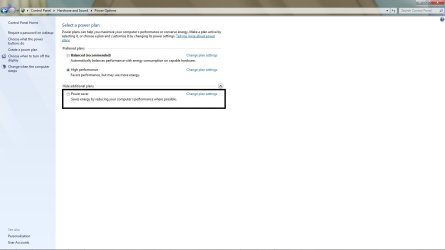
Suggest you check your power settings. If updating 150 apps its possible if powersettings are set to power saver the pc shuts down before completion of update.
 

Attachments

  • power.jpg
    power.jpg
    50.8 KB · Views: 158

My Computer

Computer Manufacturer/Model Number
Custom Build
OS
Windows 7 7600 1 X64
CPU
AMD PHENOM II X 550 PROCESSOR 3.1 ghz
Motherboard
ASUS M4A78-TE
Memory
Corsair 4 gig ddr 3
Graphics Card(s)
ati radeon 3300
Sound Card
ati hd
Monitor(s) Displays
syncmaster 2033sw
Screen Resolution
1600X900 60 hz refresh
Hard Drives
twin_seagates SATA's 1 TB & 500 Gig, hitachi_slimline 160 gig
PSU
antec_550 watt
Case
cooler master GLite
Cooling
stock_heat sink
Internet Speed
20mbs up/ 1.5mbs down
Other Info
favorite child "stewie"
favorite dog "brian"
I have the same problem. In response to your questions everything is alright except that my iPod does not show up in My Computer. The services and drivers are correct however.
 

My Computer

Computer Manufacturer/Model Number
Dell M1530
OS
Windows 7 Professional 64 Bit
CPU
Intel(R) Core2 Duo CPU T9500 @ 2.60 GHz
Memory
4.00 GB
Graphics Card(s)
NVIDIA GeForce 8600M GT
Sound Card
SigmaTel High Definition Audio CODEC
Monitor(s) Displays
Generic PnP Monitor
Screen Resolution
1920 x 1200
Hard Drives
300 GB
Welcome to Windows 7 (SEVEN) Support Forum.
All members are eager to provide support.
To provide support service please provide us with your system specifications.
You may use the bottom of the left of your screen to fill out your specifications.
Best Regards,
Adrian
 

My Computer

Computer Manufacturer/Model Number
Custom Build
OS
Windows 7 7600 1 X64
CPU
AMD PHENOM II X 550 PROCESSOR 3.1 ghz
Motherboard
ASUS M4A78-TE
Memory
Corsair 4 gig ddr 3
Graphics Card(s)
ati radeon 3300
Sound Card
ati hd
Monitor(s) Displays
syncmaster 2033sw
Screen Resolution
1600X900 60 hz refresh
Hard Drives
twin_seagates SATA's 1 TB & 500 Gig, hitachi_slimline 160 gig
PSU
antec_550 watt
Case
cooler master GLite
Cooling
stock_heat sink
Internet Speed
20mbs up/ 1.5mbs down
Other Info
favorite child "stewie"
favorite dog "brian"
I have the same problem. In response to your questions everything is alright except that my iPod does not show up in My Computer. The services and drivers are correct however.
dk, would you please show me the driver in "Device Manager"?
Thanks,
Adrian
 

My Computer

Computer Manufacturer/Model Number
Custom Build
OS
Windows 7 7600 1 X64
CPU
AMD PHENOM II X 550 PROCESSOR 3.1 ghz
Motherboard
ASUS M4A78-TE
Memory
Corsair 4 gig ddr 3
Graphics Card(s)
ati radeon 3300
Sound Card
ati hd
Monitor(s) Displays
syncmaster 2033sw
Screen Resolution
1600X900 60 hz refresh
Hard Drives
twin_seagates SATA's 1 TB & 500 Gig, hitachi_slimline 160 gig
PSU
antec_550 watt
Case
cooler master GLite
Cooling
stock_heat sink
Internet Speed
20mbs up/ 1.5mbs down
Other Info
favorite child "stewie"
favorite dog "brian"
My system specs have been updated.

Attached is a screen shot of my driver and another of the services.

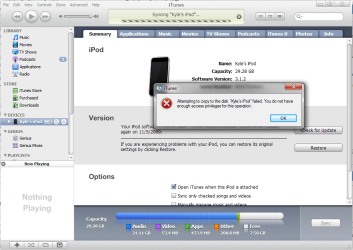
The iPod is recognized in itunes but I receive the attached error.

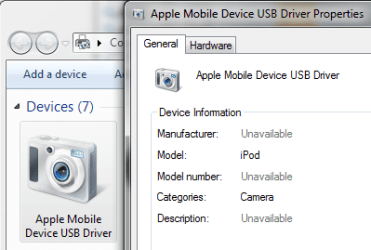
The iPod does not show up in My Computer but shows up as a camera under devices (attached)...

I have the 64 bit version of iTunes installed (without any errors).
 

Attachments

  • Driver.png
    Driver.png
    37 KB · Views: 75
  • Services.png
    Services.png
    2.2 KB · Views: 20
  • Error.png
    Error.png
    61.5 KB · Views: 151
  • Camera.png
    Camera.png
    17.7 KB · Views: 49

My Computer

Computer Manufacturer/Model Number
Dell M1530
OS
Windows 7 Professional 64 Bit
CPU
Intel(R) Core2 Duo CPU T9500 @ 2.60 GHz
Memory
4.00 GB
Graphics Card(s)
NVIDIA GeForce 8600M GT
Sound Card
SigmaTel High Definition Audio CODEC
Monitor(s) Displays
Generic PnP Monitor
Screen Resolution
1920 x 1200
Hard Drives
300 GB
Adrian,
my prior reply alluded to the power setting. Vista and Win7 run on the same computer with the same power settings. Does/should iTunes keep the session active while it is running so the power settings don't shut down the computer? It would seem unusual to have to change the power settings for only iTunes..
 

My Computer

Computer Manufacturer/Model Number
ACER AX1700
OS
Vista 64
CPU
Intel Dual Core
Memory
4 Gb
Graphics Card(s)
Ni
Monitor(s) Displays
21 Ultra Sharp Dell
Hard Drives
650 Mb
Adrian,
my prior reply alluded to the power setting. Vista and Win7 run on the same computer with the same power settings. Does/should iTunes keep the session active while it is running so the power settings don't shut down the computer? It would seem unusual to have to change the power settings for only iTunes..
Brewerma, windows 7 power settings are different, depending on your settings, ie: if you have power saver selected and you perform a synch, depending on how many files etc. power saver will shut down. If you use performance settings as I do, your system will not shut down on its own. As you said, you have a 150 apps, I use 40 apps and my synch/updates take 20 minutes. 150 apps must take over an hour!:geek:
 

My Computer

Computer Manufacturer/Model Number
Custom Build
OS
Windows 7 7600 1 X64
CPU
AMD PHENOM II X 550 PROCESSOR 3.1 ghz
Motherboard
ASUS M4A78-TE
Memory
Corsair 4 gig ddr 3
Graphics Card(s)
ati radeon 3300
Sound Card
ati hd
Monitor(s) Displays
syncmaster 2033sw
Screen Resolution
1600X900 60 hz refresh
Hard Drives
twin_seagates SATA's 1 TB & 500 Gig, hitachi_slimline 160 gig
PSU
antec_550 watt
Case
cooler master GLite
Cooling
stock_heat sink
Internet Speed
20mbs up/ 1.5mbs down
Other Info
favorite child "stewie"
favorite dog "brian"
Back
Top