Solved Windows 7 Keeps Booting Into Recovery Mode

goofeyfoot

New member
Local time
9:45 AM
Messages
25
Hello all:


I am running Windows 7 64 bit on an AMD machine.


My computer keeps booting into recovery mode. From that recovery screen I can choose to boot into Windows and that works fine and everything seems normal while in Windows. But every time I reboot I go right back into recovery mode and repeat the whole process.


I have already gone into the repair command mode thing and tried to run “sfc –scannow” but it keeps saying that there is a repair pending and to reboot. I have probably followed that directive at least a dozen times. I know you have to do that step several times but I have to believe a dozen is way more than “several”.


I have done the fixmbr thing too without result.


I have also been through the repair item on the Windows 7 operating system disk and it keeps saying there is no problem.


So what should I do now?


Thanks in advance.
 

My Computer My Computer

At a glance

Windows 7 Home Premium 64 BitPhenom Quad Core4 MGRadeon
Computer Manufacturer/Model Number
Asus Motherboard Quad Core
OS
Windows 7 Home Premium 64 Bit
CPU
Phenom Quad Core
Motherboard
Asus
Memory
4 MG
Graphics Card(s)
Radeon
Sound Card
Sound Blaster
Monitor(s) Displays
HP 17 Ince
Hard Drives
Seagate 1000
Cooling
2 Fans
Greg:

I think I figured it out this afternoon. For better or worse I kept an old Windows 7 install. I think the machine was seeing both the "good" system and the "legacy" one after a systems failure triggered by a bad RAM chip. The recovery screen was showing two systems at the restore screen. I did the routine where you delete the names of the installations and then add back just the one good one. I forgot the technical jargon but that's about the size of it.

After that everything looked good. Fingers crossed as always.

Thanks again.

Michael
 

My Computer My Computer

At a glance

Windows 7 Home Premium 64 BitPhenom Quad Core4 MGRadeon
Computer Manufacturer/Model Number
Asus Motherboard Quad Core
OS
Windows 7 Home Premium 64 Bit
CPU
Phenom Quad Core
Motherboard
Asus
Memory
4 MG
Graphics Card(s)
Radeon
Sound Card
Sound Blaster
Monitor(s) Displays
HP 17 Ince
Hard Drives
Seagate 1000
Cooling
2 Fans
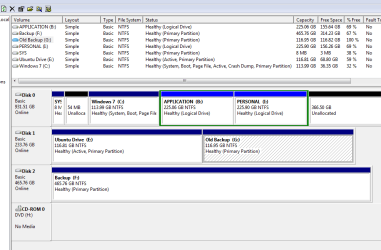
Michael, if you'll post back the requested Disk Management screenshot we can tell you if its configured correctly. About half the time it is not.
 
Greg:

Thanks. Here is the picture.

Michael
 

Attachments

  • Capture.PNG
    Capture.PNG
    19.9 KB · Views: 2

My Computer My Computer

At a glance

Windows 7 Home Premium 64 BitPhenom Quad Core4 MGRadeon
Computer Manufacturer/Model Number
Asus Motherboard Quad Core
OS
Windows 7 Home Premium 64 Bit
CPU
Phenom Quad Core
Motherboard
Asus
Memory
4 MG
Graphics Card(s)
Radeon
Sound Card
Sound Blaster
Monitor(s) Displays
HP 17 Ince
Hard Drives
Seagate 1000
Cooling
2 Fans
What a mess. I've never seen an 8mb System partition. But it's not booting Win7 so its useless just sitting on the boot sector taking up space. If you reinstall you should delete that partition and C to create a new C in all of that space.

Do you have programs separated out on another partition? I would not do this as they need to be on C since they become integrated into the OS until uninstalled and should be a part of its image. If you reinstall any programs on B you can delete it and extend Win7 into the space. You must delete it twice in Disk mgmt, first the Volume and then the Partition. Partition or Volume - Delete
Partition or Volume - Extend

You have a lot of wasted space at the end of the drive that can be made into a new Logical partition, or you can extend any of the other partitions into the space it offers even if they are not contiguous using How to extend partition easily with Partition Wizard - video help.

If you have any further problems I would move the data off, unplug all other drives, wipe the disk with Diskpart Clean Command then do a perfect Clean Reinstall - Factory OEM Windows 7 which steps are the same for retail and compile everything that works best in tens of thousands of installs we've helped with here.
 
OK. if I understand what you mean. I dump the Ubuntu drive. I use that drive to make one big c drive. But then all the applications would have to be reinstalled. That right?
 

My Computer My Computer

At a glance

Windows 7 Home Premium 64 BitPhenom Quad Core4 MGRadeon
Computer Manufacturer/Model Number
Asus Motherboard Quad Core
OS
Windows 7 Home Premium 64 Bit
CPU
Phenom Quad Core
Motherboard
Asus
Memory
4 MG
Graphics Card(s)
Radeon
Sound Card
Sound Blaster
Monitor(s) Displays
HP 17 Ince
Hard Drives
Seagate 1000
Cooling
2 Fans
Be sure to unplug all other drives during install, then set the new Win7 hard drive first to boot in BIOS setup afterwards when you plug back in the others, boot the old Win7 as long as you need it using the one-time BIOS Boot Menu key - F8 on most Asus'.

Yes, you'd have to reinstall your programs to C, but the payoff is the best install one can have if you follow the steps and use only the tools and methods in Clean Reinstall - Factory OEM Windows 7.
 
Back
Top