

SomeUserName
Banned
(When trying to upload photos to this forum , they are not uploading in the order I tell them to so thats the reason when when I reference picture numbers they are not in order and all out of whack)
I Have an Acer 5570 that likes to restart on its own. Tonight was the last straw. I was workking on a paper, didnt save it and I guess I fell asleep at the computer. The startup sound at the login screen woke me up. My paper is gone. Kind of hard to save when I am sleeping.
This is not new this is an ongoing problem but Im doing something about it now.
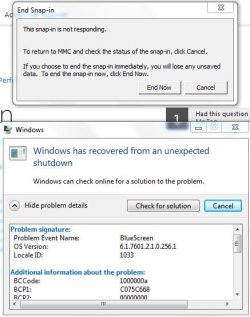
#1 - WHat are snap ins and how do I remove this MMC garbage and whatever snapins are from my computer? Snap in must be new because I have never seen/heard of them before and did just fine without them. I Dont want MMC or "snapin" on or in my machine. (picture #4 at bottom)
#2 - What does anybody make of this?
Problem signature:
Problem Event Name: BlueScreen
OS Version: 6.1.7601.2.1.0.256.1
Locale ID: 1033
Additional information about the problem:
BCCode: 1000000a
BCP1: C075C668
BCP2: 00000000
BCP3: 00000000
BCP4: 8304E847
OS Version: 6_1_7601
Service Pack: 1_0
Product: 256_1
Files that help describe the problem:
C:\Windows\Minidump\061414-33431-01.dmp
C:\Users\Laptop\AppData\Local\temp\WER-93694-0.sysdata.xml
Read our privacy statement online:
Windows 7 Privacy Statement - Microsoft Windows
If the online privacy statement is not available, please read our privacy statement offline:
C:\Windows\system32\en-US\erofflps.txt
#3 - Picture #1 at bottom
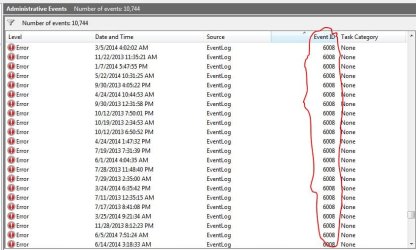
#4 - Picture #2 at bottom
#5 - When I am taking these screenshot and saving them it keeps trying to put them in favs and is making me MANUALLY select dropbox everytime. It wont hold the setting to dropbox.
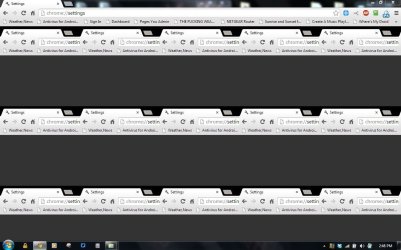
#6 - This is an ongoing problem as of recent - at extremely random times chrome will open like picture #3. Close it and reopen it, open a new tab and close the new tab then the orignial scrambled tab will look and function as normal. If I leave chrome like that and not open a new tab or do anything else the screen will just sit like that. It will NOT correct itself UNTIL I open a new tab. Its just on the initial opening of the program. No other program on my laptop does this. Just Chrome and its RECENT and it does not happen on the desktop computer. Chrome has been uninstalled and reinstalled and it is still doing this. Picture #3 at bottom
I have RECENTLY scanned this computer with Malware bytes, Microsoft Security Essentials, AVG, IOBit, Super Anti spyware, Free windows registry repair, AVG defrag, IOBit defrag so I would like to think my computer is not infected. If it was infected though the hacker would have no way of telling if I was awake or asleep because I keep electric tape over my webcam but somehow it still like to restart itself **ONLY** in the middle of the night while I sleep and theres no activity so I wake up to a login password screen. Its like this laptop it KNOWS when Im sleeping and it creeping me out.
Event ID 6008 in the day/afternoon would probably be a result of the cameras overloading the computer or me holding the power button for 3 seconds and bypassing proper shut down procedure when I am in a hurry. The RANDOM restarts I'm trying to figure out are the ones that wake me up in the night (Which is why I am here typing this at 5am instead of sleeping right now)
Would a low Windows Experience index of 3.1 and only 2gigs of ram have anything to to with with. Processor is T2450.
#7 and MOST IMPORTANT - HOW can I get the notes back that I lost when my computer randomly restarted. Would anything like Zero Access recovery or Recuva work? There HAS to be SOME KIND of way to do it. Everytime I type a button on my keyboard the HDD wirties and changes 0's and 1's regardless if its saved or not the 0s and 1s are still changing. Could I still not RECOVER the changed 0s and 1s or did it "UNDO" all the 0 & 1 changing from wordpad at restart?
Sorry if this long but I am REALLY pissed off right now and had alot to cover
(I can MAKE the laptop restart by itslef watching my security cameras. Watching 1 camera is OK but if I split the screen to quarters for front/back door, garage/driveway and back yard on a divided screen EVENTUALLY the laptop will restart itself but this time I had a browser open with a few tabs and notepad while I was sleeping and the camera were NOT on or logged into which is why I previously asked about memory and 3.1 exp index.)
If it is a memory/windows experience rating issue then what is this laptop doing in the middle of the night that so memory/CPU intensive that it need to restart?
I got side tracked again, Back to #7 is there ANY WAY I can get my notes back??
I Have an Acer 5570 that likes to restart on its own. Tonight was the last straw. I was workking on a paper, didnt save it and I guess I fell asleep at the computer. The startup sound at the login screen woke me up. My paper is gone. Kind of hard to save when I am sleeping.
This is not new this is an ongoing problem but Im doing something about it now.
#1 - WHat are snap ins and how do I remove this MMC garbage and whatever snapins are from my computer? Snap in must be new because I have never seen/heard of them before and did just fine without them. I Dont want MMC or "snapin" on or in my machine. (picture #4 at bottom)
#2 - What does anybody make of this?
Problem signature:
Problem Event Name: BlueScreen
OS Version: 6.1.7601.2.1.0.256.1
Locale ID: 1033
Additional information about the problem:
BCCode: 1000000a
BCP1: C075C668
BCP2: 00000000
BCP3: 00000000
BCP4: 8304E847
OS Version: 6_1_7601
Service Pack: 1_0
Product: 256_1
Files that help describe the problem:
C:\Windows\Minidump\061414-33431-01.dmp
C:\Users\Laptop\AppData\Local\temp\WER-93694-0.sysdata.xml
Read our privacy statement online:
Windows 7 Privacy Statement - Microsoft Windows
If the online privacy statement is not available, please read our privacy statement offline:
C:\Windows\system32\en-US\erofflps.txt
#3 - Picture #1 at bottom
#4 - Picture #2 at bottom
#5 - When I am taking these screenshot and saving them it keeps trying to put them in favs and is making me MANUALLY select dropbox everytime. It wont hold the setting to dropbox.
#6 - This is an ongoing problem as of recent - at extremely random times chrome will open like picture #3. Close it and reopen it, open a new tab and close the new tab then the orignial scrambled tab will look and function as normal. If I leave chrome like that and not open a new tab or do anything else the screen will just sit like that. It will NOT correct itself UNTIL I open a new tab. Its just on the initial opening of the program. No other program on my laptop does this. Just Chrome and its RECENT and it does not happen on the desktop computer. Chrome has been uninstalled and reinstalled and it is still doing this. Picture #3 at bottom
I have RECENTLY scanned this computer with Malware bytes, Microsoft Security Essentials, AVG, IOBit, Super Anti spyware, Free windows registry repair, AVG defrag, IOBit defrag so I would like to think my computer is not infected. If it was infected though the hacker would have no way of telling if I was awake or asleep because I keep electric tape over my webcam but somehow it still like to restart itself **ONLY** in the middle of the night while I sleep and theres no activity so I wake up to a login password screen. Its like this laptop it KNOWS when Im sleeping and it creeping me out.
Event ID 6008 in the day/afternoon would probably be a result of the cameras overloading the computer or me holding the power button for 3 seconds and bypassing proper shut down procedure when I am in a hurry. The RANDOM restarts I'm trying to figure out are the ones that wake me up in the night (Which is why I am here typing this at 5am instead of sleeping right now)
Would a low Windows Experience index of 3.1 and only 2gigs of ram have anything to to with with. Processor is T2450.
#7 and MOST IMPORTANT - HOW can I get the notes back that I lost when my computer randomly restarted. Would anything like Zero Access recovery or Recuva work? There HAS to be SOME KIND of way to do it. Everytime I type a button on my keyboard the HDD wirties and changes 0's and 1's regardless if its saved or not the 0s and 1s are still changing. Could I still not RECOVER the changed 0s and 1s or did it "UNDO" all the 0 & 1 changing from wordpad at restart?
Sorry if this long but I am REALLY pissed off right now and had alot to cover
(I can MAKE the laptop restart by itslef watching my security cameras. Watching 1 camera is OK but if I split the screen to quarters for front/back door, garage/driveway and back yard on a divided screen EVENTUALLY the laptop will restart itself but this time I had a browser open with a few tabs and notepad while I was sleeping and the camera were NOT on or logged into which is why I previously asked about memory and 3.1 exp index.)
If it is a memory/windows experience rating issue then what is this laptop doing in the middle of the night that so memory/CPU intensive that it need to restart?
I got side tracked again, Back to #7 is there ANY WAY I can get my notes back??
Attachments

My Computer
At a glance
Windows 7 Ultimate 64Bit (SP1)Intel® Core™ i3-6100 Processor (3M Cache, 3.7...Kingston 16GB Hyper X Fury Blue DDR3 1600Mhz ...On board (Asus B150M-C D3) VGA and DVI on Ext...
- Computer type
- PC/Desktop
- Computer Manufacturer/Model Number
- Custom built by myself
- OS
- Windows 7 Ultimate 64Bit (SP1)
- CPU
- Intel® Core™ i3-6100 Processor (3M Cache, 3.70 GHz)
- Motherboard
- Asus B150M-C D3
- Memory
- Kingston 16GB Hyper X Fury Blue DDR3 1600Mhz (2x 8GB sticks)
- Graphics Card(s)
- On board (Asus B150M-C D3) VGA and DVI on Extended Desktop
- Sound Card
- On Board (Asus B150M-C D3)
- Monitor(s) Displays
- Left DVI: Samsung 920WM - Right VGA: Samsung 941BW
- Hard Drives
- WD WD5000AADS 500GB SATA Green--WD 1TB WD1001FALS SATA Black--WD 320GB WD3200JB
- PSU
- Cooler Master 700W Silent Pro
- Case
- See through Side panel--right hinge door--5x 5" & 2x 3" bays
- Cooling
- Side, Front, Rear fan & Power supply fan
- Keyboard
- Logitech MX5000 BT
- Mouse
- Logitech MX500
- Internet Speed
- 40Mb down--10Mb Up
- Antivirus
- AVG Internet Security
- Browser
- Chrome-Firefox-Opera-IE-TOR
- Other Info
- 2x LG DVD-RW--NZXT Fan contoller--4in1 Card reader
 . Heck all you need to do is to start a new Document and save it what it is, after that most proper office programs that I know of will auto-save so if your computer crashes you can recover what you typed, or at least the majority of it.


