Windows 7 Large files stuck in "mapped files" / "stand-by"
Afternoon, I'm a bit boggled by this issue we are having on a PC at our office. It seems that the PC normally will boot up and the memory usage will be low 2 GB / 16 GB until 10-12 minutes go by then it shoots up 11 GB / 16 GB. It's really odd and I can't explain it, since no applications are started.
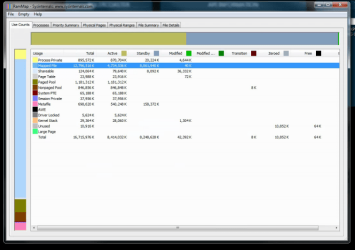
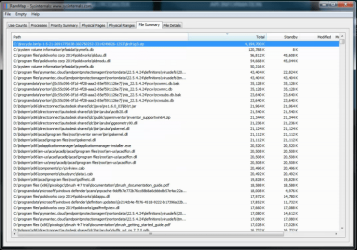
I took it upon myself and downloaded RamMap. Using RamMap I was able to determine that the memory is caused by "mapped files" under "file summary" I can see the two large files which are to blame. But I'm not able delete these currently until tomorrow to confirm the user doesn't need them.
What I'm looking for is an answer as to why these files seem to be singled out? Thanks in advance. I've included a screenshot to the RamMap findings and my understanding with how memory is handled is limited.
EDIT - I can see now only 1 large file is being selected for "mapped file".
Afternoon, I'm a bit boggled by this issue we are having on a PC at our office. It seems that the PC normally will boot up and the memory usage will be low 2 GB / 16 GB until 10-12 minutes go by then it shoots up 11 GB / 16 GB. It's really odd and I can't explain it, since no applications are started.
I took it upon myself and downloaded RamMap. Using RamMap I was able to determine that the memory is caused by "mapped files" under "file summary" I can see the two large files which are to blame. But I'm not able delete these currently until tomorrow to confirm the user doesn't need them.
What I'm looking for is an answer as to why these files seem to be singled out? Thanks in advance. I've included a screenshot to the RamMap findings and my understanding with how memory is handled is limited.
EDIT - I can see now only 1 large file is being selected for "mapped file".
Last edited:
My Computer
At a glance
Windows 7 Professional x64Intel Core i7 4790K32 GB DDR3 Crucial CT102464B160B.C16nVidia Quadro K620
- Computer type
- PC/Desktop
- Computer Manufacturer/Model Number
- Custom built
- OS
- Windows 7 Professional x64
- CPU
- Intel Core i7 4790K
- Motherboard
- ASUS Z97-USB31
- Memory
- 32 GB DDR3 Crucial CT102464B160B.C16
- Graphics Card(s)
- nVidia Quadro K620