Windows 7 Memory

riotkayak284

New member
Member
Local time
8:33 PM
Messages
33
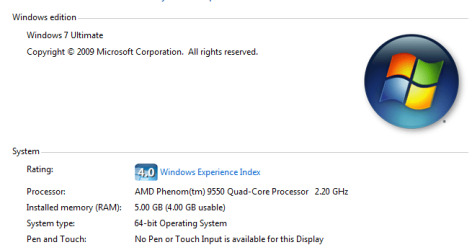
I have Win7 x64 installed and like it very much. I have a question. I have 5 gigs of RAM in my machine, but Windows reports 4 gigs as usable. Is this normal? is that meaning the OP system is taking a 1 gig for itself? I included a screenshot to help.
 

Attachments

  • Capture.PNG
    Capture.PNG
    13.5 KB · Views: 102

My Computer

OS
Windows 7
Welcome to SF.
Do you have a onboard video card? Cause if you do you might have 1gig shared video this option would be found inside your BIOS.
And can you fill out your Systems Specs in your UserCP with will help us answer your question.
 

My Computer

Computer Manufacturer/Model Number
Custom Build
OS
Windows 7 Ultimate x64 SP1
CPU
AMD Phenom II 1090 3.2 six core
Motherboard
MSI 890FXA-GD65
Memory
16 gig DDR3
Graphics Card(s)
MSI R6950 2gig
Sound Card
on board
Monitor(s) Displays
Acer 23inch led
Screen Resolution
1900x1080 widescreen
Hard Drives
Seagate 1tb SATA6
2x 1tb HITACHI Deskstar
PSU
CORSAIR Enthusiast Series TX750 V2 750W
Case
CoolMaster HAF 922
Cooling
Box AMD Heatsink/Fan
Internet Speed
Cable 12Mbps/3Mbps
Ok, i had this problem, only way i could fix it, was a fresh install and NEVER run the WEI test, because its the one that changes W7 to say xx.GB (xx.xx useable), at some stage, the WEI automatically runs, and calculates the scores, but didnt change the ram amount.
 

My Computer

OS
W7 7127 X64
New Install

This is a new install that I did 2 nights ago. How did you keep the WEI from running? This is a definite bug in the system.
 

My Computer

OS
Windows 7
i just didnt run the WEI test, at some stage it will run by itself, you wont even know, but it will give u a score, but not give you the xx.xxgb ram (xxgb useable) , just says 4gb, or in your case 5gb.
 

My Computer

OS
W7 7127 X64
I have 8Gb and I'm using about 1/5
 

My Computer

Computer type
PC/Desktop
Computer Manufacturer/Model Number
Custom build using Mainly ASUS equipment
OS
Windows 10 Pro x64
CPU
Intel i7 5930k 3.5 O/C @ 4.2ghz
Motherboard
Asus Rampage V Extreme: BIOS 1902
Memory
32Gb Dominator Platinum (4x 8GB) 2666MHz
Graphics Card(s)
Asus GeForce GTX980Ti Matrix Platinum 6Gb
Sound Card
Onboard Realtek HD (SPDIF)
Monitor(s) Displays
Primary: Asus PB287Q 28" 4K, Secondary: Samsung 55" 4k
Screen Resolution
3840 x 2160
Hard Drives
1 x SM-951 .M2 SSD 512Gb (System)
1 x Samsung 850 Pro 256Gb SSD (Games)
1 x OCZ Vector 150 240Gb SSD (Games)
3 x Western Digital Caviar Black 1TB S300 16mb 7200rpm :
1 x 10Gb RamDisk
PSU
Corsair CMPSU-850AX
Case
Coolermaster Stormtrooper
Cooling
Noctua NH-D14 SE2011
Keyboard
Apple Keyboard USB
Mouse
Logitech MX Master
Internet Speed
76mb down /16mb up
Antivirus
ESET NOD V8
Browser
Firefox, Chrome, Opera, IE
Other Info
CPU Idle Temp = 36°
CPU Load Temp = 48° @100% for 40mins

Asus - RT-AC68U Router
Ok, i had this problem, only way i could fix it, was a fresh install and NEVER run the WEI test, because its the one that changes W7 to say xx.GB (xx.xx useable), at some stage, the WEI automatically runs, and calculates the scores, but didnt change the ram amount.

Interesting... anyway to fix this WITHOUT doing a fresh install?... that would be ace...
 

My Computer

Computer type
PC/Desktop
Computer Manufacturer/Model Number
Own build
OS
Windows 7 x64 Professional
CPU
Intel Core i7-870 Lynnfield 2.93 GHz
Motherboard
Intel Whitesburg P55 LGA1156
Memory
Kingston Hyper X 1333MHz DDR3 4x4Gb
Graphics Card(s)
Nvidia GTS 250
Monitor(s) Displays
AOC Q3279VWF 31.5"
Screen Resolution
2560x1440
Hard Drives
Western Digital 1000GB Hard Drive (SATA 3.0Gb/s, 7200rpm, 32MB Cache)
Verbatim 500GB (External)
PSU
650W
Case
Coolermaster HAF 912
Cooling
Stock
Keyboard
Logitech
Mouse
Logitech
Antivirus
Avira
Browser
Firefox
Other Info
LG OptDrive 24x SATA DVDRW Lightscribe
I dont think so mate, unless there's a file or registry key holding the information somewhere that can be easily edited, to display what its supposed to display, other then that simple answer is unfortunatly no.
 

My Computer

OS
W7 7127 X64
I dont think so mate, unless there's a file or registry key holding the information somewhere that can be easily edited, to display what its supposed to display, other then that simple answer is unfortunatly no.

Sounds like a major fail on MS's part... I can't afford to spend a day reinstalling everything simply cos WEI decides to do what it wants... There must be a way...
 

My Computer

Computer type
PC/Desktop
Computer Manufacturer/Model Number
Own build
OS
Windows 7 x64 Professional
CPU
Intel Core i7-870 Lynnfield 2.93 GHz
Motherboard
Intel Whitesburg P55 LGA1156
Memory
Kingston Hyper X 1333MHz DDR3 4x4Gb
Graphics Card(s)
Nvidia GTS 250
Monitor(s) Displays
AOC Q3279VWF 31.5"
Screen Resolution
2560x1440
Hard Drives
Western Digital 1000GB Hard Drive (SATA 3.0Gb/s, 7200rpm, 32MB Cache)
Verbatim 500GB (External)
PSU
650W
Case
Coolermaster HAF 912
Cooling
Stock
Keyboard
Logitech
Mouse
Logitech
Antivirus
Avira
Browser
Firefox
Other Info
LG OptDrive 24x SATA DVDRW Lightscribe
If there is, id like to hear it, i reckon there is a file holding the info, but i dont have several spare hours to go looking for it.
 

My Computer

OS
W7 7127 X64
Well I had the exact same problem.. well aside from the amounts.

I have 4GB RAM and it said (2.91GB usable).. after a day or so a friend suggested to open MSconfig go to the 'Boot' tab, click advanced option and uncheck 'maximum memory'.

Just thought I'd pass that along. :)
 

My Computer

Computer Manufacturer/Model Number
Custom | Whitebox
OS
Windows 7 Ultimate, OS X 10.7, Ubuntu 11.04
CPU
Intel E6750 @ 3.80GHz
Motherboard
Gigabyte GA-EP45-UD3L (Revision 1.1)
Memory
2x2GB & 2x1GB (6GB) OCZ Reaper 1066MHz @ 1080MHz
Graphics Card(s)
EVGA nVidia GTX 260 896mb (216 Core) FTW Edition
Sound Card
Realtek ALC888
Monitor(s) Displays
21" VIZIO TV
Screen Resolution
1680x1050 @ 60Hz
Hard Drives
Western Digital WD6401AALS - 640GB
Hitachi HDP725016GLA380 - 160GB
PSU
Corsair 750W
Case
NZXT Nemesis Elite
Cooling
Thermaltake SpinQ
Keyboard
Logitech Wireless S520
Mouse
Logitech Wireless S520 - Microsoft Wireless Arc Mouse
Internet Speed
Download: 20mbps, Upload: 3mbps
memory question

I have Win7 x64 installed and like it very much. I have a question. I have 5 gigs of RAM in my machine, but Windows reports 4 gigs as usable. Is this normal? is that meaning the OP system is taking a 1 gig for itself? I included a screenshot to help.

How does one get 5 gigs in ram? 2+2+1?

Ken
 

My Computer

Computer Manufacturer/Model Number
HP Pavillion dv-7 1005 Tx
OS
Win 8 Release candidate 8400
CPU
[email protected]
Memory
4 gigs
Graphics Card(s)
Nvidia 9600M
Sound Card
HD built-in
Monitor(s) Displays
17" Wxga
Screen Resolution
1440x900
Cooling
none
Internet Speed
45Mb down 5Mb up
How does one get 5 gigs in ram? 2+2+1?

Ken

or 4+1, 4+512mb+512mb, could go on for a while =P

Psssst Zig's the friend that suggested it to me btw =)
 

My Computer

Computer Manufacturer/Model Number
Custom | Whitebox
OS
Windows 7 Ultimate, OS X 10.7, Ubuntu 11.04
CPU
Intel E6750 @ 3.80GHz
Motherboard
Gigabyte GA-EP45-UD3L (Revision 1.1)
Memory
2x2GB & 2x1GB (6GB) OCZ Reaper 1066MHz @ 1080MHz
Graphics Card(s)
EVGA nVidia GTX 260 896mb (216 Core) FTW Edition
Sound Card
Realtek ALC888
Monitor(s) Displays
21" VIZIO TV
Screen Resolution
1680x1050 @ 60Hz
Hard Drives
Western Digital WD6401AALS - 640GB
Hitachi HDP725016GLA380 - 160GB
PSU
Corsair 750W
Case
NZXT Nemesis Elite
Cooling
Thermaltake SpinQ
Keyboard
Logitech Wireless S520
Mouse
Logitech Wireless S520 - Microsoft Wireless Arc Mouse
Internet Speed
Download: 20mbps, Upload: 3mbps
haha, theres many combinations, and he may be right on this, im not sure tho, because setting the memory to maximum, is one of the first things i do even before i even go looking to see what my ram is.
 

My Computer

OS
W7 7127 X64
haha, theres many combinations, and he may be right on this, im not sure tho, because setting the memory to maximum, is one of the first things i do even before i even go looking to see what my ram is.

Eh.. I have no clue why it did it, but i set my max memory for 4096 (4gb) and ever reboot it set itself to 0 instead of 4096.

After unchecking it, it didn't say (2.91GB usable) anymore =P therefore I consider it a fix =D
 

My Computer

Computer Manufacturer/Model Number
Custom | Whitebox
OS
Windows 7 Ultimate, OS X 10.7, Ubuntu 11.04
CPU
Intel E6750 @ 3.80GHz
Motherboard
Gigabyte GA-EP45-UD3L (Revision 1.1)
Memory
2x2GB & 2x1GB (6GB) OCZ Reaper 1066MHz @ 1080MHz
Graphics Card(s)
EVGA nVidia GTX 260 896mb (216 Core) FTW Edition
Sound Card
Realtek ALC888
Monitor(s) Displays
21" VIZIO TV
Screen Resolution
1680x1050 @ 60Hz
Hard Drives
Western Digital WD6401AALS - 640GB
Hitachi HDP725016GLA380 - 160GB
PSU
Corsair 750W
Case
NZXT Nemesis Elite
Cooling
Thermaltake SpinQ
Keyboard
Logitech Wireless S520
Mouse
Logitech Wireless S520 - Microsoft Wireless Arc Mouse
Internet Speed
Download: 20mbps, Upload: 3mbps
This could be what we are all after! :O:O:O, i hope so :D

Could be, may have just been a bug with the combo of my hardware and W7 though. Well if anyone has this problem feel free to pass it along. Never hurts to try.
 

My Computer

Computer Manufacturer/Model Number
Custom | Whitebox
OS
Windows 7 Ultimate, OS X 10.7, Ubuntu 11.04
CPU
Intel E6750 @ 3.80GHz
Motherboard
Gigabyte GA-EP45-UD3L (Revision 1.1)
Memory
2x2GB & 2x1GB (6GB) OCZ Reaper 1066MHz @ 1080MHz
Graphics Card(s)
EVGA nVidia GTX 260 896mb (216 Core) FTW Edition
Sound Card
Realtek ALC888
Monitor(s) Displays
21" VIZIO TV
Screen Resolution
1680x1050 @ 60Hz
Hard Drives
Western Digital WD6401AALS - 640GB
Hitachi HDP725016GLA380 - 160GB
PSU
Corsair 750W
Case
NZXT Nemesis Elite
Cooling
Thermaltake SpinQ
Keyboard
Logitech Wireless S520
Mouse
Logitech Wireless S520 - Microsoft Wireless Arc Mouse
Internet Speed
Download: 20mbps, Upload: 3mbps

My Computer

Computer Manufacturer/Model Number
Custom | Whitebox
OS
Windows 7 Ultimate, OS X 10.7, Ubuntu 11.04
CPU
Intel E6750 @ 3.80GHz
Motherboard
Gigabyte GA-EP45-UD3L (Revision 1.1)
Memory
2x2GB & 2x1GB (6GB) OCZ Reaper 1066MHz @ 1080MHz
Graphics Card(s)
EVGA nVidia GTX 260 896mb (216 Core) FTW Edition
Sound Card
Realtek ALC888
Monitor(s) Displays
21" VIZIO TV
Screen Resolution
1680x1050 @ 60Hz
Hard Drives
Western Digital WD6401AALS - 640GB
Hitachi HDP725016GLA380 - 160GB
PSU
Corsair 750W
Case
NZXT Nemesis Elite
Cooling
Thermaltake SpinQ
Keyboard
Logitech Wireless S520
Mouse
Logitech Wireless S520 - Microsoft Wireless Arc Mouse
Internet Speed
Download: 20mbps, Upload: 3mbps
Back
Top