Windows 7 Notepad Problem

Armaani

New member
Local time
1:54 AM
Messages
2
hi i need help. I save some important text in a notepad file. after few days i install new windows 7 recovery from my hard disk. When i open that notepad file it doesn't showing text in that file. But file size is still 1KB and by pressing CTR+A text can also be selected. but i tried it to open by making new file and copy paste but its not showing text. I also gave this file to my friend but same problem :S How can i show the text,, that info is very important for me... pls help
 

My Computer My Computer

At a glance

Windows 7 Ultimate x86
OS
Windows 7 Ultimate x86
Please be clear on these points :

1.Did you fresh(new) installed Windows 7 or you did a "Recovery"?
2.If the text file is not showing any text how did you selected it from Ctrl+A?

Not to be offensive.: But it seems a language problem, please take help from a friend if you can..
 

My Computer My Computer

At a glance

Dual Booting Windows 7 64-Bit Ultimate Editio...AMD Phenom X4 9254gb DDR3 G.skill RipJawsATI Radeon HD 6770
Computer Manufacturer/Model Number
AMD _(Assembled)_
OS
Dual Booting Windows 7 64-Bit Ultimate Edition and Fedora 16.
CPU
AMD Phenom X4 925
Motherboard
MSI 785g-E53
Memory
4gb DDR3 G.skill RipJaws
Graphics Card(s)
ATI Radeon HD 6770
Sound Card
Realtek
Monitor(s) Displays
Dell IN2020M LED
Screen Resolution
1600*900 20"
Hard Drives
Seagate 500 Gibs
External 320 Gb Western Digital(Got Glitchy)
PSU
Cooler Master
Case
Cooler Master
Cooling
Cooler Master
Keyboard
Logitech K100
Mouse
Razor Death Adder v2 3500 dPi (Razer Goliathus Pad)
Internet Speed
Back to college Internet with Cyberroam X|
I install new window.. before installing new window i copy that Notepad file from desktop to another drive. then i install new window by formatting C drive. after that its not showing text properly.
Text can be selected check screen shot
2ykbazc.png


My Computer My Computer

At a glance

Windows 7 Ultimate x86
OS
Windows 7 Ultimate x86
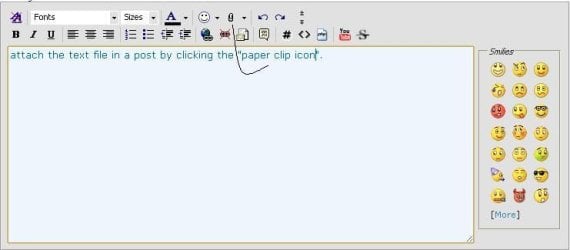
attach the text file in a post by clicking the "paper clip icon".
 

Attachments

  • attach.JPG
    attach.JPG
    21.2 KB · Views: 37

My Computer My Computer

At a glance

Dual Booting Windows 7 64-Bit Ultimate Editio...AMD Phenom X4 9254gb DDR3 G.skill RipJawsATI Radeon HD 6770
Computer Manufacturer/Model Number
AMD _(Assembled)_
OS
Dual Booting Windows 7 64-Bit Ultimate Edition and Fedora 16.
CPU
AMD Phenom X4 925
Motherboard
MSI 785g-E53
Memory
4gb DDR3 G.skill RipJaws
Graphics Card(s)
ATI Radeon HD 6770
Sound Card
Realtek
Monitor(s) Displays
Dell IN2020M LED
Screen Resolution
1600*900 20"
Hard Drives
Seagate 500 Gibs
External 320 Gb Western Digital(Got Glitchy)
PSU
Cooler Master
Case
Cooler Master
Cooling
Cooler Master
Keyboard
Logitech K100
Mouse
Razor Death Adder v2 3500 dPi (Razer Goliathus Pad)
Internet Speed
Back to college Internet with Cyberroam X|
Is it possible that you used a font that is no longer installed since you did the recovery?

With the text selected, try selecting Format->Font... from the menu and select a new font.
 

My Computer My Computer

At a glance

W10 Pro desktop, W11 laptop, W11 Pro tablet (...3.7Ghz 8700K i7, i7-11800H, i7-1065G716G desktop, 16G laptop, 4G tabletAMD Radeon RX580, RTX 3060, Intel Iris Plus
Computer type
PC/Desktop
Computer Manufacturer/Model Number
Home Built desktop, Dell G15 5511 Gaming laptop,MS Surface Pro 7 tablet
OS
W10 Pro desktop, W11 laptop, W11 Pro tablet (all 64-bit)
CPU
3.7Ghz 8700K i7, i7-11800H, i7-1065G7
Motherboard
ASUS TUF Z370-Pro Gaming in desktop
Memory
16G desktop, 16G laptop, 4G tablet
Graphics Card(s)
AMD Radeon RX580, RTX 3060, Intel Iris Plus
Sound Card
High Definition Audio (Built-in to mobo)
Monitor(s) Displays
Samsung U32J59 32" (2x), 15.6", 12"
Screen Resolution
3840x2160, 3840x2160, 1920x1080, 2160x1440
Hard Drives
500G SSD for OS; 2T, 10T & 15T HDDs for Data on Desktop, 1TB SSD laptop, 128G SSD tablet.
PSU
Corsair CX 750M
Case
Antec 100
Cooling
CM 212+
Keyboard
IBM Model M - used continuously since 1986
Mouse
Microsoft Pro IntelliMouse
Internet Speed
400M down 8M up
Antivirus
Windows Defender
Browser
FireFox
Other Info
Built my first computer (8Mhz 8088cpu, 640K RAM, 20MB HDD, 2 360K floppy drives) in 1985 and have been building them for myself, relatives and friends ever since.
Is it possible that you used a font that is no longer installed since you did the recovery?

With the text selected, try selecting Format->Font... from the menu and select a new font.

I checked it in my PC. It rolls back to the default font.:geek:
 

My Computer My Computer

At a glance

Dual Booting Windows 7 64-Bit Ultimate Editio...AMD Phenom X4 9254gb DDR3 G.skill RipJawsATI Radeon HD 6770
Computer Manufacturer/Model Number
AMD _(Assembled)_
OS
Dual Booting Windows 7 64-Bit Ultimate Edition and Fedora 16.
CPU
AMD Phenom X4 925
Motherboard
MSI 785g-E53
Memory
4gb DDR3 G.skill RipJaws
Graphics Card(s)
ATI Radeon HD 6770
Sound Card
Realtek
Monitor(s) Displays
Dell IN2020M LED
Screen Resolution
1600*900 20"
Hard Drives
Seagate 500 Gibs
External 320 Gb Western Digital(Got Glitchy)
PSU
Cooler Master
Case
Cooler Master
Cooling
Cooler Master
Keyboard
Logitech K100
Mouse
Razor Death Adder v2 3500 dPi (Razer Goliathus Pad)
Internet Speed
Back to college Internet with Cyberroam X|
Normally I would use my Ultraedit to watch that file in HEX mode (thus bypassing all format strings that prevent it from beeing shown properly)

But if I can't be sure the TS has a hex editor available it's BACK TO THE ROOTS ;)

Shift-Right click the TXT file and go to "Copy as Path"
Open a command prompt (click on START, enter CMD into the searchbox and press ENTER)

In that black window you write TYPE leave 1 space and paste the path to the file, you just copied (via right click NOT via CTRL-V)
Voila..there you have it.

-DG
 

My Computer My Computer

At a glance

Windows 7 Ultimate x86DualCore AMD Athlon 64 X2, 2600 MHz 5200+Samsung 2GB DDR2Onboard NVIDIA GeForce 6150SE nForce 430
Computer Manufacturer/Model Number
HP m8000n
OS
Windows 7 Ultimate x86
CPU
DualCore AMD Athlon 64 X2, 2600 MHz 5200+
Motherboard
Asus M2N68-LA (Narra)
Memory
Samsung 2GB DDR2
Graphics Card(s)
Onboard NVIDIA GeForce 6150SE nForce 430
Sound Card
Onboard nVIDIA nForce 6100-430 (MCP61P)
Monitor(s) Displays
Westinghouse 19" LED
Screen Resolution
1280x1024
Hard Drives
SATA II Seagate Barracuda 500GB
USB II WD Elements 500GB
USB II WD My Book 1TB
USB II WD My Book 2TB
PSU
Stock (HP)
Case
Stock (HP)
Cooling
Stock
Keyboard
Logitech Classic KB 200
Mouse
Standard HP opticle USB mouse
Select the text, and copy and paste it into WordPad (not NotePad) and then change the font to be black, size 12, etc...

Hopefully it'll show up that way.

Good Luck!
 

My Computer My Computer

At a glance

Windows 7 Ultimate x86-64, via Bootcamp.2.4 GHz Intel Core 2 Duo.4 GiB DDR3 1066 MHz.NVIDIA GeForce 320M.
Computer Manufacturer/Model Number
2010 Apple MacBook Pro 13'. (Laptop.)
OS
Windows 7 Ultimate x86-64, via Bootcamp.
CPU
2.4 GHz Intel Core 2 Duo.
Memory
4 GiB DDR3 1066 MHz.
Graphics Card(s)
NVIDIA GeForce 320M.
Screen Resolution
1280 x 800.
Hard Drives
250 GB 5400rpm HDD.
Internet Speed
Download: 20.91 Mb/s. Upload: 2.97 Mb/s.
Notepad font handling issue

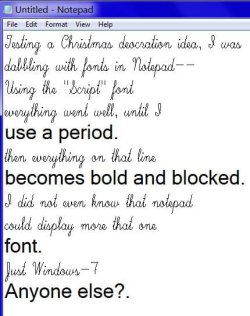
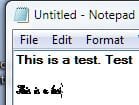
This was just trivial dabbling for me, not something I need help on, and probably too late to help the original poster, but maybe this will help to cast a little light on a Notepad problem handling some fonts?

attachment.php


When I hit the "." key, everything on that line shifts font. Does not happen in the XP version of Notepad.

Merry Christmas all.
 

Attachments

  • MWSnap 2010-12-23-21_19_03.jpg
    MWSnap 2010-12-23-21_19_03.jpg
    37.3 KB · Views: 1,742

My Computer My Computer

At a glance

Windows 7 Pro 64i7 2760QM 2.4GHz8GBIntel HD/Nvidia GeForce 555M
Computer Manufacturer/Model Number
Dell XPS17 laptop
OS
Windows 7 Pro 64
CPU
i7 2760QM 2.4GHz
Memory
8GB
Graphics Card(s)
Intel HD/Nvidia GeForce 555M
Sound Card
RealTek
Monitor(s) Displays
Ntrig DuoSense digitzer, touchscreen
Hard Drives
750GB
Mouse
Synaptics touchpad
Yep, same thing. Weird ...

ScreenShot00294.jpg ScreenShot00295.jpg

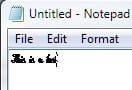
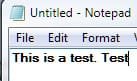
Once the "period" is typed it changes the font until the next line.

ScreenShot00296.jpg

A bug, to be sure, one would think.

Heckuva find there, periboob. "Script" seems to be the only font affected in such a manner but, then, I only cursorily checked ten or so other script fonts.
 

My Computer My Computer

At a glance

Windows 7 Ultimate x64 SP1Core2 Duo4 GBGM965 on-board
Computer Manufacturer/Model Number
Toshiba L355D
OS
Windows 7 Ultimate x64 SP1
CPU
Core2 Duo
Motherboard
Intel
Memory
4 GB
Graphics Card(s)
GM965 on-board
Sound Card
RealTek on-board
Monitor(s) Displays
19"+17"(laptop)
Screen Resolution
1440x900 (x 2)
Hard Drives
500GB Ext. 200GB Internal
PSU
N/A
Case
N/A
Cooling
N/A
Yes indeed.
How can that bug/feature fall through the cracks?

Armani,
Agree with the wordpad solution.
If that doestn't work download notepad++ (mainly used for progamming) and it should read the ASCII text.
 
Last edited:

My Computer My Computer

At a glance

Windows 7x64 Home Premium SP1Intel i7 2600kG.Skill Ripjaws (DDR3-1600) 2x4GBNvidia GeForce GTS 450; Intel HD Graphics 300...
Computer type
PC/Desktop
Computer Manufacturer/Model Number
Own build
OS
Windows 7x64 Home Premium SP1
CPU
Intel i7 2600k
Motherboard
ASUS P8Z68 Deluxe
Memory
G.Skill Ripjaws (DDR3-1600) 2x4GB
Graphics Card(s)
Nvidia GeForce GTS 450; Intel HD Graphics 3000(GT2+)
Monitor(s) Displays
Dell Ultrasharp IPS panel U2311H, Samsung SyncMaster P2350
Screen Resolution
1920x1080
Hard Drives
Samsung 850 Pro SSD 256GB, Samsung SSD 840 120GB, Seagates 1TB Barracuda ST31000528AS x2
PSU
Seasonic M12II 520W
Case
Lian Li Lancool PC-K60
Cooling
Case: 1x120mm, 3x140mm CPU: Hyper 212+
Keyboard
Logitech MK520 (wireless)
Mouse
Logitech MK520
Internet Speed
6-7 Mbps
Antivirus
Norton Security Premium, Malwarebytes on 2 (MSE on 3rd PC)
Browser
FireFox
Other Info
Audio: Logitech Z523 2.1
It's not a notepad problem. Open the font "Script" from control panel and you'll see that it is unable to display the font at all because there is a period on every line. My suspicion is that whoever created "Script" forgot to create a period specifically for it. The default period is being used, and in some programs like notepad, there is no ability to have part of a line in one font and part in another, so the whole line reverts to the default font in order to show the period.
 

My Computer My Computer

At a glance

Windows 7 Ultimate RTM (Technet)3.00 gigahertz Intel Core2 Duo E84004GBATI Radeon X1950 Pro
Computer Manufacturer/Model Number
Custom
OS
Windows 7 Ultimate RTM (Technet)
CPU
3.00 gigahertz Intel Core2 Duo E8400
Motherboard
ASUSTeK Computer INC. P5K/EPU Rev 1.xx
Memory
4GB
Graphics Card(s)
ATI Radeon X1950 Pro
Sound Card
Built in HD Audio
Monitor(s) Displays
22" Gateway LCD
Screen Resolution
1920 x 1200
Hard Drives
ST3160023A [Hard drive] (160.04 GB) -- drive 0, rev 8.01, ST3500630AS [Hard drive] (500.11 GB) -- drive 2, rev 3.AAK
ST3500630AS [Hard drive] (500.11 GB) -- drive 1, rev 3.AAK
Keyboard
Logitech G11
Mouse
Microsoft Wireless Laser Mouse 5000
Internet Speed
13.44 Mbps
hi i need help. I save some important text in a notepad file. after few days i install new windows 7 recovery from my hard disk. When i open that notepad file it doesn't showing text in that file. But file size is still 1KB and by pressing CTR+A text can also be selected. but i tried it to open by making new file and copy paste but its not showing text. I also gave this file to my friend but same problem :S How can i show the text,, that info is very important for me... pls help

I install new window.. before installing new window i copy that Notepad file from desktop to another drive. then i install new window by formatting C drive. after that its not showing text properly.
Text can be selected check screen shot
2ykbazc.png

Before you re-installed Windows, was the drive containing the original text file encrypted, or was the drive you copied it to encrypted?

Either way, after reloading Windows, you've lost the original encryption key that was tied to your original user account, and therefore the new installation is not able to decrypt the file correctly.

This is why I do not recommened using encryption unless you have an absolute, 100% need to do so...

EDIT:
And everyone else, please stay on topic. This is not a font problem, but rather a loss of data problem. By pressing the "Script" font issue, you're confusing the OP!
 

My Computer My Computer

At a glance

Windows 7 Professional 32-bit SP1AMD A4/A63.00GB EDOVMware SVGA 3D
Computer type
PC/Desktop
Computer Manufacturer/Model Number
Virtual Machine
OS
Windows 7 Professional 32-bit SP1
CPU
AMD A4/A6
Motherboard
Intel Corporation 440BX Desktop Reference Platform
Memory
3.00GB EDO
Graphics Card(s)
VMware SVGA 3D
Sound Card
High Definition Audio Device
Monitor(s) Displays
Generic Non-PnP Monitor on VMware SVGA 3D
Screen Resolution
1440x900
Hard Drives
1 x 60GB VMware Virtual SATA Hard Drive ATA Device
Antivirus
Kaspersky Total Security
The OPs problem is a display issue. His text is there. It's not "encrypted"...it's just not displaying. He may have a strange theme or color scheme running, or have bad display drivers, but it is definitely a display issue, nothing more.
 

My Computer My Computer

At a glance

Windows 7 Ultimate RTM (Technet)3.00 gigahertz Intel Core2 Duo E84004GBATI Radeon X1950 Pro
Computer Manufacturer/Model Number
Custom
OS
Windows 7 Ultimate RTM (Technet)
CPU
3.00 gigahertz Intel Core2 Duo E8400
Motherboard
ASUSTeK Computer INC. P5K/EPU Rev 1.xx
Memory
4GB
Graphics Card(s)
ATI Radeon X1950 Pro
Sound Card
Built in HD Audio
Monitor(s) Displays
22" Gateway LCD
Screen Resolution
1920 x 1200
Hard Drives
ST3160023A [Hard drive] (160.04 GB) -- drive 0, rev 8.01, ST3500630AS [Hard drive] (500.11 GB) -- drive 2, rev 3.AAK
ST3500630AS [Hard drive] (500.11 GB) -- drive 1, rev 3.AAK
Keyboard
Logitech G11
Mouse
Microsoft Wireless Laser Mouse 5000
Internet Speed
13.44 Mbps
It's not a notepad problem. Open the font "Script" from control panel and you'll see that it is unable to display the font at all because there is a period on every line. My suspicion is that whoever created "Script" forgot to create a period specifically for it. The default period is being used, and in some programs like notepad, there is no ability to have part of a line in one font and part in another, so the whole line reverts to the default font in order to show the period.
That doesn't explain the apparent ability for Notepad to display two different fonts in a document simultaneously; something it's not supposed to be capable of.
 

My Computer My Computer

At a glance

Windows 7 Ultimate x64 SP1Core2 Duo4 GBGM965 on-board
Computer Manufacturer/Model Number
Toshiba L355D
OS
Windows 7 Ultimate x64 SP1
CPU
Core2 Duo
Motherboard
Intel
Memory
4 GB
Graphics Card(s)
GM965 on-board
Sound Card
RealTek on-board
Monitor(s) Displays
19"+17"(laptop)
Screen Resolution
1440x900 (x 2)
Hard Drives
500GB Ext. 200GB Internal
PSU
N/A
Case
N/A
Cooling
N/A
The OPs problem is a display issue. His text is there. It's not "encrypted"...it's just not displaying. He may have a strange theme or color scheme running, or have bad display drivers, but it is definitely a display issue, nothing more.
Who said it was an encryption issue? More than likely it's a font color issue. Besides, the OP's post, and the last response, is over 2 and half months old.

periboob presented an odd situation as an adjunct to an old post. He did not imply it was the fix; he only implied the the issue the OP was experiencing could be related to fonts which, I believe, it was. Font color, specifically.
 

My Computer My Computer

At a glance

Windows 7 Ultimate x64 SP1Core2 Duo4 GBGM965 on-board
Computer Manufacturer/Model Number
Toshiba L355D
OS
Windows 7 Ultimate x64 SP1
CPU
Core2 Duo
Motherboard
Intel
Memory
4 GB
Graphics Card(s)
GM965 on-board
Sound Card
RealTek on-board
Monitor(s) Displays
19"+17"(laptop)
Screen Resolution
1440x900 (x 2)
Hard Drives
500GB Ext. 200GB Internal
PSU
N/A
Case
N/A
Cooling
N/A
The OPs problem is a display issue. His text is there. It's not "encrypted"...it's just not displaying. He may have a strange theme or color scheme running, or have bad display drivers, but it is definitely a display issue, nothing more.
Who said it was an encryption issue? More than likely it's a font color issue. Besides, the OP's post, and the last response, is over 2 and half months old.

periboob presented an odd situation as an adjunct to an old post. He did not imply it was the fix; he only implied the the issue the OP was experiencing could be related to fonts which, I believe, it was. Font color, specifically.

I said it was an encryption issue that has stuffed up the contents of the file. It couldn't possibly be a font color issue, since you can only change the font in notepad, not the font color.

If I'm wrong, I'll eat my hat, but I honestly do think the fonts problem is confusing the issue, which is that the OP has lost data. We ARE talking about a plain text file here.
 

My Computer My Computer

At a glance

Windows 7 Professional 32-bit SP1AMD A4/A63.00GB EDOVMware SVGA 3D
Computer type
PC/Desktop
Computer Manufacturer/Model Number
Virtual Machine
OS
Windows 7 Professional 32-bit SP1
CPU
AMD A4/A6
Motherboard
Intel Corporation 440BX Desktop Reference Platform
Memory
3.00GB EDO
Graphics Card(s)
VMware SVGA 3D
Sound Card
High Definition Audio Device
Monitor(s) Displays
Generic Non-PnP Monitor on VMware SVGA 3D
Screen Resolution
1440x900
Hard Drives
1 x 60GB VMware Virtual SATA Hard Drive ATA Device
Antivirus
Kaspersky Total Security
Thanks, Dzomlija, I suppose I'll have to eat a hat before you do about the font color in Notepad. :o

I got a little ahead of myself, I guess, sorry. It would've been nice if the OP uploaded a copy of the problematic file.

I think your hat is safe ... mine ... not so much ...
 

My Computer My Computer

At a glance

Windows 7 Ultimate x64 SP1Core2 Duo4 GBGM965 on-board
Computer Manufacturer/Model Number
Toshiba L355D
OS
Windows 7 Ultimate x64 SP1
CPU
Core2 Duo
Motherboard
Intel
Memory
4 GB
Graphics Card(s)
GM965 on-board
Sound Card
RealTek on-board
Monitor(s) Displays
19"+17"(laptop)
Screen Resolution
1440x900 (x 2)
Hard Drives
500GB Ext. 200GB Internal
PSU
N/A
Case
N/A
Cooling
N/A
Thanks, Dzomlija, I suppose I'll have to eat a hat before you do about the font color in Notepad. :o

I got a little ahead of myself, I guess, sorry. It would've been nice if the OP uploaded a copy of the problematic file.

I think your hat is safe ... mine ... not so much ...

:thumbsup:
 

My Computer My Computer

At a glance

Windows 7 Professional 32-bit SP1AMD A4/A63.00GB EDOVMware SVGA 3D
Computer type
PC/Desktop
Computer Manufacturer/Model Number
Virtual Machine
OS
Windows 7 Professional 32-bit SP1
CPU
AMD A4/A6
Motherboard
Intel Corporation 440BX Desktop Reference Platform
Memory
3.00GB EDO
Graphics Card(s)
VMware SVGA 3D
Sound Card
High Definition Audio Device
Monitor(s) Displays
Generic Non-PnP Monitor on VMware SVGA 3D
Screen Resolution
1440x900
Hard Drives
1 x 60GB VMware Virtual SATA Hard Drive ATA Device
Antivirus
Kaspersky Total Security
So we never found out if the OP solved his problem, or did I miss something?
 

My Computer My Computer

At a glance

Microsoft Windows 7 Home Premium 64-bit 7601 ...Intel(R) Core(TM) i7-3770 CPU @ 3.40GHz8.00 GBIntel(R) HD Graphics 4000
Computer type
PC/Desktop
OS
Microsoft Windows 7 Home Premium 64-bit 7601 Multiprocessor Free Service Pack 1
CPU
Intel(R) Core(TM) i7-3770 CPU @ 3.40GHz
Motherboard
ASUSTeK COMPUTER INC. P8H77-M
Memory
8.00 GB
Graphics Card(s)
Intel(R) HD Graphics 4000
Sound Card
On Board
Monitor(s) Displays
Dell 24"
Screen Resolution
1920 x 1080
Hard Drives
(1) INTEL SSDSC2CT180A3 ATA Device (2) ST500DM002-1BD142 ATA Device (3) WDC WD3200AAKS-75L9A0 ATA Device (4) Generic- Compact Flash USB Device (5) Generic- MS/MS-Pro USB Device (6) Generic- SD/MMC USB Device (7) Generic- SM/xD-Picture USB
PSU
500w Corsair
Case
Cooler Master
Cooling
3 Fans
Keyboard
Logitech MK300
Mouse
Logitech WOM
Internet Speed
75Mb
Antivirus
Norton 360
Browser
Firefox, Opera, IE
Back
Top