Windows 7 on an older computer.

pantsaregood

New member
Member
Local time
2:58 AM
Messages
53
My mom is using an older Dell. It is one of the slimline models, so I did what I could with it.

i845G motherboard
Pentium 4 2.66 GHz (Northwood)
1.125 PC2100 DDR SDRAM
128MB Geforce FX5200 PCI

The motherboard would probably run a 3.06GHz P4C, but I don't know that it meets the higher TDP required by that CPU. I don't want to blow the MOSFETs or something. The BIOS also lacks the ability to enable HT. Can't put a better GPU both because the PC lacks a PCIE/AGP slot and because it has only a 180W PSU.

Windows 7 runs pretty well. Aero is functional with no glitches. I do, however, find that Adobe Flash content generally causes the computer to have trouble.

I've heard Windows 7 can be crippled by only 1GB of RAM, but I don't know how true that is. I used to run an Athlon 64 X2 4000+ and Phenom X4 9750 on 1GB of RAM, and they worked fine; they had significantly higher memory bandwidth and were far superior CPUs, though.

Is it possible to make this PC run any better than it does? It IS ten years old, so the fact it runs Windows 7 remotely well is amazing.
 

My Computer

OS
Windows 7 Ultimate x64
CPU
Intel Core i5 2500K
Motherboard
Gigabyte GA-Z68A-D3-B3
Memory
8GB G.SKILL Ripjaws X DDR3 2133
Graphics Card(s)
nVidia Geforce 9500GT
Monitor(s) Displays
Acer H233H
Screen Resolution
1920x1080
Case
Antec Three Hundred
Hi,

The biggest issue you're experiencing that's causing the slowdown is the aero effects in general. I've had Ultimate running on a machine with 768MB of memory and it ran fine until it got to flash content. Try disabling transparency and see if it helps improve your flash performance.

Click :orb: Computer then System Properties > Advanced System Settings > Performance and un-check Enable Transparent Glass and Enable Desktop Composition. Alternatively you could just try a basic theme.
 

My Computer

Computer Manufacturer/Model Number
Compaq Desktop
OS
Windows 7 Ultimate x64
CPU
AMD Sempron Dual Core
Memory
3GB
Graphics Card(s)
NVIDIA GeForce 6150SE nForce 430
Screen Resolution
1024x768
Hard Drives
150GB Sata
At 1GB ram you are just barely scraping by the minimum requirements. With the prices of ram these days I would max it out. :D
 

My Computer

Computer Manufacturer/Model Number
Samsung Chronos 7
OS
windows 7 Pro 64Bit
CPU
2.2 GHz Intel Core i7-2675QM
Memory
8GB
Graphics Card(s)
Intel HD Graphics 3000/Radeon HD 6490M
Sound Card
Realtek High Definition Audio
Monitor(s) Displays
Built in LCD and external Dell 22 inch LCD
Screen Resolution
1600x900
Hard Drives
1 TB HDD
Internet Speed
20 MBPS Down 1500 KBPS Up
Actually, Windows 7's "minimum" requirement of 1GB of RAM is a complete fabrication. The OS will run with far less. As I said, 1GB of RAM with both an Athlon 64 X2 and Phenom X4 worked perfectly well.

DDR SDRAM prices aren't amazingly cheap compared to DDR2/3 prices, either. $30 for 1GB isn't bad, but it isn't great either.

Do you really believe the glass effects are to blame? I was under the impression that Aero was entirely GPU accelerated and deloaded the CPU.
 

My Computer

OS
Windows 7 Ultimate x64
CPU
Intel Core i5 2500K
Motherboard
Gigabyte GA-Z68A-D3-B3
Memory
8GB G.SKILL Ripjaws X DDR3 2133
Graphics Card(s)
nVidia Geforce 9500GT
Monitor(s) Displays
Acer H233H
Screen Resolution
1920x1080
Case
Antec Three Hundred
You'll find that as you only have 128MB of video memory it doesn't actually leave very much for everyday tasks, like internet browsing. You'll find that flash content is requiring more and more GPU acceleration these days.

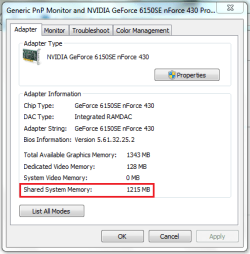
You may also want to see if Windows is allocating memory for shared use with the GPU. Right-click the desktop and select Screen Resolution then Advanced settings

Shared Video.PNG

You'll find that with shared memory, your system will experience slow periods as Windows tries to compensate for more GPU intense operations.
 

My Computer

Computer Manufacturer/Model Number
Compaq Desktop
OS
Windows 7 Ultimate x64
CPU
AMD Sempron Dual Core
Memory
3GB
Graphics Card(s)
NVIDIA GeForce 6150SE nForce 430
Screen Resolution
1024x768
Hard Drives
150GB Sata
Hm. I've only got 271MB shared VRAM. Is there any way to change this setting? Is it proportional to your amount of total system RAM?

So far, what I'm seeing is this:
Aero off resorts in graphics loading very awkwardly; they literally load from the top of the monitor to the bottom as programs/windows open.
Aero on/transparency off does not do this.
Aero on/transparency on shows no obvious performance loss from transparency off.

Maybe I should just find a cheap stick of RAM on Ebay.
 

My Computer

OS
Windows 7 Ultimate x64
CPU
Intel Core i5 2500K
Motherboard
Gigabyte GA-Z68A-D3-B3
Memory
8GB G.SKILL Ripjaws X DDR3 2133
Graphics Card(s)
nVidia Geforce 9500GT
Monitor(s) Displays
Acer H233H
Screen Resolution
1920x1080
Case
Antec Three Hundred
You'll find that as Windows requires more video memory it'll pool it's resources from your physical memory as and when it's required. Upgrading the memory would be the easiest option in this case (as it was with me).
 

My Computer

Computer Manufacturer/Model Number
Compaq Desktop
OS
Windows 7 Ultimate x64
CPU
AMD Sempron Dual Core
Memory
3GB
Graphics Card(s)
NVIDIA GeForce 6150SE nForce 430
Screen Resolution
1024x768
Hard Drives
150GB Sata
Well, I should've done my homework before I dumped that P4 2.66 in there. Apparently Dell just failed to update their documentation as newer CPUs came out.

The board should support any CPU with a CPUID of 0F27h, meaning the 3.06 GHz P4 can run in there. I don't know if it falls within the TDP limits of the board, though. The 2.8 model certainly would, however.

I'll probably pop in a second 1 GB stick and a 3.06 in there. Probably a $10 upgrade, overall.
 

My Computer

OS
Windows 7 Ultimate x64
CPU
Intel Core i5 2500K
Motherboard
Gigabyte GA-Z68A-D3-B3
Memory
8GB G.SKILL Ripjaws X DDR3 2133
Graphics Card(s)
nVidia Geforce 9500GT
Monitor(s) Displays
Acer H233H
Screen Resolution
1920x1080
Case
Antec Three Hundred
If you have spare cash you can bump the RAM to 2 GB or more & also add a HD4650 AGP 8x graphics card.

This will enable HD decoding & also accelerate flash content.
 

My Computer

Computer Manufacturer/Model Number
Assembled Desktop PC, HTPC
OS
Windows Vista Home Premium x86, Home Premium x86
CPU
Intel Pentium 4 3.00Ghz with HT, Intel P4 2.8Ghz
Motherboard
Intel Original D865GBF, GA-81915-ME-C
Memory
2x512 MB DDR 400Mhz, 2x1GB DDR 400 Mhz
Graphics Card(s)
ATI Radeon HD3650 AGP 8x, Zotac GT 430 DDR3
Sound Card
SoundMAX Digital Audio AD1985, Diamond Xtreme 7.1 24Bit
Monitor(s) Displays
SONY BRAVIA KLV-19T400A , KLV-32V300A
Screen Resolution
1920x1080, 1920x1080
Hard Drives
Hitachi HDT721010SLA360 (1TB SATA 150)
SAMSUNG 80GB IDE
WD ESSENTIAL EDITION 1TB USB
WD EARS 2TB Green
PSU
FSP Saga II 500W, FSP Saga II 400W
Case
Lancool K-62 DragonLord, Lian-Li v351
Keyboard
Logitech iTouch Combo, Logitech di Novo Mini Bluetooth Combo
Mouse
Logitech
Internet Speed
Hathway 512 Kbps
Other Info
Specs are for Desktop & HTPC
There's absolutely no way I could put a better GPU in. The PC only has PCI slots, and the PSU is only 180W. It wouldn't even run an 8400GS.
 

My Computer

OS
Windows 7 Ultimate x64
CPU
Intel Core i5 2500K
Motherboard
Gigabyte GA-Z68A-D3-B3
Memory
8GB G.SKILL Ripjaws X DDR3 2133
Graphics Card(s)
nVidia Geforce 9500GT
Monitor(s) Displays
Acer H233H
Screen Resolution
1920x1080
Case
Antec Three Hundred
Unless your mom is a gamer, she doesn't need a better GPU.

I disagree with the poster who told you to "MAX" out the RAM. But 2 GB will make it smoother.

64-bit Adobe Flash doesn't have "GPU" acceleration. Use 32-bit Internet Explorer with latest 32-bit Adobe Flash and make sure you have latest nvidia graphic drivers to go with it.

CPU is fine for basic computing needs.

Also if the hard drive is 5400 RPM, then any 7200 RPM hard drive will also help. (Seagate 7200.11 is a good one).
 

My Computer

Computer Manufacturer/Model Number
Custom
OS
Ubuntu 10.10 64 bit/Window 7 VM
CPU
Core 2 Duo 2.2 Ghz
Motherboard
ECS g31 mATX
Memory
4 GB Kingston ValueRAM (DDR2 800)
Graphics Card(s)
nVidia 240 GT
Sound Card
Onboard
Monitor(s) Displays
19" Dell LCD
Hard Drives
500 GB Seagate Drive x 2
PSU
Antec 430 Watt
Case
Coolermaster
Keyboard
Microsoft Ergonomic Keyboard 4000
Mouse
Laser Mouse (Logitech)
2GB of RAM would probably be the most tangible upgrade. The GPU isn't going to be improved realistically; there may be some driver tweaks I can do, but I'll get to that when I can. I had to force IE9 to use GPU acceleration, but it seems to work. It is important to note she's using Windows 7 32-bit: there are no 64-bit CPUs supported by the 845G chipset. Prescotts were the first 64-bit x86 CPUs Intel released.
 

My Computer

OS
Windows 7 Ultimate x64
CPU
Intel Core i5 2500K
Motherboard
Gigabyte GA-Z68A-D3-B3
Memory
8GB G.SKILL Ripjaws X DDR3 2133
Graphics Card(s)
nVidia Geforce 9500GT
Monitor(s) Displays
Acer H233H
Screen Resolution
1920x1080
Case
Antec Three Hundred
This is a easy on to me. Check you mother board specs and put 2 gig of matching ram in and make your mother a happy person.
 

My Computer

Computer type
PC/Desktop
Computer Manufacturer/Model Number
Home made Desktop
OS
Windows 10 Pro. 64/ version 1709 Windows 7 Pro/64
CPU
Intel i7-6800K @ 4.3
Motherboard
ASUS X-99 Deluxe II
Memory
Corsair Platinum 16 gig @2400
Graphics Card(s)
EVGA GTX 1070 OC
Monitor(s) Displays
Asus 27" LED LCD/VE278Q
Screen Resolution
1920-1080 or 1280-720 HDMI
Hard Drives
INTEL SSD 730-240 Gb Sata 3.0/
PSU
EVGA Platium 1200W
Case
Phanteks Luxe Tempered Glass 8 fans/ one radiator
Cooling
XSPC/ Water Cooled CPU
Keyboard
Das 4 Professional
Mouse
Logitech M705/MX Anywhere 2-S
Internet Speed
100 mbits
Antivirus
Microsoft Security Essentials/ Malwarebytes Premium 3.0/ SAS
Browser
I.E. 11 default/Firefox/ ISP Time Warner Cable/Spectrum
Other Info
LG BluRay Burner/
Sound system-KLipsch-THX/
Icy Dock ssd Hot Swap bays.
Back
Top