Windows 7 on OLD computers

I installed it on a P4 1.3 GHz PC and I am having a terrible experience. I can't watch any videos, whether DVD, or youtube or whatever. They are very choppy. I have 1GB RDRAM and a GeForce 6200 GS 256MB. Shouldn't this be enough to do the basic things?

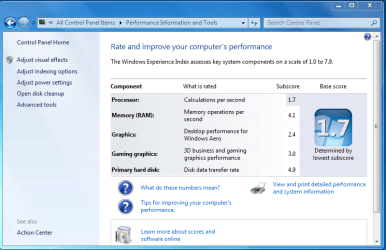
I think my experience rating is a 3.5
 

My Computer

OS
7 Ultimate
Eh, it's not 3.5 it is 1.7. But still, shouldn't that allow a video to play smoothly?

attachment.php
 

Attachments

  • Capture.PNG
    Capture.PNG
    48 KB · Views: 1,376

My Computer

OS
7 Ultimate
Hello Vanillaxtract, wow! that thread is rather old I didn't expect it to really hold out that long, but Great! to see someone trying W-7 on another marginal machine.
Well what build did you install? X-86 no doubt. You really gave only enough answeres to leave me with about 20 or 30 more questions. If you are really interested in the challenge then you should start at the bottom of the ladder. Make sure all the drivers are the best suited for the system you are running. Notice I didn't say Most Up To Date. See with an older MoBo and chipset, as well as other running gear you'll nee to be careful with drivers because some of the newest could very well be tweaked towards higher tech and newer pieces. try finding bios updates that exactly match your chipset first. then go to nvidea's websight and check out their drivers package for your video card, they have really been pretty good about getting out workable drivers for almost all their product lines. Can't say as much for Creative labs, they have been kinda slow with their audigy cards drivers but they recently put out a newer release that seems to work well.
Your next place to look at I'd recommend be FileHippo.com - Download Free Software they are a good place to get codecs packs CCCP and K-light mega pak are both very good to work with. the hippo also has a good selection of players you can get as well. media player classic, zoom,vlc, and gom are all good choices to try and are all free. And another You can acquire that works well with the geforce card is, pure video by nvidea, though this one does cost, (eh hemm).
Right now My Mom is using that very same old dell slim-line as her main machine working with build 7100 and only 500meg of mem and its built in intel graphics chipset and though somewhat slow to load pages at times, all in all it does well with video as well as utube.
The Best advice I can give is probably; Keep up the good attitude and keep on fiddling with your settings. Do regular system restore points to be able to back up from occasional problems. And have fun fiddling.

 

My Computer

OS
Windows 7 build 7000 x64
CPU
Amd Athalon 64, 2000+
Motherboard
Asus K8V Deluxe
Memory
Promise, pc2400 256mb x3, 1.5gb
Graphics Card(s)
Nvidea Geforce 6800 GTS
Sound Card
Creative Audigy 2 Platinum
Monitor(s) Displays
Westinghouse lcm22w2
Screen Resolution
1680x1050
Hard Drives
WD Caviare 250gb sata x2
Seagate Barracuda 250gb x2
PSU
Antec 500w
Case
Frankenstien in black
Cooling
when its not too dusty
Keyboard
Wolfe Claw mkII
Mouse
logitech mx100 cordless
Internet Speed
10mb p/s
Interesting topic!I'm glad are lots of people who try to install Windows 7 on older machines!
 

My Computer

Computer Manufacturer/Model Number
Fujitsu Siemens
OS
XP SP2
CPU
Intel Celeron D 3.07 GHz
Motherboard
/
Memory
1GB
Graphics Card(s)
Nvidia GeForce 6200 SE 256mb
Sound Card
Realtek
Monitor(s) Displays
17 "
Screen Resolution
1280x1024
Hard Drives
160GB
Internet Speed
2mb
I installed it on a P4 1.3 GHz PC and I am having a terrible experience. I can't watch any videos, whether DVD, or youtube or whatever. They are very choppy. I have 1GB RDRAM and a GeForce 6200 GS 256MB. Shouldn't this be enough to do the basic things?

I think my experience rating is a 3.5

VX

You really need to fill in your system specs (located in your user cp). the only way we can help is if we know what you have.

You're running a win 7 on the bare minimum specs and expecting better performance. Its a P-IV/ 1.3 ppl are having trouble with P-iv's that are 3.0 ghz

ken
 

My Computer

Computer Manufacturer/Model Number
HP Pavillion dv-7 1005 Tx
OS
Win 8 Release candidate 8400
CPU
[email protected]
Memory
4 gigs
Graphics Card(s)
Nvidia 9600M
Sound Card
HD built-in
Monitor(s) Displays
17" Wxga
Screen Resolution
1440x900
Cooling
none
Internet Speed
45Mb down 5Mb up
I installed it on a P4 1.3 GHz PC and I am having a terrible experience. I can't watch any videos, whether DVD, or youtube or whatever. They are very choppy. I have 1GB RDRAM and a GeForce 6200 GS 256MB. Shouldn't this be enough to do the basic things?

I think my experience rating is a 3.5

Maybe you need to install better codecs. :confused:
 

My Computer

Computer Manufacturer/Model Number
MasterB/Custom
OS
Windows 7 Professional x64
CPU
QuadCore AMD Phenom II X4 Black Edition 955 3.2 GHz
Motherboard
Asus M4A785TD-V Evo
Memory
8 GB Crucial DDR3
Graphics Card(s)
SAPPHIRE Radeon HD 4890 1GB HDMI New Edition
Sound Card
VIA VT1708S HD Audio 7.1 onboard/ ATI HDMI video card
Monitor(s) Displays
Acer H233H 23'' LCD HDMI
Screen Resolution
1920x1080
Hard Drives
1x 500GB and 1x 1TB 7200RPM 32MB Cache WD Caviar Black
PSU
CORSAIR CMPSU-620HX 620W
Case
COOLER MASTER Storm Scout SGC-2000
Cooling
2x 140mm and 1x 120mm case fans, Stock CPU fan
Keyboard
Logitech MX 3200
Mouse
Logitech MX 3200
Internet Speed
15 Mbps
Other Info
My first build!
Hello Vanillaxtract, wow! that thread is rather old I didn't expect it to really hold out that long, but Great! to see someone trying W-7 on another marginal machine.
Well what build did you install? X-86 no doubt. You really gave only enough answeres to leave me with about 20 or 30 more questions. If you are really interested in the challenge then you should start at the bottom of the ladder. Make sure all the drivers are the best suited for the system you are running. Notice I didn't say Most Up To Date. See with an older MoBo and chipset, as well as other running gear you'll nee to be careful with drivers because some of the newest could very well be tweaked towards higher tech and newer pieces. try finding bios updates that exactly match your chipset first. then go to nvidea's websight and check out their drivers package for your video card, they have really been pretty good about getting out workable drivers for almost all their product lines. Can't say as much for Creative labs, they have been kinda slow with their audigy cards drivers but they recently put out a newer release that seems to work well.
Your next place to look at I'd recommend be FileHippo.com - Download Free Software they are a good place to get codecs packs CCCP and K-light mega pak are both very good to work with. the hippo also has a good selection of players you can get as well. media player classic, zoom,vlc, and gom are all good choices to try and are all free. And another You can acquire that works well with the geforce card is, pure video by nvidea, though this one does cost, (eh hemm).
Right now My Mom is using that very same old dell slim-line as her main machine working with build 7100 and only 500meg of mem and its built in intel graphics chipset and though somewhat slow to load pages at times, all in all it does well with video as well as utube.
The Best advice I can give is probably; Keep up the good attitude and keep on fiddling with your settings. Do regular system restore points to be able to back up from occasional problems. And have fun fiddling.
Thanks for the advice. I know about K-Lite and have installed that and nVidia drivers. I will look into it some more and try to tweak it better.
 

My Computer

OS
7 Ultimate
VX

You really need to fill in your system specs (located in your user cp). the only way we can help is if we know what you have.

You're running a win 7 on the bare minimum specs and expecting better performance. Its a P-IV/ 1.3 ppl are having trouble with P-iv's that are 3.0 ghz

ken
I know I am working on it. I was bored at work and figured I would join and share my experience. In fact I am at work right now, so I still can't fill it in. I know it is a HP Vectra VL800 that I upped the RAM to 1GB and installed a 120GB hard drive. I believe the chipset is an Intel 850.
 

My Computer

OS
7 Ultimate
I've tried Windows 7 RC on my old rig, Pentium 4 3.0GHz with 2.5GB DDR memory, it is actually running very well! I think the large memory is truly helping!
 

My Computer

Computer Manufacturer/Model Number
BrandSystem
OS
Windows 7 Enterprise x64 [dual boot with Windows Vista Enterprise w/SP2]
CPU
Intel Core 2 Quad Q6600
Motherboard
Gigabyte GA-P35-DQ6
Memory
8GB GeIL DDR2 800 [2GBx4]
Graphics Card(s)
ATI Radeon HD2600 PRO
Sound Card
Integrated Realtek ALC889A
Monitor(s) Displays
LG Flatron L1520B
Screen Resolution
1024x768
Hard Drives
Western Digital WD6400AAKS
PSU
Entac Earthwatts 380A
Case
CoolerMaster Ammo 533
Cooling
Thermalright Ultra-120 eXtreme
Keyboard
DELL Multimedia Keyboard SK-8135
Mouse
IBM Travel Mouse 31p7410 USB
I've tried Windows 7 RC on my old rig, Pentium 4 3.0GHz with 2.5GB DDR memory, it is actually running very well! I think the large memory is truly helping!

That is a decent hardware....

Ok
I ran windows 7 build 7201 on: AMD athlon 2000+ (1.66ghz)
512 mb DRR ram..
256 mb NVDIA 6200lt..

I have to say this baby runs very well with aero colour scheme.:D

I am still using this same Hardware with 1Gb ram.
 

My Computer

Computer Manufacturer/Model Number
Custom made
OS
Window 7 build 7600, Xp pro(VM)
CPU
Amd Athlon 2000 xp+
Motherboard
Asus x series
Memory
kingstone(1gb+256MB)
Graphics Card(s)
Nvdia 6200(256 mb+255mb(shared))
Sound Card
soundmax
Monitor(s) Displays
Lg Flatron w1943
Screen Resolution
1360x768
Hard Drives
segate 80GB
Case
i-ball
Keyboard
i-ball
Mouse
i-ball
Internet Speed
256kbps up and 256 kbps down
Ahh..

One thing you can do.. Install the proper chipset drivers. Sure, they're for XP, but they work well with 7. Just make sure you set the Compatibility mode to XP.

I'm doing it with my Thinkpad R40 and Qosmio E15-AV101, both have i855 chipsets. It makes them run a bit better.
 

My Computer

Computer Manufacturer/Model Number
IBM ThinkCentre M50 / IBM ThinkPad R40
OS
Windows 7 (Build 7600-16385)
CPU
Intel Pentium 4 HT @ 3.2GHz 1MB Cache / Pentium-M @ 1.6GHz
Memory
2GB PC3200 / 2GB PC2700
Graphics Card(s)
nVidia GeForce 6800 256MB / ATI Radeon 7500 32MB
Sound Card
SB Audigy 2 / Onboard
Monitor(s) Displays
Dual 21" CRTs / 15" LCD
Screen Resolution
1600x1200 / 1400x1050
Hard Drives
ThinkCentre: 2x 1TB SATA HDDs
ThinkPad: 80GB PATA HDD
Internet Speed
Bresnan: 15mb UL/1mb DL
People How many of you can install Win7 on such old computers like with 512mb ram and lower specs...

When i'm trying to install in it on my 6 years old computer it says that i dont have ACPI-compliant computer...
How can I come over this error to install win7? 'Cause my Motherboard is ACPI-compliant, but version 1.0b..

thanks for all..
 

My Computer

OS
Windows XP Pro SP3
CPU
Intel Celeron 2.00GHz
Motherboard
ECS P4S5MG/GL+
Memory
512 MBytes
Graphics Card(s)
MSI G4Ti4200
Sound Card
Sound Blaster 128
Hard Drives
WDC WD800JB-00FMA0
WDC WD200EB-00CSF0
People How many of you can install Win7 on such old computers like with 512mb ram and lower specs...

When i'm trying to install in it on my 6 years old computer it says that i dont have ACPI-compliant computer...
How can I come over this error to install win7? 'Cause my Motherboard is ACPI-compliant, but version 1.0b..

thanks for all..

Try to updating your bios. Then Try to Install windows 7.
 

My Computer

Computer Manufacturer/Model Number
Custom made
OS
Window 7 build 7600, Xp pro(VM)
CPU
Amd Athlon 2000 xp+
Motherboard
Asus x series
Memory
kingstone(1gb+256MB)
Graphics Card(s)
Nvdia 6200(256 mb+255mb(shared))
Sound Card
soundmax
Monitor(s) Displays
Lg Flatron w1943
Screen Resolution
1360x768
Hard Drives
segate 80GB
Case
i-ball
Keyboard
i-ball
Mouse
i-ball
Internet Speed
256kbps up and 256 kbps down
I have a Dell in the house that's getting a 1.0 on WEI. Still sruns just about as good as XP
 

My Computer

Computer Manufacturer/Model Number
Dell 6400/My own build
OS
Windows 7 RTM x86/x64
CPU
Yonah/e6600 O.C. to 3.4GHz
Motherboard
Dell/EVGA
Memory
2GB/4GB
Graphics Card(s)
ATI/EVGA NVIDIA 8800
Sound Card
RealTek/Auzentech X-Meridian
Monitor(s) Displays
Built-in/65" Mitsubishi HDTV
Screen Resolution
1280x1800/1920x1280
Hard Drives
80GB Toshiba/Several
PSU
Dell Laptop/CoolerMaster
Case
Laptop/CoolerMaster Cosmos
Cooling
Air/Water
Keyboard
Standard/Media Center Kbd
Mouse
Touchpad/Bluetooth
Internet Speed
20MBPS
I do agree that Windows 7 is a lot better on old computers.
 

My Computer

Computer Manufacturer/Model Number
Advent
OS
banned for piracy
CPU
2.4Ghz Quad-Core P4
Motherboard
FOXCONN A6VMX
Memory
4GB
Graphics Card(s)
256MB X1200 On-board graphics
Sound Card
On-board
Monitor(s) Displays
19" TFT Mointer
Hard Drives
500GB WD Hard-drive.
Case
Mid-tower
Keyboard
Usb HP Keyboard
septprince,
I have the latest BIOS version available for my computer.
And the installation halts on ACPI-non compliant commputer..
What can i do ?
 

My Computer

OS
Windows XP Pro SP3
CPU
Intel Celeron 2.00GHz
Motherboard
ECS P4S5MG/GL+
Memory
512 MBytes
Graphics Card(s)
MSI G4Ti4200
Sound Card
Sound Blaster 128
Hard Drives
WDC WD800JB-00FMA0
WDC WD200EB-00CSF0
septprince,
I have the latest BIOS version available for my computer.
And the installation halts on ACPI-non compliant commputer..
What can i do ?

Have you got the bios from your manufacturer`s official website?

Open bios and then load optimised settings and then try.
 

My Computer

Computer Manufacturer/Model Number
Custom made
OS
Window 7 build 7600, Xp pro(VM)
CPU
Amd Athlon 2000 xp+
Motherboard
Asus x series
Memory
kingstone(1gb+256MB)
Graphics Card(s)
Nvdia 6200(256 mb+255mb(shared))
Sound Card
soundmax
Monitor(s) Displays
Lg Flatron w1943
Screen Resolution
1360x768
Hard Drives
segate 80GB
Case
i-ball
Keyboard
i-ball
Mouse
i-ball
Internet Speed
256kbps up and 256 kbps down
What kind of system is this? If this is a custom build, what's the motherboard manufacturer and model?

Also, some systems allow you to disable ACPI (I don't have a clue why). Dig through your BIOS and see if it does.
 

My Computer

Computer Manufacturer/Model Number
IBM ThinkCentre M50 / IBM ThinkPad R40
OS
Windows 7 (Build 7600-16385)
CPU
Intel Pentium 4 HT @ 3.2GHz 1MB Cache / Pentium-M @ 1.6GHz
Memory
2GB PC3200 / 2GB PC2700
Graphics Card(s)
nVidia GeForce 6800 256MB / ATI Radeon 7500 32MB
Sound Card
SB Audigy 2 / Onboard
Monitor(s) Displays
Dual 21" CRTs / 15" LCD
Screen Resolution
1600x1200 / 1400x1050
Hard Drives
ThinkCentre: 2x 1TB SATA HDDs
ThinkPad: 80GB PATA HDD
Internet Speed
Bresnan: 15mb UL/1mb DL
septprince,
Ok.. i'm trying now to update the bios version.. it seem that there is one newer that was on my mb.

Simba7,
Motherboard ECS P4S5MG/GL+ Rev:7.0

P.S: And how could you install windows XP if there was no option to disable ACPI ?
of cource i have enabled it before installinf 7..

p.S2: i'm afraid of updating bios cause if something goes wrong i will end up with broken pc..
 

My Computer

OS
Windows XP Pro SP3
CPU
Intel Celeron 2.00GHz
Motherboard
ECS P4S5MG/GL+
Memory
512 MBytes
Graphics Card(s)
MSI G4Ti4200
Sound Card
Sound Blaster 128
Hard Drives
WDC WD800JB-00FMA0
WDC WD200EB-00CSF0
Ok..
I have updated the bios to the latesst version (Release 28/10/2003)
Then loaded default setting in bios.
Then tried to install windows 7 again.. and// again it showed me the ACPI-error !
I don't know what to do anymore.. i'm tired..
What can i do to make this wtupid setup install on my computer?
 

My Computer

OS
Windows XP Pro SP3
CPU
Intel Celeron 2.00GHz
Motherboard
ECS P4S5MG/GL+
Memory
512 MBytes
Graphics Card(s)
MSI G4Ti4200
Sound Card
Sound Blaster 128
Hard Drives
WDC WD800JB-00FMA0
WDC WD200EB-00CSF0
Back
Top