Windows 7 on OLD computers

My Computer

Computer Manufacturer/Model Number
Intel
OS
Windows 7 Ulti x64
CPU
QX6700
Motherboard
975XBX2
Memory
6G Corsair DDR2 6400
Graphics Card(s)
Nvidia GTX 470
Monitor(s) Displays
BenQ 24/Princeton 19
Screen Resolution
1920X1200/1280X1024
Hard Drives
4X500G 4X1TB 2x2TB Esata
PSU
Rosewill 950W
Case
Thermaltake
Cooling
Koolance Exos 2.5
Keyboard
MS Natural 4000
Mouse
Kensington Expert Ball
Internet Speed
DSL
Here is my ABIT IC7-Max3 with a P4 EE 3.4Ghz. Windows 7 seems rather snappy on this thing.

[img=http://img118.imageshack.us/img118/6567/extrememb3.th.png]

Out of curiosity what's the HD on your rig? Seems like that's usually the boat anchor on these indexes but yours scores high.

Also we should keep in mind most people when they finally buy a PC off the shelf will likely get Home Premium preinstalled. The beta we're playing with is Ultimate. The default install may not be so tuned in Home Premium. I know my Vista Home Premium wasn't.
 

My Computer

Computer Manufacturer/Model Number
HP Media Center
OS
Windows 7 32 bit
CPU
AMD 5200+ dual core
Memory
2 GB
Graphics Card(s)
NVidia GeForce 6150SE 128 MB
Monitor(s) Displays
CRT
Screen Resolution
1280x1024
Hard Drives
500 GB Sata internal :

SIIG USB 3.0 docking stations w/WD Caviar Black 6 Gb/s drives
Keyboard
PS/2
Mouse
PS/2 Wheel Mouse
Other Info
SIIG USB 3.0 PCIexpress card.
Yeah Miles, I thought it was high also. When I installed Win7 on this very same drive in my Badaxe2 mobo it scored a 3.0 I believe. It is a Hitachi Deckstar HDS721616PLA300, which I thought was a SATA1 when I saw the score on the XBX2. Strange, but I 'm not too convinced that the WEI scores are all that relevant as benchmarks. It is plugged into the intel connectors as it wouldn't boot from the Silicon Image connectors. The Abit IC7 Max3 mobo has 6 SATA1 conectors 2 Intel 4 SI.
Whatever... this system runs great with Windows 7 and when it finally comes out I will run it that way.
 

My Computer

Computer Manufacturer/Model Number
Intel
OS
Windows 7 Ulti x64
CPU
QX6700
Motherboard
975XBX2
Memory
6G Corsair DDR2 6400
Graphics Card(s)
Nvidia GTX 470
Monitor(s) Displays
BenQ 24/Princeton 19
Screen Resolution
1920X1200/1280X1024
Hard Drives
4X500G 4X1TB 2x2TB Esata
PSU
Rosewill 950W
Case
Thermaltake
Cooling
Koolance Exos 2.5
Keyboard
MS Natural 4000
Mouse
Kensington Expert Ball
Internet Speed
DSL
I have Win7 running in a dualboot with XP Pro on my P4 2.8GHz machine (2GB ram, GeForce 7300GT). My WEI score is only 1.8 for the processor but the others scores are 3-5.5. So far, so good. My PC is only used for web surfing, Quicken, and some light picture editing so I'm happy with its performance.

:sarc: a 1.8 for the processor? My P3 gets that. I don't think the WEI is accurate.

Hmmm.... I just re-ran it and this time my processor got a 3.7! I think they might just have a random number generator creating these scores. :sarc:
 

My Computer

Computer Manufacturer/Model Number
Built by my Indian friend.
OS
Windows7 7201
CPU
Intel P4 2.8GHz
Motherboard
Asus P48X-X
Memory
2GB
Graphics Card(s)
GeForce 7300GT
Sound Card
on board
Monitor(s) Displays
HP w2007
Screen Resolution
1680x1050
Hard Drives
150GB IDE, 1TB SATA internal
1TB MyBook eSATA
PSU
RPI
Case
White and blue
Cooling
Air cooled
Keyboard
Logitech Wave
Mouse
Logitech cordless
Other Info
Also running W7 on an old Dell Insprion laptop (1.5Ghz, 1.5GB).
@hkancyr if it feels fast then it's fast. My P4 machine has Sata I drive and it's not fast but HDTune shows bizarre things in W7. I tried turning the write caching on, off, OS caching size large on,off. Sometimes it shows like 4.7% cpu usage, then on another run it will show 52.7% cpu usage. I reboot inbetween so it's not that the test data is cached. Shows DMA as UDMA 5 enabled. Maybe the benmarks are broken or something. :)
 

My Computer

Computer Manufacturer/Model Number
HP Media Center
OS
Windows 7 32 bit
CPU
AMD 5200+ dual core
Memory
2 GB
Graphics Card(s)
NVidia GeForce 6150SE 128 MB
Monitor(s) Displays
CRT
Screen Resolution
1280x1024
Hard Drives
500 GB Sata internal :

SIIG USB 3.0 docking stations w/WD Caviar Black 6 Gb/s drives
Keyboard
PS/2
Mouse
PS/2 Wheel Mouse
Other Info
SIIG USB 3.0 PCIexpress card.
Hmmm.... I just re-ran it and this time my processor got a 3.7! I think they might just have a random number generator creating these scores. :sarc:


were you running anything proccesor intensive or Av or malware scanners?
 

My Computer

Computer Manufacturer/Model Number
Tx2500z Tablet Pc/Homemade Server
OS
Windows 7 Ult x64(x2), HomePrem x32(x4), Server 08 (+VM), 08 R2 (VM) , SuSe 11.2 (VM), XP 32 (VM)
CPU
Turion X2 ultra (oh well came with laptop)/P4 @3.2 (yes P4)
Motherboard
IDK HP Motherboard / Intel DG965SS
Memory
OCZ Dual Channel 4GB kit/ 1gb Dual Channel
Graphics Card(s)
HD 3200 graphics /GMA x3100 (yay for intergrated!!)
Sound Card
Realtek HD Audio(mic working, well sort of)/Siig IC-70012
Monitor(s) Displays
built-in Hp 12" laptop screen/ Acer 19"
Screen Resolution
1280x800 /1440x900
Cooling
All Air Cooled
Mouse
Logi MX Rev. /MS Wheel Optical 1.1A /Logitech Optical Mouse
Internet Speed
College baby but its still routed through vpn to 1536k...
Other Info
love my wacom pen and pressure sensitivity...
wished it worked in 7, SUSE for that matter though
Hmmm.... I just re-ran it and this time my processor got a 3.7! I think they might just have a random number generator creating these scores. :sarc:

Yeah, I found a page on the web where the guy claimed he got a much higher index for the HD by turning write caching off! Seems bizarre to me.
He was using the WEI as the benchmark!!

:shock:
 

My Computer

Computer Manufacturer/Model Number
HP Media Center
OS
Windows 7 32 bit
CPU
AMD 5200+ dual core
Memory
2 GB
Graphics Card(s)
NVidia GeForce 6150SE 128 MB
Monitor(s) Displays
CRT
Screen Resolution
1280x1024
Hard Drives
500 GB Sata internal :

SIIG USB 3.0 docking stations w/WD Caviar Black 6 Gb/s drives
Keyboard
PS/2
Mouse
PS/2 Wheel Mouse
Other Info
SIIG USB 3.0 PCIexpress card.
I just installed Win7 on an Intel pent III 600mhz w 512mb ram . It works but real slow like a win98 on a 233mhz computer. I can access the internet & my other networked computers okay.
 

My Computer

Computer type
PC/Desktop
Computer Manufacturer/Model Number
Built them myself, Science Experiments !
OS
Win7 Enterprise, Win7 x86 (Ult 7600), Win7 x64 Ult 7600, TechNet RTM on AMD x64 (2.8Ghz)
CPU
AMD fx8350 4ghz, AMD-32 2400mhz, AMD-64 3200mhz, AMDx64 2.8G
Motherboard
SIS 755, ECS-K8M890M-M (Ult 7600), GigaByte & others
Memory
2gb, 4gb on the Ult 7600, 4gb on Technet RTM, 32gb on FX8350
Graphics Card(s)
Draw my own Graphics, several nVidia cards
Sound Card
on motherboard
Monitor(s) Displays
19" flat scr, 28" I-Inc widescr,22" Emprex Widescr, 23" Acer
Screen Resolution
1280 x 1024, 1440 x 900, 1920 x 1080
Hard Drives
6 pata Ide HD's & 2 Sata HD's
added 80gb external on Ult 7600 computer,
numerous extra 1tb, 2TB, 3Tb SATA HD's
A collection of ext HD Docks w/ HDs
PSU
430w, 550w, 600w, 700, 800, etc
Case
All Generic Full Towers
Cooling
Open Air & a few fans, some w/ colored LEDs
Keyboard
Compaq & Dell recycled from GoodWill
Mouse
Made in China Optical Wired Mouse
Internet Speed
Fast Cable InterNet
Antivirus
AVG Free on 24 different Desktops, NO Problems!
Browser
IE 8 is preferred, but use FireFox sometimes
Other Info
Linksys Routers, switches, & Hubs
Too Many USB Flash Drives to count, Biggest is 64GB !
Eight computers in my home network.
Sixteen computers at my business network.
Linked via TeamViewer !
Lots of old used spare computer parts everywhere!
Dell Inspiron 8000

Surprise I just installed Win 7 on the old Dell Inspiron 8000 1 Gig processor, 512 memory and 30 gig hard drive, It will not run all the fancy stuff but it is not that bad. Office 2003 installed fine, and works Access to the internet is through a wireless card on board network driver is not working. No driver I did get the sound to work and am working on the 32 meg video driver. It is as fast as xp it seems to work fine internet is ok and I was able to move all files from windows old to win 7 documents and then delete the old windows. Score was a 1 because of the video driver or lack of but Microsoft may really annoy computer manufactures with 7 it does not need a big new machine to run. Not bad for a beta
 

My Computer

Computer Manufacturer/Model Number
Me with help from a lot of news group friends
OS
windows 7 ultimate final Office 2007,27 Quad IMAC vm 7 64 bit
CPU
Dual Opteron 275 x 2
Motherboard
Tyan Thunder 2885 Highpoint 1820 raidcard
Memory
4 gigs reg ecc corsair
Graphics Card(s)
SaphireATI 3850 agp
Sound Card
AMD-8111 AC'97 Audio Controller Driver
Monitor(s) Displays
Samsung 2333,Samsung 32 inch flat screen
Screen Resolution
1920 x 1080
Hard Drives
5 raptor 37 gig in raid 5 off Highpoint 1820 card, 3 more for photos etc plus 300 gig 2 for storage 12 total
PSU
2 power supplies about 1750 total original 750 second 1000
Case
2 theramaltake married together
Cooling
air
Keyboard
logitech wireless
Mouse
wireless logitech track ball
Internet Speed
1000 down 250 up DSL, wireless net 3500 down 2000 up
Other Info
work in progress now running windows 7,Office 2007 using kvm switch sharing key board, trackball with xp 32 machine. xp machine is 2253 and 206 BW, Sat TV on 206 . add quad core 27 inch IMAC. w fusion 3 win 7 ultimate 64 as guest
screen2.png


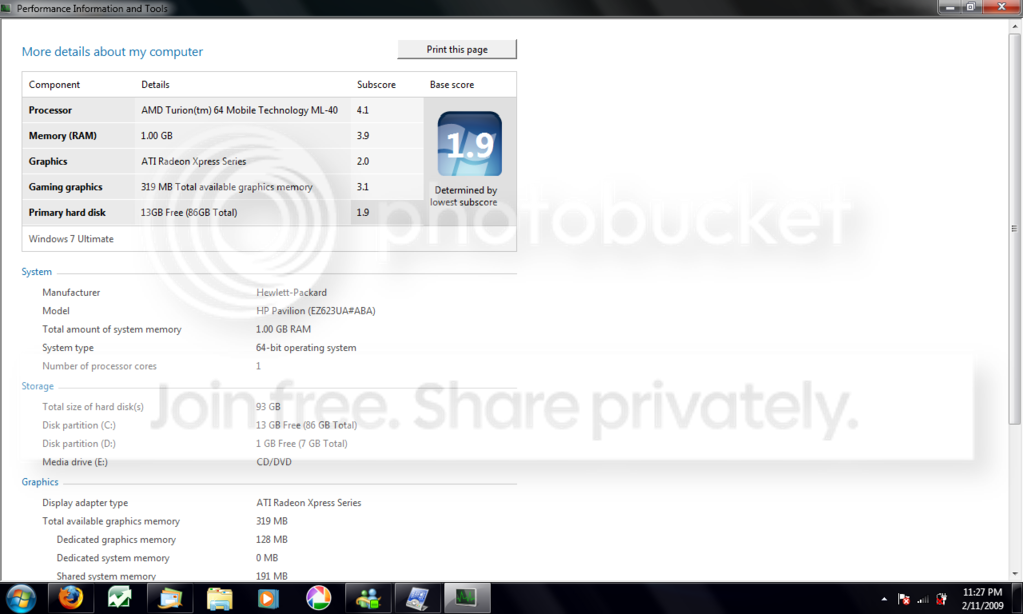
Thats my 3yo laptop. I dunno know why my HD gets such a bad rating. O well, but I run everything maxed out in the settings and no hickups on x64. It runs faster then x86 XP Pro.
 

My Computer

OS
windows 7
I've been running Win7 on my home threatre pc and more recently my desktop, and I've been thinking of installing it on my old laptop. It's a Fujitsu Lifebook and I'm not sure if I should. It's a 1.7ghz AMD Athlon XP 2200+, 512mb RAM shared with an onboard ATI Radeon EGP 320M (currently using 16MB.

Do you think it would run alright? Especially with Aero (I doubt it would let me but I guess I could force it to test it out). It's currently running XP pretty sluggishly, and I thought Windows 7 might be a slight improvement but I'm not sure. It couldn't run any worse than it does not (I hope).
 

My Computer

OS
Windows 7
I've installed Win7 on my laptop, 1.6GHz Pentium M, 1GB ram, Intel 855 chipset, 4200 rpm HD.

I think it is slower with Windows 7 compared to a fresh Windows XP installation. But I'm not sure. Aero doesn't work. When the laptop is started, it runs fine, but my hard drive work hard on start-up.

Using hibernation helps a lot for start-up time.
 

My Computer

OS
Win7 64 bits FR
CPU
2500K @ 4.5 GHz
Motherboard
Asrock Z68 Gen3 Extreme3
Memory
4x4GB 1600MHz GSkill CL9.
Graphics Card(s)
HD6850 Powercolor stock
Sound Card
Integrated
Monitor(s) Displays
Samsung 2343 + Dell 20in 4/3
Screen Resolution
2048x1152, 1600x1200
Hard Drives
OCZ Vertex LE SSD, 50GB
OCZ Solid 3 120GB
OCZ Vertex 2 240GB
Western Digital Scorpio 320GB 5400 rpm
PSU
KingWin Lazer Platinum (90+) 550Watts
Case
HAF912
Cooling
CPU: OCZ Vendetta 2
Keyboard
MX5500 revolution bluetooth
Mouse
MX5500 revolution bluetooth
Internet Speed
Cable 7 Mbps
Actually, on my Thinkpad, I've noticed it run things alot faster and my download times have increased from around 500KB/sec per site to around 1.5MB/sec. Not to mention it seems to run more fluid, especially when you install and run a bunch of programs.

This is where I was experiencing the limitations of XP. The more programs I run, the slower it got. I had a gig of memory free and was still slowing down.

After I switched to Win7, I haven't had those problems since. Sure, I don't have Aero on most of my systems, but who cares. I prefer stability than eye candy anyday.

Oh, and Rusty, I have Win7 running on a Latitude C610 ([email protected], 1GB RAM, 40GB HDD, 16MB Radeon). No problems here and it runs really good.
 

My Computer

Computer Manufacturer/Model Number
IBM ThinkCentre M50 / IBM ThinkPad R40
OS
Windows 7 (Build 7600-16385)
CPU
Intel Pentium 4 HT @ 3.2GHz 1MB Cache / Pentium-M @ 1.6GHz
Memory
2GB PC3200 / 2GB PC2700
Graphics Card(s)
nVidia GeForce 6800 256MB / ATI Radeon 7500 32MB
Sound Card
SB Audigy 2 / Onboard
Monitor(s) Displays
Dual 21" CRTs / 15" LCD
Screen Resolution
1600x1200 / 1400x1050
Hard Drives
ThinkCentre: 2x 1TB SATA HDDs
ThinkPad: 80GB PATA HDD
Internet Speed
Bresnan: 15mb UL/1mb DL
x40 laptop

Dual booting XP & Win7 x86 on an IBM/Lenovo x40.
Pentium M, 1.4 Ghz
1.25 GB Ram
Index is 1.0 (hehe)

I LOVE IT ! ! !
It's just as snappy as XP, if not a litttle more so.
IE 8 is a winner too. (ditched IE7 after a week of testing.)
 

My Computer

Computer Manufacturer/Model Number
Bumpus Did it!
OS
WIN7
CPU
Intel i7 920
Motherboard
Gigabyte EX58-UDR
Memory
6GB DDR3 Triple Channel
Graphics Card(s)
Nvidia 250 GTS
Sound Card
Realtek onboard
Monitor(s) Displays
Samsung 192n & 204b
Hard Drives
37gb WD Velociraptors (2) Raid 1 -
Seagate SATAII 1 tb -
WD SATAII 1tb -
WD SATAII Green 1.5tb
PSU
OCZ ModXStream Pro 600W
Case
Lian-Li V1000
Cooling
3 x 120mm
Keyboard
crap
Mouse
MS Intelimouse
Internet Speed
Uverse 12mbps
Other Info
TV (via Slingbox), Data backup & game box.

Hope it never blows up ;)
Actually, on my Thinkpad, I've noticed it run things alot faster and my download times have increased from around 500KB/sec per site to around 1.5MB/sec. Not to mention it seems to run more fluid, especially when you install and run a bunch of programs.

This is where I was experiencing the limitations of XP. The more programs I run, the slower it got. I had a gig of memory free and was still slowing down.

After I switched to Win7, I haven't had those problems since. Sure, I don't have Aero on most of my systems, but who cares. I prefer stability than eye candy anyday.

Oh, and Rusty, I have Win7 running on a Latitude C610 ([email protected], 1GB RAM, 40GB HDD, 16MB Radeon). No problems here and it runs really good.
Ah thanks. It's a school laptop and I mainly use it for work and what not, but it takes its time even doing the simplest of tasks. I think I will chuck WIN7 on there. How would it operate with forced Aero (I heard you can do this)?
 

My Computer

OS
Windows 7
Here's mine on a P4 machine with 512MB of RAM. It runs fine. I am trying 32 bit on it right now. It seems to run better with 32 bit for some reason.

View attachment 10317
 
Last edited:

My Computer

Computer Manufacturer/Model Number
Keeps changing - (Custom)
OS
Windows 7 Professional x64
CPU
Intel Core i7 860
Motherboard
Gigabyte GA-P55-UD4P
Memory
4GB DDR3 Mushkin 1600Mhz @ 7-8-7-20
Graphics Card(s)
MSI GTS250 1GB DDR3 Twin Frozr
Sound Card
Onboard realtek
Monitor(s) Displays
Samsung SyncMaster 24" P2450 + Samsung 20" 2033
Screen Resolution
1920 X 1080 and 1600 X 900 (#2 system 1440 X 900)
Hard Drives
Patriot Inferno 120GB SSD + 3 WD Blue 640GB drives
PSU
Corsair 750 HX Modular
Case
Lancool PC-K62
Cooling
Cooler Master TX3 CPU cooler and 4-140mm and 1-120mm case
Keyboard
Gigabyte USB keyboard
Mouse
Microsoft wireless laser mouse 5000
Internet Speed
7 Mb down 1.5 up
Other Info
System #2: AMD Phenom II X6 1055T (Freezer 7 Pro cooler) - Gigabyte 880GMA-UD2H - WD 500GB Black - 9500GT (1GB) 500W OCZ modular PSU - Antec 200 case. System #3 (LapTop) Core 2 Duo T6670 - 320GB 7200RPM HD - 4GB DDR3 RAM.
Ah thanks. It's a school laptop and I mainly use it for work and what not, but it takes its time even doing the simplest of tasks. I think I will chuck WIN7 on there. How would it operate with forced Aero (I heard you can do this)?


How can you "force" Aero???
 

My Computer

OS
Win7 64 bits FR
CPU
2500K @ 4.5 GHz
Motherboard
Asrock Z68 Gen3 Extreme3
Memory
4x4GB 1600MHz GSkill CL9.
Graphics Card(s)
HD6850 Powercolor stock
Sound Card
Integrated
Monitor(s) Displays
Samsung 2343 + Dell 20in 4/3
Screen Resolution
2048x1152, 1600x1200
Hard Drives
OCZ Vertex LE SSD, 50GB
OCZ Solid 3 120GB
OCZ Vertex 2 240GB
Western Digital Scorpio 320GB 5400 rpm
PSU
KingWin Lazer Platinum (90+) 550Watts
Case
HAF912
Cooling
CPU: OCZ Vendetta 2
Keyboard
MX5500 revolution bluetooth
Mouse
MX5500 revolution bluetooth
Internet Speed
Cable 7 Mbps
How can you "force" Aero???
I was wondering that same question. I know you can do it with early betas of Vista, but I doubt it with 7.
 

My Computer

Computer Manufacturer/Model Number
IBM ThinkCentre M50 / IBM ThinkPad R40
OS
Windows 7 (Build 7600-16385)
CPU
Intel Pentium 4 HT @ 3.2GHz 1MB Cache / Pentium-M @ 1.6GHz
Memory
2GB PC3200 / 2GB PC2700
Graphics Card(s)
nVidia GeForce 6800 256MB / ATI Radeon 7500 32MB
Sound Card
SB Audigy 2 / Onboard
Monitor(s) Displays
Dual 21" CRTs / 15" LCD
Screen Resolution
1600x1200 / 1400x1050
Hard Drives
ThinkCentre: 2x 1TB SATA HDDs
ThinkPad: 80GB PATA HDD
Internet Speed
Bresnan: 15mb UL/1mb DL
I was wondering that same question. I know you can do it with early betas of Vista, but I doubt it with 7.
You can't do it anymore. I researched this extensively to see if I can force it on my i915 chipset.
If the video card doesn't have the "hardware scheduler" feature, it just won't work unless somebody manages to hack Windows system files to disable that requirement (which at least one person is already trying to do, but the outlook is bleak).
Hardware scheduler apparently allows it to multi-process desktop effects with other video acceleration more efficiently, although Aero does seem to work just fine on the 915 video chip judging by the early Vista betas I used to have.
 

My Computer

Computer Manufacturer/Model Number
custom build
OS
Windows 7 Ultimate x64
CPU
AMD Athlon II X2 240 @ 2.8 GHz
Motherboard
Gigabyte GA-MA78LM-S2H rev 1.1
Memory
2*2GB OCZ 1066MHz DDR2
Graphics Card(s)
nVidia GeForce 9400 GT 1GB (overclocked 725/1725/500 MHz)
Sound Card
Onboard Realtek HD Audio
Monitor(s) Displays
23" LG Flatron E2350V, 14" hp pavilion f1503 display
Screen Resolution
1920*1080, 1024*768
Hard Drives
1TB 7200RPM WD SATA (Black)
320GB 7200RPM WD ATA
250GB 7200RPM WD ATA
PSU
Earthwatts 500W 80plus
Case
Antec Sonata III
Cooling
stock
Keyboard
Logitech Cordless Desktop Wave
Mouse
Logitech Cordless Desktop Wave
Internet Speed
7Mbps/512Kbps ADSL
You can't do it anymore. I researched this extensively to see if I can force it on my i915 chipset.
If the video card doesn't have the "hardware scheduler" feature, it just won't work unless somebody manages to hack Windows system files to disable that requirement (which at least one person is already trying to do, but the outlook is bleak).
Hardware scheduler apparently allows it to multi-process desktop effects with other video acceleration more efficiently, although Aero does seem to work just fine on the 915 video chip judging by the early Vista betas I used to have.

Oh thank you for the information, I won't spend more time on this.
 

My Computer

OS
Win7 64 bits FR
CPU
2500K @ 4.5 GHz
Motherboard
Asrock Z68 Gen3 Extreme3
Memory
4x4GB 1600MHz GSkill CL9.
Graphics Card(s)
HD6850 Powercolor stock
Sound Card
Integrated
Monitor(s) Displays
Samsung 2343 + Dell 20in 4/3
Screen Resolution
2048x1152, 1600x1200
Hard Drives
OCZ Vertex LE SSD, 50GB
OCZ Solid 3 120GB
OCZ Vertex 2 240GB
Western Digital Scorpio 320GB 5400 rpm
PSU
KingWin Lazer Platinum (90+) 550Watts
Case
HAF912
Cooling
CPU: OCZ Vendetta 2
Keyboard
MX5500 revolution bluetooth
Mouse
MX5500 revolution bluetooth
Internet Speed
Cable 7 Mbps
Back
Top