Windows 7 on OLD computers

Darryl Licht, :thumbsup:

Welcome to The Dinosaurs Club :geek:


We have No Meetings or Badges, but we sure surprise users

with our installations !


" Doc "

Dinosaur... well after 15 years in the industry, I do feel like a dino at times! Still good with a DOS prompt and sometimes it comes in real handy!

I must update regarding performing windows updates on this old baby... I'm on my 3rd windows update (these are going a tad on the slow side). My 2nd update failed at last 2 of the 7 files. <-- but 1 was an IE update, and I had mistakenly left ie open... so I think the cause of that update failure was in fact a loose nut behind the keyboard!(d)

BTW--- I LOVE UR AVATAR DOC! BIG BTTF FAN!
 

My Computer

Computer Manufacturer/Model Number
Homebrew PC - "Alpha_Dawg"
OS
Windows 7 Ultimate 64 bit Steve Ballmer Signature Edition
CPU
Intel Core 2 Quad - Q9550 - 2.83GHz stock - OC'd to 3.6GHz
Motherboard
Gigabyte EP45-UD3P
Memory
4GB DDR2 800MHz (PC6400) OCZ Reaper
Graphics Card(s)
Nvidia GE Force 8800 GTS
Sound Card
Asus Xonar DX
Monitor(s) Displays
Samsung SyncMaster 2333HD
Screen Resolution
1920 x 1080
Hard Drives
WD Caviar Black 750GB - 7200RPM - 32MB cache
WD Caviar Green 1.5TB - 5400RPM - 64MB cache
WD Caviar Green 2.0TB - 5400RPM - 64MB cache
PSU
PC Power & Cooling Silencer 750
Case
Gigabyte 3D Aurora
Cooling
Case is Air - 5ea. 120mm fans (mix of Arctic and Xigmatec)
Keyboard
MS Natural Wireless KB
Mouse
MS Wireless Mouse
Internet Speed
50 mbps down/5 mbps up
Other Info
AVerMedia - AVerTVHD G2 Dual Tuner Card
I put RC1 on a Compaq laptop with 500 mhz cpu, 256 ram and a 40 gig hard drive. No clue what the video puts out but it did run pretty good...as good as the Pro 2000 that was on the original drive. It died though. Froze up and even after putting in the old drive with Win 2000 it would just freeze.
Gave it a good burial-double barrel from 5 yards but I did save the drive, dvd and the memory.
 

My Computer

Computer Manufacturer/Model Number
dell 8300
OS
Windows 7 Home Premium Family Pack now on two machines one more to go
CPU
3 ghz pentium 4
Motherboard
dell
Memory
2 gig
Graphics Card(s)
ati hd3650 agp
Sound Card
onboard
Monitor(s) Displays
dell
This is more practical than my dinosaur project...

Doc: You have inspired me to post some more results on old PC's!

This is an older project and much more practical from a cost/benefit standpoint... not to mention what many people who may be contemplating an upgrade to Win 7, may currently own.

The system is a Dell Dimension 4600 that was actually rescued from a dumpster at an apartment building a friend of mine moved into! It (computer... not friend) now lives in my garage on my workbench!

You may ask yourself why would someone throw away a perfectly good PC? Answer... YES! ....it had a virus!

I think I will call it T-Wrex! :geek:

Its sooo much smooter than XP, and this is a system that would not run Vista!

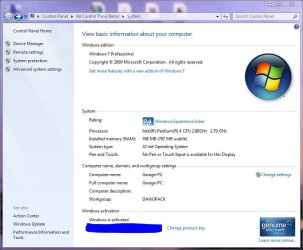
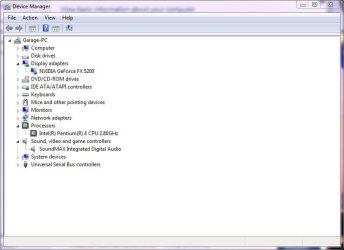
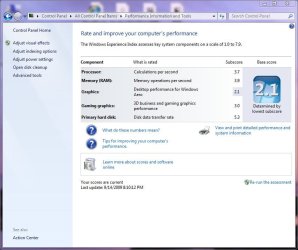
It has a P4 2.8GHz, and only 768MB of RAM. It too has a FX-5200 video card that runs aero perfectly! Add 2-4GB of RAM, and perhaps a larger HDD and this thing will really rock!
 

Attachments

  • Garage_PC_1.JPG
    Garage_PC_1.JPG
    68.7 KB · Views: 162
  • Garage_PC_2.JPG
    Garage_PC_2.JPG
    41.5 KB · Views: 79
  • Garage_PC_3.JPG
    Garage_PC_3.JPG
    69.6 KB · Views: 116
  • Garage_PC_4.JPG
    Garage_PC_4.JPG
    166.9 KB · Views: 163

My Computer

Computer Manufacturer/Model Number
Homebrew PC - "Alpha_Dawg"
OS
Windows 7 Ultimate 64 bit Steve Ballmer Signature Edition
CPU
Intel Core 2 Quad - Q9550 - 2.83GHz stock - OC'd to 3.6GHz
Motherboard
Gigabyte EP45-UD3P
Memory
4GB DDR2 800MHz (PC6400) OCZ Reaper
Graphics Card(s)
Nvidia GE Force 8800 GTS
Sound Card
Asus Xonar DX
Monitor(s) Displays
Samsung SyncMaster 2333HD
Screen Resolution
1920 x 1080
Hard Drives
WD Caviar Black 750GB - 7200RPM - 32MB cache
WD Caviar Green 1.5TB - 5400RPM - 64MB cache
WD Caviar Green 2.0TB - 5400RPM - 64MB cache
PSU
PC Power & Cooling Silencer 750
Case
Gigabyte 3D Aurora
Cooling
Case is Air - 5ea. 120mm fans (mix of Arctic and Xigmatec)
Keyboard
MS Natural Wireless KB
Mouse
MS Wireless Mouse
Internet Speed
50 mbps down/5 mbps up
Other Info
AVerMedia - AVerTVHD G2 Dual Tuner Card
For sheer ENTERTAINMENT VALUE:

BUMP.

(so all the Forum Newbies can appreciate the Skillz of those in this thread--the sheer inability to throw away outdated and obsolete hardware)

Note Also the SHEER WASTE of time involved.

I am still laughing
 

My Computer

Computer Manufacturer/Model Number
Custom Built and Maintained...by Me
OS
Windows 7 Ultimate x64
CPU
AMD Phenome x4 965 Black Ed (Lovingly OverClocked.a tad)
Motherboard
Gigabyte GA 890GPA-UD3H
Memory
6 Gb (3 x 2 Gb GSKILL 16000CL9 )
Graphics Card(s)
ASUS EAH5850/2DIS/1GD5 Radeon HD 5850 1GB
Sound Card
Creative SB X-Fi
Monitor(s) Displays
Dual 24" Samsung Wide-Sceens
Screen Resolution
Good Enough.
Hard Drives
5x SATA Seagates (in assorted sizes, shapes, and colors--Variety is the spice of Life)
PSU
790 Watt Enermax Modular
Case
Lian-Li Black Mesh (Love that Mesh !!)
Cooling
Pure Air Baby..Flowin Freely
Keyboard
Microsoft 4000 Natural Ergonomic
Mouse
Multiple Logitech Laser mice....each has its specific use
Internet Speed
Not Fast Enough, it's probably never going to be fast enough
Other Info
This Computer building crap started out years ago as a simple hobby..that has now gotten completely out of hand !!
(It does come in handy though, when everyone in the family wants their own computer)
For sheer ENTERTAINMENT VALUE:

BUMP.

(so all the Forum Newbies can appreciate the Skillz of those in this thread--the sheer inability to throw away outdated and obsolete hardware)

Note Also the SHEER WASTE of time involved.

I am still laughing

Laugh away Daffy!

It wasnt a sheer waste of time as you put it... It took me 3 mins to boot and use a USB with Win7 install files on it. I started the install, took care of other business, came back an hour or so later and wala... finished!

Laugh all you want, but this forum is to show techies, noobs, whomever... that Win7 will install on much older equipment than Vista ever thought about! And run better than XP on most equipment!

This is the first OS Microsoft has ever put out which actually LOWERED the Hardware requirements over the previous OS.... so many of us want to see how "low can we go"! REMEMBER not everyone can go out and buy or build a new PC everytime MS puts out a new OS!


Lastly, as to your "sheer inability to throw away outdated and obsolete hardware" comment: This server went out of service 2.5 years ago, it was a champ for 8 years; and frankly wasnt worth anything to anyone except me the builder/owner! If you've got it flaunt it! LOL!
:roflmao:

In the future, if you dont have anything constructive to say, or relevant to the threads topic, please move on!
 

My Computer

Computer Manufacturer/Model Number
Homebrew PC - "Alpha_Dawg"
OS
Windows 7 Ultimate 64 bit Steve Ballmer Signature Edition
CPU
Intel Core 2 Quad - Q9550 - 2.83GHz stock - OC'd to 3.6GHz
Motherboard
Gigabyte EP45-UD3P
Memory
4GB DDR2 800MHz (PC6400) OCZ Reaper
Graphics Card(s)
Nvidia GE Force 8800 GTS
Sound Card
Asus Xonar DX
Monitor(s) Displays
Samsung SyncMaster 2333HD
Screen Resolution
1920 x 1080
Hard Drives
WD Caviar Black 750GB - 7200RPM - 32MB cache
WD Caviar Green 1.5TB - 5400RPM - 64MB cache
WD Caviar Green 2.0TB - 5400RPM - 64MB cache
PSU
PC Power & Cooling Silencer 750
Case
Gigabyte 3D Aurora
Cooling
Case is Air - 5ea. 120mm fans (mix of Arctic and Xigmatec)
Keyboard
MS Natural Wireless KB
Mouse
MS Wireless Mouse
Internet Speed
50 mbps down/5 mbps up
Other Info
AVerMedia - AVerTVHD G2 Dual Tuner Card
Oh Dear, You COMPLETELY Misunderstood me Mr Licht !!!
(or perhaps I was a little too obscure in my poor attempt at humor).

1. I, myself, have ridiculous amounts of "old hardware" clutting up my Closets and Garage. (my long-suffering wife will attest to that!!)
2. I was JOKING about the amount of time (me included) that we "use up" doing such things..just to see if they are possible...even though they might not have a long term practical use. (cmon...Window 7 on a P-II with <1 Gig of memory???? may work but not very quickly).
3. I applaud such INVENTIVENESS.

as far as:

In the future, if you dont have anything constructive to say, or relevant to the threads topic, please move on!

I would not have BUMPED this thread (for all to thoroughly enjoy) if I did not think it worthwhile.

Sorry if I was misunderstood, I will, in the future, try to avoid such misunderstanding.

...Unfortunately My Boss (Wife) has given me a Ultimatum (call it a deadline of sorts) to CLEAN out all that "old computer crap (her words, not mine)...or else.... so my days of enjoying the really, really old hardware are numbered---cause I know where my 'bread is buttered".


My Computer

Computer Manufacturer/Model Number
Custom Built and Maintained...by Me
OS
Windows 7 Ultimate x64
CPU
AMD Phenome x4 965 Black Ed (Lovingly OverClocked.a tad)
Motherboard
Gigabyte GA 890GPA-UD3H
Memory
6 Gb (3 x 2 Gb GSKILL 16000CL9 )
Graphics Card(s)
ASUS EAH5850/2DIS/1GD5 Radeon HD 5850 1GB
Sound Card
Creative SB X-Fi
Monitor(s) Displays
Dual 24" Samsung Wide-Sceens
Screen Resolution
Good Enough.
Hard Drives
5x SATA Seagates (in assorted sizes, shapes, and colors--Variety is the spice of Life)
PSU
790 Watt Enermax Modular
Case
Lian-Li Black Mesh (Love that Mesh !!)
Cooling
Pure Air Baby..Flowin Freely
Keyboard
Microsoft 4000 Natural Ergonomic
Mouse
Multiple Logitech Laser mice....each has its specific use
Internet Speed
Not Fast Enough, it's probably never going to be fast enough
Other Info
This Computer building crap started out years ago as a simple hobby..that has now gotten completely out of hand !!
(It does come in handy though, when everyone in the family wants their own computer)
LP:

That's a downside of written only communication in the digital age, yes I thought you were attacking all of us who loaded Win7 on dinosaurs! We dont get to see each others sarcastic expressions! :sarc:

I too have my own boss (wife v2.0) and I had to throw out my original IBM PC/AT and several AT lunchbox PC's years ago... It was tuff on me but they were all slow at DOS & Win3.x and I needed the space!

Glad we cleared that up... :p

WHO'S NEXT IN THE DINO CLUB???
 

My Computer

Computer Manufacturer/Model Number
Homebrew PC - "Alpha_Dawg"
OS
Windows 7 Ultimate 64 bit Steve Ballmer Signature Edition
CPU
Intel Core 2 Quad - Q9550 - 2.83GHz stock - OC'd to 3.6GHz
Motherboard
Gigabyte EP45-UD3P
Memory
4GB DDR2 800MHz (PC6400) OCZ Reaper
Graphics Card(s)
Nvidia GE Force 8800 GTS
Sound Card
Asus Xonar DX
Monitor(s) Displays
Samsung SyncMaster 2333HD
Screen Resolution
1920 x 1080
Hard Drives
WD Caviar Black 750GB - 7200RPM - 32MB cache
WD Caviar Green 1.5TB - 5400RPM - 64MB cache
WD Caviar Green 2.0TB - 5400RPM - 64MB cache
PSU
PC Power & Cooling Silencer 750
Case
Gigabyte 3D Aurora
Cooling
Case is Air - 5ea. 120mm fans (mix of Arctic and Xigmatec)
Keyboard
MS Natural Wireless KB
Mouse
MS Wireless Mouse
Internet Speed
50 mbps down/5 mbps up
Other Info
AVerMedia - AVerTVHD G2 Dual Tuner Card
@gforce23


Did you do anything out of the ordinary to install W7 on your A7N266-VM board? When I ran the Compatibility app it showed the "NVIDIA nForce PCI System Management" as not compatible. I'm not entirely sure what it does, but it looked like a deal-breaker to me.
 

My Computer

Computer Manufacturer/Model Number
Home brew
OS
xp pro
CPU
athlon 2500xp
Motherboard
Asus A7N266-VM
Memory
1GB Crucial PC3200
Graphics Card(s)
ATI Radeon 9600xt 256MB
Sound Card
Sound Blaster Audigy
Monitor(s) Displays
CTX Ultra crt
Screen Resolution
1280x960 @ 85hz
Hard Drives
old, old 20GB WD
PSU
Cheapo 220W
Case
Unknown
Cooling
CPU and PSU fans only
Keyboard
wired standard
Mouse
wired ordinary
Internet Speed
9300kbps actual throughput
As a follow-up to the previous post:

I went ahead and installed W7 on my A7N266-VM board and it works with no problem at all. The NVIDIA nForce PCI System Management whatsit didn't work as predicted, but it made no difference to the installation or the functioning of the computer.

W7 has given the old machine a new lease of life. Good result.
 

My Computer

Computer Manufacturer/Model Number
Home brew
OS
xp pro
CPU
athlon 2500xp
Motherboard
Asus A7N266-VM
Memory
1GB Crucial PC3200
Graphics Card(s)
ATI Radeon 9600xt 256MB
Sound Card
Sound Blaster Audigy
Monitor(s) Displays
CTX Ultra crt
Screen Resolution
1280x960 @ 85hz
Hard Drives
old, old 20GB WD
PSU
Cheapo 220W
Case
Unknown
Cooling
CPU and PSU fans only
Keyboard
wired standard
Mouse
wired ordinary
Internet Speed
9300kbps actual throughput
As a follow-up to the previous post:

I went ahead and installed W7 on my A7N266-VM board and it works with no problem at all. The NVIDIA nForce PCI System Management whatsit didn't work as predicted, but it made no difference to the installation or the functioning of the computer.

W7 has given the old machine a new lease of life. Good result.


:thumbsup: Nice going Sammy Noote :thumbsup:


" Doc "
 

Attachments

  • Doc_in_deep_Thought.JPG
    Doc_in_deep_Thought.JPG
    18.7 KB · Views: 14

My Computer

Computer type
PC/Desktop
Computer Manufacturer/Model Number
Built them myself, Science Experiments !
OS
Win7 Enterprise, Win7 x86 (Ult 7600), Win7 x64 Ult 7600, TechNet RTM on AMD x64 (2.8Ghz)
CPU
AMD fx8350 4ghz, AMD-32 2400mhz, AMD-64 3200mhz, AMDx64 2.8G
Motherboard
SIS 755, ECS-K8M890M-M (Ult 7600), GigaByte & others
Memory
2gb, 4gb on the Ult 7600, 4gb on Technet RTM, 32gb on FX8350
Graphics Card(s)
Draw my own Graphics, several nVidia cards
Sound Card
on motherboard
Monitor(s) Displays
19" flat scr, 28" I-Inc widescr,22" Emprex Widescr, 23" Acer
Screen Resolution
1280 x 1024, 1440 x 900, 1920 x 1080
Hard Drives
6 pata Ide HD's & 2 Sata HD's
added 80gb external on Ult 7600 computer,
numerous extra 1tb, 2TB, 3Tb SATA HD's
A collection of ext HD Docks w/ HDs
PSU
430w, 550w, 600w, 700, 800, etc
Case
All Generic Full Towers
Cooling
Open Air & a few fans, some w/ colored LEDs
Keyboard
Compaq & Dell recycled from GoodWill
Mouse
Made in China Optical Wired Mouse
Internet Speed
Fast Cable InterNet
Antivirus
AVG Free on 24 different Desktops, NO Problems!
Browser
IE 8 is preferred, but use FireFox sometimes
Other Info
Linksys Routers, switches, & Hubs
Too Many USB Flash Drives to count, Biggest is 64GB !
Eight computers in my home network.
Sixteen computers at my business network.
Linked via TeamViewer !
Lots of old used spare computer parts everywhere!
As a follow-up to the previous post:

I went ahead and installed W7 on my A7N266-VM board and it works with no problem at all. The NVIDIA nForce PCI System Management whatsit didn't work as predicted, but it made no difference to the installation or the functioning of the computer.

W7 has given the old machine a new lease of life. Good result.

:geek: Sammy:

From your specs looks like you might want to throw a lil RAM in the old gal and keep her around a while longer!

Are you running Aero?

Whats your WEI? <--- Please post!
 

My Computer

Computer Manufacturer/Model Number
Homebrew PC - "Alpha_Dawg"
OS
Windows 7 Ultimate 64 bit Steve Ballmer Signature Edition
CPU
Intel Core 2 Quad - Q9550 - 2.83GHz stock - OC'd to 3.6GHz
Motherboard
Gigabyte EP45-UD3P
Memory
4GB DDR2 800MHz (PC6400) OCZ Reaper
Graphics Card(s)
Nvidia GE Force 8800 GTS
Sound Card
Asus Xonar DX
Monitor(s) Displays
Samsung SyncMaster 2333HD
Screen Resolution
1920 x 1080
Hard Drives
WD Caviar Black 750GB - 7200RPM - 32MB cache
WD Caviar Green 1.5TB - 5400RPM - 64MB cache
WD Caviar Green 2.0TB - 5400RPM - 64MB cache
PSU
PC Power & Cooling Silencer 750
Case
Gigabyte 3D Aurora
Cooling
Case is Air - 5ea. 120mm fans (mix of Arctic and Xigmatec)
Keyboard
MS Natural Wireless KB
Mouse
MS Wireless Mouse
Internet Speed
50 mbps down/5 mbps up
Other Info
AVerMedia - AVerTVHD G2 Dual Tuner Card
I just installed Win 7 Ultimate on my old P4 3.0 HT pentium board with 1GB memory and a 160GB harddrive. I built this machine 8 years ago.

It's like having a new lease on life for my old P4 machines.

I did have to clear the cmos twice with the jumper in order to get Windows 7 to install to my old P4 machine. Everything was going very slowly for some reason. After I cleared the cmos the installation went flawlessly.

This seems to be a recurring problem when ever I install Windows 7 on a machine that once had XP or Vista on it. The same thing has happend on 4 completely different machines so far, on both notebook's and pc's using different media.
It only seems to be a problem on the very first installation.

I'll post my WEI for this old P4 machine later.

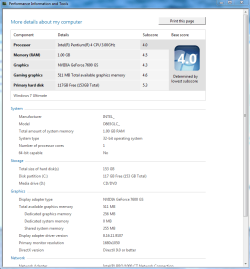
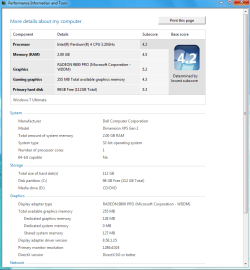
Ok I ran it on both my P4 machines. This one recieved a 4.0 and my old Dell P4 recieved a 4.2. Running flawlessly on both machines as of today. I also found some decent drivers for the old audigy 2 ZS sound cards also from Daniel K but had to torrent them.
 

Attachments

  • Detail 4.0 P4 robs.PNG
    Detail 4.0 P4 robs.PNG
    29.8 KB · Views: 121
  • 4.2 Dell wei 3,2.PNG
    4.2 Dell wei 3,2.PNG
    28.3 KB · Views: 98
Last edited:

My Computer

Computer type
PC/Desktop
Computer Manufacturer/Model Number
Home built
OS
Windows 7 Ult, Windows 8.1 Pro,
CPU
Q9650-4.275GHz, E8600 4.5GHz, E6750-3.8GHz
Motherboard
Evga 780i FTW
Memory
G.Skill PC2 9600 1200Mhz 5 5 5 15 2T
Graphics Card(s)
GTX480
Sound Card
Asus Xonar D2
Monitor(s) Displays
HannsG
Screen Resolution
1680X1050
Hard Drives
GSkill Phoenix Pro 120GB SSD
PSU
ThermalTake Toughpower 1000Watt modular
Case
ThermalTake XaserV
Cooling
Xigmatek S1283
Keyboard
Logitech G15
Mouse
Logitech G9
Internet Speed
T1
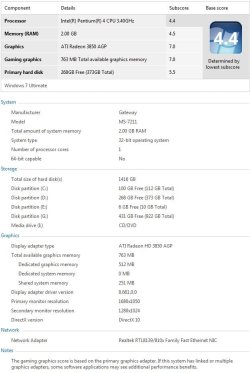
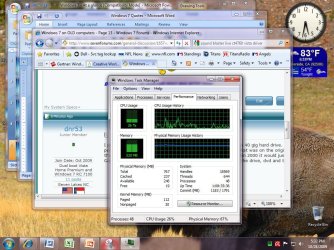
My P4 still kicking strong, no doubt. I have another P4 1.5 GHz non-hyperthreading running Windows 7 with current uptime like 14 days or so.
 

Attachments

  • Capture.JPG
    Capture.JPG
    63.3 KB · Views: 71
  • Untitled2.jpg
    Untitled2.jpg
    69.6 KB · Views: 116

My Computer

Computer Manufacturer/Model Number
self built
OS
7600.20510 x86
CPU
P4 550 3.4 GHz HT running at 3.5 GHz
Motherboard
MSI PM8M3-V (MS-7211 v1.x) Micro-ATX mainboard
Memory
OCZ 2 GB(2x1GB) DDR400mHz running @ 414 mHz
Graphics Card(s)
HIS Radeon HD 3850 IceQ 3 Turbo HDMI Dual DL-DVI AGP
Sound Card
MOTU Traveler firewire studio interface 192 kHz 24 bit
Monitor(s) Displays
22" widescreen Acer X223W LCD, 17" Compaq P75 CRT
Screen Resolution
1680x1050 and 1280x1024
Hard Drives
SATA I x2 WD, 400 GB and 120 GB, SATA 2 WD Caviar Black 1 TB
PSU
350W generic
Case
Cybertronpc, it glows blue
Cooling
stock cpu fan, Ice-Q 3 gpu and system, many case fans
Keyboard
Logitch Classical Keyboard 200
Mouse
Logitech Mediaplay cordless
Internet Speed
1792/448 kbits/sec
Other Info
SATA II PCI fake RAID adapter, 1 GB Readyboost, original ATI Remote Wonder (even works with WMC perfectly), Logitech Rumblepad 2 game controller x2
I just installed Win 7 Ultimate on my old P4 3.0 HT pentium board with 1GB memory and a 160GB harddrive. I built this machine 8 years ago.

It's like having a new lease on life for my old P4 machine.

I did have to clear the cmos twice with the jumper in order to get Windows 7 to install to my old P4 machine. Everything was going very slowly for some reason. After I cleared the cmos the installation went flawlessly.

This seems to be a recurring problem when ever I install Windows 7 on a machine that once had XP or Vista on it. The same thing has happend on 4 completely different machines so far, on both notebook's and pc's using different media.
It only seems to be a problem on the very first installation.

I'll post my WEI for this old P4 machine later.

I havent had to do that on an machine! Hmmmm only thing I did was check to see if BIOS was latest version and it was in all but one case!
 

My Computer

Computer Manufacturer/Model Number
Homebrew PC - "Alpha_Dawg"
OS
Windows 7 Ultimate 64 bit Steve Ballmer Signature Edition
CPU
Intel Core 2 Quad - Q9550 - 2.83GHz stock - OC'd to 3.6GHz
Motherboard
Gigabyte EP45-UD3P
Memory
4GB DDR2 800MHz (PC6400) OCZ Reaper
Graphics Card(s)
Nvidia GE Force 8800 GTS
Sound Card
Asus Xonar DX
Monitor(s) Displays
Samsung SyncMaster 2333HD
Screen Resolution
1920 x 1080
Hard Drives
WD Caviar Black 750GB - 7200RPM - 32MB cache
WD Caviar Green 1.5TB - 5400RPM - 64MB cache
WD Caviar Green 2.0TB - 5400RPM - 64MB cache
PSU
PC Power & Cooling Silencer 750
Case
Gigabyte 3D Aurora
Cooling
Case is Air - 5ea. 120mm fans (mix of Arctic and Xigmatec)
Keyboard
MS Natural Wireless KB
Mouse
MS Wireless Mouse
Internet Speed
50 mbps down/5 mbps up
Other Info
AVerMedia - AVerTVHD G2 Dual Tuner Card
I'm running win 7 pro on Dell D410 laptop. WEI is 1.0 but it runs fine.
 

My Computer

OS
Win 7
I just installed Win 7 Ultimate on my old P4 3.0 HT pentium board with 1GB memory and a 160GB harddrive. I built this machine 8 years ago.

It's like having a new lease on life for my old P4 machine.

I did have to clear the cmos twice with the jumper in order to get Windows 7 to install to my old P4 machine. Everything was going very slowly for some reason. After I cleared the cmos the installation went flawlessly.

This seems to be a recurring problem when ever I install Windows 7 on a machine that once had XP or Vista on it. The same thing has happend on 4 completely different machines so far, on both notebook's and pc's using different media.
It only seems to be a problem on the very first installation.

I'll post my WEI for this old P4 machine later.

I havent had to do that on an machine! Hmmmm only thing I did was check to see if BIOS was latest version and it was in all but one case!

This is the fourth machine that would not install Win 7 unless I cleared the cmos. And today I was getting stuck at expanding files on my old Dell machine which is a very common problem when I googled it.

I used a different CD and it magically installed. The very same CD worked on another machine.

Whats strange is that all machines were completely different and all used different CD's to install with. The good thing is that everything works flawlessly now that Win 7 is installed :cool:
 

My Computer

Computer type
PC/Desktop
Computer Manufacturer/Model Number
Home built
OS
Windows 7 Ult, Windows 8.1 Pro,
CPU
Q9650-4.275GHz, E8600 4.5GHz, E6750-3.8GHz
Motherboard
Evga 780i FTW
Memory
G.Skill PC2 9600 1200Mhz 5 5 5 15 2T
Graphics Card(s)
GTX480
Sound Card
Asus Xonar D2
Monitor(s) Displays
HannsG
Screen Resolution
1680X1050
Hard Drives
GSkill Phoenix Pro 120GB SSD
PSU
ThermalTake Toughpower 1000Watt modular
Case
ThermalTake XaserV
Cooling
Xigmatek S1283
Keyboard
Logitech G15
Mouse
Logitech G9
Internet Speed
T1

My Computer

Computer Manufacturer/Model Number
IBM Thinkpad T42p
OS
windows7 Professional
CPU
Pentium M
Memory
2 gig
Graphics Card(s)
FireGL T2
Sound Card
Sound Max
Monitor(s) Displays
onboard
Hard Drives
150g
Internet Speed
DSL
Darryl Licht said:
Sammy:

From your specs looks like you might want to throw a lil RAM in the old gal and keep her around a while longer!

Are you running Aero?

Whats your WEI? <--- Please post!
I'm afraid it'll only take 2X512MB of memory, so I'm already maxxed out. Yes, I'm running Aero - in fact, that was one of the attractions of Win7; it just looks so much better than XP. I picked up the Radeon 9600XT card on eBay for £18 ($30) just for that purpose. And I'd love to post the WEI, but it runs through its routine and finally tells me that there was a problem and it couldn't complete. I don't know what the culprit is, but I suspect the hard drive.

The WEI is, in fact, the only glitch I've had with this installation.
 

My Computer

Computer Manufacturer/Model Number
Home brew
OS
xp pro
CPU
athlon 2500xp
Motherboard
Asus A7N266-VM
Memory
1GB Crucial PC3200
Graphics Card(s)
ATI Radeon 9600xt 256MB
Sound Card
Sound Blaster Audigy
Monitor(s) Displays
CTX Ultra crt
Screen Resolution
1280x960 @ 85hz
Hard Drives
old, old 20GB WD
PSU
Cheapo 220W
Case
Unknown
Cooling
CPU and PSU fans only
Keyboard
wired standard
Mouse
wired ordinary
Internet Speed
9300kbps actual throughput
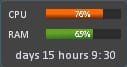
What's that gadget you're using torrentg, I have a similar but it doesn't give the uptime :P.
 

My Computer

Computer type
PC/Desktop
Computer Manufacturer/Model Number
Custom built Desktop(Myself) Specs below - Also Asus G53SW-A1 laptop
OS
Windows 10 Pro / OpenSUSE
CPU
Intel Core i7 4790K
Motherboard
Asus Z97-A
Memory
32GB DDR3
Graphics Card(s)
EVGA GTX 1070
Sound Card
OnBoard
Monitor(s) Displays
3 X 1080P 24" displays
Screen Resolution
1280x1050 & 1920x1080
Hard Drives
SSD: Crucial M500 128GB
HD 1: WD Caviar Black 1TB
HD 2: WD Caviar Black 2TB
HD 3: WD Caviar Blue 500GB
PSU
Corsair CX650M
Case
Corsair Obisidian 450D
Cooling
Noctua NH-D14
Keyboard
Corsair K70 Vengeance (blue switches)
Mouse
Logitech M500
Internet Speed
65/10
Antivirus
Kaskersky Internet Securty
Browser
Opera
It's mCPU Meter. It shows output by multicores/threads too. This screenshot I had it on there is only a P4 single core, single thread.

Still up!
 

Attachments

  • Untitled.jpg
    Untitled.jpg
    13.8 KB · Views: 697

My Computer

Computer Manufacturer/Model Number
self built
OS
7600.20510 x86
CPU
P4 550 3.4 GHz HT running at 3.5 GHz
Motherboard
MSI PM8M3-V (MS-7211 v1.x) Micro-ATX mainboard
Memory
OCZ 2 GB(2x1GB) DDR400mHz running @ 414 mHz
Graphics Card(s)
HIS Radeon HD 3850 IceQ 3 Turbo HDMI Dual DL-DVI AGP
Sound Card
MOTU Traveler firewire studio interface 192 kHz 24 bit
Monitor(s) Displays
22" widescreen Acer X223W LCD, 17" Compaq P75 CRT
Screen Resolution
1680x1050 and 1280x1024
Hard Drives
SATA I x2 WD, 400 GB and 120 GB, SATA 2 WD Caviar Black 1 TB
PSU
350W generic
Case
Cybertronpc, it glows blue
Cooling
stock cpu fan, Ice-Q 3 gpu and system, many case fans
Keyboard
Logitch Classical Keyboard 200
Mouse
Logitech Mediaplay cordless
Internet Speed
1792/448 kbits/sec
Other Info
SATA II PCI fake RAID adapter, 1 GB Readyboost, original ATI Remote Wonder (even works with WMC perfectly), Logitech Rumblepad 2 game controller x2
Back
Top