Solved Windows 7 paging file problems

Synthetic

New member
Local time
2:21 PM
Messages
6
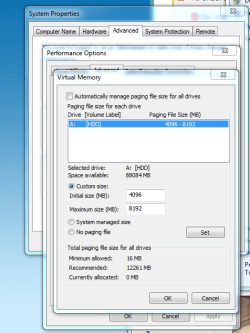
I have some sort of paging file issue on my win7x64 PC. I have 8GB ram and still getting the low memory error even when using very little ram. Paging file is set to 4GB min and 8GB max currently.
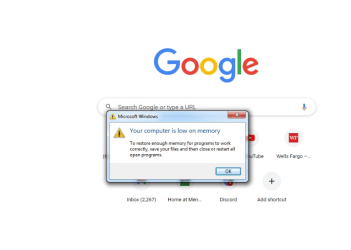
paging file.PNGpaging file2.PNGerror1.PNGPF.PNG


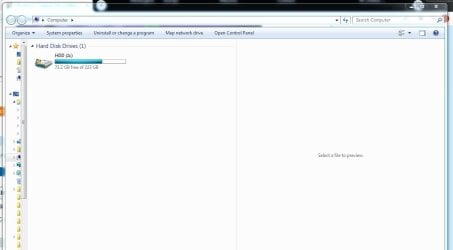
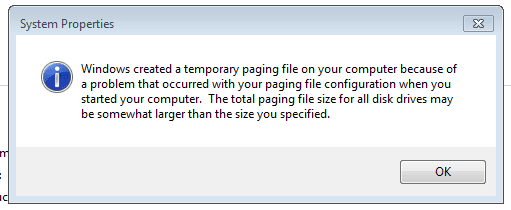
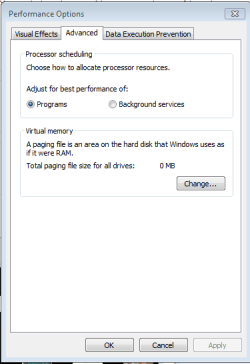
The first pic is an error I get every time the PC is restarted and every time I click the "advanced" tab shown on the second pic. The second pic shows a 0MB paging file, but when I click "change" it shows the 4-8GB I have it set at. Third and fourth pic are the error and paging file settings. I have also tried using the "system managed size" option but I still get the error. The issue causes chrome to hang a lot. I would like to know wtf is going on.

Thanks
 

My Computer

Computer type
PC/Desktop
Computer Manufacturer/Model Number
Custom
OS
7 x64
CPU
AMD FX 4300
Motherboard
Asus
Memory
8 GB
Graphics Card(s)
RX 580
Hard Drives
PNY 240 GB SSD
Browser
Chrome
drive a is a floppy disk set pagefile to c and it will work
 

My Computer

Computer type
PC/Desktop
OS
win 8 32 bit
Hello samuria,

There is no C drive on my PC. The only drive on the PC is named A. IIRC when I was installing win7 on this PC there was another disk as well and it was named C, so I named this one AHDD.JPG
 

My Computer

Computer type
PC/Desktop
Computer Manufacturer/Model Number
Custom
OS
7 x64
CPU
AMD FX 4300
Motherboard
Asus
Memory
8 GB
Graphics Card(s)
RX 580
Hard Drives
PNY 240 GB SSD
Browser
Chrome
Have you tried letting windows automatically manage ?
 

My Computers

System One System Two

  • Computer type
    PC/Desktop
    OS
    7 X64
    CPU
    i5 8400
    Motherboard
    gigabyte b365m ds3h
    Memory
    2x8gb 3200mhz
    Hard Drives
    various
    PSU
    pure power 11 400w cm
    Case
    Coolermaster
    Cooling
    cryorig m9i
  • Computer type
    PC/Desktop
    OS
    7x64
    CPU
    g5400
    Motherboard
    ga b365m ds3h
    Memory
    8gb ddr4 2400
    PSU
    xfx pro 450w
Hello samuria,

There is no C drive on my PC. The only drive on the PC is named A. IIRC when I was installing win7 on this PC there was another disk as well and it was named C, so I named this one AView attachment 420252

Shrink your drive, and create a new partition just for the swap file. Just don't assing letter "B" to the new drive and everything will be fine.
 

My Computers

System One System Two

  • Computer type
    PC/Desktop
    OS
    Windows 7 Ultimate 64-bit SP1
    CPU
    Intel Core 2 Quad Q6700 @ 2.66GHz
    Motherboard
    ECS MCP73PVT-SM
    Memory
    4.00GB Single-Channel DDR2 @ 399MHz
    Graphics Card(s)
    2047MB NVIDIA GeForce GT 710 (ASUStek Computer Inc)
    Sound Card
    Realtek High Definition Audio
    Monitor(s) Displays
    HP 21kd
    Screen Resolution
    1920x1080@60Hz
    Hard Drives
    149GB Western Digital WDC WD1600AABS-61PRA0 ATA Device (SATA )
    4000GB Seagate ST4000DM004-2U9104 ATA Device (SATA )
    931GB TOSHIBA External USB 3.0 USB Device (USB (SATA) )
    Antivirus
    None. Don't Need it.
    Browser
    Librewolf Portable
    Other Info
    It's a very old system.
  • Computer type
    PC/Desktop
Have you tried letting windows automatically manage ?

I am trying that now. But no matter what settings I choose I still get that error from my first post every time I reboot or click on the "advanced" tab.

I have just recently come to fully understand the problem. It looks like chrome is eating up enormous amounts of ram so even with 8GB I really am running out of memory. Back in the day you could run 20+ tabs with only 4GB...

When I open Process Hacker it shows 8GB of ram, but a couple days ago it was showing 16GB (8ram + 8 virtual). When it shows 16GB I have no problems, but I do not know the rhyme-or-reason to get it to recognize 16GB. I am guessing that because I named it A: which is traditionally a floppy there is some error.

- - - Updated - - -

Shrink your drive, and create a new partition just for the swap file. Just don't assing letter "B" to the new drive and everything will be fine.

Thanks, I will look into that.
 

My Computer

Computer type
PC/Desktop
Computer Manufacturer/Model Number
Custom
OS
7 x64
CPU
AMD FX 4300
Motherboard
Asus
Memory
8 GB
Graphics Card(s)
RX 580
Hard Drives
PNY 240 GB SSD
Browser
Chrome
diz - I shrank my disk by 8GB and set the paging file to D using those 8GB. Process Hacker is now showing 16GB ram and the error is gone.

Thank you
 

My Computer

Computer type
PC/Desktop
Computer Manufacturer/Model Number
Custom
OS
7 x64
CPU
AMD FX 4300
Motherboard
Asus
Memory
8 GB
Graphics Card(s)
RX 580
Hard Drives
PNY 240 GB SSD
Browser
Chrome
Back
Top