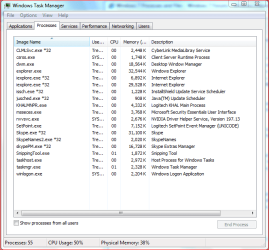
I am working on compiling a short list and explanation of all the Windows 7 process and files. Here is what I have so far, feel free to add to it, and I will put them on this post as well.
Processes
AppleMobileDeciveSerice.exe
What It Is: Service installed with Apple's iTunes 7.3 onward. It enables iTunes to interact with the Apple iPhone and the Apple TV.
What Can I Do? If you do not have an iPhone or Apple TV, then you can disable it is the msconfig.exe menu.
AxSysCtrlService.exe
What It Is: This service runs the ASUS System Control Service, used with the TurboV program.
What Can I Do? If you have an ASUS Motherboard with the TurboV driver installed, you can remove it through Add/Remove Programs normally. If you do not, you may be infected.
audiodg.exe
What It Is: This process controls the audio drivers, and should run from \Windows\System32.
What Can I Do? If you stop this process, you will lose Audio. If it is not running from the \Windows\System32 directory, you may be infected.
cftmon.exe
What It Is: This is the process that controls the Alternative User Input and the Office Language Bar (this means the onscreen keyboard, speech recognition, and speech to text).
What Can I do? This process is not needed if you do not use any of the above (though it only takes >4 MBs of memory), and can be disabled without harm through msconfig.exe (startup tab).
cmd.exe
What It Is: This is the Command Prompt Process.
What Can I Do? Do NOT ever delete this process.
conhost.exe
What It Is: This process fixes the broken Drag and Drop in Vista. It is ligitamate, as long as it is run through the system32 folder. If it is not (or there is 2), you may have a virus. It should appear as ComSpec in the properties window.
What Can I Do? Do NOT ever delete or stop this process.
csrss.exe
What It Is: Client/Server Run-Time Subsystem, and is an essential subsystem that must be running at all times. Csrss is responsible for console windows, creating and/or deleting threads, and implementing some portions of the 16-bit virtual MS-DOS environment. This should run from the \Windows\System32 directory.
What Can I Do? Do NOT ever stop or delete this process.
dwm.exe
What It Is: The Desktop Window Manager runs the Aero effects in Seven. Each application has a section of memory, and Windows compiles these through the dwm to create what you see. Windows adds all the pretty effects and layering through this.
dwm.exe takes about 30-50MBs of memory on average, depending on how many windows you have open, and effects.
What Can I Do? Turning off Aero and switching to a Basic theme does not turn it off, it merely reduces the memory usage of this process. Windows still needs it to control the windows you have open, and to organize them on the taskbar.
If you absolutely need to turn this off (not recommended), you can do so through the service window (services.msc). This will switch you to the basic theme, and will start back up on restart.
explorer.exe
What It Is: This process controls the user shell (the desktop), and other interfaces.
What Can I Do? This process can be stopped and started without harm, though you will lose access to your desktop and must restart it by rebooting or through the Task Manager.
ipoint.exe
What It Is: This is the driver for Microsoft IntelliPoint mice products.
What Can I Do? If you have one of these mice, do not delete it. It should run from the C:\Program Files\Microsoft IntelliPoint directory, assuming you installed it there. It can be stopped and removed through the Add/Remove Programs menu like a normal driver.
ituneshelper.exe
What It Is: This program used to be the layer between iTunes and CD drives, but is now part of iTunes.
What Can I Do? If iTunes is running, leave it alone.
itype.exe
What It Is: This process belongs to Microsoft IntelliType, the driver for Microsoft Keyboards.
What Can I Do? If you have a MS Keyboard, then this should not be deleted (or you could lose some functionality from your keyboard). If you do not, you should check for infections.
iphlpsvc
What It Is: This process is the IP Helper Service. Provides automatic IPv6 connectivity over an IPv4 network. If this service is stopped, the machine will only have IPv6 connectivity if it is connected to a native IPv6 network.
What Can I Do? If you are connected to a IPv4 network, do not disable this, as you will lose connectivity.
jusched.exe
What It Is: This is the Java Update Scheduler. This checks once a month for Java updates.
What Can I Do? This can be stopped at any time without any ill effects, or disabled entirely through control panel. You can also set up a task schedule for it to run through the Task Scheduler.
lsass.exe
What It Is: This is the Local Security Authentication Server. It verifies the validity of user logons to your PC or server. If authentication is successful, Lsass generates the user's access token, which is used to launch the initial shell.
What Can I Do? This should be located in the \Windows\System32 directory. Do NOT delete or stop this service.
lsm.exe
What It Is: This process is the Local Session Manager, whose role is to manage the terminal server connections to the machine.
What Can I Do? This should be located in the \Windows\System32 directory. Do NOT delete or stop this service.
mDNSResponder.exe
What It Is: The mDNSResponder.exe process belongs to the Bonjour for Windows service, which is Apple’s “Zero Configuration Networking” application, typically installed automatically by iTunes. It is also installed by Skype, Pidgin, Sagari, and other connection clients.
What Can I Do? This can be disabled from services.msc if unneeded.
mobsync.exe
What It Is: This process belongs to the Microsoft Sync Center, used for mobile phones, or servers.
What Can I Do? Do not remove this process.
MsMpEng.exe
What It Is: This process is Microsoft Security Essentials or Windows Defender.
What Can I Do? This process is required to run MSE or Defender, but can be stopped if you desire.
msseces.exe
What It Is: This is the User Interface for MSE, in conjunction with the runtime process MsMpEng.exe.
What Can I Do? If you shut this process down, it will lock you out of the GUI of MSE, and will not notify you of any threats. If you are runnning MSE, this is normal. If you do stop it, you can restart it using cmd.exe or closing MsMpEng.exe and restarting MSE.
nvvsvc.exe
What It Is: nvvsvc.exe is a service installed by NVIDIA drivers for graphics cards (or graphics cards based on an NVIDIA chipset). This service is used by some of the specific advanced features of your NVidia graphics card, in particular overclocking, overriding of the refresh rate for OpenGL games, and dual monitor display. It is also needed if you have configured your PC or laptop to go into Sleep Mode or Hibernation.
What Can I Do? If you do not use any of the advanced features, it is recommended that you disable the service by setting it to disabled in the Startup Mode of the Services tab, but it is not necessary (they will just consume memory).
PSR.exe
What is it?: PSR stands for "Problem Steps Recorder" it takes a snapshot of your current problems and records each section you click on.
What can it do?: With PSR you can record your activities and it adds notes to each snapshot. You can also pause and add your own comments to each snapshot as well. It highlights and focuses on each snapshot automatically, it can also be played as a slideshow and can be opened in Internet Explorer and saves as a Zip file.
What do I press PSR can be started in a number of different ways. The best way is to Windows Button>Press "R"> Type into the command window psr.exe or PSR.exe either way it does not matter. or you can Start>Help and Support> then type into the search window PSR. Another simple way is to press F1 and then type into search window PSR.
RAVCpl64.exe
What It Is: This is the driver for Realtek HD Audio devices.
What Can I Do? If you use Realtek HD audio, disabling it will stop your audio.
rundll32.exe
What It Is: This is the process that launches Dynamic Link Library (DLL) files in conjunction with svchost.exe. This is normally launched from the \Windows\System32\rundll32.exe directory. Some malicious software will use the same process name, from a different location to run. If you see this running somewhere else, you may be infected.
What Can I Do? If you enable the command line column in Task Manager, you can see the path that it is running from, and its component DLL file. These can be disabled through the startup tab in msconfig.exe.
SearchIndexer.exe
What It Is: This process runs the Windows Search function.
What Can I Do? This can be disabled without any problems, but search will no longer work.
services.exe
What It Is: This is the Services Control Manager, which is responsible for running, ending, and interacting with system services.
What Can I Do? As long as it is located from \Windows\System32, do NOT delete or stop.
sidebar.exe
What It Is: This runs the Windows SideBar.
What Can I Do? Stopping this process will close the Sidebar, but have no other ill effects.
smss.exe
What It Is: This is the session manager subsystem, which is responsible for starting the user session. This will also control shut down and startup.
What Can I Do? Do NOT delete or end this process.
spoolsv.exe
What It Is: The spool service runs the print and fax jobs. It allows printing from the background.
What Can I Do? Do not stop this process unless you are sure it is causing a problem, and stopping it will not allow printing.
svchost.exe
What It Is: According to MS "svchost.exe is a generic host process name for services that run from dynamic-link libraries". This is what controls the dll (dynamic link libraries) and allows them to be run.
In English, Windows separates them out so that one crash will not bring your whole system down, similar to spreading out your monetary investments. They are separated by type; one svchost.exe will run the firewall and AV, another the user interface, etc.
What can I do? In the Task Manager, you can restart a process if it is taking a lot of CPU or memory. By right clicking the svchost.exe you want to know more about, you can go to the services that it controls. This will take you to the services tab which will show you each service it controls. You can also bring up the list in command prompt by typing: tasklist /SVC.
To stop services manually, go to services.msc (from the start menu, search it) and disable, enable, restart, etc from there.
System Idle Process
What It Is: Because your computer can never not do anything, the IDLE process controls what is NOT being used by you. This process should take up what CPU is NOT being used by you, so in my case it is sitting at 96%. This is NORMAL. The lower this is, the more load is being applied to your system.
What Can I Do? Do NOT ever stop or delete this process.
taskeng.exe
What It Is: This controls the Task Scheduler.
What Can I Do? If it is running from the \Windows\System32 directory, leave it alone.
taskhost.exe
What It Is: This runs DLLs in groups.
What Can I Do? If it is running from the \Windows\System32 directory, leave it alone.
wfcrun32.exe
What It Is: This process belongs to the Citrix Program Neighborhood Connection Center, used in corporate environment for remote access to client/server applications.
What Can I Do? If you have this, it should not be deleted (providing you know you are supposed to have it).
wfica32.exe
What It Is: This process belongs to the Citrix ICA client, usually used in a corporate environment for remote access to server applications.
What Can I Do? If you have this, it should not be deleted (providing you know you are supposed to have it).
wininit.exe
What It Is: System process.
What Can I Do? This is a crucial system file, do NOT ever stop or delete this process, you will get a BSoD.
winlogon.exe
What It Is: This is part of the Windows Login Subsystem, and helps authorize users.
What Can I Do? Do NOT ever delete or stop this process.
wmpnetwk.exe
What It Is: This is the network sharing service for the Windows Media Player, which is needed to share music with other computers or XBox 360s.
What Can I Do? This can be disabled through the Media Sharing menu in WMP, or services.msc (Windows Media Player Network Sharing Service).
wmpnscfg.exe
What It Is: This is the network sharing service for the Windows Media Player, which is needed to share music with other computers or XBox 360s.
What Can I Do? This can be disabled through the Media Sharing menu in WMP, or services.msc (Windows Media Player Network Sharing Service).
Files
Soon to come...
~Lordbob
EDIT: My first sticky!!!! Yay!
(Pay no attention to my expression of age there...:sarc
Processes
AppleMobileDeciveSerice.exe
What It Is: Service installed with Apple's iTunes 7.3 onward. It enables iTunes to interact with the Apple iPhone and the Apple TV.
What Can I Do? If you do not have an iPhone or Apple TV, then you can disable it is the msconfig.exe menu.
AxSysCtrlService.exe
What It Is: This service runs the ASUS System Control Service, used with the TurboV program.
What Can I Do? If you have an ASUS Motherboard with the TurboV driver installed, you can remove it through Add/Remove Programs normally. If you do not, you may be infected.
audiodg.exe
What It Is: This process controls the audio drivers, and should run from \Windows\System32.
What Can I Do? If you stop this process, you will lose Audio. If it is not running from the \Windows\System32 directory, you may be infected.
cftmon.exe
What It Is: This is the process that controls the Alternative User Input and the Office Language Bar (this means the onscreen keyboard, speech recognition, and speech to text).
What Can I do? This process is not needed if you do not use any of the above (though it only takes >4 MBs of memory), and can be disabled without harm through msconfig.exe (startup tab).
cmd.exe
What It Is: This is the Command Prompt Process.
What Can I Do? Do NOT ever delete this process.
conhost.exe
What It Is: This process fixes the broken Drag and Drop in Vista. It is ligitamate, as long as it is run through the system32 folder. If it is not (or there is 2), you may have a virus. It should appear as ComSpec in the properties window.
What Can I Do? Do NOT ever delete or stop this process.
csrss.exe
What It Is: Client/Server Run-Time Subsystem, and is an essential subsystem that must be running at all times. Csrss is responsible for console windows, creating and/or deleting threads, and implementing some portions of the 16-bit virtual MS-DOS environment. This should run from the \Windows\System32 directory.
What Can I Do? Do NOT ever stop or delete this process.
dwm.exe
What It Is: The Desktop Window Manager runs the Aero effects in Seven. Each application has a section of memory, and Windows compiles these through the dwm to create what you see. Windows adds all the pretty effects and layering through this.
dwm.exe takes about 30-50MBs of memory on average, depending on how many windows you have open, and effects.
What Can I Do? Turning off Aero and switching to a Basic theme does not turn it off, it merely reduces the memory usage of this process. Windows still needs it to control the windows you have open, and to organize them on the taskbar.
If you absolutely need to turn this off (not recommended), you can do so through the service window (services.msc). This will switch you to the basic theme, and will start back up on restart.
explorer.exe
What It Is: This process controls the user shell (the desktop), and other interfaces.
What Can I Do? This process can be stopped and started without harm, though you will lose access to your desktop and must restart it by rebooting or through the Task Manager.
ipoint.exe
What It Is: This is the driver for Microsoft IntelliPoint mice products.
What Can I Do? If you have one of these mice, do not delete it. It should run from the C:\Program Files\Microsoft IntelliPoint directory, assuming you installed it there. It can be stopped and removed through the Add/Remove Programs menu like a normal driver.
ituneshelper.exe
What It Is: This program used to be the layer between iTunes and CD drives, but is now part of iTunes.
What Can I Do? If iTunes is running, leave it alone.
itype.exe
What It Is: This process belongs to Microsoft IntelliType, the driver for Microsoft Keyboards.
What Can I Do? If you have a MS Keyboard, then this should not be deleted (or you could lose some functionality from your keyboard). If you do not, you should check for infections.
iphlpsvc
What It Is: This process is the IP Helper Service. Provides automatic IPv6 connectivity over an IPv4 network. If this service is stopped, the machine will only have IPv6 connectivity if it is connected to a native IPv6 network.
What Can I Do? If you are connected to a IPv4 network, do not disable this, as you will lose connectivity.
jusched.exe
What It Is: This is the Java Update Scheduler. This checks once a month for Java updates.
What Can I Do? This can be stopped at any time without any ill effects, or disabled entirely through control panel. You can also set up a task schedule for it to run through the Task Scheduler.
lsass.exe
What It Is: This is the Local Security Authentication Server. It verifies the validity of user logons to your PC or server. If authentication is successful, Lsass generates the user's access token, which is used to launch the initial shell.
What Can I Do? This should be located in the \Windows\System32 directory. Do NOT delete or stop this service.
lsm.exe
What It Is: This process is the Local Session Manager, whose role is to manage the terminal server connections to the machine.
What Can I Do? This should be located in the \Windows\System32 directory. Do NOT delete or stop this service.
mDNSResponder.exe
What It Is: The mDNSResponder.exe process belongs to the Bonjour for Windows service, which is Apple’s “Zero Configuration Networking” application, typically installed automatically by iTunes. It is also installed by Skype, Pidgin, Sagari, and other connection clients.
What Can I Do? This can be disabled from services.msc if unneeded.
mobsync.exe
What It Is: This process belongs to the Microsoft Sync Center, used for mobile phones, or servers.
What Can I Do? Do not remove this process.
MsMpEng.exe
What It Is: This process is Microsoft Security Essentials or Windows Defender.
What Can I Do? This process is required to run MSE or Defender, but can be stopped if you desire.
msseces.exe
What It Is: This is the User Interface for MSE, in conjunction with the runtime process MsMpEng.exe.
What Can I Do? If you shut this process down, it will lock you out of the GUI of MSE, and will not notify you of any threats. If you are runnning MSE, this is normal. If you do stop it, you can restart it using cmd.exe or closing MsMpEng.exe and restarting MSE.
nvvsvc.exe
What It Is: nvvsvc.exe is a service installed by NVIDIA drivers for graphics cards (or graphics cards based on an NVIDIA chipset). This service is used by some of the specific advanced features of your NVidia graphics card, in particular overclocking, overriding of the refresh rate for OpenGL games, and dual monitor display. It is also needed if you have configured your PC or laptop to go into Sleep Mode or Hibernation.
What Can I Do? If you do not use any of the advanced features, it is recommended that you disable the service by setting it to disabled in the Startup Mode of the Services tab, but it is not necessary (they will just consume memory).
PSR.exe
What is it?: PSR stands for "Problem Steps Recorder" it takes a snapshot of your current problems and records each section you click on.
What can it do?: With PSR you can record your activities and it adds notes to each snapshot. You can also pause and add your own comments to each snapshot as well. It highlights and focuses on each snapshot automatically, it can also be played as a slideshow and can be opened in Internet Explorer and saves as a Zip file.
What do I press PSR can be started in a number of different ways. The best way is to Windows Button>Press "R"> Type into the command window psr.exe or PSR.exe either way it does not matter. or you can Start>Help and Support> then type into the search window PSR. Another simple way is to press F1 and then type into search window PSR.
RAVCpl64.exe
What It Is: This is the driver for Realtek HD Audio devices.
What Can I Do? If you use Realtek HD audio, disabling it will stop your audio.
rundll32.exe
What It Is: This is the process that launches Dynamic Link Library (DLL) files in conjunction with svchost.exe. This is normally launched from the \Windows\System32\rundll32.exe directory. Some malicious software will use the same process name, from a different location to run. If you see this running somewhere else, you may be infected.
What Can I Do? If you enable the command line column in Task Manager, you can see the path that it is running from, and its component DLL file. These can be disabled through the startup tab in msconfig.exe.
SearchIndexer.exe
What It Is: This process runs the Windows Search function.
What Can I Do? This can be disabled without any problems, but search will no longer work.
services.exe
What It Is: This is the Services Control Manager, which is responsible for running, ending, and interacting with system services.
What Can I Do? As long as it is located from \Windows\System32, do NOT delete or stop.
sidebar.exe
What It Is: This runs the Windows SideBar.
What Can I Do? Stopping this process will close the Sidebar, but have no other ill effects.
smss.exe
What It Is: This is the session manager subsystem, which is responsible for starting the user session. This will also control shut down and startup.
What Can I Do? Do NOT delete or end this process.
spoolsv.exe
What It Is: The spool service runs the print and fax jobs. It allows printing from the background.
What Can I Do? Do not stop this process unless you are sure it is causing a problem, and stopping it will not allow printing.
svchost.exe
What It Is: According to MS "svchost.exe is a generic host process name for services that run from dynamic-link libraries". This is what controls the dll (dynamic link libraries) and allows them to be run.
In English, Windows separates them out so that one crash will not bring your whole system down, similar to spreading out your monetary investments. They are separated by type; one svchost.exe will run the firewall and AV, another the user interface, etc.
What can I do? In the Task Manager, you can restart a process if it is taking a lot of CPU or memory. By right clicking the svchost.exe you want to know more about, you can go to the services that it controls. This will take you to the services tab which will show you each service it controls. You can also bring up the list in command prompt by typing: tasklist /SVC.
To stop services manually, go to services.msc (from the start menu, search it) and disable, enable, restart, etc from there.
System Idle Process
What It Is: Because your computer can never not do anything, the IDLE process controls what is NOT being used by you. This process should take up what CPU is NOT being used by you, so in my case it is sitting at 96%. This is NORMAL. The lower this is, the more load is being applied to your system.
What Can I Do? Do NOT ever stop or delete this process.
taskeng.exe
What It Is: This controls the Task Scheduler.
What Can I Do? If it is running from the \Windows\System32 directory, leave it alone.
taskhost.exe
What It Is: This runs DLLs in groups.
What Can I Do? If it is running from the \Windows\System32 directory, leave it alone.
wfcrun32.exe
What It Is: This process belongs to the Citrix Program Neighborhood Connection Center, used in corporate environment for remote access to client/server applications.
What Can I Do? If you have this, it should not be deleted (providing you know you are supposed to have it).
wfica32.exe
What It Is: This process belongs to the Citrix ICA client, usually used in a corporate environment for remote access to server applications.
What Can I Do? If you have this, it should not be deleted (providing you know you are supposed to have it).
wininit.exe
What It Is: System process.
What Can I Do? This is a crucial system file, do NOT ever stop or delete this process, you will get a BSoD.
winlogon.exe
What It Is: This is part of the Windows Login Subsystem, and helps authorize users.
What Can I Do? Do NOT ever delete or stop this process.
wmpnetwk.exe
What It Is: This is the network sharing service for the Windows Media Player, which is needed to share music with other computers or XBox 360s.
What Can I Do? This can be disabled through the Media Sharing menu in WMP, or services.msc (Windows Media Player Network Sharing Service).
wmpnscfg.exe
What It Is: This is the network sharing service for the Windows Media Player, which is needed to share music with other computers or XBox 360s.
What Can I Do? This can be disabled through the Media Sharing menu in WMP, or services.msc (Windows Media Player Network Sharing Service).
Files
Soon to come...
~Lordbob
EDIT: My first sticky!!!! Yay!
(Pay no attention to my expression of age there...:sarc
Last edited:
My Computer
- Computer Manufacturer/Model Number
- Hera
- OS
- Windows 7 Ultimate x64, Mint 9
- CPU
- Intel i5-2500k
- Motherboard
- ASUS P8P67 Pro
- Memory
- 2x 4Gb Corsair VENGEANCE DDR3-1600
- Graphics Card(s)
- NVidia GeForce N260GTX Twin Frozr
- Sound Card
- Realtek HD OnBoard Audio
- Monitor(s) Displays
- ASUS 24" Monitor
- Screen Resolution
- 1920x1080
- Hard Drives
- G.SKILL Phoenix Series 60GB SATA II MLC Internal Solid State Drive (SSD)
SAMSUNG Spinpoint F3R 1TB 7200 RPM 32MB Cache SATA II
- PSU
- Cooler Master Real Power Pro 750W
- Case
- Cooler Master Haf 932
- Cooling
- Fans
- Keyboard
- Razer Tarantula
- Mouse
- Razer Lachesis
- Internet Speed
- not fast enough