Windows 7 Ram usage???

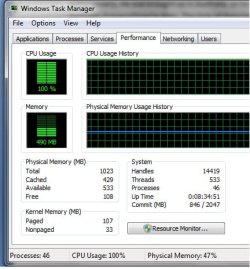
490mb of 1gb

With A Few things running, Word 2007, BONIC SETI@home, avira and my usage grabber
 

Attachments
  • Untitled.jpg
    Untitled.jpg
    39.3 KB · Views: 106
Last edited:

My Computer

OS
Windows 7 Ultimate 32bit, Mac OS Snow Leopard 10.6
CPU
P4 2.4ghz @ 2.56Ghz
Memory
1gb DDR
Graphics Card(s)
7600GT AGP 4X
Sound Card
Onboard
Monitor(s) Displays
19LG
Screen Resolution
1280x1024
Hard Drives
120GB WD Caviar
80 Seagate Barracuda
PSU
430W Thermaltake
Keyboard
Logitech Media Keyboard
Internet Speed
1.5MB

My Computer

Computer type
PC/Desktop
Computer Manufacturer/Model Number
intel x58 selfmade
OS
Windows 7 Ultimate x64
CPU
[email protected] (non overclocked)
Motherboard
x58
Memory
8gb DDR3
Graphics Card(s)
Asus 6850
Monitor(s) Displays
lg 22"
Hard Drives
1TB
PSU
Corsair 650w
Case
Gigabyte
Cooling
Scytech
Keyboard
noname
Mouse
Logitech wireless xy
Internet Speed
70GB
Antivirus
Windows Defender
Browser
Chrome (default)
Fullyloadedman

Your problem is seti@home. Your 100% cpu is definately from seti. I run it as well but have both set it to run at idle, and have an app to keep it from maxing out. Be careful there is a thread on @home about heat damage from the app PS 1.5 million Wu's:)

ken
 

My Computer

Computer Manufacturer/Model Number
HP Pavillion dv-7 1005 Tx
OS
Win 8 Release candidate 8400
CPU
[email protected]
Memory
4 gigs
Graphics Card(s)
Nvidia 9600M
Sound Card
HD built-in
Monitor(s) Displays
17" Wxga
Screen Resolution
1440x900
Cooling
none
Internet Speed
45Mb down 5Mb up
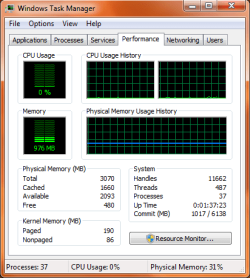
I have W7 64 7100 and mine shows 943MB out of 3gb and 0% CPU usage. Nothing is running and I don't have antivirus.
 

My Computer

Computer Manufacturer/Model Number
XPS M1530
OS
Windows 7 64-bit
CPU
Intel Core2 Duo T5500 1.83 GHz 2MG Cache
Motherboard
Mobile Intel PM965
Memory
3gb 667 MHz Dual DDR2 SDRAM
Graphics Card(s)
Integrated NVIDIA GeForce 8400M GS 128MB
Monitor(s) Displays
15.4" Widescreen WXGA TFT LCD display
Screen Resolution
1280 x 800
evildocrsx
You getting cpu use from taskmanager? I have never seen 0% cpu could you send a snip?

Ken
 

My Computer

Computer Manufacturer/Model Number
HP Pavillion dv-7 1005 Tx
OS
Win 8 Release candidate 8400
CPU
[email protected]
Memory
4 gigs
Graphics Card(s)
Nvidia 9600M
Sound Card
HD built-in
Monitor(s) Displays
17" Wxga
Screen Resolution
1440x900
Cooling
none
Internet Speed
45Mb down 5Mb up
I guess it fluctuates from 1% to 0% with the sipping tool on. When it was 0%, the computer had been idle for a while with nothing running on it.


Task mgr snip.PNG
 

My Computer

Computer Manufacturer/Model Number
XPS M1530
OS
Windows 7 64-bit
CPU
Intel Core2 Duo T5500 1.83 GHz 2MG Cache
Motherboard
Mobile Intel PM965
Memory
3gb 667 MHz Dual DDR2 SDRAM
Graphics Card(s)
Integrated NVIDIA GeForce 8400M GS 128MB
Monitor(s) Displays
15.4" Widescreen WXGA TFT LCD display
Screen Resolution
1280 x 800
Mine fluctuates between 0% and 2% when I'm not actively doing anything. Only things running are Avast, MSN (1 idle conversation) and Chrome (10+ tabs).
 

My Computer

Computer Manufacturer/Model Number
HP Pavillion dv2550se
OS
Windows 7 Build 7229 x64
CPU
Intel Core2 Duo T5250 @ 1.50GHz
Memory
2GB DDR2
Graphics Card(s)
Moble Intel 965 Express
Screen Resolution
1280x800
Hard Drives
160GB
750GB External
evildocrsx
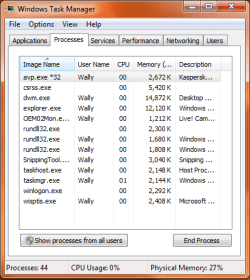
Cool I have never seen a dual core running 37 processes at 0%. whats using 934Mb?

Ken
 

My Computer

Computer Manufacturer/Model Number
HP Pavillion dv-7 1005 Tx
OS
Win 8 Release candidate 8400
CPU
[email protected]
Memory
4 gigs
Graphics Card(s)
Nvidia 9600M
Sound Card
HD built-in
Monitor(s) Displays
17" Wxga
Screen Resolution
1440x900
Cooling
none
Internet Speed
45Mb down 5Mb up
These are the processes it is running. I now have Kaspersky antivirus running on the system.

Task mgr snip2.PNG
 

My Computer

Computer Manufacturer/Model Number
XPS M1530
OS
Windows 7 64-bit
CPU
Intel Core2 Duo T5500 1.83 GHz 2MG Cache
Motherboard
Mobile Intel PM965
Memory
3gb 667 MHz Dual DDR2 SDRAM
Graphics Card(s)
Integrated NVIDIA GeForce 8400M GS 128MB
Monitor(s) Displays
15.4" Widescreen WXGA TFT LCD display
Screen Resolution
1280 x 800
evildocrsx
What I think your talking about that is different in win 7 is that it will cache memory that it doesn't need so that it can keep future requests in memory (making it faster). My 43 bit system takes 2gigs of 4. Im sure there is a way to change it but it would make the system less responsive. Your mem load is light, cpu is nil, and do you need the ram for other things? You still have what ~2 gigs left. If someone else has a more clear explanation I sure they will jump in
K
 

My Computer

Computer Manufacturer/Model Number
HP Pavillion dv-7 1005 Tx
OS
Win 8 Release candidate 8400
CPU
[email protected]
Memory
4 gigs
Graphics Card(s)
Nvidia 9600M
Sound Card
HD built-in
Monitor(s) Displays
17" Wxga
Screen Resolution
1440x900
Cooling
none
Internet Speed
45Mb down 5Mb up
I try to keep as many things not running as possible. What I did notice though, is that I have Aero on and have not touched any other setting on the system. All the services that come activated with W7 have not been touched. I have not disabled any of them. I have not even tampered with the looks of W7. The quick launch icons are there and even then, W7 uses about the same resources than Vista Ultimate 32-bit running on bare minimums. At least on my laptop with a dual core.
 

My Computer

Computer Manufacturer/Model Number
XPS M1530
OS
Windows 7 64-bit
CPU
Intel Core2 Duo T5500 1.83 GHz 2MG Cache
Motherboard
Mobile Intel PM965
Memory
3gb 667 MHz Dual DDR2 SDRAM
Graphics Card(s)
Integrated NVIDIA GeForce 8400M GS 128MB
Monitor(s) Displays
15.4" Widescreen WXGA TFT LCD display
Screen Resolution
1280 x 800
evildocrsx
You might want to fill in your system specs so that we can tell more about your set up. Is the system running slow, or doing something odd?

Ken
 

My Computer

Computer Manufacturer/Model Number
HP Pavillion dv-7 1005 Tx
OS
Win 8 Release candidate 8400
CPU
[email protected]
Memory
4 gigs
Graphics Card(s)
Nvidia 9600M
Sound Card
HD built-in
Monitor(s) Displays
17" Wxga
Screen Resolution
1440x900
Cooling
none
Internet Speed
45Mb down 5Mb up
Oh no! Thanks for asking. My system is running great. I was just throwing in my 2 cents. :D
 

My Computer

Computer Manufacturer/Model Number
XPS M1530
OS
Windows 7 64-bit
CPU
Intel Core2 Duo T5500 1.83 GHz 2MG Cache
Motherboard
Mobile Intel PM965
Memory
3gb 667 MHz Dual DDR2 SDRAM
Graphics Card(s)
Integrated NVIDIA GeForce 8400M GS 128MB
Monitor(s) Displays
15.4" Widescreen WXGA TFT LCD display
Screen Resolution
1280 x 800
Im guessing, so 0% with more than 60 processes running could be a stable system? Apart of all the fixes and other stuff like that? My cpu readings are almost always at 0% if i dont touch anything, no matter the applications opened.
 

Attachments

  • Capture45.JPG
    Capture45.JPG
    85.8 KB · Views: 435

My Computer

Computer Manufacturer/Model Number
Custom Built Pc
OS
Windows 7 Ultimate x64 7127
CPU
AMD Phenom X4 9950 B.E.
Motherboard
Gigabyte GA-MA790X
Memory
4 x 2GB 1066MHz Gskill DDRII (5-5-5-15)
Graphics Card(s)
XFX ATI HD4890 1GB
Sound Card
Soundblaster Xi-Fi Faltal1ty
Monitor(s) Displays
HP TFT W20 20"
Screen Resolution
1680x1050
Hard Drives
6 x 500GB WD + 1x WD Raptor 320GB
PSU
OCZ Powerstream 650w
Case
Thermaltake Shark Case
Cooling
Typical Case Fans & Stock Cooler
Keyboard
Razer Tarantula
Mouse
Razer Diamondback
Internet Speed
100Mb Fiber
Well it is at 0%, but your ram is still being used on the fly. There should always be something using your CPU, especially with 60 processes running, even if it is getting the time sync from microsoft. I have found that with 4cpus, all have to be at 1% or greater for it to show 1% due to it takes the average of your CPUs, which in yours and mine is 4. So if one or two processors says 1%, then that is <.5 which doesn't show up as anything on the blip.
 

My Computer

Computer Manufacturer/Model Number
Custom Made
OS
Windows 7 Build 7600|16384- 64bit
CPU
AMD Phenom II X4 810 - 2.61ghz Deneb
Motherboard
Asus M4A79T Deluxe
Memory
4GB DDR3 Mushkin (1600 O.C. Rated)
Graphics Card(s)
ATI HD Radeon 4890 1GB
Sound Card
Realtek HD Onboard Audio
Monitor(s) Displays
AOC 912vwa-1
Screen Resolution
1440x900 (Max Monitor)
Hard Drives
10000RPM 150GB Western Digital Velociraptor
PSU
Corsair TSX750W
Case
Antec Nine Hundred
Cooling
Air Cooled
Keyboard
Logitech Elite
Mouse
Logitech MX518
Internet Speed
Comcast High-Speed (+Powerboost)
So I'm coming out the wood works with a similar issue. My CPU is running at about 1-4% while running Chrome with 1-3 tabs, IRC connected to two servers, and AIM. The kicker is both the window side bar gadget and task manager report me running at 85% of my ram in use out of 6gigs, worse yet, I can close all of this walk away for half an hour and still be at 85%

Any thoughts?
 

My Computer

OS
7 x64
57 processes and 973MB on a 3GB system.
 

My Computer

Computer Manufacturer/Model Number
HP, Dell, Gateway, Toshiba - 4 laptops and 2 desktops
OS
Vista, Windows7, Mint Mate, Zorin, Windows 8
CPU
from 1.6GHz Duo to i7
Monitor(s) Displays
2x HP w2207
Hard Drives
5x HDD, 7x SSD, 12x Externals
Keyboard
with trackball - no mices
Mouse
Trackball mice
Internet Speed
DSL 6000
help me pleese windows 7 problem

hi all

first my computer has just recoverd from the black screen of death as well as the blue, thank you to the guys who make the fix for it :)

i have had windows 7 for about 4 months now but i am not getting fast roaming speeds so as i looked into it i have only got 1gb ram in use and the other gig is being un used
this is the message:

installed memory (RAM): 2.00 GB (1.00 GB usable)


i am running the 32bit vision but want all my ram to be in use as it cost money to buy these things
could any one help
thank rich.
 

My Computer

Computer Manufacturer/Model Number
n/a
OS
windows 7
CPU
n/a
Motherboard
g force
Memory
kingston 2X1gb
Graphics Card(s)
1xn/a
Sound Card
built in
Monitor(s) Displays
1 samsung syncmaster 710n
Hard Drives
1x baracuda 80gb
PSU
n/a
Case
xtyling
Cooling
2x fans
From where do you get the "1GB usable" number from?
 

My Computer

Computer Manufacturer/Model Number
HP, Dell, Gateway, Toshiba - 4 laptops and 2 desktops
OS
Vista, Windows7, Mint Mate, Zorin, Windows 8
CPU
from 1.6GHz Duo to i7
Monitor(s) Displays
2x HP w2207
Hard Drives
5x HDD, 7x SSD, 12x Externals
Keyboard
with trackball - no mices
Mouse
Trackball mice
Internet Speed
DSL 6000
There is a program called Windows 7 manager - and it has an option to set the amount of RAM WIN can use,the lowest lv is 256mb.
That way it can use min RAM,but fast boots are not guaranteed.
I have 2gb of RAM and it stays at 35% when idle and max 45% (btw 32bit) if i do a lot of things.
To the users that want their RAM freed this works but it may take longer to boot up etc.(dont let this scare you only 1-2 mins max)

URL: http://www.zamunda.net/details.php?id=216833&hit=1 (its not genuine but works) Hope i helped.(or not)
 

My Computer

Computer Manufacturer/Model Number
OEM
OS
Windows 7 Ultimate
CPU
Intel Core 2 Duo E4600 2.4ghz
Motherboard
Foxconn
Memory
2.00gb
Graphics Card(s)
ATI RADEON HD3400 1024mb
Sound Card
ATI something
Monitor(s) Displays
20" BENQ
Screen Resolution
1440x960
Hard Drives
Hitachi 320 gb
Case
HYNDAI
Cooling
A fan,lol.
Keyboard
A load of junk
Mouse
Genius
Other Info
I hate Bill Gates
Back
Top