Windows 7 Re-install went horribly wrong

Bitterzoet

New member
Local time
11:44 PM
Messages
2
Hello!

I've got a bit of an issue on my hand.
Windows was being re-installed on my laptop from the partition. Unfortunately, the laptop shut off for unknown reasons - it was on charge and had a full battery, flipped open, and uninterrupted but it still shut off. Since then, I've not been able to get it to do much else but to start Windows, only for it to then tell me that apparently it was switched off during installation and asking me to reboot. Which accomplishes nothing but the same message all over again. So, as it would seem, it's not possible for me anymore to actually install the OS off the laptop itself.
Now the real issue is that it doesn't seem to install from discs or usb drives anymore either. Half of the time it will not open up the file at all from a disc or usb, although I did get it to boot Zorin OS off a disc once. Or well, almost; It showed that the kernel image was possibly damaged which is a known problem for certain Ubuntu ISO's, apparently.

I would hate to throw away a perfectly fine laptop (hardware wise) just because I can't figure out how to run a working OS on it and I'm really hoping to find a solution. Preferably I'd like to keep using Windows, especially since I've paid for it. If not, I'd be quite content using a Linux OS too of course.

Thank you very much for reading. :)
If more information is needed please let me know, as I'm nigh computer illiterate and wasn't too sure what information I should provide and what information I should leave out.
 

My Computer

Computer type
PC/Desktop
Computer Manufacturer/Model Number
Acer Aspire
OS
Windows 7

My Computer

Computer type
PC/Desktop
Computer Manufacturer/Model Number
Golden Mk. I.4
OS
Windows 10 Pro x64 ; Xubuntu x64
CPU
Intel i7 860 @ 2.80 GHz O/C'ed to 4.0GHz
Motherboard
Gigabyte P55A-UD3R Rev.1. Award BIOS F13
Memory
16GB Corsair Vengance DDR3 @ 661 MHz Dual Channel (9-9-9-24)
Graphics Card(s)
EVGA NVidia GTX 560 1024MB
Sound Card
Realtek Integrated
Monitor(s) Displays
Dual Samsung SyncMaster 2494HS
Screen Resolution
1920*1080 and 1920*1080
Hard Drives
1*Samsung 840 EVO 120GB SSD;
1*OCZ Vertex 2 60GB SSD;
2*Samsung F3 SpinPoint 1TB in RAID0;
1*Samsung F1 SpinPoint 1TB;
2*Western Digital 1TB External USB 3.0
1*Western Digital 500GB External USB 3.0
1*Seagate 500GB External USB 2.0
PSU
Thermaltake ToughPower QFan 750W
Case
Thermaltake Element S VK60001W2Z
Cooling
Corsair H60 Water Cooling, 2*230mm and 2*80mm case fans
Keyboard
Logitech G110
Mouse
Logitech MX518
Thank you for replying, Golden!

I've tried to use Start-up Repair but it doesn't give it as an option when I restart. So far all it keeps giving me is a message that installation will continue after the laptop restarts - but then after it restarts it says the exact same thing all over again, and it's not making any progress.
I don't have a disc with Start-up Repair either so I can't boot it from a disc - unless I find a friend that has it but I really don't think I know anybody that does. I'll keep trying though, and will update if there are any changes.

Thanks again!
 

My Computer

Computer type
PC/Desktop
Computer Manufacturer/Model Number
Acer Aspire
OS
Windows 7
Thank you for replying, Golden!

I've tried to use Start-up Repair but it doesn't give it as an option when I restart. So far all it keeps giving me is a message that installation will continue after the laptop restarts - but then after it restarts it says the exact same thing all over again, and it's not making any progress.
I don't have a disc with Start-up Repair either so I can't boot it from a disc - unless I find a friend that has it but I really don't think I know anybody that does. I'll keep trying though, and will update if there are any changes.

Thanks again!

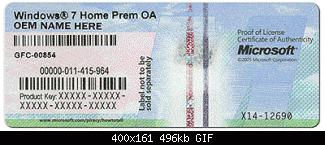
If you want to do a http://www.sevenforums.com/tutorials/1649-clean-install-windows-7-a.html this tells you the exact steps. You can get a Win 7 disk from Windows 7 Direct Download Links, Official Disk Images from Digital River You need to be careful that you download the correct file. There are a lot on this page. Get the correct version of Win 7 (Home Premium, Pro, Etc) and also make sure you get the correct either 32-bit or 64-bit. Download the correct file and burn it to a DVD. You can do a Clean Install from the DVD. When you are satisfied it is installed correctly, you can then enter your Win 7 Product Key which is on a sticker on your PC. It is a 25-charater Key.
 

Attachments

  • coa-stickers.gif
    coa-stickers.gif
    30.4 KB · Views: 30

My Computer

Computer type
PC/Desktop
Computer Manufacturer/Model Number
Custom Build
OS
Windows 7 Home Premium 32-Bit - Build 7600 SP1
CPU
Intel Core i3-2120 3.30Ghz
Motherboard
Asus P8Z68-V LX Intel Z68 Socket H2 ATX
Memory
Kingston 4 GB DDR3 1333 mhz
Graphics Card(s)
AMD Radeon HD6670
Sound Card
Sound Blaster Audigy SE 24-Bit
Monitor(s) Displays
Asus VE228
Screen Resolution
1440 X 900
Hard Drives
OCZ Vertex 3 120 GB Sata 3 SSD ==
Kingston SH103/S3 120 G Hyper X 120 GB SSD ==
Western Digital 500 GB Caviar Green 7200 RPM ==
PSU
Corsair CX600M == 600 Watt
Case
NZXT Apollo - Silver with Clear Side Panel
Cooling
Three 120 mm Fans
Keyboard
Microsoft Natural 4000
Mouse
Microsoft Custom Optical 3000
Internet Speed
AT&T Fiber Optic Wireless Network
Antivirus
Microsoft Security Essentials
Browser
Chrome
Other Info
120 mm Blue LED Fan -- Three Blue LED Lazer Light Sticks
Bitterzoet


I was going to suggest the same as Bigmck but want to make sure that you can. You said you were doing a reinstall from the partition. Hope that means that the Windows you had came pre-installed on the laptop because that's the only way the product key sticker will be on it.


Either that or you purchased the Windows OS thru a download and you actually have the product key written down. You must have that product key number because the image file that you will be downloading from digital river doesn't come with one. Be sure to download the right OS version like bigmck said. e.g. Home, Pro or Ultimate and the right encryption 32bit or 64bit.


And one more thing - very important. I hope you have learned that when ever you're doing something important on a laptop NEVER EVER do it running on just the battery. It doesn't matter if its fully charged. You must keep it plugged in the entire time. This goes for back ups, downloading, installing, uninstalling, running tests, repairs, defragging, etc.
 

My Computer

Computer type
Laptop
Computer Manufacturer/Model Number
HP
OS
Windows 7 Ultimate x86 SP1
CPU
Intel Core 2 Duo T6600 @ 2.20ghz
Memory
4 gigs
Graphics Card(s)
Mobile Intel (R) 4 Series Express Chipset Family
Sound Card
Intel (R) High Definition Audio HDMI
Monitor(s) Displays
Generic PnP Monitor
Screen Resolution
1360 x 768
Hard Drives
SAMSUNG HM500JI ATA Device
Antivirus
ESET Nod32
Browser
IE10 and Chrome
Well I'm not disagreeing with you. And I wasn't talking about a clean install or that he couldn't do it. I specifically referred to the product key sticker that you said would be on the laptop.
He had said he was doing the install from a partition on the laptop. He mentioned that he had used a disk to boot an OS called Zorin. He also said there was "possible damage which is a known problem for certain Ubuntu ISO's." as well as "Preferably I'd like to keep using Windows, especially since I've paid for it."


This sounded confusing so my thinking was that it was possible that Windows was not the original OS on that laptop and if that was so then the product key sticker for Windows would not be on it. I didn't say it was a fact I said I hoped it meant that Windows was either preinstalled or he had bought it from a download -again relating to actually having the product key. Not sure how that has anything to do with a clean install or free trials or why its incorrect to question the source of the product key.
 

My Computer

Computer type
Laptop
Computer Manufacturer/Model Number
HP
OS
Windows 7 Ultimate x86 SP1
CPU
Intel Core 2 Duo T6600 @ 2.20ghz
Memory
4 gigs
Graphics Card(s)
Mobile Intel (R) 4 Series Express Chipset Family
Sound Card
Intel (R) High Definition Audio HDMI
Monitor(s) Displays
Generic PnP Monitor
Screen Resolution
1360 x 768
Hard Drives
SAMSUNG HM500JI ATA Device
Antivirus
ESET Nod32
Browser
IE10 and Chrome
Back
Top