
Windows 7 Realtek HD and Logitech z906 Problem

daldec

New member
Local time
9:59 PM
Messages
3
Hi, this is my first thread and post and I'm Mexican so please sorry my bad english.
Well my problem is that I have realtek hd audio manager on my Windows 7 OS PC, a few days ago I bought a Logitech z906 speakers but when I config the realtek hd manager to play on 5.1 surround and test the sound the only speakers that sound are front ones, the rear ones nor the center nor the subwoofer sounds, I have tild the speakers fill option.... yes when I play music it sounds in all speakers well BUT why in the test it doesn't recognize the rear center and sub speakers?
This is my options:
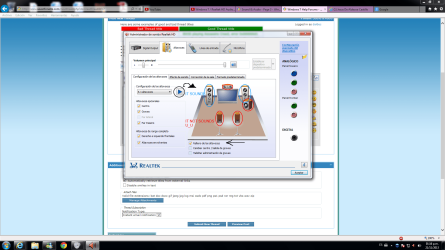
5.1 sound problem.png

ALSO, I have test the Stereo config VS the 5.1 config and the Stereo config is better than the 5.1 one, why? It is supossed to be the 5.1 better not? Is it have something to do with the speakers not recognized? I also tried to test the speakers here:
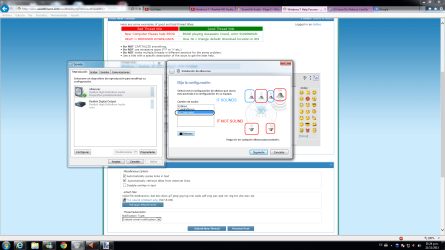
5.1 sound problem 1.png

And there the rear center and sub speakers does not sound as well.

PLEASE help me in this, I am desperated... it has to sound the 5.1 config better than the stereo one, but why in my case it isn't better? Also why the tests doesn't recognize me the other speakers?
Thanks in advance.
 

My Computer My Computer

At a glance

Windows 7 Ultimate x32
Computer type
PC/Desktop
OS
Windows 7 Ultimate x32
Welcome to SF daldec.
Understand just because you have a 5.1 speaker set up the main sound will always be from the stereo pair and only when you have a substantial surround effect or sound will the others play. If you have a 5.1 surround movie with lots of action or a game with the same please test using it and let us know how that works/sounds. Oh I also trust you've made the 5.1 audio connections properly?
 

My Computer My Computer

At a glance

Windows 7 Ultimate 64i7 3770k OC'd 4.6 @ 1.17v, also FX 8120 & i5 ...32 gb G.Skill Sniper DDR3 10-12-12-31 @ 2133XFX Radeon 7870 2GB DDR5
Computer type
PC/Desktop
Computer Manufacturer/Model Number
A blend of brains, brawn and dumb luck.
OS
Windows 7 Ultimate 64
CPU
i7 3770k OC'd 4.6 @ 1.17v, also FX 8120 & i5 miniITX
Motherboard
MSI P67A-GD80 b3
Memory
32 gb G.Skill Sniper DDR3 10-12-12-31 @ 2133
Graphics Card(s)
XFX Radeon 7870 2GB DDR5
Sound Card
Sound Blaster Z Series Card
Monitor(s) Displays
(2) LG LED 23" 1920 x 1080 2ms Monitors via mini d-port
Screen Resolution
1680 X 1050 p
Hard Drives
Samsung 256 gb 830 SSD sata III
(1) 1 tb WD Black
(2) 1 tb Hitachi deskmates/sata II
(2) 1 tb WD green/sata II
(2) 3 tb Seagate Barracuda
(1) 120 gb OCZ Vertex SS
(1) Drobo 5N w/5 Seagate 3tb
PSU
EVGA modular 1000G2 80% gold rating & APC 1200 RS
Case
CoolerMaster Storm Styker
Cooling
7 case fans 140mm & 120mm, NZXT Kraken X60
Keyboard
(2) Logitech Illuminated Keyboards (1) usb (1) wireless
Mouse
Logitech G700 & T-BC21 - nano nx for the laptop
Internet Speed
Basic 120mbps down
Antivirus
Trend Micro Titanium Max Security & Malwarebytes Premium
Browser
Chrome and IE 10
Other Info
5 Noctua case fans + 3 Noctua in p/p on NZXT cooler
Integrated hot swap drive bays for 2.5" Drives
(2) Lite-on dvd/cd/Blu Ray optical 22X
Integrated fan controller and led on/off
HP Officejet Pro 8630 all-n-one
Hot-swappable 3.5" hard drive bay
Netgear Nighthawk router
Asus USB 3 & sata 6 PCIe card
Vantec IDE to sata adptr./Ultra sata adptr
Lenovo L420 i5 lappy with m sata
Drobo 5N advanced NAS
Hello daldec,

Please check out this article: Answer ID: 23022. I think it would be very helpful in resolving the issue with your Surround Sound Speakers Z906. If your sound card does not support surround sound, you can still get audio from all the speakers through simulated surround sound. For configuring the Z906 for simulated surround sound, check out this article: Answer ID: 23020.

NOTE:

  • If your sound card supports surround sound, follow the instructions for 6-channel analog (6-channel direct).
  • If your sound card doesn't support surround sound, follow the instructions for 4-channel & 2-channel analog.
Hope this helps,
John
 

My Computers My Computers

  • At a glance

    Win7, Win10, Win11
    Computer type
    PC/Desktop
    Computer Manufacturer/Model Number
    HP Pavilion 6751c
    OS
    Win7, Win10, Win11
    Internet Speed
    100 Mbps
    Antivirus
    Norton 360
    Browser
    IE 11
  • At a glance

    Win7, Win10, Win11
    Computer type
    PC/Desktop
    System Manufacturer/Model Number
    HP ENVY 750-514 & Dell XPS 8960
    OS
    Win7, Win10, Win11
    Antivirus
    Norton 360
Thanks for the answers I thing John is right, i have the 4.1 effect and it sounds better than the 3d effect, ALL the speakers sound even in ares, on YouTube too, only if I select the effect on the Logitech z906 speakers....... BUT why in the test of the realtek hd it doesn't recognize me the other speakers... the speakers are well conected because when I play on my ps3 it sounds REALLY good... I have seen very videos and other posts from people having the 5.1 test in their realtek manager and to them it sounds all the speakers but why in mine not.. is this because of my sound card???

Is it supossed to be that the 4.1 effect sounds better than the 3d effect one??
 
Last edited:

My Computer My Computer

At a glance

Windows 7 Ultimate x32
Computer type
PC/Desktop
OS
Windows 7 Ultimate x32
daldec,

If you have a soundcard which supports surround sound, you can run in 5.1, 3D mode and the Real tech audio test should work for all speakers.

However, if your soundcard does not support surround sounds, this would be why the 4.1 simulated surround mode sounds better and the reason why the Real tech audio test does not work for all the speakers.

John
 

My Computers My Computers

  • At a glance

    Win7, Win10, Win11
    Computer type
    PC/Desktop
    Computer Manufacturer/Model Number
    HP Pavilion 6751c
    OS
    Win7, Win10, Win11
    Internet Speed
    100 Mbps
    Antivirus
    Norton 360
    Browser
    IE 11
  • At a glance

    Win7, Win10, Win11
    Computer type
    PC/Desktop
    System Manufacturer/Model Number
    HP ENVY 750-514 & Dell XPS 8960
    OS
    Win7, Win10, Win11
    Antivirus
    Norton 360
Hi again, I spent like 3 hours investigating and learning about Logitech z906....
First of, when I disable the effects sound in the console of the speakers and test the sound, it recognize the 6 channels, but when I active an effect sound (3d, 4.1 or 2.1) it doesn't recognize IN THE TEST the sub nor the rear nor the center speakers... anyway it doesn't matter because it sounds good I just had the doubt in the test the other speakers don't sound.. I want to hear your opinion of this please.

Then, I found that even if the 3D effect uses the 5 speakers it does in a form of echoic style SO the 4.1 effect sounds better than the 3D effect even if the 4.1 uses only 4 speakers leaving the center one disabled.... PLEASE let me read your opinion about this. That means that my center speaker is useless because the 4.1 effect is the best one and it only uses 4 speakers... so why Logitech included 5 speakers? Is there a form to use the 5 speakers in the 4.1 effect?
Here is the page where you can somewhat make an idea of the effects of the Logitech z906: First Looks: Logitech Speaker System Z906 - HardwareZone.com

Thanks in advance and hope I explain myself well.
 

My Computer My Computer

At a glance

Windows 7 Ultimate x32
Computer type
PC/Desktop
OS
Windows 7 Ultimate x32
Daldec,

You never did say what type of sound your PC has, integrated or dedicated?

It would be helpful if you were to completely fill out your system specs in your profile. This way when you ask us for assistance, we can see what components your system has.

Some, of the questions you ask are difficult to address, due to the fact we have little information about your system.

I have personally owned all three of Logitech’s larger Multimedia Surround Sound Systems Z-680, Z-5500, and Z-906. Of all three, I like the Z-680 the best.


I have played around with their speakers settings, with onboard sound, and a few different soundcards. But, that is pretty much the extent of my knowledge for troubleshooting their systems.

If you want more detailed information, it would be best for you to contact Logitech support. Their techs are trained to help with their products.

Ask Logitech which soundcards work best with the Z-906.

Your settings do not work like they should because you do not have the proper soundcard installed.

John
 

My Computers My Computers

  • At a glance

    Win7, Win10, Win11
    Computer type
    PC/Desktop
    Computer Manufacturer/Model Number
    HP Pavilion 6751c
    OS
    Win7, Win10, Win11
    Internet Speed
    100 Mbps
    Antivirus
    Norton 360
    Browser
    IE 11
  • At a glance

    Win7, Win10, Win11
    Computer type
    PC/Desktop
    System Manufacturer/Model Number
    HP ENVY 750-514 & Dell XPS 8960
    OS
    Win7, Win10, Win11
    Antivirus
    Norton 360
Back
Top