Windows 7 Search Function Not Working Correctly

No luck in Safe Mode.

Lately it's been taking an abnormally long amount of time to boot up the system after I put in my password. I mentioned this earlier, but could there be a hard drive issue here...?
 

My Computer My Computer

OS
Windows 7
Go to the website of your hard drive mfg and take the test to see how your HD is doing?
 

My Computer My Computer

Computer type
PC/Desktop
Computer Manufacturer/Model Number
Dell XPS 420
OS
Windows 10, Home Clean Install
CPU
Intel Core2 processsor Q8200(2.33Ghz 1333FSB) Quad Core Tech
Motherboard
Dell
Memory
6 gb
Graphics Card(s)
ATI Radeon 256MB HD3650
Sound Card
Intergrated 7.1 Channel Audio
Monitor(s) Displays
Dell SP2009W 20"
Hard Drives
640 GB Serial ATA Hard drive
Cooling
Fan
Keyboard
Dell USB Keyboard
Mouse
Dell Premium Optical USB
Internet Speed
DSL 2.85
No luck in Safe Mode.

Lately it's been taking an abnormally long amount of time to boot up the system after I put in my password. I mentioned this earlier, but could there be a hard drive issue here...?

As recommended, test the hard disk:
Hard drive diagnostics and utilities Hard Drive Diagnostics Tools and Utilities (Storage) - TACKtech Corp.
latest diagnostic software and utilities from the manufacturer of your hard drive(s).


Conner
Fujitsu
Hitachi
IBM
Maxtor
Quantum
Samsung
Seagate
Toshiba
Western Digital


Hitachi Drive Fitness Testhttp://www.hitachigst.com/hdd/support/downloads/dft32_v416_b00.iso
tests SCSI, IDE and SATA drives without overwriting data

=============================================
If you pass hard disk test,
then If it was my system, then I would:
1. Backup all info dear to my heart.
2. wipe disk clean
3. perform a complete clean install

One can try repair installs, but I'm a fan of fresh installs.
 

My Computer My Computer

Computer Manufacturer/Model Number
Toshiba Satellite S875D-S7239 laptop
OS
MS Windows 7 Ultimate SP1 64-bit
CPU
AMD A10-4600M
Motherboard
AMD Pumori (Socket FT1)
Memory
6.00 GB Dual-Channel DDR3 @ 798MHz (11-11-12-28)
Graphics Card(s)
AMD Radeon HD 7660G
Sound Card
High Definition Audio Device
Monitor(s) Displays
Generic PnP Monitor (1600x900@60Hz)
Screen Resolution
1600x900@60Hz
Hard Drives
SSD 119GB Corsair CSSD-V128GB2 ATA Device
Keyboard
Standard PS/2 Keyboard
Mouse
HP Wireless Optical Mobile Mouse Model FHA-3410
Internet Speed
What the local pub, local coffee shop offers.
Other Info
Optical Drive:MATSHITA BD-CMB UJ160B ATA Device


Also have an Asus ha1002xp netbook with Win 7 Ultimate installed.
One last post before I go to bed (hoping to get some replies I can check in the morning...)

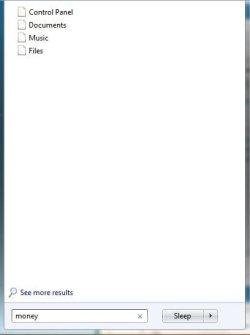
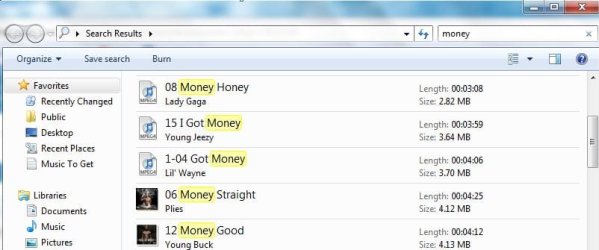
Looks like I can actually conduct a search, and just click "See More Results" at the bottom of the search function. Once I click that, the letters/words I entered into the search bar actually found stuff - I just don't understand why that is not showing on my start menu, just in the stupid "See More Results" thing. Some images are attached.

If it helps, I have tried to go in and modify my indexes, but Windows always seems to encounter an error when I try to Modify the start menu folder and it just crashes (so and so has stopped working).

Thanks for the help guys.

PS Unless you're keen on losing IQ, I wouldn't listen to the music that is featured in my screenshots. :p
 

Attachments

  • Capture.JPG
    Capture.JPG
    16.4 KB · Views: 14
  • Capture2.JPG
    Capture2.JPG
    44.1 KB · Views: 29

My Computer My Computer

OS
Windows 7
In my case search stopped working when i disabled libraries, when i restored system defaults all went back to normal.
 

My Computer My Computer

Computer Manufacturer/Model Number
HP Pavilion DV7-3197.eo
OS
Windows 7 NVIDIA Edition x64
CPU
Intel Core i7 Q720 1,60GHZ @ 1,60GHZ
Memory
6GB DDR3
Graphics Card(s)
NVIDIA GeForce GT 230M
Screen Resolution
1600 x 900
Hard Drives
500GB + 1000GB
Internet Speed
10 megabyte ADSL
Other Info
Current Windows 7 visual style:

Dark Soft
How exactly did you restore your system defaults? Did you right click a libraries folder>Restore Default Libraries? Tried that and it didn't work...
 

My Computer My Computer

OS
Windows 7
The question above is very relevant. Have you done anything as far and changing indexing options or any other file modifications?

If you open Windows Explorer and highlight the C: partition, then type something in the search box, what happens?

If you go to the Control Panel and select Indexing Options, the window that opens has a "Troubleshoot search and indexing". Since the trouble shooter was suggested before, what does it show?

Do you run any third party software that involves file manipulation?

You might try rebuilding the index, but it may not help.

 

My Computer My Computer

Computer Manufacturer/Model Number
Homebuilt
OS
Windows 7 x64
CPU
i7-2600K
Motherboard
Asus P8Z77-v Pro
Memory
8 G
Graphics Card(s)
GTX 480
Sound Card
Onboard
Monitor(s) Displays
LG W2753V
Screen Resolution
1920x1080
Hard Drives
Crucial M4 128 G SSD
I have the same issue! anybody solved this problem yet? pls reply!
 

My Computer My Computer

OS
Windows 7 32 bit
Back
Top