Windows 7 Search Not Working

Nioxxe

New member
Local time
11:17 PM
Messages
2
Searching folders for documents, music, etc. was working fine just a few days ago, but now suddenly it has stopped working completely. The search features in the start menu, windows explorer, and WIN + F aren't working.

As I type a search query, I get no instant results. Even after I press enter I get absolutely no results. However in the start menu when I search something and click "See more results" I get an error like this:

[Window Title]
search:query=notepad

Contents

Windows cannot access the specified device, path, or file. You may not have the appropriate permissions to access the item.

[OK]

--------------------------------------
I've tried to rebuild the search index and disable and enable the search feature through control panel, but it still isn't working. I've tried system restore but that hasn't helped either.

I would like to note that when I start Windows in safe mode, the search features work as usual.

What else can I do to fix this? Thanks for your help!
 

My Computer

OS
Windows 7 Home Premium 64bit

My Computer

Computer type
PC/Desktop
Computer Manufacturer/Model Number
Self built custom
OS
64-bit Windows 11 Pro for Workstations
CPU
Intel i7-8700K OC'd to 5 GHz
Motherboard
ASUS ROG Maximus XI Formula Z390
Memory
64 GB (4x16GB) G.SKILL TridentZ RGB DDR4 3600 MHz
Graphics Card(s)
ASUS ROG-STRIX-GTX1080TI-O11G-GAMING
Sound Card
Integrated
Monitor(s) Displays
2 x Samsung Odyssey G7 27"
Screen Resolution
2560x1440
Hard Drives
1TB Samsung 990 PRO M.2,
4TB Samsung 990 PRO PRO M.2,
TerraMaster F8 SSD Plus NAS
PSU
Seasonic Prime Titanium 850W
Case
Thermaltake Core P3
Cooling
Corsair Hydro H115i
Keyboard
Logitech wireless K800
Mouse
Logitech MX Master 4
Internet Speed
2 Gb/s Download and 100 Mb/s Upload
Antivirus
Malwarebyte Anti-Malware Premium
Browser
Google Chrome
Other Info
Logitech Z625 speaker system,
Logitech BRIO 4K Pro webcam,
HP Color LaserJet Pro MFP M477fdn,
APC SMART-UPS RT 1000 XL - SURT1000XLI,
Galaxy S23 Plus phone
Thanks for your help, but tips listed did not solve my problem :(
 

My Computer

OS
Windows 7 Home Premium 64bit
Sorry to hear that.

Since it was working a few days ago, you may be able to do a system restore using a restore point dated for when search did work properly.
 

My Computer

Computer type
PC/Desktop
Computer Manufacturer/Model Number
Self built custom
OS
64-bit Windows 11 Pro for Workstations
CPU
Intel i7-8700K OC'd to 5 GHz
Motherboard
ASUS ROG Maximus XI Formula Z390
Memory
64 GB (4x16GB) G.SKILL TridentZ RGB DDR4 3600 MHz
Graphics Card(s)
ASUS ROG-STRIX-GTX1080TI-O11G-GAMING
Sound Card
Integrated
Monitor(s) Displays
2 x Samsung Odyssey G7 27"
Screen Resolution
2560x1440
Hard Drives
1TB Samsung 990 PRO M.2,
4TB Samsung 990 PRO PRO M.2,
TerraMaster F8 SSD Plus NAS
PSU
Seasonic Prime Titanium 850W
Case
Thermaltake Core P3
Cooling
Corsair Hydro H115i
Keyboard
Logitech wireless K800
Mouse
Logitech MX Master 4
Internet Speed
2 Gb/s Download and 100 Mb/s Upload
Antivirus
Malwarebyte Anti-Malware Premium
Browser
Google Chrome
Other Info
Logitech Z625 speaker system,
Logitech BRIO 4K Pro webcam,
HP Color LaserJet Pro MFP M477fdn,
APC SMART-UPS RT 1000 XL - SURT1000XLI,
Galaxy S23 Plus phone
Try this:
  1. Click Start
  2. Click Control Panel
  3. Click System and Security
  4. Click Administrative Tools
  5. Double-click Services (You may need to responond to a UAC prompt
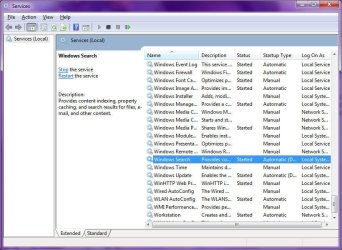
  6. Find and double click the Windows Search service:
    Image1.jpg
    Services
  7. Is the Startup type set to Automatic (Delayed Start):
    Image2.jpg
    Windows Search Service Settings
 

My Computer

Computer type
PC/Desktop
Computer Manufacturer/Model Number
Virtual Machine
OS
Windows 7 Professional 32-bit SP1
CPU
AMD A4/A6
Motherboard
Intel Corporation 440BX Desktop Reference Platform
Memory
3.00GB EDO
Graphics Card(s)
VMware SVGA 3D
Sound Card
High Definition Audio Device
Monitor(s) Displays
Generic Non-PnP Monitor on VMware SVGA 3D
Screen Resolution
1440x900
Hard Drives
1 x 60GB VMware Virtual SATA Hard Drive ATA Device
Antivirus
Kaspersky Total Security
Problem:

Windows search does not display any results, the message “see more results” returns an error message:

search:query=(Your_Search_item) Windows cannot access the specified device path or file. You may not have the appropriate permissions to access the item.

Similar issue applies to Outlook. Outlook simply cannot search anything.

Solution:

I found out eventually that the error was due to a corrupt Structured Query Schema bin file. By deleting the corrupt file, Windows will then recreate a new file. And voila! Problem solved.

How? Follow my instructions below:

Step 1:

Click on the “Start” button. In the menu that appears, click on “Control Panel.” From the “Control Panel,” click on “Folder Options.”

When the Folder Options menu opens, click the “View” tab.

Change settings to show hidden files: Scroll down until you see an option called “Hidden Files and Folders” Cick on “Show hidden files, folders, and drives”

Change settings to show operating system files: In the same window, uncheck (untick) the box that reads “Hide protected operating system files (Recommended).” Do this if the folder you want to unhide is a system folder.

Step 2:

Locate the file StructuredQuerySchema.bin from the path below – note that you need to to replace ‘YOUR_USER_NAME’ below with your correct Windows user name.

c:\Users\YOUR_USER_NAME\AppData\Local\Microsoft\Windows\1033\StructuredQuerySchema.bin

This should fix your issue! Make sure you do the reverse of Step 1 to re-hide the folders.

I hope you find this article useful. Please feel free to click on the ‘like’ button and leave me a good comment below, thanks!
 

My Computer

Computer type
PC/Desktop
OS
Windows 7 Pro 64bit
Win7 tiny Search missing

To restore the search tool to win7 tiny any version

Remove any MS office products you have installed ( Any and all )

Use a different Office package eg : Apache OpenOffice or LibreOffice

Its worked for me many times .


Or just dont install any office progarms at all
 

My Computer

Computer type
PC/Desktop
OS
7 32bit
Browser
firefox
Back
Top