Solved Windows 7 Start Button Changer Problems

danfyee332

New member
Member
Local time
2:36 AM
Messages
32
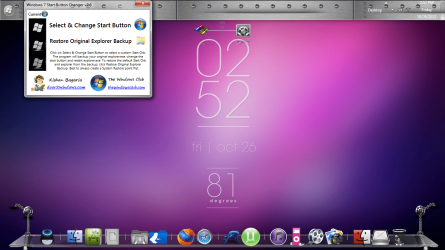
Does anyone know how to fix this? Yesterday when I went to change my windows theme, the start button automatically changed to some kind of default orb. Not the one that came with windows, but a custom one. One that I didn't even download. When I try changing it back it stays the same but it tells me that it changed it. I tried restarting and that didn't help. I tried manually changing it and got the same result. The only thing I know is that this happened after I installed a custom theme and then uninstalled it; and after I had used window blinds to change back my custom theme after uninstalling the one through control panel before. :cry:
 

Attachments

  • 10-26-2012 2-52-52 PM.png
    10-26-2012 2-52-52 PM.png
    612.2 KB · Views: 39

My Computer

OS
Windows 7 Home Premium x64

My Computer

Computer type
PC/Desktop
Computer Manufacturer/Model Number
Self Built
OS
Win 10 Pro x64
CPU
Intel I5-2500K @3.3GHz
Motherboard
Asrock P67 Extreme4
Memory
16GB G.Skill Ripjaws X (4x4GB)
Graphics Card(s)
EVGA GeForce 750 Ti SC 2GB
Sound Card
ASUS Xonar DG 5.1 Channels 24-bit 96KHz PCI Interface Sound
Monitor(s) Displays
auria eq2367
Screen Resolution
1920 x 1080
Hard Drives
250GB Samsung 850 EVO SSD
1TB WD Blue
1TB Hitachi
PSU
SeaSonic X 650W 80 Plus Gold
Case
Corsair Obsidian 750D
Cooling
Corsair H60, Three 140mm case fans
Keyboard
Logitech Wireless Keyboard K520
Mouse
Logitech Wireless Mouse M310
Internet Speed
Wave Broadband ~ 100 dn 5 up
Antivirus
Windows Defender, Malwarebytes Premium
Browser
Edge, IE11, Chrome
Other Info
Laptop specs: HP g7-1365dx /
CPU: AMD A6-3420M APU with Radeon(tm) HD Graphics /
RAM: Crucial 8Gb (2x4Gb) /
SSD: Crucial M4-CT128M4SSD2 ATA Device/ FW 000F /
GFX: AMD Radeon HD 6520G /
OS: Windows 10 Pro x64
Ok thanks I'll try it. Hopefully it works.
 

My Computer

OS
Windows 7 Home Premium x64
Thanks man. It worked.
 

My Computer

OS
Windows 7 Home Premium x64
You're welcome, glad you got it fixed. :)
 

My Computer

Computer type
PC/Desktop
Computer Manufacturer/Model Number
Self Built
OS
Win 10 Pro x64
CPU
Intel I5-2500K @3.3GHz
Motherboard
Asrock P67 Extreme4
Memory
16GB G.Skill Ripjaws X (4x4GB)
Graphics Card(s)
EVGA GeForce 750 Ti SC 2GB
Sound Card
ASUS Xonar DG 5.1 Channels 24-bit 96KHz PCI Interface Sound
Monitor(s) Displays
auria eq2367
Screen Resolution
1920 x 1080
Hard Drives
250GB Samsung 850 EVO SSD
1TB WD Blue
1TB Hitachi
PSU
SeaSonic X 650W 80 Plus Gold
Case
Corsair Obsidian 750D
Cooling
Corsair H60, Three 140mm case fans
Keyboard
Logitech Wireless Keyboard K520
Mouse
Logitech Wireless Mouse M310
Internet Speed
Wave Broadband ~ 100 dn 5 up
Antivirus
Windows Defender, Malwarebytes Premium
Browser
Edge, IE11, Chrome
Other Info
Laptop specs: HP g7-1365dx /
CPU: AMD A6-3420M APU with Radeon(tm) HD Graphics /
RAM: Crucial 8Gb (2x4Gb) /
SSD: Crucial M4-CT128M4SSD2 ATA Device/ FW 000F /
GFX: AMD Radeon HD 6520G /
OS: Windows 10 Pro x64
Hi all,

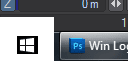
I've been using this for a bit now and all works well except I just can't get the alpha channel aligned on the mousover or selected states right. It *always* fringes for me. I know it's not a big deal, but does anyone know how to tidy it? My OCD kicks in every time I have to use the Start button... :D

Attached are screengrabs of the Start button and the button I'm currently using. I do have the PSD working file if someone would like it.

Alternatively, if someone can point me to a working Win10-style orb, that would be great too :)

B
 

Attachments

  • 2016-02-11_15-49-28.png
    2016-02-11_15-49-28.png
    1.5 KB · Views: 16
  • 2016-02-11_15-49-15.png
    2016-02-11_15-49-15.png
    2 KB · Views: 16
  • Windows_Logo4.zip
    Windows_Logo4.zip
    835 bytes · Views: 1

My Computer

Computer type
PC/Desktop
Computer Manufacturer/Model Number
custom build
OS
Windows 7 Home Premium SP1 64-bit
CPU
AMD FX 8350
Motherboard
Gigabyte 990FX
Memory
16GB
Graphics Card(s)
GeForce GTX 960 4GB
Hard Drives
~3 TB over various drives including SSD
Antivirus
Avast
Browser
Firefox
Welcome to the Seven Forums

Go ahead and attached the PSD to your next post and I will look at it.

Jerry
 

My Computer

Computer type
Laptop
Computer Manufacturer/Model Number
Sager NP9170
OS
Win 7 Pro x64 / Win 10 Pro
CPU
Intel(R) Core(TM) i7-3630QM CPU @ 2.40GHz
Motherboard
CLEVO P170EM
Memory
12 GB
Graphics Card(s)
(1) Intel(R) HD Graphics 4000 (2) NVIDIA GeForce GTX 675M
Sound Card
(1) Realtek High Definition Audio (2) Intel(R) Display Aud
Monitor(s) Displays
17.3
Screen Resolution
1920x1080
Hard Drives
(1) Samsung 860 EVO 500GB(OS) (1) Samsung 860 EVO 500GB(Data)
Keyboard
Backlite
Antivirus
MSE, Malwarebytes Pro
Browser
Firefox
Other Info
DESKTOP: Custom-built.
OS: Win 10 Pro x64.
CASE: Rosewill R5.
CPU: Intel I5 4670K CPU @ 3.40GHz.
CPU COOLER: Cool Master Hyper 212 EVO.
MOTHERBOARD: Asus Z87-A.
MEMORY: Kingston HyperX 2x4 GB.
GPU: Nvidia Geforce 650 TI.
PSU: Corsair TX750.
DRIVES: (1) Samsung 840 120 GB SSD (2) Western Digital blue 500 GB 7200 RPM.
Here you go, thanks.

B
PS. I also use DisplayFusion Pro 7.3.4 (right now) for my two-monitor system and it's fine on the Start button on the second monitor controlled by DF.
 

Attachments

Last edited:

My Computer

Computer type
PC/Desktop
Computer Manufacturer/Model Number
custom build
OS
Windows 7 Home Premium SP1 64-bit
CPU
AMD FX 8350
Motherboard
Gigabyte 990FX
Memory
16GB
Graphics Card(s)
GeForce GTX 960 4GB
Hard Drives
~3 TB over various drives including SSD
Antivirus
Avast
Browser
Firefox
Here you go, thanks.

B
PS. I also use DisplayFusion Pro 7.3.4 (right now) for my two-monitor system and it's fine on the Start button on the second monitor controlled by DF.

Try this one out, had to move the top and bottom image up 1 px. Let me know if it's OK if not I can adjust it.

Jerry
 

Attachments

My Computer

Computer type
Laptop
Computer Manufacturer/Model Number
Sager NP9170
OS
Win 7 Pro x64 / Win 10 Pro
CPU
Intel(R) Core(TM) i7-3630QM CPU @ 2.40GHz
Motherboard
CLEVO P170EM
Memory
12 GB
Graphics Card(s)
(1) Intel(R) HD Graphics 4000 (2) NVIDIA GeForce GTX 675M
Sound Card
(1) Realtek High Definition Audio (2) Intel(R) Display Aud
Monitor(s) Displays
17.3
Screen Resolution
1920x1080
Hard Drives
(1) Samsung 860 EVO 500GB(OS) (1) Samsung 860 EVO 500GB(Data)
Keyboard
Backlite
Antivirus
MSE, Malwarebytes Pro
Browser
Firefox
Other Info
DESKTOP: Custom-built.
OS: Win 10 Pro x64.
CASE: Rosewill R5.
CPU: Intel I5 4670K CPU @ 3.40GHz.
CPU COOLER: Cool Master Hyper 212 EVO.
MOTHERBOARD: Asus Z87-A.
MEMORY: Kingston HyperX 2x4 GB.
GPU: Nvidia Geforce 650 TI.
PSU: Corsair TX750.
DRIVES: (1) Samsung 840 120 GB SSD (2) Western Digital blue 500 GB 7200 RPM.
That's no good for me? It creates a large white square and there's no mouseover difference, not sure if I'm doing something wrong. The main reason I'm doing this is to avoid the "overflow" that standard orb does over the top of the taskbar, which is very irritating since it encroaches on fullscreen software interface screenshots.

B
 

Attachments

  • 2016-02-11_23-40-52.png
    2016-02-11_23-40-52.png
    4.7 KB · Views: 12

My Computer

Computer type
PC/Desktop
Computer Manufacturer/Model Number
custom build
OS
Windows 7 Home Premium SP1 64-bit
CPU
AMD FX 8350
Motherboard
Gigabyte 990FX
Memory
16GB
Graphics Card(s)
GeForce GTX 960 4GB
Hard Drives
~3 TB over various drives including SSD
Antivirus
Avast
Browser
Firefox
I tried moving my upper and lower orb pics up one pixel myself but that resulted in no mouseover colour change and still offset for the selected. Weird.

In other matters, weird how the Iowa state flag on here looks a bit like a French flag with extra stuff :)

B
 

My Computer

Computer type
PC/Desktop
Computer Manufacturer/Model Number
custom build
OS
Windows 7 Home Premium SP1 64-bit
CPU
AMD FX 8350
Motherboard
Gigabyte 990FX
Memory
16GB
Graphics Card(s)
GeForce GTX 960 4GB
Hard Drives
~3 TB over various drives including SSD
Antivirus
Avast
Browser
Firefox

Attachments

My Computer

Computer type
Laptop
Computer Manufacturer/Model Number
Sager NP9170
OS
Win 7 Pro x64 / Win 10 Pro
CPU
Intel(R) Core(TM) i7-3630QM CPU @ 2.40GHz
Motherboard
CLEVO P170EM
Memory
12 GB
Graphics Card(s)
(1) Intel(R) HD Graphics 4000 (2) NVIDIA GeForce GTX 675M
Sound Card
(1) Realtek High Definition Audio (2) Intel(R) Display Aud
Monitor(s) Displays
17.3
Screen Resolution
1920x1080
Hard Drives
(1) Samsung 860 EVO 500GB(OS) (1) Samsung 860 EVO 500GB(Data)
Keyboard
Backlite
Antivirus
MSE, Malwarebytes Pro
Browser
Firefox
Other Info
DESKTOP: Custom-built.
OS: Win 10 Pro x64.
CASE: Rosewill R5.
CPU: Intel I5 4670K CPU @ 3.40GHz.
CPU COOLER: Cool Master Hyper 212 EVO.
MOTHERBOARD: Asus Z87-A.
MEMORY: Kingston HyperX 2x4 GB.
GPU: Nvidia Geforce 650 TI.
PSU: Corsair TX750.
DRIVES: (1) Samsung 840 120 GB SSD (2) Western Digital blue 500 GB 7200 RPM.
It really does, but I just noticed that loading it up again it was white too, so I guess I changed the opacity on the layer for some reason :) That's a great tutorial, thanks...

B
 

My Computer

Computer type
PC/Desktop
Computer Manufacturer/Model Number
custom build
OS
Windows 7 Home Premium SP1 64-bit
CPU
AMD FX 8350
Motherboard
Gigabyte 990FX
Memory
16GB
Graphics Card(s)
GeForce GTX 960 4GB
Hard Drives
~3 TB over various drives including SSD
Antivirus
Avast
Browser
Firefox
Back
Top