

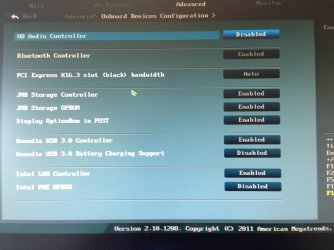
does any of this looks for you fimilliar for J Micron controller?Reboot and look for the key to press to enter BIOS setup.
In BIOS setup go through each tab thoroughly to become familar with the settings. Under boot there should be a Fast Boot option to check its setting. There may be others which govern whether and which controllers are enabled and how they are displayed. If not on the Boot tab, look at the others.
I would also set HDD first device to boot in Boot Order Priority. This can make it a bit faster. Remember to Save any changes.
If you see what you think are other related settings, make note of them and ask back.
Attachments
My Computer
- Computer type
- PC/Desktop
- Computer Manufacturer/Model Number
- iBUYPOWER Computers
- OS
- Windows 7 Home Premium x64 SP1
- CPU
- Intel(R) Core(TM) i5-2500K CPU @ 3.30GHz
- Motherboard
- ASUSTeK Computer INC. P8Z68-V GEN3
- Memory
- G.SKILL Sniper Series 8GB DDR3 1866 (PC3 14900)
- Graphics Card(s)
- ASUS GTX660 TI-DC2O-2GD5
- Sound Card
- HT | OMEGA Claro Halo
- Monitor(s) Displays
- ASUS VE247H Black 23.6" 2ms
- Screen Resolution
- 1920 x 1080
- Hard Drives
- 1TB SATAII/128GB SSD
- Case
- NZXT Guardian921 Gaming Tower
- Keyboard
- Razer DeathStalker
- Mouse
- Razer Naga Hex
- Internet Speed
- 96.71
- Antivirus
- Microsoft Security Essentials
- Browser
- Google Chrome
- Other Info
- speaker: Logitech Z506
Laptop: Lenovo y510p
mousepad:Razer Vespula
mic: Logitech 980186-0403 Silver USB Connector USB Desktop Microphone

 im going to get love this pc even more


