
MassaTheChamp
New member
- Local time
- 4:53 PM
- Messages
- 8
Hi!
Because of the errors reported by the action center i installed the WD SES driver, another WD driver, USB 3 driver and Marvell Console driver.
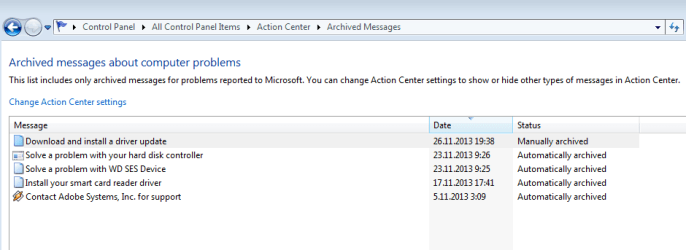
After that my PC started taking long time to boot. Usually it booted fast, now it is taking more than a minute at the windows logo screen.
I thought this was caused by the Marvell console driver. So I tried to uninstall it, but couldn't find the uninstaller, so I uninstalled it with Driver Fusion. It didn't help. Then I uninstalled every program/driver I installed on that day.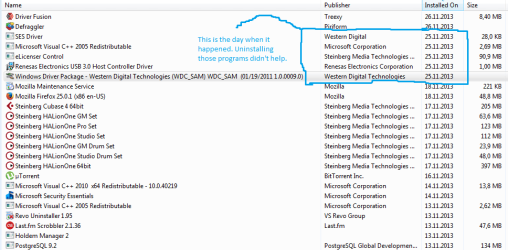
Clearing CMOS didn't help either. Now i ran sfc/scannnow and it did not find any integrity violations. I managed to find the right logs by googling and i see I have a lot of Critical levels and Errors.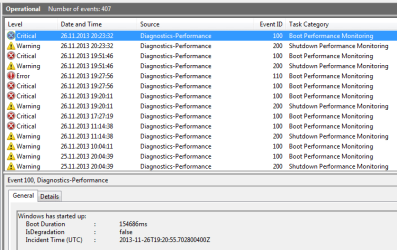
I have attached all the Operational logs from 24.10.2013 when i did a complete reinstall.
I have no idea what to do, please help.
My specs:
OS: Windows7 Ultimate SP1, 64-bit
BIOS Version: F6
MB: Gigabyte X58A-UD3R rev.1.0
Processor: Intel(R) Core(TM) i7 CPU 930 @ 2.80GHz, 2794 Mhz
Graphics card: AMD Radeon HD 5700 Series
RAM: 16GB DDR3 1600 Kingston
Hard drives: Crucial M4 CT512M4SSD2 512 GB SSD - OS is installed here
Western Digital WD15EARS-00Z5B1 1.5TB
Kingston SSDNow SNV425-S2 128GB SSD
All are in AHCI mode.
Because of the errors reported by the action center i installed the WD SES driver, another WD driver, USB 3 driver and Marvell Console driver.
After that my PC started taking long time to boot. Usually it booted fast, now it is taking more than a minute at the windows logo screen.
I thought this was caused by the Marvell console driver. So I tried to uninstall it, but couldn't find the uninstaller, so I uninstalled it with Driver Fusion. It didn't help. Then I uninstalled every program/driver I installed on that day.
Clearing CMOS didn't help either. Now i ran sfc/scannnow and it did not find any integrity violations. I managed to find the right logs by googling and i see I have a lot of Critical levels and Errors.
I have attached all the Operational logs from 24.10.2013 when i did a complete reinstall.
I have no idea what to do, please help.
My specs:
OS: Windows7 Ultimate SP1, 64-bit
BIOS Version: F6
MB: Gigabyte X58A-UD3R rev.1.0
Processor: Intel(R) Core(TM) i7 CPU 930 @ 2.80GHz, 2794 Mhz
Graphics card: AMD Radeon HD 5700 Series
RAM: 16GB DDR3 1600 Kingston
Hard drives: Crucial M4 CT512M4SSD2 512 GB SSD - OS is installed here
Western Digital WD15EARS-00Z5B1 1.5TB
Kingston SSDNow SNV425-S2 128GB SSD
All are in AHCI mode.
Attachments
My Computer
At a glance
Windows 7 Ultimate x64Intel(R) Core(TM) i7 CPU 930 @ 2.80GHz16GB 1600MHz DDR3 Non-ECC CL9 DIMM (Kit of 4)...ATI Radeon HD 5700 Series
- Computer type
- PC/Desktop
- Computer Manufacturer/Model Number
- custom build
- OS
- Windows 7 Ultimate x64
- CPU
- Intel(R) Core(TM) i7 CPU 930 @ 2.80GHz
- Motherboard
- GA-X58A-UD3R
- Memory
- 16GB 1600MHz DDR3 Non-ECC CL9 DIMM (Kit of 4) XMP
- Graphics Card(s)
- ATI Radeon HD 5700 Series
- Hard Drives
- KINGSTON SNV425S2128GB ATA Device
M4-CT512M4SSD2 ATA Device
WDC WD15EARS-00Z5B1 ATA Device
- Antivirus
- Microsoft Security Essentials
- Browser
- Google Chrome


