Hey guys,
About 5 days ago I changed my theme to windows classic to get rid of some lag for the program that I was using. When I changed back to windows 7 theme, I noticed a few changes that I can't seem to solve by myself. Some of them are gonna be hard to explain but I will try my best.
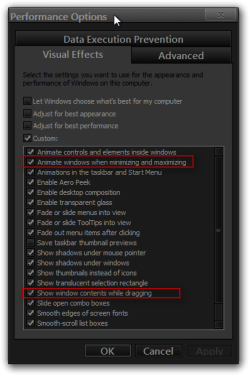
First issue: When I try to move the window I have opened, instead of moving the whole window, I get the outline of the window. I really don't like this and want to back to the windows 7 style.

Uploaded with ImageShack.us
Second issue: When I select something on my desktop, instead of having the blue selection back, I just have the standard dotted line.

Uploaded with ImageShack.us
Third issue: When I close a windows or program, in windows 7 and even in vista, it usually "fades" into the background, for me, the windows just closes. Its better when it fades away.
Those are the three issues I am having, and I know they can be a little bit weird, but I just want it back to the way it was. I have also tried restarting my computer and that does not help.
Thanks
About 5 days ago I changed my theme to windows classic to get rid of some lag for the program that I was using. When I changed back to windows 7 theme, I noticed a few changes that I can't seem to solve by myself. Some of them are gonna be hard to explain but I will try my best.
First issue: When I try to move the window I have opened, instead of moving the whole window, I get the outline of the window. I really don't like this and want to back to the windows 7 style.

Uploaded with ImageShack.us
Second issue: When I select something on my desktop, instead of having the blue selection back, I just have the standard dotted line.

Uploaded with ImageShack.us
Third issue: When I close a windows or program, in windows 7 and even in vista, it usually "fades" into the background, for me, the windows just closes. Its better when it fades away.
Those are the three issues I am having, and I know they can be a little bit weird, but I just want it back to the way it was. I have also tried restarting my computer and that does not help.
Thanks
My Computer
- OS
- Windows 7 64-bit