Solved Windows 7 Themes interfering with FireFox/Gadgets useability

NewUserOne

New member
Local time
6:40 AM
Messages
28
I have a custom theme that I have been using for the past month.

It is a theme with dark menus that I have come to love. I have never had problems with it interfering with Firefox or desktop gadgets before.

Last night, I tried an 'Aero' theme and decided I didn't like it and switched back to my old theme. However, now whenever firefox is loaded, the page background appears the wrong color and pictures do not load. This happens for youtube, facebook, and netflix (all opened in my homepage). I have uninstalled firefox and reinstalled twice since this issue has come up and nothing has changed.

Gadgets also do not load correctly (appearance). This has never occurred before.

This problem goes away when I use an Aero theme or the Windows 7 classic theme, but returns when I use my custom theme or a high contrast theme.

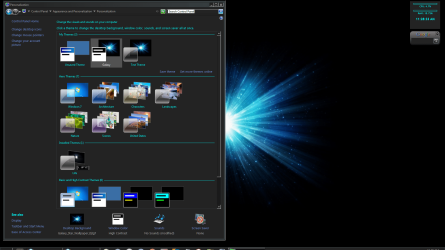
I do not believe I changed any settings under my custom theme, but if we have to, we could run through all the setting under

Appearance and Personalization > Personalization > Window Color and Appearance

To see if I have accidentally filled a field that affects Firefox/gadgets

Here are some pictures for explanation:

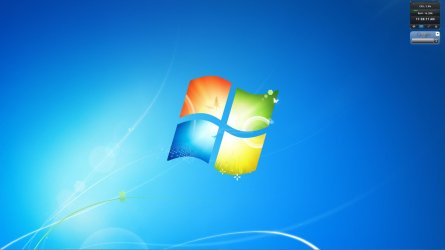
So this is what the gadgets should be doing and this is with the Windows 7 Aero Theme


attachment.php


And this is how Firefox looks


attachment.php


And this is how the Menu looks


attachment.php


Everything is fine with this theme.

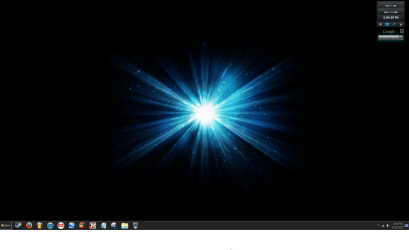
Okay, so this is the "Life" Theme. This is a dark theme that doesn't interfere with gadgets/firefox.


attachment.php


And this is how Firefox looks


attachment.php


And this is how the menus look


attachment.php


Seems to be fine, despite the obvious and drastic change of colors.

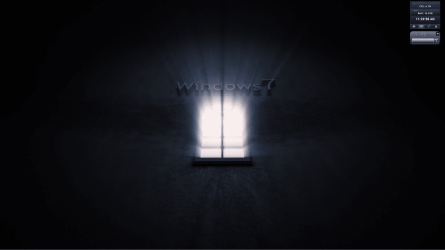
Now here's where problems come in with my theme.

Here's how gadgets look.

attachment.php


Here's how Firefox looks :(


attachment.php


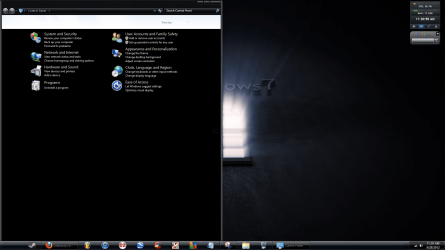
Here's how the menus look


attachment.php


I never had this problem until last night and don't remember changing anything except for switching to Aeros and back.

Is there something I'm missing? Is there a way to set windows themes to not interfere with other programs?

Thanks a lot to anyone who answers, I've become really attached to this theme and would hate to lose it.
 

Attachments

  • Desktop + Gadgets Custom.PNG
    Desktop + Gadgets Custom.PNG
    176.3 KB · Views: 194
  • Desktop + Gadgets Life Theme.PNG
    Desktop + Gadgets Life Theme.PNG
    206.7 KB · Views: 205
  • Desktop + Gadgets Normal.jpg
    Desktop + Gadgets Normal.jpg
    65.2 KB · Views: 217
  • Desktop Snip.PNG
    Desktop Snip.PNG
    205.3 KB · Views: 2
  • FireFox Custom.PNG
    FireFox Custom.PNG
    102.5 KB · Views: 188
  • Menus Normal.PNG
    Menus Normal.PNG
    378.1 KB · Views: 202
  • Menus Life theme.PNG
    Menus Life theme.PNG
    200.2 KB · Views: 195
  • Menus Custom.PNG
    Menus Custom.PNG
    194 KB · Views: 182
  • FireFox Normal.jpg
    FireFox Normal.jpg
    190.2 KB · Views: 198
  • FireFox Life Theme.jpg
    FireFox Life Theme.jpg
    190.4 KB · Views: 200

My Computer My Computer

OS
Windows 7 Ultimate x64
Welcome to the Seven Forums

Which one did you use the Universal Theme Patcher or UxStyle to enable custom themes?

Jerry
 

My Computer My Computer

Computer type
Laptop
Computer Manufacturer/Model Number
Sager NP9170
OS
Win 7 Pro x64 / Win 10 Pro
CPU
Intel(R) Core(TM) i7-3630QM CPU @ 2.40GHz
Motherboard
CLEVO P170EM
Memory
12 GB
Graphics Card(s)
(1) Intel(R) HD Graphics 4000 (2) NVIDIA GeForce GTX 675M
Sound Card
(1) Realtek High Definition Audio (2) Intel(R) Display Aud
Monitor(s) Displays
17.3
Screen Resolution
1920x1080
Hard Drives
(1) Samsung 860 EVO 500GB(OS) (1) Samsung 860 EVO 500GB(Data)
Keyboard
Backlite
Antivirus
MSE, Malwarebytes Pro
Browser
Firefox
Other Info
DESKTOP: Custom-built.
OS: Win 10 Pro x64.
CASE: Rosewill R5.
CPU: Intel I5 4670K CPU @ 3.40GHz.
CPU COOLER: Cool Master Hyper 212 EVO.
MOTHERBOARD: Asus Z87-A.
MEMORY: Kingston HyperX 2x4 GB.
GPU: Nvidia Geforce 650 TI.
PSU: Corsair TX750.
DRIVES: (1) Samsung 840 120 GB SSD (2) Western Digital blue 500 GB 7200 RPM.
Do you mean in Firefox or in Windows?

I don't believe I initially installed any additional software to alter windows themes.

I eventually did install Universal Theme Patcher, it was an impulse decision that I made because I was trying to change the color of the taskbar in windows (which I eventually decided I didn't even want to do).

I have uninstalled it though.

There was a piece of software (add-on) that I installed in Firefox, after the issue came up, to try and fix the problem, but I ended up uninstalling it because I had no luck with it. It now doesn't show up in Firefox add-ons. However, I haven't checked the Program Files (x86) folder and there could be some left over files there.

Like I said, I have reinstalled Firefox twice since this incident, but maybe there are still files left over that are causing this to happen.

I'm somewhat comfortable/proficient with Windows, but I honestly don't know where to start backtracking and I don't even know how the problem originally came up.

Thanks for you response. :)
 

My Computer My Computer

OS
Windows 7 Ultimate x64

My Computer My Computer

Computer type
PC/Desktop
OS
Windows 10 Home x64
CPU
INTEL Core i5-750 Quad-Core 3.37GHz
Motherboard
ASUS P7P55D
Memory
HyperX Fury Black Series 8GB (2 x 4GB) 1866Mhz
Graphics Card(s)
EVGA GeForce GTX 750 Superclocked 1GB 128-Bit GDDR5
Monitor(s) Displays
LG 32MA68HY 32" IPS
Screen Resolution
1920 x 1080
Hard Drives
Samsung 840 Evo 120GB, SEAGATE 500GB Barracuda® 7200.12, SATA 3 Gb/s, 7200 RPM, 16MB cache
PSU
ANTEC TruePower New TP-550, 80 PLUS, 550W
Case
ANTEC Three Hundred Illusion
Cooling
COOLER MASTER Hyper 212 Plus, 4 x 120mm 1 x 140mm Noctua's
Internet Speed
85 + Mbps
Antivirus
Avast
Browser
Vivaldi
i would just system restore if you want it back with your dark theme working as it did the previous night.
sfc scan will reset windows themes and file icons to default .
 

My Computer My Computer

Computer Manufacturer/Model Number
Hewlett packard/p6512uk
OS
Microsoft Windows 7 Home Premium 64-bit 7600
CPU
IIx4 amd athelon 635 processor
Motherboard
FOXCONN 2AA9
Memory
2x2gb
Graphics Card(s)
ati radeon HD 5450
Sound Card
(1) Realtek High Definition Audio (2) AMD High Definition
Monitor(s) Displays
samsung lcd tv 32"
Screen Resolution
1360x 768
Hard Drives
(1) WDC WD10 01FAES-60Z2A0 SATA Disk Device (2) Maxtor OneTouch USB Device (3) ST310003 33AS USB Device (4) WD My Book 1111 USB Device
PSU
?
Cooling
air!
Keyboard
wireless hp
Mouse
wireless Hp,optical
Internet Speed
1.10mb/s
Antivirus
MSE
Browser
Firefox

My Computer My Computer

Computer type
Laptop
Computer Manufacturer/Model Number
Sager NP9170
OS
Win 7 Pro x64 / Win 10 Pro
CPU
Intel(R) Core(TM) i7-3630QM CPU @ 2.40GHz
Motherboard
CLEVO P170EM
Memory
12 GB
Graphics Card(s)
(1) Intel(R) HD Graphics 4000 (2) NVIDIA GeForce GTX 675M
Sound Card
(1) Realtek High Definition Audio (2) Intel(R) Display Aud
Monitor(s) Displays
17.3
Screen Resolution
1920x1080
Hard Drives
(1) Samsung 860 EVO 500GB(OS) (1) Samsung 860 EVO 500GB(Data)
Keyboard
Backlite
Antivirus
MSE, Malwarebytes Pro
Browser
Firefox
Other Info
DESKTOP: Custom-built.
OS: Win 10 Pro x64.
CASE: Rosewill R5.
CPU: Intel I5 4670K CPU @ 3.40GHz.
CPU COOLER: Cool Master Hyper 212 EVO.
MOTHERBOARD: Asus Z87-A.
MEMORY: Kingston HyperX 2x4 GB.
GPU: Nvidia Geforce 650 TI.
PSU: Corsair TX750.
DRIVES: (1) Samsung 840 120 GB SSD (2) Western Digital blue 500 GB 7200 RPM.
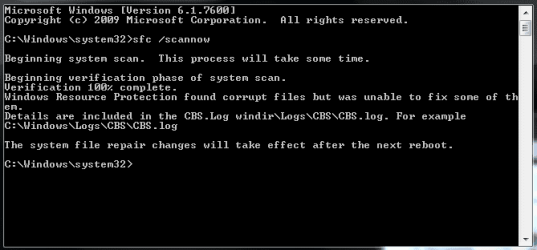
I did the SFC Scan and got this message:

attachment.php


Then when to CBS Logs and got the message: "Access is denied" and it opens a blank notepad file.

I have restarted the computer and nothing has changed cosmetically and I have still having the same problems with Firefox.

I would like to repatch the problems, but I need to be able to see them.

Should i just do a system restore? :confused:
 

Attachments

  • Sfc.PNG
    Sfc.PNG
    6.4 KB · Views: 145

My Computer My Computer

OS
Windows 7 Ultimate x64
Should i just do a system restore?
If you can

Try the sfc /scannow 3 times with a restart after each scan.

Jerry
 

My Computer My Computer

Computer type
Laptop
Computer Manufacturer/Model Number
Sager NP9170
OS
Win 7 Pro x64 / Win 10 Pro
CPU
Intel(R) Core(TM) i7-3630QM CPU @ 2.40GHz
Motherboard
CLEVO P170EM
Memory
12 GB
Graphics Card(s)
(1) Intel(R) HD Graphics 4000 (2) NVIDIA GeForce GTX 675M
Sound Card
(1) Realtek High Definition Audio (2) Intel(R) Display Aud
Monitor(s) Displays
17.3
Screen Resolution
1920x1080
Hard Drives
(1) Samsung 860 EVO 500GB(OS) (1) Samsung 860 EVO 500GB(Data)
Keyboard
Backlite
Antivirus
MSE, Malwarebytes Pro
Browser
Firefox
Other Info
DESKTOP: Custom-built.
OS: Win 10 Pro x64.
CASE: Rosewill R5.
CPU: Intel I5 4670K CPU @ 3.40GHz.
CPU COOLER: Cool Master Hyper 212 EVO.
MOTHERBOARD: Asus Z87-A.
MEMORY: Kingston HyperX 2x4 GB.
GPU: Nvidia Geforce 650 TI.
PSU: Corsair TX750.
DRIVES: (1) Samsung 840 120 GB SSD (2) Western Digital blue 500 GB 7200 RPM.
Should I try the 3 SFC/Restart first?

( should I keep system restore as last resort ? )


Also, there were some modifications like removing start button and removing start menu user picture, will these be altered/reset by system restore?

Thanks SO MUCH for your quick response!
 

My Computer My Computer

OS
Windows 7 Ultimate x64
Should I try the 3 SFC/Restart first?
Sure you will not hurt anything.


should I keep system restore as last resort
If the scan does not help then do it.

Jerry
 

My Computer My Computer

Computer type
Laptop
Computer Manufacturer/Model Number
Sager NP9170
OS
Win 7 Pro x64 / Win 10 Pro
CPU
Intel(R) Core(TM) i7-3630QM CPU @ 2.40GHz
Motherboard
CLEVO P170EM
Memory
12 GB
Graphics Card(s)
(1) Intel(R) HD Graphics 4000 (2) NVIDIA GeForce GTX 675M
Sound Card
(1) Realtek High Definition Audio (2) Intel(R) Display Aud
Monitor(s) Displays
17.3
Screen Resolution
1920x1080
Hard Drives
(1) Samsung 860 EVO 500GB(OS) (1) Samsung 860 EVO 500GB(Data)
Keyboard
Backlite
Antivirus
MSE, Malwarebytes Pro
Browser
Firefox
Other Info
DESKTOP: Custom-built.
OS: Win 10 Pro x64.
CASE: Rosewill R5.
CPU: Intel I5 4670K CPU @ 3.40GHz.
CPU COOLER: Cool Master Hyper 212 EVO.
MOTHERBOARD: Asus Z87-A.
MEMORY: Kingston HyperX 2x4 GB.
GPU: Nvidia Geforce 650 TI.
PSU: Corsair TX750.
DRIVES: (1) Samsung 840 120 GB SSD (2) Western Digital blue 500 GB 7200 RPM.
Okay, I am doing another scan now and will do one more after reboot (followed by another reboot).

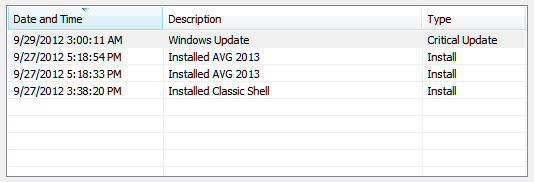
- update, so I am going to use system restore, here are the restore points

attachment.php


So it looks like Classic Shell would be a good point to restore to and could be causing the problems.
 

Attachments

  • system restore referencfe.PNG
    system restore referencfe.PNG
    3.4 KB · Views: 38

My Computer My Computer

OS
Windows 7 Ultimate x64
OK guys, system restore was the cure.

All that I need to fix now is to auto hide the lock bar and remove the user picture from the start menu (easy).

Thanks a lot for your patience and all of your suggestions.

I did extensive searching on Google beforehand, but due to the keywords I only received unwanted links.

Problem solved.
 

My Computer My Computer

OS
Windows 7 Ultimate x64
Good job, glad you got it sorted :thumbsup:

A Guy
 

My Computer My Computer

Computer type
PC/Desktop
OS
Windows 10 Home x64
CPU
INTEL Core i5-750 Quad-Core 3.37GHz
Motherboard
ASUS P7P55D
Memory
HyperX Fury Black Series 8GB (2 x 4GB) 1866Mhz
Graphics Card(s)
EVGA GeForce GTX 750 Superclocked 1GB 128-Bit GDDR5
Monitor(s) Displays
LG 32MA68HY 32" IPS
Screen Resolution
1920 x 1080
Hard Drives
Samsung 840 Evo 120GB, SEAGATE 500GB Barracuda® 7200.12, SATA 3 Gb/s, 7200 RPM, 16MB cache
PSU
ANTEC TruePower New TP-550, 80 PLUS, 550W
Case
ANTEC Three Hundred Illusion
Cooling
COOLER MASTER Hyper 212 Plus, 4 x 120mm 1 x 140mm Noctua's
Internet Speed
85 + Mbps
Antivirus
Avast
Browser
Vivaldi
So do you think it's safe to say that 'Classic Shell' was causing the problem?

I like the fact that it successfully got rid of the start menu picture, however it obviously causes problems.

I've tried other fixes online (even some offered in these forums) but none of the software based fixes worked.

Do you guys know of a way to do it through the registry or other settings?

It's not super important, but I figure this is a good place to ask. :)
 

My Computer My Computer

OS
Windows 7 Ultimate x64

My Computer My Computer

Computer type
PC/Desktop
OS
Windows 10 Home x64
CPU
INTEL Core i5-750 Quad-Core 3.37GHz
Motherboard
ASUS P7P55D
Memory
HyperX Fury Black Series 8GB (2 x 4GB) 1866Mhz
Graphics Card(s)
EVGA GeForce GTX 750 Superclocked 1GB 128-Bit GDDR5
Monitor(s) Displays
LG 32MA68HY 32" IPS
Screen Resolution
1920 x 1080
Hard Drives
Samsung 840 Evo 120GB, SEAGATE 500GB Barracuda® 7200.12, SATA 3 Gb/s, 7200 RPM, 16MB cache
PSU
ANTEC TruePower New TP-550, 80 PLUS, 550W
Case
ANTEC Three Hundred Illusion
Cooling
COOLER MASTER Hyper 212 Plus, 4 x 120mm 1 x 140mm Noctua's
Internet Speed
85 + Mbps
Antivirus
Avast
Browser
Vivaldi
I downloaded the file and extracted it with winrar to the desktop, clicked on the program and the dialog box opened and said it was fixed, but nothing changed and after restarting nothing changed..
 

My Computer My Computer

OS
Windows 7 Ultimate x64
Hmmm, worked for me when I used it. Had it in my startup. Since I liked the Classic Shell cascading all programs, and it very handily removed the user picture, I stopped using it. If I were you, I'd make a restore point then try Classic Shell again. The developer is a member here BTW. A Guy
 

My Computer My Computer

Computer type
PC/Desktop
OS
Windows 10 Home x64
CPU
INTEL Core i5-750 Quad-Core 3.37GHz
Motherboard
ASUS P7P55D
Memory
HyperX Fury Black Series 8GB (2 x 4GB) 1866Mhz
Graphics Card(s)
EVGA GeForce GTX 750 Superclocked 1GB 128-Bit GDDR5
Monitor(s) Displays
LG 32MA68HY 32" IPS
Screen Resolution
1920 x 1080
Hard Drives
Samsung 840 Evo 120GB, SEAGATE 500GB Barracuda® 7200.12, SATA 3 Gb/s, 7200 RPM, 16MB cache
PSU
ANTEC TruePower New TP-550, 80 PLUS, 550W
Case
ANTEC Three Hundred Illusion
Cooling
COOLER MASTER Hyper 212 Plus, 4 x 120mm 1 x 140mm Noctua's
Internet Speed
85 + Mbps
Antivirus
Avast
Browser
Vivaldi
Is there a way to install classic shell without it automatically altering your start menu upon installation?

All I would need it for is just simply removing the user account picture from the start menu, but last time I installed it it automatically changed it to a classic menu and only gave me three option to choose from for the start menu (none of which were remotely similar to mine). The one that was closest to mine looked like the windows 7 Aero start menu. I didn't feel like backtracking all of the fields to get it back to how I had it, so I just restored to before I installed.

Was there some category I missed where you can just keep your current (pre-installation) start menu?


I almost don't want to download the program for one minor change, but its the only solution that has worked (among 4 other 'fixes').

Thanks
 

My Computer My Computer

OS
Windows 7 Ultimate x64

My Computer My Computer

Computer type
PC/Desktop
OS
Windows 10 Home x64
CPU
INTEL Core i5-750 Quad-Core 3.37GHz
Motherboard
ASUS P7P55D
Memory
HyperX Fury Black Series 8GB (2 x 4GB) 1866Mhz
Graphics Card(s)
EVGA GeForce GTX 750 Superclocked 1GB 128-Bit GDDR5
Monitor(s) Displays
LG 32MA68HY 32" IPS
Screen Resolution
1920 x 1080
Hard Drives
Samsung 840 Evo 120GB, SEAGATE 500GB Barracuda® 7200.12, SATA 3 Gb/s, 7200 RPM, 16MB cache
PSU
ANTEC TruePower New TP-550, 80 PLUS, 550W
Case
ANTEC Three Hundred Illusion
Cooling
COOLER MASTER Hyper 212 Plus, 4 x 120mm 1 x 140mm Noctua's
Internet Speed
85 + Mbps
Antivirus
Avast
Browser
Vivaldi
That was the second or third method I tried and it never worked.

Oh well, it's really one of the most minor things to worry about.
 

My Computer My Computer

OS
Windows 7 Ultimate x64
Back
Top