Solved Windows 7 Themes interfering with FireFox/Gadgets useability

My Computer My Computer

Computer type
PC/Desktop
OS
Windows 10 Home x64
CPU
INTEL Core i5-750 Quad-Core 3.37GHz
Motherboard
ASUS P7P55D
Memory
HyperX Fury Black Series 8GB (2 x 4GB) 1866Mhz
Graphics Card(s)
EVGA GeForce GTX 750 Superclocked 1GB 128-Bit GDDR5
Monitor(s) Displays
LG 32MA68HY 32" IPS
Screen Resolution
1920 x 1080
Hard Drives
Samsung 840 Evo 120GB, SEAGATE 500GB Barracuda® 7200.12, SATA 3 Gb/s, 7200 RPM, 16MB cache
PSU
ANTEC TruePower New TP-550, 80 PLUS, 550W
Case
ANTEC Three Hundred Illusion
Cooling
COOLER MASTER Hyper 212 Plus, 4 x 120mm 1 x 140mm Noctua's
Internet Speed
85 + Mbps
Antivirus
Avast
Browser
Vivaldi
Yeah, I tried that as well. It never worked for me either.


Nothing has worked except the classic shell fix. Even the taskbar bug didn't work as described.

I think I'll just get used to the user picture.
 

My Computer My Computer

OS
Windows 7 Ultimate x64
Are you still using the third-party custom theme?
If so post the link to it and I will ask the theme maker if I can edit that, I use Windows Style Builder and there is a setting in their that I can uncheck any removes the user picture in the start menu. If you are using the default Aero theme I could do that and posted here with no problem.
Let me know.
Jerry
 

My Computer My Computer

Computer type
Laptop
Computer Manufacturer/Model Number
Sager NP9170
OS
Win 7 Pro x64 / Win 10 Pro
CPU
Intel(R) Core(TM) i7-3630QM CPU @ 2.40GHz
Motherboard
CLEVO P170EM
Memory
12 GB
Graphics Card(s)
(1) Intel(R) HD Graphics 4000 (2) NVIDIA GeForce GTX 675M
Sound Card
(1) Realtek High Definition Audio (2) Intel(R) Display Aud
Monitor(s) Displays
17.3
Screen Resolution
1920x1080
Hard Drives
(1) Samsung 860 EVO 500GB(OS) (1) Samsung 860 EVO 500GB(Data)
Keyboard
Backlite
Antivirus
MSE, Malwarebytes Pro
Browser
Firefox
Other Info
DESKTOP: Custom-built.
OS: Win 10 Pro x64.
CASE: Rosewill R5.
CPU: Intel I5 4670K CPU @ 3.40GHz.
CPU COOLER: Cool Master Hyper 212 EVO.
MOTHERBOARD: Asus Z87-A.
MEMORY: Kingston HyperX 2x4 GB.
GPU: Nvidia Geforce 650 TI.
PSU: Corsair TX750.
DRIVES: (1) Samsung 840 120 GB SSD (2) Western Digital blue 500 GB 7200 RPM.
I have my own custom theme I'm using right now.

I have saved the theme for sharing, now where should I upload it to for you to take a look at?

I would really like if you could delete the start menu picture for me.

----------------------


Another, possibly related problem I've been having is that my computer has been slower than normal and my gadgets aren't working right. They function completely, up until the point I try to delete them (with the 'x' on top right corner, or disable under "turn windows features on or off"). Then what happens is my google app will get slightly darker and then become completely unresponsive and my cpu meter will just freeze at that moment and also becomes unresponsive.

Using the control panel to "turn windows features on or off" does not work, because it stops working before the progress bar shows anything. I will do a system restore to a comfortable point (as far back as I'm willing to go), but it will tell me that the system restore was not successful. The gadgets will work again after that, but once I try to disable or move them the same problem happens again.

I tried searching the forums for this issue, but this case seemed unique and I couldn't find any related threads.

:mad:
 

My Computer My Computer

OS
Windows 7 Ultimate x64

My Computer My Computer

Computer type
Laptop
Computer Manufacturer/Model Number
Sager NP9170
OS
Win 7 Pro x64 / Win 10 Pro
CPU
Intel(R) Core(TM) i7-3630QM CPU @ 2.40GHz
Motherboard
CLEVO P170EM
Memory
12 GB
Graphics Card(s)
(1) Intel(R) HD Graphics 4000 (2) NVIDIA GeForce GTX 675M
Sound Card
(1) Realtek High Definition Audio (2) Intel(R) Display Aud
Monitor(s) Displays
17.3
Screen Resolution
1920x1080
Hard Drives
(1) Samsung 860 EVO 500GB(OS) (1) Samsung 860 EVO 500GB(Data)
Keyboard
Backlite
Antivirus
MSE, Malwarebytes Pro
Browser
Firefox
Other Info
DESKTOP: Custom-built.
OS: Win 10 Pro x64.
CASE: Rosewill R5.
CPU: Intel I5 4670K CPU @ 3.40GHz.
CPU COOLER: Cool Master Hyper 212 EVO.
MOTHERBOARD: Asus Z87-A.
MEMORY: Kingston HyperX 2x4 GB.
GPU: Nvidia Geforce 650 TI.
PSU: Corsair TX750.
DRIVES: (1) Samsung 840 120 GB SSD (2) Western Digital blue 500 GB 7200 RPM.
Sorry, I still don't understand.

Is there a way to directly upload the .themepack to sevenforums via attachments or do I have to use a site like mediafire?

I tried to understand your post as best as I could, but I couldn't catch the terminology and it comes off looking like broken english.

Thanks for your patience.

Edit: Oh, I think I get it:

"If it is just your theme (zip file), then just upload the .msstyles for that theme and post it here (sevenforums)"

Now I understand, but how do I upload just the .msstyles and not .themepack ?
 

My Computer My Computer

OS
Windows 7 Ultimate x64
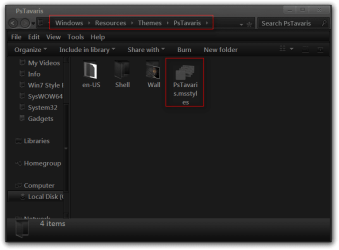
Go to C:\Windows\Resources\Themes then open the theme folder, look for your theme inside your theme theme folder will be a (your theme name).msstyles, right click on it and go to Send to then Compressed (zipped) folder post that ziip folder here.
PsTavaris.png

PsTavaris2.png
Jerry
 

My Computer My Computer

Computer type
Laptop
Computer Manufacturer/Model Number
Sager NP9170
OS
Win 7 Pro x64 / Win 10 Pro
CPU
Intel(R) Core(TM) i7-3630QM CPU @ 2.40GHz
Motherboard
CLEVO P170EM
Memory
12 GB
Graphics Card(s)
(1) Intel(R) HD Graphics 4000 (2) NVIDIA GeForce GTX 675M
Sound Card
(1) Realtek High Definition Audio (2) Intel(R) Display Aud
Monitor(s) Displays
17.3
Screen Resolution
1920x1080
Hard Drives
(1) Samsung 860 EVO 500GB(OS) (1) Samsung 860 EVO 500GB(Data)
Keyboard
Backlite
Antivirus
MSE, Malwarebytes Pro
Browser
Firefox
Other Info
DESKTOP: Custom-built.
OS: Win 10 Pro x64.
CASE: Rosewill R5.
CPU: Intel I5 4670K CPU @ 3.40GHz.
CPU COOLER: Cool Master Hyper 212 EVO.
MOTHERBOARD: Asus Z87-A.
MEMORY: Kingston HyperX 2x4 GB.
GPU: Nvidia Geforce 650 TI.
PSU: Corsair TX750.
DRIVES: (1) Samsung 840 120 GB SSD (2) Western Digital blue 500 GB 7200 RPM.

My Computer My Computer

Computer type
PC/Desktop
OS
Windows 10 Home x64
CPU
INTEL Core i5-750 Quad-Core 3.37GHz
Motherboard
ASUS P7P55D
Memory
HyperX Fury Black Series 8GB (2 x 4GB) 1866Mhz
Graphics Card(s)
EVGA GeForce GTX 750 Superclocked 1GB 128-Bit GDDR5
Monitor(s) Displays
LG 32MA68HY 32" IPS
Screen Resolution
1920 x 1080
Hard Drives
Samsung 840 Evo 120GB, SEAGATE 500GB Barracuda® 7200.12, SATA 3 Gb/s, 7200 RPM, 16MB cache
PSU
ANTEC TruePower New TP-550, 80 PLUS, 550W
Case
ANTEC Three Hundred Illusion
Cooling
COOLER MASTER Hyper 212 Plus, 4 x 120mm 1 x 140mm Noctua's
Internet Speed
85 + Mbps
Antivirus
Avast
Browser
Vivaldi
So, the operating system became really unstable and explorer would constantly crash (every 5 seconds or so) so I decided to do a clean install and am going to manage my files/backing up better from now on. It would have taken a lot longer to just fix all of the problems and this gives me peace of mind.

Back on themes though, do you guys know of any good, dark Aero themes that have dark menus and the stock cursor icon? I've seen some good dark themes, but most are over-customized to the point where Windows is barely recognizable (which looks cool but isn't really what I'm after).

Thanks for all the suggestions so far.
 

My Computer My Computer

OS
Windows 7 Ultimate x64
Sometimes a fresh install is necessary, it also gives you nice clean start.

Here is my favorite dark theme Tavaris by ~charleston2378 on deviantART and by the way the user picture in the start menu is disabled in this theme.

Jerry
 

My Computer My Computer

Computer type
Laptop
Computer Manufacturer/Model Number
Sager NP9170
OS
Win 7 Pro x64 / Win 10 Pro
CPU
Intel(R) Core(TM) i7-3630QM CPU @ 2.40GHz
Motherboard
CLEVO P170EM
Memory
12 GB
Graphics Card(s)
(1) Intel(R) HD Graphics 4000 (2) NVIDIA GeForce GTX 675M
Sound Card
(1) Realtek High Definition Audio (2) Intel(R) Display Aud
Monitor(s) Displays
17.3
Screen Resolution
1920x1080
Hard Drives
(1) Samsung 860 EVO 500GB(OS) (1) Samsung 860 EVO 500GB(Data)
Keyboard
Backlite
Antivirus
MSE, Malwarebytes Pro
Browser
Firefox
Other Info
DESKTOP: Custom-built.
OS: Win 10 Pro x64.
CASE: Rosewill R5.
CPU: Intel I5 4670K CPU @ 3.40GHz.
CPU COOLER: Cool Master Hyper 212 EVO.
MOTHERBOARD: Asus Z87-A.
MEMORY: Kingston HyperX 2x4 GB.
GPU: Nvidia Geforce 650 TI.
PSU: Corsair TX750.
DRIVES: (1) Samsung 840 120 GB SSD (2) Western Digital blue 500 GB 7200 RPM.
OMG thank you so much, that theme is EXACTLY what I had in mind (good taste:) )

Is there some way I can keep the taskbar icons normal?

I like the custom look, but some programs I use have custom icons, so I'd rather just keep them all stock.

Thanks so much :party:
 

My Computer My Computer

OS
Windows 7 Ultimate x64
Oh, nevermind, it didn't change anything.

This theme is perfect and I would highly recommend it to anyone.

The author mentioned a 'bug' where some menus appear black with black text and he said to install google chrome to fix it.

I actually like google chrome a lot now, it is basically the same as firefox with some minor changes that I actually enjoy.

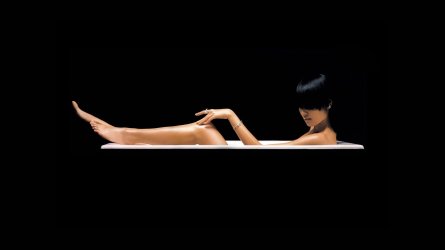
I am running the theme you suggested with this picture as the desktop and it is very nice and sleek.

Good look and thanks a bunch. :cool:
 

Attachments

  • black_wallpaper04.jpg
    black_wallpaper04.jpg
    36.8 KB · Views: 7

My Computer My Computer

OS
Windows 7 Ultimate x64
You're Welcome
 

My Computer My Computer

Computer type
Laptop
Computer Manufacturer/Model Number
Sager NP9170
OS
Win 7 Pro x64 / Win 10 Pro
CPU
Intel(R) Core(TM) i7-3630QM CPU @ 2.40GHz
Motherboard
CLEVO P170EM
Memory
12 GB
Graphics Card(s)
(1) Intel(R) HD Graphics 4000 (2) NVIDIA GeForce GTX 675M
Sound Card
(1) Realtek High Definition Audio (2) Intel(R) Display Aud
Monitor(s) Displays
17.3
Screen Resolution
1920x1080
Hard Drives
(1) Samsung 860 EVO 500GB(OS) (1) Samsung 860 EVO 500GB(Data)
Keyboard
Backlite
Antivirus
MSE, Malwarebytes Pro
Browser
Firefox
Other Info
DESKTOP: Custom-built.
OS: Win 10 Pro x64.
CASE: Rosewill R5.
CPU: Intel I5 4670K CPU @ 3.40GHz.
CPU COOLER: Cool Master Hyper 212 EVO.
MOTHERBOARD: Asus Z87-A.
MEMORY: Kingston HyperX 2x4 GB.
GPU: Nvidia Geforce 650 TI.
PSU: Corsair TX750.
DRIVES: (1) Samsung 840 120 GB SSD (2) Western Digital blue 500 GB 7200 RPM.
Back
Top