Windows 7 Toolbar

Revol

New member
Local time
3:12 PM
Messages
60
Howdy! When I scroll over an icon in the toolbar, I only get written information and not big thumbnails like it normally should be. How can I change it to look like the picture below?

windows7-toolbar.jpg


Hope you get the question.
 
Last edited by a moderator:

My Computer

OS
Windows 7
CPU
Inter Core Duo CPU (1.66 GHz, 1.67 GHz)
Memory
4 GB DDR2
Graphics Card(s)
Geforce 8600M GS 256 MB
Screen Resolution
1280x800
Howdy! When I scroll over an icon in the toolbar, I only get written information and not big thumbnails like it normally should be. How can I change it to look like the picture below?

windows7-toolbar.jpg


Hope you get the question.

Maybe in System=>Advanced=> Performance options, you have disable/uncheck a box about the desktop management...?
 

My Computer

Computer type
PC/Desktop
Computer Manufacturer/Model Number
Custom Build
OS
Windows 7 Professional SP1 - x64 [Non-UEFI Boot]
CPU
Ivy Bridge Core i5 3570K (Delidded)
Motherboard
Asus P8Z77-V LE PLUS
Memory
G.Skill "Ares" DDR3 PC3-12800 - 1600MHz (16Gb)
Graphics Card(s)
Asus Dual-RX480-O4G
Sound Card
Creative Sound Blaster Z w/5.1 sound system
Monitor(s) Displays
Asus IPS 23"
Screen Resolution
16/9
Hard Drives
Internal:
500Go Sata 6Gb/s (x2)
500Go Sata 3Gb/s (x2)
SSD 60Go Sata 6Gb/s
PSU
In Win C 900W Series 80+ Platinum
Case
Thermaltake Chaser A71
Cooling
Custom Water Cooling Loop
Keyboard
Cooler Master QuickFire XTi
Mouse
Razer Imperator 2012 (4G)
Antivirus
MSE
Browser
IE 11.0.xxx Rtm
Other Info
"Raid0" with Intel Smart Response Technology (HDD/SSD)
What do you mean by "written information" ?
 

My Computer

Computer Manufacturer/Model Number
HP, Dell, Gateway, Toshiba - 4 laptops and 2 desktops
OS
Vista, Windows7, Mint Mate, Zorin, Windows 8
CPU
from 1.6GHz Duo to i7
Monitor(s) Displays
2x HP w2207
Hard Drives
5x HDD, 7x SSD, 12x Externals
Keyboard
with trackball - no mices
Mouse
Trackball mice
Internet Speed
DSL 6000
What do you mean by "written information" ?

I think he wants to tell, he's got only thumbnails with infos written, no image associated with.
 

My Computer

Computer type
PC/Desktop
Computer Manufacturer/Model Number
Custom Build
OS
Windows 7 Professional SP1 - x64 [Non-UEFI Boot]
CPU
Ivy Bridge Core i5 3570K (Delidded)
Motherboard
Asus P8Z77-V LE PLUS
Memory
G.Skill "Ares" DDR3 PC3-12800 - 1600MHz (16Gb)
Graphics Card(s)
Asus Dual-RX480-O4G
Sound Card
Creative Sound Blaster Z w/5.1 sound system
Monitor(s) Displays
Asus IPS 23"
Screen Resolution
16/9
Hard Drives
Internal:
500Go Sata 6Gb/s (x2)
500Go Sata 3Gb/s (x2)
SSD 60Go Sata 6Gb/s
PSU
In Win C 900W Series 80+ Platinum
Case
Thermaltake Chaser A71
Cooling
Custom Water Cooling Loop
Keyboard
Cooler Master QuickFire XTi
Mouse
Razer Imperator 2012 (4G)
Antivirus
MSE
Browser
IE 11.0.xxx Rtm
Other Info
"Raid0" with Intel Smart Response Technology (HDD/SSD)
Hm, all boxes are checked in Performance=>Visual Effects.
 

My Computer

OS
Windows 7
CPU
Inter Core Duo CPU (1.66 GHz, 1.67 GHz)
Memory
4 GB DDR2
Graphics Card(s)
Geforce 8600M GS 256 MB
Screen Resolution
1280x800

My Computer

OS
Windows 7
CPU
Inter Core Duo CPU (1.66 GHz, 1.67 GHz)
Memory
4 GB DDR2
Graphics Card(s)
Geforce 8600M GS 256 MB
Screen Resolution
1280x800
What do you mean by "written information" ?

I think he wants to tell, he's got only thumbnails with infos written, no image associated with.

Exactly. Here's a screenshot of what it looks like.

2ugfp6f.png

I've tested the uncheck box and check it again...I've got this result when it is uncheck...!!!

Are you sure you're in the right tab, in the Perfomance Options in advanced tab of the system properties.

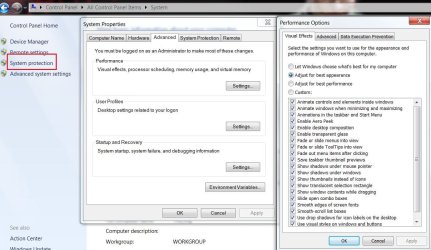
Control Panel=>System=>System Protection=>Advanced Parameters=>Performances=>Parameters....there's a list of boxes...:)
 

My Computer

Computer type
PC/Desktop
Computer Manufacturer/Model Number
Custom Build
OS
Windows 7 Professional SP1 - x64 [Non-UEFI Boot]
CPU
Ivy Bridge Core i5 3570K (Delidded)
Motherboard
Asus P8Z77-V LE PLUS
Memory
G.Skill "Ares" DDR3 PC3-12800 - 1600MHz (16Gb)
Graphics Card(s)
Asus Dual-RX480-O4G
Sound Card
Creative Sound Blaster Z w/5.1 sound system
Monitor(s) Displays
Asus IPS 23"
Screen Resolution
16/9
Hard Drives
Internal:
500Go Sata 6Gb/s (x2)
500Go Sata 3Gb/s (x2)
SSD 60Go Sata 6Gb/s
PSU
In Win C 900W Series 80+ Platinum
Case
Thermaltake Chaser A71
Cooling
Custom Water Cooling Loop
Keyboard
Cooler Master QuickFire XTi
Mouse
Razer Imperator 2012 (4G)
Antivirus
MSE
Browser
IE 11.0.xxx Rtm
Other Info
"Raid0" with Intel Smart Response Technology (HDD/SSD)

My Computer

OS
Windows 7
CPU
Inter Core Duo CPU (1.66 GHz, 1.67 GHz)
Memory
4 GB DDR2
Graphics Card(s)
Geforce 8600M GS 256 MB
Screen Resolution
1280x800

My Computer

Computer type
PC/Desktop
Computer Manufacturer/Model Number
Custom Build
OS
Windows 7 Professional SP1 - x64 [Non-UEFI Boot]
CPU
Ivy Bridge Core i5 3570K (Delidded)
Motherboard
Asus P8Z77-V LE PLUS
Memory
G.Skill "Ares" DDR3 PC3-12800 - 1600MHz (16Gb)
Graphics Card(s)
Asus Dual-RX480-O4G
Sound Card
Creative Sound Blaster Z w/5.1 sound system
Monitor(s) Displays
Asus IPS 23"
Screen Resolution
16/9
Hard Drives
Internal:
500Go Sata 6Gb/s (x2)
500Go Sata 3Gb/s (x2)
SSD 60Go Sata 6Gb/s
PSU
In Win C 900W Series 80+ Platinum
Case
Thermaltake Chaser A71
Cooling
Custom Water Cooling Loop
Keyboard
Cooler Master QuickFire XTi
Mouse
Razer Imperator 2012 (4G)
Antivirus
MSE
Browser
IE 11.0.xxx Rtm
Other Info
"Raid0" with Intel Smart Response Technology (HDD/SSD)
Maybe that is program specific. After you posted that problem, I checked my own toolbar icons. And I have one program that does exactly the same - but only that one. And with another program, hovering over the taskbar icon shows nothing when the program is minimized. I will have a look in program properties whether there is anything specific to those programs.
 

My Computer

Computer Manufacturer/Model Number
HP, Dell, Gateway, Toshiba - 4 laptops and 2 desktops
OS
Vista, Windows7, Mint Mate, Zorin, Windows 8
CPU
from 1.6GHz Duo to i7
Monitor(s) Displays
2x HP w2207
Hard Drives
5x HDD, 7x SSD, 12x Externals
Keyboard
with trackball - no mices
Mouse
Trackball mice
Internet Speed
DSL 6000
Are you sure you're in the right tab, in the Perfomance Options in advanced tab of the system properties.

Control Panel=>System=>System Protection=>Advanced Parameters=>Performances=>Parameters....there's a list of boxes...:)

4444.JPG
 

My Computer

Computer Manufacturer/Model Number
* BFK Customs *
OS
W 7 64-bit Ultimate
CPU
Intel Q9550 Yorkfield
Motherboard
ASUS P5Q Pro
Memory
8GB Dominator 8500C5D
Graphics Card(s)
ATI : XFX 5870
Sound Card
Realtek HD Audio 7-1
Monitor(s) Displays
1x 47" LCD HDMI & 3x 26" LCD HDMI
Screen Resolution
1920x1080P & 1920x1200
Hard Drives
1x 80GB Intel X25-M G2 SSD : 1x 500GB & 1x 640GB WD Caviar Black(s)
PSU
Corsair 620HX
Case
Cooler Master RC-690
Cooling
Tuniq Tower 120, 2x 140mm and 3x 120mm case fans
Keyboard
Microsoft 500
Mouse
Razer Diamondback 3G
Internet Speed
14 Mb/s
Other Info
1x Koutech 3Gb/s SATA HDD Hot Swap Rack
Yes, that's what I meant earlier.

2j60mt4.jpg


You mean this, right? All boxes are checked...
 

My Computer

OS
Windows 7
CPU
Inter Core Duo CPU (1.66 GHz, 1.67 GHz)
Memory
4 GB DDR2
Graphics Card(s)
Geforce 8600M GS 256 MB
Screen Resolution
1280x800
I notice you are not using an Aero theme?
 

My Computer

Computer Manufacturer/Model Number
Neo Vivid V2121
OS
Windows 7 Ultimate 32-bit Version 6.1 (build 7600.16385)
CPU
Intel Pentium Dual CPU T2390 @ 1.86GHz
Motherboard
SiS M720SR
Graphics Card(s)
SiS Mirage 3 Graphics SiS627 series
Sound Card
Built-in
Monitor(s) Displays
Generic PnP Monitor
Screen Resolution
1280x800
Hard Drives
Fujitsu MHZ2160BH G1 ATA Device 160GB
Keyboard
Standard PS/2 Keyboard
Mouse
Synaptics PS/2 Port Pointing Device

My Computer

Computer type
PC/Desktop
Computer Manufacturer/Model Number
Custom Build
OS
Windows 7 Professional SP1 - x64 [Non-UEFI Boot]
CPU
Ivy Bridge Core i5 3570K (Delidded)
Motherboard
Asus P8Z77-V LE PLUS
Memory
G.Skill "Ares" DDR3 PC3-12800 - 1600MHz (16Gb)
Graphics Card(s)
Asus Dual-RX480-O4G
Sound Card
Creative Sound Blaster Z w/5.1 sound system
Monitor(s) Displays
Asus IPS 23"
Screen Resolution
16/9
Hard Drives
Internal:
500Go Sata 6Gb/s (x2)
500Go Sata 3Gb/s (x2)
SSD 60Go Sata 6Gb/s
PSU
In Win C 900W Series 80+ Platinum
Case
Thermaltake Chaser A71
Cooling
Custom Water Cooling Loop
Keyboard
Cooler Master QuickFire XTi
Mouse
Razer Imperator 2012 (4G)
Antivirus
MSE
Browser
IE 11.0.xxx Rtm
Other Info
"Raid0" with Intel Smart Response Technology (HDD/SSD)
Yes, that's what I meant earlier.

2j60mt4.jpg


You mean this, right? All boxes are checked...

YES it is exactly there...but looks another probs for you.

Try to uncheck=>apply and check it again=>apply, to see if there's a move....
 

My Computer

Computer type
PC/Desktop
Computer Manufacturer/Model Number
Custom Build
OS
Windows 7 Professional SP1 - x64 [Non-UEFI Boot]
CPU
Ivy Bridge Core i5 3570K (Delidded)
Motherboard
Asus P8Z77-V LE PLUS
Memory
G.Skill "Ares" DDR3 PC3-12800 - 1600MHz (16Gb)
Graphics Card(s)
Asus Dual-RX480-O4G
Sound Card
Creative Sound Blaster Z w/5.1 sound system
Monitor(s) Displays
Asus IPS 23"
Screen Resolution
16/9
Hard Drives
Internal:
500Go Sata 6Gb/s (x2)
500Go Sata 3Gb/s (x2)
SSD 60Go Sata 6Gb/s
PSU
In Win C 900W Series 80+ Platinum
Case
Thermaltake Chaser A71
Cooling
Custom Water Cooling Loop
Keyboard
Cooler Master QuickFire XTi
Mouse
Razer Imperator 2012 (4G)
Antivirus
MSE
Browser
IE 11.0.xxx Rtm
Other Info
"Raid0" with Intel Smart Response Technology (HDD/SSD)
An Aero theme is needed in order for you to use the Live thumbnails.
 

My Computer

Computer Manufacturer/Model Number
Neo Vivid V2121
OS
Windows 7 Ultimate 32-bit Version 6.1 (build 7600.16385)
CPU
Intel Pentium Dual CPU T2390 @ 1.86GHz
Motherboard
SiS M720SR
Graphics Card(s)
SiS Mirage 3 Graphics SiS627 series
Sound Card
Built-in
Monitor(s) Displays
Generic PnP Monitor
Screen Resolution
1280x800
Hard Drives
Fujitsu MHZ2160BH G1 ATA Device 160GB
Keyboard
Standard PS/2 Keyboard
Mouse
Synaptics PS/2 Port Pointing Device

My Computer

OS
Windows 7
CPU
Inter Core Duo CPU (1.66 GHz, 1.67 GHz)
Memory
4 GB DDR2
Graphics Card(s)
Geforce 8600M GS 256 MB
Screen Resolution
1280x800

My Computer

Computer Manufacturer/Model Number
Neo Vivid V2121
OS
Windows 7 Ultimate 32-bit Version 6.1 (build 7600.16385)
CPU
Intel Pentium Dual CPU T2390 @ 1.86GHz
Motherboard
SiS M720SR
Graphics Card(s)
SiS Mirage 3 Graphics SiS627 series
Sound Card
Built-in
Monitor(s) Displays
Generic PnP Monitor
Screen Resolution
1280x800
Hard Drives
Fujitsu MHZ2160BH G1 ATA Device 160GB
Keyboard
Standard PS/2 Keyboard
Mouse
Synaptics PS/2 Port Pointing Device

My Computer

Computer type
PC/Desktop
Computer Manufacturer/Model Number
Custom Build
OS
Windows 7 Professional SP1 - x64 [Non-UEFI Boot]
CPU
Ivy Bridge Core i5 3570K (Delidded)
Motherboard
Asus P8Z77-V LE PLUS
Memory
G.Skill "Ares" DDR3 PC3-12800 - 1600MHz (16Gb)
Graphics Card(s)
Asus Dual-RX480-O4G
Sound Card
Creative Sound Blaster Z w/5.1 sound system
Monitor(s) Displays
Asus IPS 23"
Screen Resolution
16/9
Hard Drives
Internal:
500Go Sata 6Gb/s (x2)
500Go Sata 3Gb/s (x2)
SSD 60Go Sata 6Gb/s
PSU
In Win C 900W Series 80+ Platinum
Case
Thermaltake Chaser A71
Cooling
Custom Water Cooling Loop
Keyboard
Cooler Master QuickFire XTi
Mouse
Razer Imperator 2012 (4G)
Antivirus
MSE
Browser
IE 11.0.xxx Rtm
Other Info
"Raid0" with Intel Smart Response Technology (HDD/SSD)
Back
Top