Windows 7 Trouble Connecting With Comcast

Panchito

New member
Local time
7:07 AM
Messages
5
A few days ago i decided to upgrade to Windows 7 64 bit from Windows Home 32 Bit.

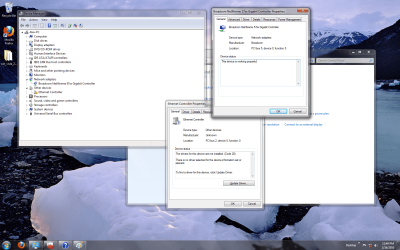
The installation went well with no problems at all, the problem began as soon as i tried to get online. I have cable internet with Comcast, when I open the hardware manager i see my network card that i had with Vista, which it seems to be working fine and an extra item under Other Devices "Ethernet Controller" with an exclamation mark on it.

I upgraded the drivers for the network card, the motherboard and still shows as troubled. I have disabled it also and when i do that i get another message to plug an ethernet cable which i have made sure plenty of times that it is.

Anyone has heard of this problem before? I would really appreciate any help that you may have. I am enclosing the ss of the device manager and the windows for both items.

Please feel free to ask any questions and I will try to answer them.
 

Attachments
  • controller.png
    controller.png
    412.4 KB · Views: 161

My Computer My Computer

Computer Manufacturer/Model Number
Dell XPS 720
OS
Windows 7
Motherboard
Nforce 680i

My Computer My Computer

Computer Manufacturer/Model Number
Lenovo ThinkPad T60
OS
Windows 7 Ultimate 64Bit
CPU
GenuineIntel Intel(R) Core(TM) DuoCore T2400 @ 1.83GHz
Motherboard
Intel(R) 82801G (ICH7 Family)
Memory
2.00 GB
Graphics Card(s)
Mobile Intel(R) 945 Express Chipset
Sound Card
SoundMAX Integrated Digital HD Audio
Monitor(s) Displays
ThinkPad Display
Screen Resolution
1400x1050
Hard Drives
100Gb SATA
Keyboard
Standard Keyboard
Mouse
HID-compliant Mouse
Internet Speed
Cable Broadband - 54Mbps
Other Info
Intel(R) PRO/1000 PL Network Connection
11a/b/g Wireless LAN Mini PCI Express Adapter
sadly I am at work atm, I will get you this information as soon as possible.
 

My Computer My Computer

Computer Manufacturer/Model Number
Dell XPS 720
OS
Windows 7
Motherboard
Nforce 680i
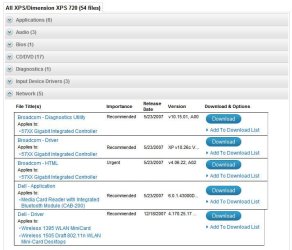
Just for the record, I wasn't able to find W7 drivers for the XPS 720 desktop. Here are the Vista 64Bit. Have you tried the Vista 64bit driver?

Was the Broadcom - Driver what you downloaded and update with?
Noname.jpg
 

My Computer My Computer

Computer Manufacturer/Model Number
Lenovo ThinkPad T60
OS
Windows 7 Ultimate 64Bit
CPU
GenuineIntel Intel(R) Core(TM) DuoCore T2400 @ 1.83GHz
Motherboard
Intel(R) 82801G (ICH7 Family)
Memory
2.00 GB
Graphics Card(s)
Mobile Intel(R) 945 Express Chipset
Sound Card
SoundMAX Integrated Digital HD Audio
Monitor(s) Displays
ThinkPad Display
Screen Resolution
1400x1050
Hard Drives
100Gb SATA
Keyboard
Standard Keyboard
Mouse
HID-compliant Mouse
Internet Speed
Cable Broadband - 54Mbps
Other Info
Intel(R) PRO/1000 PL Network Connection
11a/b/g Wireless LAN Mini PCI Express Adapter
ok i managed to get a hold of what the detail says on the item:

PCI\VEN_1317&DEB_0985&SUBSYS_05741317&REV_11

---------- Post added at 07:27 PM ---------- Previous post was at 07:25 PM ----------

yeah i installed that one too
 

My Computer My Computer

Computer Manufacturer/Model Number
Dell XPS 720
OS
Windows 7
Motherboard
Nforce 680i
The bloody Manufacturer's website is for sale...how do download the drivers for it :(

I googled "PCI\VEN_1317&DEV_0985", and everysite comes up with details but then when you go to download, it gives you scan utilties etc....

You're gonna have to try your luck i'm afraid.
 

My Computer My Computer

Computer Manufacturer/Model Number
Lenovo ThinkPad T60
OS
Windows 7 Ultimate 64Bit
CPU
GenuineIntel Intel(R) Core(TM) DuoCore T2400 @ 1.83GHz
Motherboard
Intel(R) 82801G (ICH7 Family)
Memory
2.00 GB
Graphics Card(s)
Mobile Intel(R) 945 Express Chipset
Sound Card
SoundMAX Integrated Digital HD Audio
Monitor(s) Displays
ThinkPad Display
Screen Resolution
1400x1050
Hard Drives
100Gb SATA
Keyboard
Standard Keyboard
Mouse
HID-compliant Mouse
Internet Speed
Cable Broadband - 54Mbps
Other Info
Intel(R) PRO/1000 PL Network Connection
11a/b/g Wireless LAN Mini PCI Express Adapter
ok so i managed to find what it was wrong with it. I am sure you folks will laugh at it. After installing tons of "drivers" last night, i decided to start all over again but this time, i removed my network card which was a "Lynksys" and was not listed on the Device Manager, and plugged the cable to the mobo ethernet plug and BAM it found it, patched it and was able to get online right away.

Thank you very much for your help.
 

My Computer My Computer

Computer Manufacturer/Model Number
Dell XPS 720
OS
Windows 7
Motherboard
Nforce 680i
You mean you build W7 with the device attached? you still should be able to install drivers for it?
 

My Computer My Computer

Computer Manufacturer/Model Number
Lenovo ThinkPad T60
OS
Windows 7 Ultimate 64Bit
CPU
GenuineIntel Intel(R) Core(TM) DuoCore T2400 @ 1.83GHz
Motherboard
Intel(R) 82801G (ICH7 Family)
Memory
2.00 GB
Graphics Card(s)
Mobile Intel(R) 945 Express Chipset
Sound Card
SoundMAX Integrated Digital HD Audio
Monitor(s) Displays
ThinkPad Display
Screen Resolution
1400x1050
Hard Drives
100Gb SATA
Keyboard
Standard Keyboard
Mouse
HID-compliant Mouse
Internet Speed
Cable Broadband - 54Mbps
Other Info
Intel(R) PRO/1000 PL Network Connection
11a/b/g Wireless LAN Mini PCI Express Adapter
yes the item was attached when i did it. I think the big problem was that i was not seeing the Lynksys card on the device manager at all, so I could not upload the new driver for it. Probably if i installed it now i am sure it would see it.
 

My Computer My Computer

Computer Manufacturer/Model Number
Dell XPS 720
OS
Windows 7
Motherboard
Nforce 680i
Back
Top