
Windows 7 Ult. Creating New Folder Problem

MsGuided

New member
Local time
5:19 AM
Messages
3
Location
Philippines
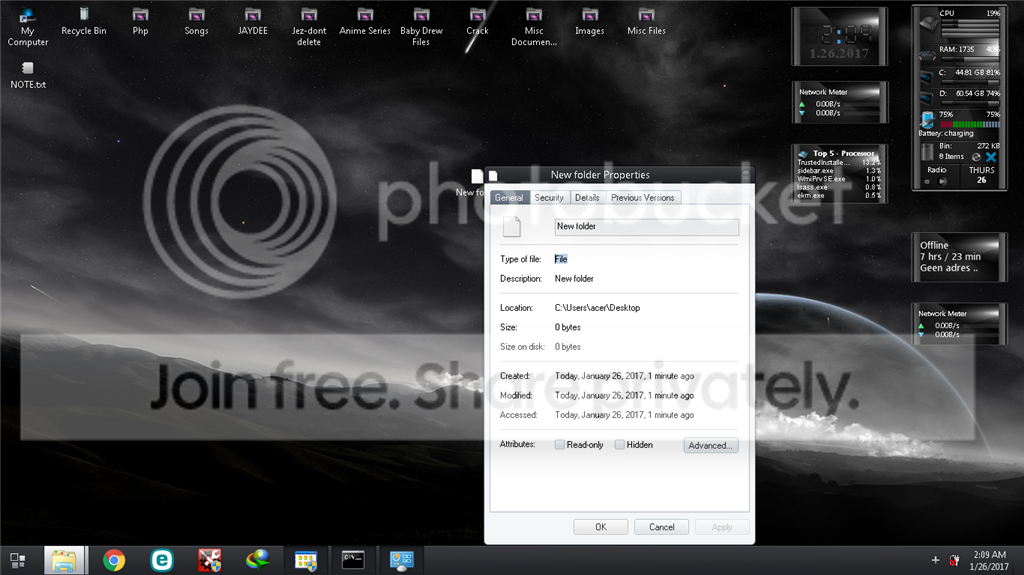
So i've tried to create a new folder earlier this morning but suddenly every time i created a new folder it just creates a file named "New Folder" with a file type of "File" rather than "File Folder". Please help so confused while searching the web if i do anything further might end up much worst.
 

My Computer

Computer type
Laptop
Computer Manufacturer/Model Number
Acer
OS
Windows 7 Ultimate 32bit
Welcome to the forum. It creates new folder you then edit that by renaming to what ever you want
 

My Computer

Computer type
PC/Desktop
OS
win 8 32 bit
Welcome to the forum. It creates new folder you then edit that by renaming to what ever you want

hmm already tried that even if i rename it it just stays as a "File" and not a Folder even dragging items won't work .... rather than having a folder icon it just stays as a blank sheet when i create a folder should be the same icon as the one seen at the top of my image.

Thx for replying though appreciate it.
 

My Computer

Computer type
Laptop
Computer Manufacturer/Model Number
Acer
OS
Windows 7 Ultimate 32bit
MsGuided, you seem to be going about this the wrong way. To get a New Folder, when at the Desktop, just Right Click & select New & then from that menu select Folder.

Now that New Folder will appear on the Desktop. If you wish to Rename it, Right Click on it & select Rename.

You are trying to use Properties to rename it & that wont work.
 

My Computer

Computer type
PC/Desktop
Computer Manufacturer/Model Number
Self built using existing case
OS
Windows 7 Home Premium 64 bit sp1
CPU
Intel i5 3570 3.4Ghz Ivy Bridge SKT 1155 quad core
Motherboard
Gigabyte Z77-HD3 SKT 1155 2xSata 3, 4x USB 3.0
Memory
G-Skill Rip Jaws 16Gb (8x2) DDR3 -1600 PC3 12800 CL 10 red
Graphics Card(s)
Gigabyte NVIDIA GT610 1Gb DDR3 810/1200 PCI-E 2.0 Silent
Sound Card
NVIDIA High Definition & Realtech High Definition Audio
Monitor(s) Displays
2 x Philips 226V4L 16:9 aspect ratio
Screen Resolution
1920 x 1080 HD
Hard Drives
Samsung 840 Pro 256gb SSD, SATA 3.
Hitachi Touro Portable 1tb, USB 3.0 HDD used for image b/ups.
PSU
Corsair VS450
Case
Codeng
Cooling
PSU fan & CPU fan
Keyboard
Logitech
Mouse
Logitech Wireless trackball M570
Internet Speed
Wireless 3G. 3mg down & 550kb up.
Antivirus
Bitdefender Internet Security 2020
Browser
Opera (Current Version) & Firefox
Other Info
MS Office 2013 Pro. Davis weather station software. MGE Nova 600 avr UPS.
MsGuided, you seem to be going about this the wrong way. To get a New Folder, when at the Desktop, just Right Click & select New & then from that menu select Folder.

Now that New Folder will appear on the Desktop. If you wish to Rename it, Right Click on it & select Rename.

You are trying to use Properties to rename it & that wont work.

sir i've already tried that im not trying to change the name im currently studying IT as jr so i know the basics what im doing is not renaming it but something messed up my folder setting instead of creating a "Folder" it creates a file type which is "full" ... what im showing in the image above in the properties is the File type "File" which should be doing this which is "File Folder"

File type "File" = no extension associated in my windows meaning i don't have the extention folder existing on my "New Folder" Command/ menu
 

My Computer

Computer type
Laptop
Computer Manufacturer/Model Number
Acer
OS
Windows 7 Ultimate 32bit
Have you tried restoring Folder defaults. To do that, open Control Panel, select Folder Options, when that opens, select View & click on Restore Defaults. You could also Click on Reset Folders. Be sure to click the Apply button after you have made any changes.

Reboot the computer & see if this has fixed your problem.
 

My Computer

Computer type
PC/Desktop
Computer Manufacturer/Model Number
Self built using existing case
OS
Windows 7 Home Premium 64 bit sp1
CPU
Intel i5 3570 3.4Ghz Ivy Bridge SKT 1155 quad core
Motherboard
Gigabyte Z77-HD3 SKT 1155 2xSata 3, 4x USB 3.0
Memory
G-Skill Rip Jaws 16Gb (8x2) DDR3 -1600 PC3 12800 CL 10 red
Graphics Card(s)
Gigabyte NVIDIA GT610 1Gb DDR3 810/1200 PCI-E 2.0 Silent
Sound Card
NVIDIA High Definition & Realtech High Definition Audio
Monitor(s) Displays
2 x Philips 226V4L 16:9 aspect ratio
Screen Resolution
1920 x 1080 HD
Hard Drives
Samsung 840 Pro 256gb SSD, SATA 3.
Hitachi Touro Portable 1tb, USB 3.0 HDD used for image b/ups.
PSU
Corsair VS450
Case
Codeng
Cooling
PSU fan & CPU fan
Keyboard
Logitech
Mouse
Logitech Wireless trackball M570
Internet Speed
Wireless 3G. 3mg down & 550kb up.
Antivirus
Bitdefender Internet Security 2020
Browser
Opera (Current Version) & Firefox
Other Info
MS Office 2013 Pro. Davis weather station software. MGE Nova 600 avr UPS.
Back
Top