Windows 7 Ultimate 64 bit "limited access" Wireless Network Connection

wAk

New member
Local time
11:05 PM
Messages
2
Windows 7 Ultimate 64 bit "limited access" Wireless Network Connection

I just did a clean install on my windows 7 ultimate 32 bit computer to 64 bit. At first, my wireless internet was working fine, but it suddenly dropped to "limited access". I'm using a Linksys WUSB100 ver. 2 wireless network USB adapter. I've already tried downloading the latest driver for windows 7 64 bit, 3.0.3.0 from the Linksys website. I've also tried restarting my computer and the wireless modem. I did a system restore to the point where it was last working but it still isn't working. I can't think of anything else to do, please help.
 

My Computer My Computer

OS
Windows 7 Ultimate 64 bit
   Information
I hope this helps unidentified-network

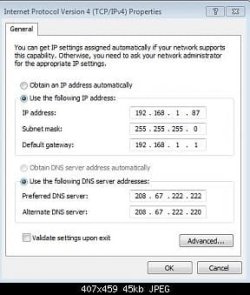
Try entering you Ip and Dns. Look at mine
and all the pictures are in order.
   Note
I am using Open Dns


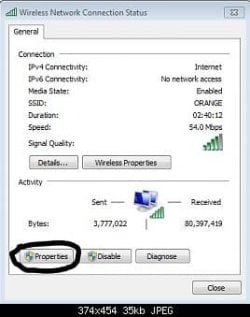
1.JPG
Open network and sharing center and click on connections (your network name)

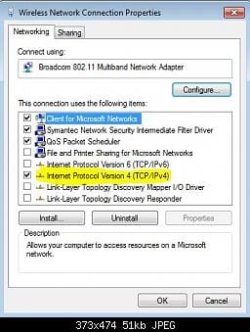
2.JPG
Click on Properties.

3.JPG
click on Internet Protocol Version 4

4.JPG
Enter your (computer)Ip address, Subnet mask,(router ip) Ip address, Preferred Dns Sever and Alternate Dns server.


   Information
normally it is the same as mine


Ip address: 192.168.1.2
Subnet mask: (will come up automatically) 255.255.255.0
Ip address: 192.168.1.1

Using open dns

Preferred Dns sever: 208.67.222.222
Alternate Dns sever: 208.27.222.220
 
Last edited:

My Computer My Computer

Computer Manufacturer/Model Number
Acer Aspire 4740
OS
Windows 7
CPU
Intel i3 Core
Motherboard
Intel
Memory
3.00Gb
Graphics Card(s)
Intel Graphics Media Accelerator HD
Sound Card
Realtel HD Audio
Monitor(s) Displays
Laptop display
Screen Resolution
1280x800
Hard Drives
350GB
Cooling
Fans
Keyboard
Build in keyboard (laptop)
Mouse
touch pad mouse
Internet Speed
512 Kbps = 64 KBPS
Is it a good idea to diable IPv6? I know most sites dont use it... yet, but why did you disable it?
 

My Computer My Computer

Computer Manufacturer/Model Number
HP
OS
Windows 7 Ultimate 64-bit
CPU
Intel(R) Core(TM) i5-540M @ 2.53GHz
Motherboard
Hewlett-Packard 1522
Memory
4GB DDR3 System Memory
Graphics Card(s)
1GB ATI Mobility Radeon HD 5830 Graphics
Monitor(s) Displays
15.6" diagonal Full High Definition LED
Screen Resolution
1920x1080
Hard Drives
500GB 7200RPM SATA Hard Drive
PSU
6 Cell Lithium Ion Polymer Battery
Cooling
NZXT Aluminum Notebook Cooler With 3 120mm Adjustable Fans
Other Info
Envy 15
It's not required that you disable IPv6, doing that hardly ever solves any problems. Ipv6 is only used for the Homegroup network which is used only on the LAN.

I'm not sure why anyone would think that using a static IP would solve a wireless connection problem so I don't think that is the solution. This is most likely a driver or a wireless modem-router problem.
 

My Computer My Computer

Computer type
PC/Desktop
Computer Manufacturer/Model Number
Home built
OS
Windows 7 Ult, Windows 8.1 Pro,
CPU
Q9650-4.275GHz, E8600 4.5GHz, E6750-3.8GHz
Motherboard
Evga 780i FTW
Memory
G.Skill PC2 9600 1200Mhz 5 5 5 15 2T
Graphics Card(s)
GTX480
Sound Card
Asus Xonar D2
Monitor(s) Displays
HannsG
Screen Resolution
1680X1050
Hard Drives
GSkill Phoenix Pro 120GB SSD
PSU
ThermalTake Toughpower 1000Watt modular
Case
ThermalTake XaserV
Cooling
Xigmatek S1283
Keyboard
Logitech G15
Mouse
Logitech G9
Internet Speed
T1

My Computer My Computer

Computer type
Laptop
Computer Manufacturer/Model Number
Toshiba P775-S7100
OS
Windows 7 Professional SP1 64-bit
CPU
Intel Core i5-2450M @2.5 GHz
Memory
6 GB DDR3 1333MHz
Graphics Card(s)
Intel HD 3000
Monitor(s) Displays
Built-in 17.3" LED; 22" Insignia NS-L22Q-10A
Screen Resolution
1600x900; 1360x768
Hard Drives
750 GB Hitachi
1TB Seagate FreeAgent External
Internet Speed
Verizon DSL Speed(Down/Up): 3360 Kbps / 800 Kbps
Antivirus
MSE and MBAM Pro
Browser
IE10
Is it a good idea to diable IPv6? I know most sites dont use it... yet, but why did you disable it?

It's not required that you disable IPv6, doing that hardly ever solves any problems. Ipv6 is only used for the Homegroup network which is used only on the LAN.

I'm not sure why anyone would think that using a static IP would solve a wireless connection problem so I don't think that is the solution. This is most likely a driver or a wireless modem-router problem.


I didn't know. I wanted to try disabling it and see if it improves my internet speed.

Unfortunately, it didn't.
 

My Computer My Computer

Computer Manufacturer/Model Number
Acer Aspire 4740
OS
Windows 7
CPU
Intel i3 Core
Motherboard
Intel
Memory
3.00Gb
Graphics Card(s)
Intel Graphics Media Accelerator HD
Sound Card
Realtel HD Audio
Monitor(s) Displays
Laptop display
Screen Resolution
1280x800
Hard Drives
350GB
Cooling
Fans
Keyboard
Build in keyboard (laptop)
Mouse
touch pad mouse
Internet Speed
512 Kbps = 64 KBPS
Back
Top