Windows 7 unable to connect

atlanta1

New member
Local time
2:58 PM
Messages
8
Hi -
I know many people have had this problem, but I need help. I had to reformat my hard drive, and after that, I haven't been able to connect to my home network, though I can connect to other networks. Every time I try to connect, it just says "Unable to connect" (I can't even enter in the password). When I click on troubleshoot, it just says that it can't find the problem. Any ideas??
 

My Computer

Computer Manufacturer/Model Number
Dell Inspiron 11Z
OS
Windows 7
Well, the normal recommendations are to unplug both your router and modem for 30-60 seconds. Plug the modem back in and wait until all the normal lights are lit with no blinking. Then plug your router back in. If that does not work you can reset your router to the factory defaults by pushing the rest button which should be on the back or bottom of the router.
 

My Computer

Computer type
Laptop
Computer Manufacturer/Model Number
Toshiba P775-S7100
OS
Windows 7 Professional SP1 64-bit
CPU
Intel Core i5-2450M @2.5 GHz
Memory
6 GB DDR3 1333MHz
Graphics Card(s)
Intel HD 3000
Monitor(s) Displays
Built-in 17.3" LED; 22" Insignia NS-L22Q-10A
Screen Resolution
1600x900; 1360x768
Hard Drives
750 GB Hitachi
1TB Seagate FreeAgent External
Internet Speed
Verizon DSL Speed(Down/Up): 3360 Kbps / 800 Kbps
Antivirus
MSE and MBAM Pro
Browser
IE10
Yes, I've done that, but it still says "Windows was unable to connect to [network]." My husband's computer can connect to our network, and my computer can connect to other networks, just not our wireless. I've tried disabling the firewall, to no avail. I'm not sure what else to try?
 

My Computer

Computer Manufacturer/Model Number
Dell Inspiron 11Z
OS
Windows 7
where is your computer in relation to the router? I assume that you've tried connecting when right next to it, but it I want to be sure. Did you actually try reseting the router, then trying to connect to it afterwards? Once again, I have to be sure, because a lot of people don't follow all the advice given to them.
 

My Computer

Computer type
Laptop
Computer Manufacturer/Model Number
Toshiba P775-S7100
OS
Windows 7 Professional SP1 64-bit
CPU
Intel Core i5-2450M @2.5 GHz
Memory
6 GB DDR3 1333MHz
Graphics Card(s)
Intel HD 3000
Monitor(s) Displays
Built-in 17.3" LED; 22" Insignia NS-L22Q-10A
Screen Resolution
1600x900; 1360x768
Hard Drives
750 GB Hitachi
1TB Seagate FreeAgent External
Internet Speed
Verizon DSL Speed(Down/Up): 3360 Kbps / 800 Kbps
Antivirus
MSE and MBAM Pro
Browser
IE10
Yes, I'm right next to the router. The connection throughout the house is 4 bars.

Yes, I reset it using the red button on the back. Still the same thing.
 

My Computer

Computer Manufacturer/Model Number
Dell Inspiron 11Z
OS
Windows 7
I'm trying to think of something that would prevent you from connecting to certain routers that has nothing to do with the router itself. Can you do me a favor. Look in Device Manager (you can find this by typing it in the start menu search bar), find you network adapter, right click it, then click properties, and tell me the name of the wireless adapter and the date it list for the driver.
 

My Computer

Computer type
Laptop
Computer Manufacturer/Model Number
Toshiba P775-S7100
OS
Windows 7 Professional SP1 64-bit
CPU
Intel Core i5-2450M @2.5 GHz
Memory
6 GB DDR3 1333MHz
Graphics Card(s)
Intel HD 3000
Monitor(s) Displays
Built-in 17.3" LED; 22" Insignia NS-L22Q-10A
Screen Resolution
1600x900; 1360x768
Hard Drives
750 GB Hitachi
1TB Seagate FreeAgent External
Internet Speed
Verizon DSL Speed(Down/Up): 3360 Kbps / 800 Kbps
Antivirus
MSE and MBAM Pro
Browser
IE10
If you plug in with an ethernet cable, what happens?

~Lordbob
 

My Computer

Computer Manufacturer/Model Number
Hera
OS
Windows 7 Ultimate x64, Mint 9
CPU
Intel i5-2500k
Motherboard
ASUS P8P67 Pro
Memory
2x 4Gb Corsair VENGEANCE DDR3-1600
Graphics Card(s)
NVidia GeForce N260GTX Twin Frozr
Sound Card
Realtek HD OnBoard Audio
Monitor(s) Displays
ASUS 24" Monitor
Screen Resolution
1920x1080
Hard Drives
G.SKILL Phoenix Series 60GB SATA II MLC Internal Solid State Drive (SSD)
SAMSUNG Spinpoint F3R 1TB 7200 RPM 32MB Cache SATA II
PSU
Cooler Master Real Power Pro 750W
Case
Cooler Master Haf 932
Cooling
Fans
Keyboard
Razer Tarantula
Mouse
Razer Lachesis
Internet Speed
not fast enough
Try using an ethernet cable to hard wire into the router. I suspect it will work, but if it doesn't, it will give us something else to consider.

I suspect the issue is with the encryption. Try disabling encryption on the router, for the time being, and see if you can connect.
 

My Computer

Computer Manufacturer/Model Number
Custom
OS
Windows 7 Professional x64
CPU
Intel i7 2600K OC'd @ 4620 MHz
Motherboard
Asus P8Z68-V Pro
Memory
16GB GSkill Sniper 2133 Mhz (4x4GB)
Graphics Card(s)
EVGA GeForce GTX 480 SuperClocked+
Sound Card
Realtek High Definition Audio
Monitor(s) Displays
2x Acer S273HLbmii 27"
Screen Resolution
2 x 1920x1080
Hard Drives
64GB Crucial M4 SSD

Storage: Hitachi 1TB 5400RPM, Samsung 1.5TB 5400RPM
PSU
Corsair HW Series 750w (modular)
Case
Cooler Master HAF 932 Advanced Blue Edition
Cooling
CM Hyper 212+ CPU cooler, 3x 230mm + 1x 140mm case fans
Keyboard
Logitech MK320 (wireless)
Mouse
Logitech MK320 (wireless)
Internet Speed
30 Mb/s : 2 Mb/s
When I plug in the ethernet cable, nothing happens. Well, under "view your active networks," it shows up as connecting, but it never does. when i click on it, it says that it's been connected for however long, but the "packets sent" are like 200 or so and there are none received.

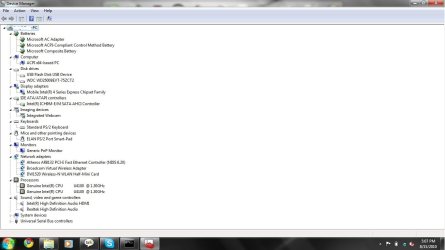
There are two network adapters.
1) Atheros AR8132 PCI-E Fast Ethernet Controller (NDIS 6.20) - date for the driver is 6/5/2009 (when I click to update, it says it's up to date).
2) Dell Wireless 1520 Wireless-N WLAN Mini-Card; driver - 7/7/2009, says it's up to date too.

I'll have to hunt for a flash drive or something in order to transfer a screen shot from that computer to this one.
 

My Computer

Computer Manufacturer/Model Number
Dell Inspiron 11Z
OS
Windows 7
I suspect the issue is with the encryption. Try disabling encryption on the router, for the time being, and see if you can connect.

How do I do this?
 

My Computer

Computer Manufacturer/Model Number
Dell Inspiron 11Z
OS
Windows 7
encryption should have been turned off when reseting the router. There is a new version of your network card driver available at the Dell website. According to them the the download contains the 32bit and 64bit driver.
Drivers and Downloads
 

My Computer

Computer type
Laptop
Computer Manufacturer/Model Number
Toshiba P775-S7100
OS
Windows 7 Professional SP1 64-bit
CPU
Intel Core i5-2450M @2.5 GHz
Memory
6 GB DDR3 1333MHz
Graphics Card(s)
Intel HD 3000
Monitor(s) Displays
Built-in 17.3" LED; 22" Insignia NS-L22Q-10A
Screen Resolution
1600x900; 1360x768
Hard Drives
750 GB Hitachi
1TB Seagate FreeAgent External
Internet Speed
Verizon DSL Speed(Down/Up): 3360 Kbps / 800 Kbps
Antivirus
MSE and MBAM Pro
Browser
IE10
I suspect the issue is with the encryption. Try disabling encryption on the router, for the time being, and see if you can connect.

How do I do this?
Log into the router by entering your default gateway into the address bar of your browser. You can find that by opening a command prompt and entering ipconfig /all

Then look around for the security, and disable it.
 

My Computer

Computer Manufacturer/Model Number
Custom
OS
Windows 7 Professional x64
CPU
Intel i7 2600K OC'd @ 4620 MHz
Motherboard
Asus P8Z68-V Pro
Memory
16GB GSkill Sniper 2133 Mhz (4x4GB)
Graphics Card(s)
EVGA GeForce GTX 480 SuperClocked+
Sound Card
Realtek High Definition Audio
Monitor(s) Displays
2x Acer S273HLbmii 27"
Screen Resolution
2 x 1920x1080
Hard Drives
64GB Crucial M4 SSD

Storage: Hitachi 1TB 5400RPM, Samsung 1.5TB 5400RPM
PSU
Corsair HW Series 750w (modular)
Case
Cooler Master HAF 932 Advanced Blue Edition
Cooling
CM Hyper 212+ CPU cooler, 3x 230mm + 1x 140mm case fans
Keyboard
Logitech MK320 (wireless)
Mouse
Logitech MK320 (wireless)
Internet Speed
30 Mb/s : 2 Mb/s
Sorry for the time between postings.

Still no luck with getting it connected to the home network. I just spent a couple of hours at a coffeeshop downloading new drivers (not just for the wireless card), and no luck. I went by the order on the instruction sheet.

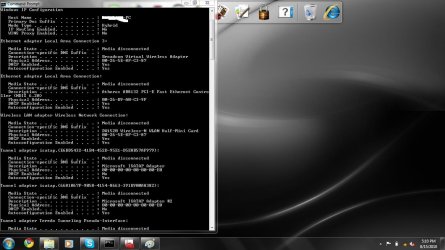
I tried to get the gateway IP address, but ...it just doesn't seem like there is one? For each of the connections (ethernet adapter local area connection, wireless lan adapter wireless network connection, etc.), it says that the media is disconnected. Under physical address, it has 6 sets of 2 numbers or number/letter combinations, but it doesn't look like an IP address. Am I just not seeing something/looking in the wrong place? Sorry for being such an idiot....:o

I'm going to get a screen cap of the command prompt and of the device manager now.
 

My Computer

Computer Manufacturer/Model Number
Dell Inspiron 11Z
OS
Windows 7
Okay, screenshots attached. Any suggestions?
 

Attachments

  • commandprompt1.jpg
    commandprompt1.jpg
    105.7 KB · Views: 15
  • commandprompt2.jpg
    commandprompt2.jpg
    101.2 KB · Views: 6
  • devicemanager.jpg
    devicemanager.jpg
    69.6 KB · Views: 11

My Computer

Computer Manufacturer/Model Number
Dell Inspiron 11Z
OS
Windows 7
Back
Top