Windows 7 unable to read external drive formatted FAT32

Sunitalynn

New member
Local time
3:36 AM
Messages
1
I have an external drive that was formatted FAT32 which I have been using with my XP laptop for the past year. I have data on it that I want to transfer to my Windows 7 laptop. However, as soon as I connect it to my Windows 7 laptop, it comes up with a message saying "You need to format the disk before you can use it. Do you want to format it?" I assumed that Windows 7 was unable to read the drive because it was FAT32, so I connected it back to my XP laptop and ran the conversion: CONVERT E: /FS:NTFS - The conversion completed successfully and I connected the drive back to my Windows 7 laptop. But it still came up with the same message that the drive needs to be formatted. Does anyone know what the problem could be?
 

My Computer My Computer

At a glance

Windows 7
OS
Windows 7
What I would do, is format the drive using Windows 7 then copy the files with your XP then copy them over to your 7. Windows 7 uses NTFS system while XP can use both so if the drive is formatted with 7 then XP can backwards convert it. Windows 7 kinda sucks when it comes to accessing drives. I don't know why they did that but oh well.....
 

My Computer My Computer

At a glance

Windows 7 Ultimate 64-BitAMD Phenom x4 3.4 GHz16 GB DDR3 G.Skill RAMATI Radeon HD
Computer Manufacturer/Model Number
I Built MY Own...
OS
Windows 7 Ultimate 64-Bit
CPU
AMD Phenom x4 3.4 GHz
Motherboard
MSI 790GX
Memory
16 GB DDR3 G.Skill RAM
Graphics Card(s)
ATI Radeon HD
Sound Card
Buit on Motherboard
Monitor(s) Displays
Trio-Display > Hanspree HF207, acer Z193w, Epson Projector
Hard Drives
5 SATA WD Green 1 TB
PSU
Thermaltake Black Widow 850-Watt
Case
Thermaltake SopranoRS
Cooling
3 120mm Fans Exhaust
Theres no issue with win7 reading fat32 usb drives. The "Do you want to format it?" is a well-known nag that mostly happens because the drive is flagged dirty for some reason, maybe because it was yanked off instead of being ejected properly.

You're lucky, XP can read the data. Just copy the data over to the hard drive, then format the drive in win7- fat32 would be perfectly fine. After that copy the data over to the win7 computer.

USB drives can be optimized either for quick removal or for performance. If you're the yanking out types, set it for quick removal.

How to Optimize Your Flash Drive for Quick and Safe Removal | eHow.com
 

My Computer My Computer

At a glance

Windows 7 x64 pro/ Windows 7 x86 Pro/ XP SP3 x86
Computer Manufacturer/Model Number
Too many to describe...
OS
Windows 7 x64 pro/ Windows 7 x86 Pro/ XP SP3 x86
I doubt the OP will reply since this thread is over a year old. As far as having 7 recognise the Fat 32 volume on any external drive when first plugged in you would take a fast trip into the Disk Management tool and use the Add New Volume wizard which will likely be seen first when going to right click on the drive to use the change drive letter option. http://www.sevenforums.com/tutorials/82994-drive-letter-add-change-remove-windows-7-a.html
 

My Computers My Computers

  • At a glance

    W7 Ultimate x64/W10 Pro x64/W11 Pro Triple Bo...AMD Phenom II X4 975 Deneb 3.6ghz - 965 2nd r...Kingston Hyper X DDR3 1600 1.5v 16gb - Hyper ...MSI HD Radeon 5750 1gb - MSI HD Radeon 6450 o...
    Computer type
    PC/Desktop
    Computer Manufacturer/Model Number
    Custom builds = 2
    OS
    W7 Ultimate x64/W10 Pro x64/W11 Pro Triple Boot - Main PC W7 Remote PC Micro ATX W7 Pro x64/W11 Pro
    CPU
    AMD Phenom II X4 975 Deneb 3.6ghz - 965 2nd remote pc
    Motherboard
    Gigabyte GA-790XTA-UD4-Gigabyte GA-880GM-D2H remote pc
    Memory
    Kingston Hyper X DDR3 1600 1.5v 16gb - Hyper X Fury 8gb 2nd
    Graphics Card(s)
    MSI HD Radeon 5750 1gb - MSI HD Radeon 6450 on mini tower
    Sound Card
    Creative Labs X-Fi Xtreme Audio P - Realtek onooard 2nd case
    Monitor(s) Displays
    ASUS VW199T-P 19" HP 2082a Main-HP 2082a 20" remote pc
    Screen Resolution
    Asus 1440x900 - HP 1600x900
    Hard Drives
    WD Black 1TB HD per OS W7, W10, and pending W11 presently on 500gb OS Drive - Pending Triple 1TB HDs for Spanned Storage/backup volume
    Single 2TB external USB enclosure, single 1TB System 7 Host/Boot drive, Pending 8TB external HD for system image b
    PSU
    Corsair 750TX - primary / Corsair CX600 - second
    Case
    Antec 900-2 - SSD compatible / NZXT Vulcan mini tower
    Cooling
    Zalman CNPS9900A
    Keyboard
    AZIO L70 Backlit Letters Gaming - ONN Cordless/USB
    Mouse
    MSI DS200 Programmable, Logitech Cordless
    Internet Speed
    30mbps upgrade - primary hard wired - mini tower usb WiFi
    Antivirus
    GFI VIPRE Internet Security 2014 on W7 2016 beta on W10,
    Browser
    Cyberfox, WaterFox 64bit FF variants, FireFox x64, Pale Moon
    Other Info
    Accomdata fan cooled usb 2.0 PIDE/Sata II, III external enclosure.
    Sambient usb/eSata PATA/Sata II, III external enclosure.
  • At a glance

    W7 Pro x64/W11 ProAMD Deneb 3.6ghz - 965Kingston Hyper X Fury 8gbMSI HD Radeon 6450 DVI Output
    Computer type
    PC/Desktop
    System Manufacturer/Model Number
    CUSTOM ASSEMBLY
    OS
    W7 Pro x64/W11 Pro
    CPU
    AMD Deneb 3.6ghz - 965
    Motherboard
    Gigabyte GA-880GM-D2H remote pc
    Memory
    Kingston Hyper X Fury 8gb
    Graphics Card(s)
    MSI HD Radeon 6450 DVI Output
    Sound Card
    Realtek onooard Creative or Other separate PENDING
    Monitor(s) Displays
    VIZIO 32" LCD TV Separate LCD Pending
    Screen Resolution
    1600x1080
    Hard Drives
    WD 500GB OS Host/Boot WD Green 1TB Storage/Backup
    PSU
    Corsair 600W - THERMALTAKE 600W spare case
    Case
    NZXT Vulcan mini tower
    Cooling
    Twin 120mm Top Fans - 240mm Side Cover
    Keyboard
    ONN Cordless/USB Logitech Cordless
    Mouse
    ONN USB/Cordless - Logitech Cordless
    Internet Speed
    DSL 5G
    Browser
    MS Edge, FireFox, WaterFox x64, FireFox Nightly
    Other Info
    OS Testing-Remote Access to Main TeamViewer
So... If WIn 7 has no problem with FAT then how come it can't read either of my two FAT Hard drives? The Problem is not that Windows just recognized a "Dirty Drive" it recognizes them fine but you can't access them. If you look in device manager, yes they show up but you cant access them in any way. They Don't show up on MY computer and since they have no assigned drive letter you can't manually tyoe in an address. Microsoft just dropped the ball the last few years making everything only posible their way and no other way will work.
 

My Computer My Computer

At a glance

Windows 7 Ultimate 64-BitAMD Phenom x4 3.4 GHz16 GB DDR3 G.Skill RAMATI Radeon HD
Computer Manufacturer/Model Number
I Built MY Own...
OS
Windows 7 Ultimate 64-Bit
CPU
AMD Phenom x4 3.4 GHz
Motherboard
MSI 790GX
Memory
16 GB DDR3 G.Skill RAM
Graphics Card(s)
ATI Radeon HD
Sound Card
Buit on Motherboard
Monitor(s) Displays
Trio-Display > Hanspree HF207, acer Z193w, Epson Projector
Hard Drives
5 SATA WD Green 1 TB
PSU
Thermaltake Black Widow 850-Watt
Case
Thermaltake SopranoRS
Cooling
3 120mm Fans Exhaust
First you have to go into the Disk Management tool whenever adding on any new drive or device like a flash in order to initialize the drive or device there. 7 will read and write to Fat 32 volumes since MS returned Fat support with the new version due to flash drives along with the use of external drives.

External hard drives boxed as Windows/Mac compatible will come with a factory Fat 32 volume or the new exFat in order to be cross platform. Drives intended for Windows only the way they are packaged will see NTFS being native to 2000 through W7. Flash drives come with Fat by default to available for use on most OSs.

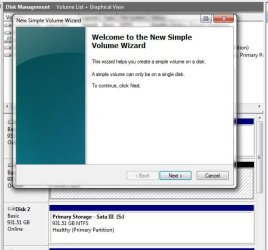
Once in the DM and you right click on the drive or device seen there you will likely see the Add New Volume prompt appear like the image attached here. That will take you through the steps of selecting the mbr or guid type partition info as well as selecting the drive letter available to be assigned.

Once that is seen to the auto play prompt flashing may be seen as the drive is then listed in Windows Explorer with that same drive letter. If the volume has been corrupted somehow then a reformat would be necessary while a good partition table will see immediate access.

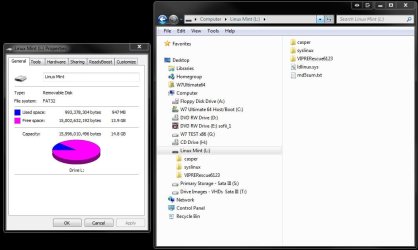
For a flash drive or memory card you would find that under removable storage while an external hard drive will be mixed in along with the internal drives. The other image shows a look at a usb flash drive with Fat 32 as the file system viewing the iso for a Linux distro written to it. Note the properites screen in particular showing on the 64bit 7 Ultimate here.
 

Attachments

  • Fat32 available on 64bit Windows 7.jpg
    Fat32 available on 64bit Windows 7.jpg
    63.4 KB · Views: 1,061
  • Add New Volume Wizard Prompt.jpg
    Add New Volume Wizard Prompt.jpg
    48.3 KB · Views: 868

My Computers My Computers

  • At a glance

    W7 Ultimate x64/W10 Pro x64/W11 Pro Triple Bo...AMD Phenom II X4 975 Deneb 3.6ghz - 965 2nd r...Kingston Hyper X DDR3 1600 1.5v 16gb - Hyper ...MSI HD Radeon 5750 1gb - MSI HD Radeon 6450 o...
    Computer type
    PC/Desktop
    Computer Manufacturer/Model Number
    Custom builds = 2
    OS
    W7 Ultimate x64/W10 Pro x64/W11 Pro Triple Boot - Main PC W7 Remote PC Micro ATX W7 Pro x64/W11 Pro
    CPU
    AMD Phenom II X4 975 Deneb 3.6ghz - 965 2nd remote pc
    Motherboard
    Gigabyte GA-790XTA-UD4-Gigabyte GA-880GM-D2H remote pc
    Memory
    Kingston Hyper X DDR3 1600 1.5v 16gb - Hyper X Fury 8gb 2nd
    Graphics Card(s)
    MSI HD Radeon 5750 1gb - MSI HD Radeon 6450 on mini tower
    Sound Card
    Creative Labs X-Fi Xtreme Audio P - Realtek onooard 2nd case
    Monitor(s) Displays
    ASUS VW199T-P 19" HP 2082a Main-HP 2082a 20" remote pc
    Screen Resolution
    Asus 1440x900 - HP 1600x900
    Hard Drives
    WD Black 1TB HD per OS W7, W10, and pending W11 presently on 500gb OS Drive - Pending Triple 1TB HDs for Spanned Storage/backup volume
    Single 2TB external USB enclosure, single 1TB System 7 Host/Boot drive, Pending 8TB external HD for system image b
    PSU
    Corsair 750TX - primary / Corsair CX600 - second
    Case
    Antec 900-2 - SSD compatible / NZXT Vulcan mini tower
    Cooling
    Zalman CNPS9900A
    Keyboard
    AZIO L70 Backlit Letters Gaming - ONN Cordless/USB
    Mouse
    MSI DS200 Programmable, Logitech Cordless
    Internet Speed
    30mbps upgrade - primary hard wired - mini tower usb WiFi
    Antivirus
    GFI VIPRE Internet Security 2014 on W7 2016 beta on W10,
    Browser
    Cyberfox, WaterFox 64bit FF variants, FireFox x64, Pale Moon
    Other Info
    Accomdata fan cooled usb 2.0 PIDE/Sata II, III external enclosure.
    Sambient usb/eSata PATA/Sata II, III external enclosure.
  • At a glance

    W7 Pro x64/W11 ProAMD Deneb 3.6ghz - 965Kingston Hyper X Fury 8gbMSI HD Radeon 6450 DVI Output
    Computer type
    PC/Desktop
    System Manufacturer/Model Number
    CUSTOM ASSEMBLY
    OS
    W7 Pro x64/W11 Pro
    CPU
    AMD Deneb 3.6ghz - 965
    Motherboard
    Gigabyte GA-880GM-D2H remote pc
    Memory
    Kingston Hyper X Fury 8gb
    Graphics Card(s)
    MSI HD Radeon 6450 DVI Output
    Sound Card
    Realtek onooard Creative or Other separate PENDING
    Monitor(s) Displays
    VIZIO 32" LCD TV Separate LCD Pending
    Screen Resolution
    1600x1080
    Hard Drives
    WD 500GB OS Host/Boot WD Green 1TB Storage/Backup
    PSU
    Corsair 600W - THERMALTAKE 600W spare case
    Case
    NZXT Vulcan mini tower
    Cooling
    Twin 120mm Top Fans - 240mm Side Cover
    Keyboard
    ONN Cordless/USB Logitech Cordless
    Mouse
    ONN USB/Cordless - Logitech Cordless
    Internet Speed
    DSL 5G
    Browser
    MS Edge, FireFox, WaterFox x64, FireFox Nightly
    Other Info
    OS Testing-Remote Access to Main TeamViewer
Win7 will read FAT32. - Yipper.

Solutions are simple. Go methodical. Eliminate one by one.
Try these:

1. Plug into the USB port at the back of the computer. Why? Some drives like the 'direct' connection than some circutous route to get to reading the drive.

2. Change the USB cable. Try another one if you have it. You may laugh. It worked for me. As simple as that. Sometimes solutions are simple and they are staring at you and we tend to miss it. LOL

3. Go to Devices and Printers (control panel). See if your drive shows up there. Right click, open. You now can read files.

4. Start ->Mycomputer->Rightclick-> Manage ->System->diskmanage. See if your drive shows up without a letter. Assign a letter and it will work.

So there you have it. One of the 4 solutions will work. Trust me, WIN7 will read FAT32. No question about that. MS built it to be backward compatible.
 

My Computer My Computer

At a glance

Windows 7 Ultimate x64
OS
Windows 7 Ultimate x64
Back
Top