Windows 7 Universal Installation Disc - Create

How to Create a Windows 7 Universal Installation Disc

Introduction

For Windows users who installed or upgraded Windows Vista, there is one big difference that will be immediately noticed when installing or upgrading to Windows 7: The Windows 7 installation wizard no longer prompts, or asks, for the user to select which edition of the operating system to install. Instead, each Windows 7 DVD disc will automatically install the specific edition which it’s limited to. So a Windows 7 Home Premium disc will only install Windows 7 HP, a Pro disc will only install Pro, etc.

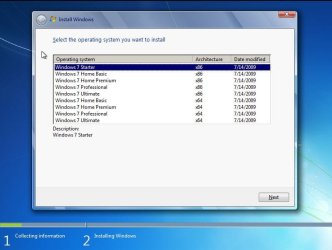
Although Microsoft does not provide any such universal Windows 7 installation media, the function is indeed feasible. (see Screenshot below) A disc such as this can be especially helpful to PC technicians, IT staff, and the like who need to reinstall Win7 frequently. Remember you will still need a valid license key specific to the version you are installing. In addition, Microsoft has eliminated the differences between the retail and OEM install discs with Windows 7, so this disc can be used to reinstall Win7 on PC’s where the owner has lost, or is unable to find, the OEM restore discs. In order to create such a disc; just delete and remove the ei.cfg from any Windows 7 ISO to convert that image into a universal disc for all editions of Windows 7.
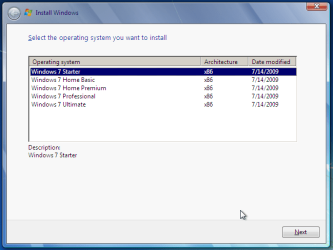
Win7 Universal Install Disc SS.PNG


STAGE 1 UNIVERSAL DVD - ALL 32 OR 64 BIT ON 1 DVD

For any user who has the Windows 7 install DVD or ISO and wishes to make a universal installer disc now there is an easier way to modify the ISO. Normally this was accomplished by manually unpacking and extracting the contents of the ISO image (or copying files from DVD to HDD), deleting the ei.cfg and then repacking the installation files back into an ISO to burn. Users can now eliminate these tedious procedures by making use of the “ei.cfg Removal Utility”.

The ei.cfg Removal Utility is a simple tool that will disable the ei.cfg from any Windows 7 ISO disc image, thereby converting the image into a “universal disc” that will prompt the user to select their preferred edition during setup. The ei.cfg Removal Utility works directly to patch the ISO image, by toggling the deletion bit in the UDF file table to instruct the operating system to ignore and remove ei.cfg, or treat it as if it does not exist. Best of all, the ei.cfg Removal Utility can reverse the patching to restore the ISO disc image to its original state when the tool is been used to apply on a disc image that previously been patched by the utility.

The ei.cfg Removal Utility is a standalone portable app, and requires no installation. In fact, the program does not have much of a user interface at all. Simply selecting the target Windows 7 ISO, and the disc image (ISO) will be patched right away. So make sure a backup copy of your ISO is created beforehand.

Download the ei.cfg Removal Utility here:eicfg_removal_utility.zip


STAGE 2 UNIVERSAL DVD - ALL 32 AND ALL 64 BIT ON 1 DVD

I was amazed at how easy it is to merge Win7 x86 and Win7 x64 editions (DVDs) in a single DVD or 4GB USB. The process is pretty simple, you need a copy of both any 32 bit and any 64 bit Windows 7 install DVD or ISO. Either copy the DVD's contents to a folder on a HDD, or extract the ISO's contents to a folder. Run 4 commands from the prompt, then create and burn your new Universal install DVD/USB.


Requirements:

  1. WAIK (Windows Automation Installation Kit) Download WAIK
  2. Windows Win7 x86 and Windows Win7 x64 DVDs.
  3. An application that can extract the files from an ISO (if using a downloaded ISO). I use WinRAR, but many apps can do this extraction.
  4. An application that allows you to build a new iso or create a bootable DVD/USB. I use UltraISO for this.
  5. Single Layer DVD, compatible DVD Burner and, of course DVD burning software… or a 4GB USB flash drive.
We will merge the four Windows 7 x64 editions into the Win7 x86 DVD contents, because Win7 x64 DVD has 64-bit content that can’t run some of the Win32 installation components.


Getting Started


1. Install WAIK in your Windows (doesn’t matter you are running Win7 or Windows XP)

2. Make two folders, in my examples I use Win7_64 and Win7_32. Now copy both Windows 7 x64 and x86 DVDs contents into their respective folders. Or extract your downloaded ISO’s into their respective folder.

   Note
If copying files over from a DVD to the above folders, you actually only need the Sources\install.wim file from the Windows 7 x64 DVD.


3. Run WAIK command prompt (Run as Administrator if UAC enabled):
Start à All Programs àWindows AIK àWindows AIK and PE Command Prompt

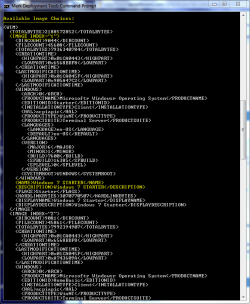
4. Each and every Win7 edition has an index no. in the install.wim (WIM file), you can check using the following command:
Code:
Imagex/info G:\Win7_32\Sources\install.wim
   Note
Where G:\Win7_32 represents the location of your 32 bit DVD files

Win7 Universal Install Disc cmd 1.PNG

The results will look something like above.
This shows that INDEX=1 denotes Windows 7 Starter and so on… (you may have to scroll down to observe these entries)

5. We will use the Imagex /export command to move our x64 WIM entries into the x86 wim file.
   Note
The syntax for this command is:
   Note

imagex /export src_file src_number src_name dest_file dest_name


Now execute the following commands with appropriate INDEX no. to export a copy of the specified image to the Windows 7 32bit (x86) WIM file.

For Win7 Home Basic x64:
Code:
Imagex/export G:\Win7_64\Sources\install.wim 1 G:\Win7_32\Sources\install.wim "Windows 7 Home Basic (x64)"
For Win7 Home Premium x64:
Code:
Imagex/export G:\Win7_64\Sources\install.wim 2 G:\Win7_32\Sources\install.wim "Windows 7 Home Premium (x64)"
For Win7 Professional x64:
Code:
Imagex/export G:\Win7_64\Sources\install.wim 3 G:\Win7_32\Sources\install.wim "Windows 7 Professional (x64)"
For Win7 Ultimate x64:
Code:
Imagex /export G:\Win7_64\Sources\install.wim 4 G:\Win7_32\Sources\install.wim "Windows 7 Ultimate (x64)"
6. After execution of above commands Win7_32's WIM file will be the universal WIM file that contains all version of Win7. You can export only desired versions into the image. For example you could make a Win7 DVD, which includes Win7 Ultimate x86 and x64 version only.

7. Now to make bootable DVD image...


Last edited by a moderator:
Nice for portability, but you still need at least one DVD, lol.
 

My Computers

System One System Two

  • Computer type
    PC/Desktop
    Computer Manufacturer/Model Number
    PowerSpec G164
    OS
    WIN10
    CPU
    AMD Ryzen 5 3600 6-Core Processor 3.59 GHz
    Memory
    16.0 GB
    Internet Speed
    VERY FAST>>>!!!
  • Antivirus
    ESET Security Premium
I have a single ISO with all (it also fits on a single DVD) both 32-bit and 64-bit versions included; that is great for installing any version in VirtualBox for testing and this way takes about 8 minutes to be on a working desktop.
 

My Computer

Computer Manufacturer/Model Number
* BFK Customs *
OS
W 7 64-bit Ultimate
CPU
Intel Q9550 Yorkfield
Motherboard
ASUS P5Q Pro
Memory
8GB Dominator 8500C5D
Graphics Card(s)
ATI : XFX 5870
Sound Card
Realtek HD Audio 7-1
Monitor(s) Displays
1x 47" LCD HDMI & 3x 26" LCD HDMI
Screen Resolution
1920x1080P & 1920x1200
Hard Drives
1x 80GB Intel X25-M G2 SSD : 1x 500GB & 1x 640GB WD Caviar Black(s)
PSU
Corsair 620HX
Case
Cooler Master RC-690
Cooling
Tuniq Tower 120, 2x 140mm and 3x 120mm case fans
Keyboard
Microsoft 500
Mouse
Razer Diamondback 3G
Internet Speed
14 Mb/s
Other Info
1x Koutech 3Gb/s SATA HDD Hot Swap Rack
The problem for most is obtaining that first DVD, since manufactures don't supple them. After that, then you can use this tutorial to create one of those AIO DVD's.
 

My Computers

System One System Two

  • Computer type
    PC/Desktop
    Computer Manufacturer/Model Number
    PowerSpec G164
    OS
    WIN10
    CPU
    AMD Ryzen 5 3600 6-Core Processor 3.59 GHz
    Memory
    16.0 GB
    Internet Speed
    VERY FAST>>>!!!
  • Antivirus
    ESET Security Premium
THe nice thing is any Win7 DVD can be used as there is no connection between the disc and the install on an OEM PC. Its all in the Key now, so this AIO DVD is best for an IT person or PC Repair person... one disc many versions, all you need is the sticker on the side of any OEM PC with the Key!
 

My Computer

Computer Manufacturer/Model Number
Homebrew PC - "Alpha_Dawg"
OS
Windows 7 Ultimate 64 bit Steve Ballmer Signature Edition
CPU
Intel Core 2 Quad - Q9550 - 2.83GHz stock - OC'd to 3.6GHz
Motherboard
Gigabyte EP45-UD3P
Memory
4GB DDR2 800MHz (PC6400) OCZ Reaper
Graphics Card(s)
Nvidia GE Force 8800 GTS
Sound Card
Asus Xonar DX
Monitor(s) Displays
Samsung SyncMaster 2333HD
Screen Resolution
1920 x 1080
Hard Drives
WD Caviar Black 750GB - 7200RPM - 32MB cache
WD Caviar Green 1.5TB - 5400RPM - 64MB cache
WD Caviar Green 2.0TB - 5400RPM - 64MB cache
PSU
PC Power & Cooling Silencer 750
Case
Gigabyte 3D Aurora
Cooling
Case is Air - 5ea. 120mm fans (mix of Arctic and Xigmatec)
Keyboard
MS Natural Wireless KB
Mouse
MS Wireless Mouse
Internet Speed
50 mbps down/5 mbps up
Other Info
AVerMedia - AVerTVHD G2 Dual Tuner Card
Understood! I guess my question and point, didn't make sense.
 

My Computers

System One System Two

  • Computer type
    PC/Desktop
    Computer Manufacturer/Model Number
    PowerSpec G164
    OS
    WIN10
    CPU
    AMD Ryzen 5 3600 6-Core Processor 3.59 GHz
    Memory
    16.0 GB
    Internet Speed
    VERY FAST>>>!!!
  • Antivirus
    ESET Security Premium
Yes, that is the difficulty many face.

Blame the oem's.

If you know someone with an install dvd - you can always borrow it, - not many do sadly.

You can make the install media from the files on the recovery partition. It shouldn't be too hard - but again - the average user wouldn't be able to.


The problem for most is obtaining that first DVD, since manufactures don't supple them. After that, then you can use this tutorial to create one of those AIO DVD's.
 

My Computers

System One System Two

  • Computer type
    PC/Desktop
    OS
    7 X64
    CPU
    i5 8400
    Motherboard
    gigabyte b365m ds3h
    Memory
    2x8gb 3200mhz
    Hard Drives
    various
    PSU
    pure power 11 400w cm
    Case
    Coolermaster
    Cooling
    cryorig m9i
  • Computer type
    PC/Desktop
    OS
    7x64
    CPU
    g5400
    Motherboard
    ga b365m ds3h
    Memory
    8gb ddr4 2400
    PSU
    xfx pro 450w
I'm good I have one, LOL.. I mainly wanted to find out can I direct people here when they need a DVD.. I thought this tutorial helped members create one from scratch.
 

My Computers

System One System Two

  • Computer type
    PC/Desktop
    Computer Manufacturer/Model Number
    PowerSpec G164
    OS
    WIN10
    CPU
    AMD Ryzen 5 3600 6-Core Processor 3.59 GHz
    Memory
    16.0 GB
    Internet Speed
    VERY FAST>>>!!!
  • Antivirus
    ESET Security Premium
I'm good I have one, LOL.. I mainly wanted to find out can I direct people here when they need a DVD.. I thought this tutorial helped members create one from scratch.

Unfortunately, if you could create one from scratch MicroSloth would be outta business!!!

:roflmao::roflmao::roflmao:
 

My Computer

Computer Manufacturer/Model Number
Homebrew PC - "Alpha_Dawg"
OS
Windows 7 Ultimate 64 bit Steve Ballmer Signature Edition
CPU
Intel Core 2 Quad - Q9550 - 2.83GHz stock - OC'd to 3.6GHz
Motherboard
Gigabyte EP45-UD3P
Memory
4GB DDR2 800MHz (PC6400) OCZ Reaper
Graphics Card(s)
Nvidia GE Force 8800 GTS
Sound Card
Asus Xonar DX
Monitor(s) Displays
Samsung SyncMaster 2333HD
Screen Resolution
1920 x 1080
Hard Drives
WD Caviar Black 750GB - 7200RPM - 32MB cache
WD Caviar Green 1.5TB - 5400RPM - 64MB cache
WD Caviar Green 2.0TB - 5400RPM - 64MB cache
PSU
PC Power & Cooling Silencer 750
Case
Gigabyte 3D Aurora
Cooling
Case is Air - 5ea. 120mm fans (mix of Arctic and Xigmatec)
Keyboard
MS Natural Wireless KB
Mouse
MS Wireless Mouse
Internet Speed
50 mbps down/5 mbps up
Other Info
AVerMedia - AVerTVHD G2 Dual Tuner Card
What about including x86 and x64 Windows Recovery Environment choices?
 

My Computer

OS
Win7 Ultimate x64 SP1
What about including x86 and x64 Windows Recovery Environment choices?

I have tried doing that, but you can not.
If you are going to include both 32bit and 64bit images to the AIO, then the base image needs to be 32bit.

You will need to make both a 64bit and 32bit AIO if you want both Repair environments.
There would then be no point in trying to add them through a WAIK built PE or something.
This would be easier in the long run.

Yeah, that is a pain in the butt, but, if you use a large enough USB Drive and the leave the AIO's as ISO's you can then use GRUB4DOS, size and being split like that won't matter, you could have everything on one drive. IMO, CD/DVD disks are almost an outdated resource for this kind of thing. Almost, if not all modern PC's will boot a USB stick/drive.
 
Last edited:

My Computer

Computer Manufacturer/Model Number
Self Built
OS
Win 7 Ultimate 32bit
CPU
C2D E6600 2.4Ghz
Motherboard
Intel D965WH
Memory
4G Kingston KHX5400D2
Graphics Card(s)
EVGA GTX 570 HD SC (012-P3-1573-KR)
Sound Card
On-Board
Monitor(s) Displays
Samsung 226BW
Screen Resolution
1680 x 1050
Hard Drives
2 x 250 Seagate Barracuda
2 x 500 Seagate Barracuda (Raid1)
PSU
Corsair TX750W
Case
In-Win C589
Cooling
Stock Intel Cooling
Can't get my image to boot. What's wrong?
 

My Computer

Computer type
PC/Desktop
Computer Manufacturer/Model Number
Custom Build
OS
Microsoft Windows 7 64-bit Service Pack 1
CPU
Intel Core i7-4790K Devil's Canyon Quad-Core 4.0 GHz
Motherboard
GIGABYTE GA-Z97X-SLI LGA 1150
Memory
16.00 GB
Graphics Card(s)
NVIDIA GeForce GTX 950
Monitor(s) Displays
AOC 2050W
Screen Resolution
1920 x 1080
Hard Drives
ST1000DL002-9TT153 ATA Device
Seagate 2TB FireCuda Gaming SSHD (Solid State Hybrid Drive) - 7200 RPM SATA 6Gb/s 64MB Cache 3.5-Inch Hard Drive
Samsung 850 EVO - 250GB - 2.5-Inch SATA III Internal SSD
PSU
CORSAIR CX-M Series CX750M 750W ATX12V & EPS12V Semi-modular
Case
Lian Li PC-7H
Browser
Firefox
Cool, doing just the 32-bit & 64-bit separately was a breeze, just point the "ei.cfg Removal Utility" at the ISO then burn to disk; I'm going to have a go at the whole enchilada after while.


View attachment 86430View attachment 86431


Piece-a-cake, I'm now installing 64-bit HP from this same disk; now to do it all again when W_7 SP 1 goes RTM. :confused:

Now to clean-up all the files I scattered around the PC doing this. :shock:
View attachment 86432
So I have to use the ei.cfg remover on both DVDs?
 

My Computer

Computer type
PC/Desktop
Computer Manufacturer/Model Number
Custom Build
OS
Microsoft Windows 7 64-bit Service Pack 1
CPU
Intel Core i7-4790K Devil's Canyon Quad-Core 4.0 GHz
Motherboard
GIGABYTE GA-Z97X-SLI LGA 1150
Memory
16.00 GB
Graphics Card(s)
NVIDIA GeForce GTX 950
Monitor(s) Displays
AOC 2050W
Screen Resolution
1920 x 1080
Hard Drives
ST1000DL002-9TT153 ATA Device
Seagate 2TB FireCuda Gaming SSHD (Solid State Hybrid Drive) - 7200 RPM SATA 6Gb/s 64MB Cache 3.5-Inch Hard Drive
Samsung 850 EVO - 250GB - 2.5-Inch SATA III Internal SSD
PSU
CORSAIR CX-M Series CX750M 750W ATX12V & EPS12V Semi-modular
Case
Lian Li PC-7H
Browser
Firefox
How did you construct the boot media?

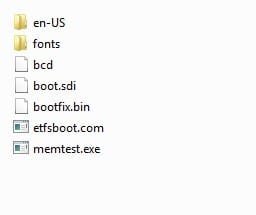
I assume you have a boot directory, a sources directory containing boot.wim and install.wim, and bootmgr on the dvd/flash?

Like this:

Contents.jpg


Inside the boot directory ( bootfix and memtest optional), the bcd store entry needs to point at boot.wim

Contents2.jpg


>bcdedit /store bcd

Windows Boot Manager
--------------------
identifier {bootmgr}
description Windows Boot Manager
locale en-US
inherit {globalsettings}
default {default}
displayorder {default}
toolsdisplayorder {memdiag}
timeout 30

Windows Boot Loader
-------------------
identifier {default}
device ramdisk=[boot]\sources\boot.wim,{7619dcc8-fafe-11d9-b411
-000476eba25f}
path \windows\system32\boot\winload.exe
description Windows Setup
locale en-US
inherit {bootloadersettings}
osdevice ramdisk=[boot]\sources\boot.wim,{7619dcc8-fafe-11d9-b411
-000476eba25f}
systemroot \windows
detecthal Yes
winpe Yes
ems Yes
 

My Computers

System One System Two

  • Computer type
    PC/Desktop
    OS
    7 X64
    CPU
    i5 8400
    Motherboard
    gigabyte b365m ds3h
    Memory
    2x8gb 3200mhz
    Hard Drives
    various
    PSU
    pure power 11 400w cm
    Case
    Coolermaster
    Cooling
    cryorig m9i
  • Computer type
    PC/Desktop
    OS
    7x64
    CPU
    g5400
    Motherboard
    ga b365m ds3h
    Memory
    8gb ddr4 2400
    PSU
    xfx pro 450w
I got it to boot, but I didn't use the ei.cfg remover and my first disc that I created only has W7 Ultimate x86 and x64 on it. So I redid the process using the remover and made it into a bootable iso file. I need to find a way to test the iso file before burning it.
 

My Computer

Computer type
PC/Desktop
Computer Manufacturer/Model Number
Custom Build
OS
Microsoft Windows 7 64-bit Service Pack 1
CPU
Intel Core i7-4790K Devil's Canyon Quad-Core 4.0 GHz
Motherboard
GIGABYTE GA-Z97X-SLI LGA 1150
Memory
16.00 GB
Graphics Card(s)
NVIDIA GeForce GTX 950
Monitor(s) Displays
AOC 2050W
Screen Resolution
1920 x 1080
Hard Drives
ST1000DL002-9TT153 ATA Device
Seagate 2TB FireCuda Gaming SSHD (Solid State Hybrid Drive) - 7200 RPM SATA 6Gb/s 64MB Cache 3.5-Inch Hard Drive
Samsung 850 EVO - 250GB - 2.5-Inch SATA III Internal SSD
PSU
CORSAIR CX-M Series CX750M 750W ATX12V & EPS12V Semi-modular
Case
Lian Li PC-7H
Browser
Firefox
Use Easybcd to add the iso to windows boot menu - select "run from memory".

If it boots fine from the HD , then you are good to burn it
 

My Computers

System One System Two

  • Computer type
    PC/Desktop
    OS
    7 X64
    CPU
    i5 8400
    Motherboard
    gigabyte b365m ds3h
    Memory
    2x8gb 3200mhz
    Hard Drives
    various
    PSU
    pure power 11 400w cm
    Case
    Coolermaster
    Cooling
    cryorig m9i
  • Computer type
    PC/Desktop
    OS
    7x64
    CPU
    g5400
    Motherboard
    ga b365m ds3h
    Memory
    8gb ddr4 2400
    PSU
    xfx pro 450w
I guess what I'm really trying to ask is, if I followed the instructions word for word, I should have an iso that can boot all versions of Windows, right? Are there side steps that aren't included? Should I have made the separate iso files (x86 and x64) universal before beginning?
 

My Computer

Computer type
PC/Desktop
Computer Manufacturer/Model Number
Custom Build
OS
Microsoft Windows 7 64-bit Service Pack 1
CPU
Intel Core i7-4790K Devil's Canyon Quad-Core 4.0 GHz
Motherboard
GIGABYTE GA-Z97X-SLI LGA 1150
Memory
16.00 GB
Graphics Card(s)
NVIDIA GeForce GTX 950
Monitor(s) Displays
AOC 2050W
Screen Resolution
1920 x 1080
Hard Drives
ST1000DL002-9TT153 ATA Device
Seagate 2TB FireCuda Gaming SSHD (Solid State Hybrid Drive) - 7200 RPM SATA 6Gb/s 64MB Cache 3.5-Inch Hard Drive
Samsung 850 EVO - 250GB - 2.5-Inch SATA III Internal SSD
PSU
CORSAIR CX-M Series CX750M 750W ATX12V & EPS12V Semi-modular
Case
Lian Li PC-7H
Browser
Firefox
Hello TONPumper, welcome to Seven Forums!


I started with 2 completely separate downloaded ISOs, 32-bit and 64-bit, followed the tutorial to the letter and it went very easy and this is what I finished with.


click to enlarge
All.jpg
 

My Computer

Computer Manufacturer/Model Number
* BFK Customs *
OS
W 7 64-bit Ultimate
CPU
Intel Q9550 Yorkfield
Motherboard
ASUS P5Q Pro
Memory
8GB Dominator 8500C5D
Graphics Card(s)
ATI : XFX 5870
Sound Card
Realtek HD Audio 7-1
Monitor(s) Displays
1x 47" LCD HDMI & 3x 26" LCD HDMI
Screen Resolution
1920x1080P & 1920x1200
Hard Drives
1x 80GB Intel X25-M G2 SSD : 1x 500GB & 1x 640GB WD Caviar Black(s)
PSU
Corsair 620HX
Case
Cooler Master RC-690
Cooling
Tuniq Tower 120, 2x 140mm and 3x 120mm case fans
Keyboard
Microsoft 500
Mouse
Razer Diamondback 3G
Internet Speed
14 Mb/s
Other Info
1x Koutech 3Gb/s SATA HDD Hot Swap Rack
Hi Ton,

You should have a boot.wim.

That is the bit which loads into memory. From there you can use the 32 bit recovery options, or you can install any edition/bit version that you put into install.wim.

If you want to have the 64 bit recovery options as well , then you can include another bootable wim in the "sources" directory ( either boot.wim from the 64 bit install dvd , or winre.wim off your 64 installation hard drive).

Name it something else , e.g REC64.WIM, then add an entry to bcd to point at it.
 

My Computers

System One System Two

  • Computer type
    PC/Desktop
    OS
    7 X64
    CPU
    i5 8400
    Motherboard
    gigabyte b365m ds3h
    Memory
    2x8gb 3200mhz
    Hard Drives
    various
    PSU
    pure power 11 400w cm
    Case
    Coolermaster
    Cooling
    cryorig m9i
  • Computer type
    PC/Desktop
    OS
    7x64
    CPU
    g5400
    Motherboard
    ga b365m ds3h
    Memory
    8gb ddr4 2400
    PSU
    xfx pro 450w
Tested and working! Thanks all!
 

Attachments

  • Untitled.jpg
    Untitled.jpg
    67.4 KB · Views: 6,513

My Computer

Computer type
PC/Desktop
Computer Manufacturer/Model Number
Custom Build
OS
Microsoft Windows 7 64-bit Service Pack 1
CPU
Intel Core i7-4790K Devil's Canyon Quad-Core 4.0 GHz
Motherboard
GIGABYTE GA-Z97X-SLI LGA 1150
Memory
16.00 GB
Graphics Card(s)
NVIDIA GeForce GTX 950
Monitor(s) Displays
AOC 2050W
Screen Resolution
1920 x 1080
Hard Drives
ST1000DL002-9TT153 ATA Device
Seagate 2TB FireCuda Gaming SSHD (Solid State Hybrid Drive) - 7200 RPM SATA 6Gb/s 64MB Cache 3.5-Inch Hard Drive
Samsung 850 EVO - 250GB - 2.5-Inch SATA III Internal SSD
PSU
CORSAIR CX-M Series CX750M 750W ATX12V & EPS12V Semi-modular
Case
Lian Li PC-7H
Browser
Firefox
Great - did you add in the 64 bit recovery options?
 

My Computers

System One System Two

  • Computer type
    PC/Desktop
    OS
    7 X64
    CPU
    i5 8400
    Motherboard
    gigabyte b365m ds3h
    Memory
    2x8gb 3200mhz
    Hard Drives
    various
    PSU
    pure power 11 400w cm
    Case
    Coolermaster
    Cooling
    cryorig m9i
  • Computer type
    PC/Desktop
    OS
    7x64
    CPU
    g5400
    Motherboard
    ga b365m ds3h
    Memory
    8gb ddr4 2400
    PSU
    xfx pro 450w
Back
Top