Windows 7 update error 80070002, "usual" rescue options not working.

mrhat111

New member
Local time
11:49 PM
Messages
8
Windows 7 update error 80070002, "usual" rescue options not working.

Dear Forum,

the windows update service on my laptop only returns error 80070002. It seems to be a common problem for a lot of people, however most of the standard steps to take do not seem to work for my machine.

CHKDSK is ok.

sfc /scannow however refuses to work. Even with admin privileges, it says that "resource protection" wont allow it to run. If started from windows recovery mode, sfc claims that there is another operation pending and a reboot is needed, first. Needless to say, this other operation is stuck in limbo.

All other methods of manually deleting/reseting the update logs, including the .bat from this website, have failed.

Even returning to a system restore point brought no change.

The last known update to work was for net framework.

I'm not sure where to go from here since i figure my attempts might have already made the situation worse.

Had to use a third party filesharing provider:

Logs.zip
 

My Computer My Computer

At a glance

Windows 7 Home Premium x64
Computer type
Laptop
Computer Manufacturer/Model Number
Dell
OS
Windows 7 Home Premium x64
Please post the requested files anyhow.
 

My Computer My Computer

At a glance

Win 7 x64 Home Premium (and x86 VirtualBox VM...i3 370M/i7 6500U8GB - finally :)/8GBit's an i3, dude!/dual Intel&nVidia
Computer type
Laptop
Computer Manufacturer/Model Number
Asus K52F or Lenovo B51-80
OS
Win 7 x64 Home Premium (and x86 VirtualBox VM)/Win10
CPU
i3 370M/i7 6500U
Motherboard
Asus/Lenovo
Memory
8GB - finally :)/8GB
Graphics Card(s)
it's an i3, dude!/dual Intel&nVidia
Sound Card
onboard
Monitor(s) Displays
15.6" built-in
Screen Resolution
1366x768/1920x1080
Hard Drives
750GB Seagate internal
Sundry external drives attached to other computers on the local network
1TB SSD on the Lenovo
PSU
n/a
Internet Speed
as much as I can get - usually on a dongle/phone, so <1MB/s
Antivirus
MSE/Defender
Browser
IE11/12/Edge/Chrome/FF(if I must)
Here's what appears to be the problem...
Code:
2015-06-06 20:32:55, Info                  CSI    00000004@2015/6/6:18:32:55.153 PopulateComponentFamiliesKey - Begin
2015-06-06 20:33:19, Error                 CSI    00000005 (F) STATUS_OBJECT_NAME_NOT_FOUND #1546429# from Windows::Rtl::SystemImplementation::DirectRegistryProvider::SysOpenKey(flg = 0, key = {provider=NULL, handle=0}, da = (KEY_READ|KEY_WOW64_64KEY), oa = @0x146e020->OBJECT_ATTRIBUTES {s:48; rd:NULL; on:[195]"\Registry\Machine\Software\Microsoft\Windows\CurrentVersion\SideBySide\Winners\amd64_7d78f1219de776590121d423bf220aa2_31bf3856ad364e35_none_6d0acdf54e87b35c\{E08225F7-6C94-40B9-AB95-D5FFFEAB154A}"; a:(OBJ_CASE_INSENSITIVE)}, disp = Unmapped disposition: 21423080 (0x0146e3e8))[gle=0xd0000034]
2015-06-06 20:33:19, Error                 CSI    00000006@2015/6/6:18:33:19.489 (F) d:\win7sp1_gdr\base\wcp\sil\merged\ntu\ntsystem.cpp(3676): Error STATUS_OBJECT_NAME_NOT_FOUND originated in function Windows::Rtl::SystemImplementation::DirectRegistryProvider::SysOpenKey expression: (null)
[gle=0x80004005]
2015-06-06 20:33:19, Error                 CSI    00000007 (F) STATUS_OBJECT_NAME_NOT_FOUND #1546428# from Windows::Rtl::SystemImplementation::CKey::OpenExistingKey(f = 0, da = (KEY_READ), oa = @0x146e4e0, key = NULL, disp = (null))[gle=0xd0000034]
2015-06-06 20:33:19, Info                  CBS    NonStart: Failed to get store. [HRESULT = 0x80070002 - ERROR_FILE_NOT_FOUND]
2015-06-06 20:33:19, Info                  CBS    Failed to ensure no startup processing was required. [HRESULT = 0x80070002 - ERROR_FILE_NOT_FOUND]
2015-06-06 20:33:19, Info                  CBS    Failed during startup processing, continuing with Trusted Installer execution [HRESULT = 0x80070002 - ERROR_FILE_NOT_FOUND]
2015-06-06 20:33:19, Info                  CBS    Startup processing thread terminated normally

You're getting that set of errors repeatedly at every boot - and various retires as well
Of the 71000+ lines of data in the CBS.log, over 32000 relate to this one error!


Let's try this...

Please open an elevated Command Prompt, and run the following command,

REG LOAD HKLM\COMPONENTS C:\Windows\System32\config\COMPONENTS
REG QUERY HKLM\COMPONENTS


post the results.


Here are some instructions to make life easier :)
1) To open an Elevated Command Prompt Window (the ECP window), click on Start, All Programs, Accessories – then right-click on Command Prompt, and select Run as Administrator. Accept the UAC prompt.
2) To run the commands easier, highlight the block of commands, and right-click on the highlight – select Copy. In the CP Window, click on the black/white icon at top left – select Paste. The commands will run but may not complete the last command, so hit the Enter Key once.
3) To copy the results... click on the Black/White icon in the top left, and select Edit... 'Select All', and hit the Enter key - then use Ctrl+V or r-click+Paste to paste it into your response.
 

My Computer My Computer

At a glance

Win 7 x64 Home Premium (and x86 VirtualBox VM...i3 370M/i7 6500U8GB - finally :)/8GBit's an i3, dude!/dual Intel&nVidia
Computer type
Laptop
Computer Manufacturer/Model Number
Asus K52F or Lenovo B51-80
OS
Win 7 x64 Home Premium (and x86 VirtualBox VM)/Win10
CPU
i3 370M/i7 6500U
Motherboard
Asus/Lenovo
Memory
8GB - finally :)/8GB
Graphics Card(s)
it's an i3, dude!/dual Intel&nVidia
Sound Card
onboard
Monitor(s) Displays
15.6" built-in
Screen Resolution
1366x768/1920x1080
Hard Drives
750GB Seagate internal
Sundry external drives attached to other computers on the local network
1TB SSD on the Lenovo
PSU
n/a
Internet Speed
as much as I can get - usually on a dongle/phone, so <1MB/s
Antivirus
MSE/Defender
Browser
IE11/12/Edge/Chrome/FF(if I must)
Microsoft Windows [Version 6.1.7601]
Copyright (c) 2009 Microsoft Corporation. Alle Rechte vorbehalten.

C:\Windows\system32>REG LOAD HKLM\COMPONENTS C:\Windows\System32\config\COMPONEN
TS
Der Vorgang wurde erfolgreich beendet.

C:\Windows\system32>REG QUERY HKLM\COMPONENTS

HKEY_LOCAL_MACHINE\COMPONENTS
StoreFormatVersion REG_BINARY 30002E0030002E0030002E003600
StoreArchitecture REG_BINARY 09000000

HKEY_LOCAL_MACHINE\COMPONENTS\CanonicalData
HKEY_LOCAL_MACHINE\COMPONENTS\ccpinterface
HKEY_LOCAL_MACHINE\COMPONENTS\Configuration
HKEY_LOCAL_MACHINE\COMPONENTS\DerivedData
HKEY_LOCAL_MACHINE\COMPONENTS\Installers
HKEY_LOCAL_MACHINE\COMPONENTS\ServicingStackVersions

C:\Windows\system32>
 

My Computer My Computer

At a glance

Windows 7 Home Premium x64
Computer type
Laptop
Computer Manufacturer/Model Number
Dell
OS
Windows 7 Home Premium x64
That looks perfectly normal....
(digs deeper)

Please run this command, and post the results

ICACLS C:\Windows\System32\config\COMPONENTS.*
 

My Computer My Computer

At a glance

Win 7 x64 Home Premium (and x86 VirtualBox VM...i3 370M/i7 6500U8GB - finally :)/8GBit's an i3, dude!/dual Intel&nVidia
Computer type
Laptop
Computer Manufacturer/Model Number
Asus K52F or Lenovo B51-80
OS
Win 7 x64 Home Premium (and x86 VirtualBox VM)/Win10
CPU
i3 370M/i7 6500U
Motherboard
Asus/Lenovo
Memory
8GB - finally :)/8GB
Graphics Card(s)
it's an i3, dude!/dual Intel&nVidia
Sound Card
onboard
Monitor(s) Displays
15.6" built-in
Screen Resolution
1366x768/1920x1080
Hard Drives
750GB Seagate internal
Sundry external drives attached to other computers on the local network
1TB SSD on the Lenovo
PSU
n/a
Internet Speed
as much as I can get - usually on a dongle/phone, so <1MB/s
Antivirus
MSE/Defender
Browser
IE11/12/Edge/Chrome/FF(if I must)
Microsoft Windows [Version 6.1.7601]
Copyright (c) 2009 Microsoft Corporation. Alle Rechte vorbehalten.

C:\Windows\system32>ICACLS C:\Windows\System32\config\COMPONENTS.*
C:\Windows\System32\config\components NT-AUTORITÄT\SYSTEM:(I)(F)
VORDEFINIERT\Administratoren:(I)(F)

C:\Windows\System32\config\COMPONENTS.LOG NT-AUTORITÄT\SYSTEM:(I)(F)
VORDEFINIERT\Administratoren:(I)(F)

C:\Windows\System32\config\COMPONENTS.LOG1 NT-AUTORITÄT\SYSTEM:(I)(F)
VORDEFINIERT\Administratoren:(I)(F)

C:\Windows\System32\config\COMPONENTS.LOG2 NT-AUTORITÄT\SYSTEM:(I)(F)
VORDEFINIERT\Administratoren:(I)(F)

4 Dateien erfolgreich verarbeitet, bei 0 Dateien ist ein Verarbeitungsfehler auf
getreten.

C:\Windows\system32>
 

My Computer My Computer

At a glance

Windows 7 Home Premium x64
Computer type
Laptop
Computer Manufacturer/Model Number
Dell
OS
Windows 7 Home Premium x64
That may explain it!
The TrustedInstaller account should have some permissions there, as should the Users account -
I need to do some checking before attempting to post a fix, as I get conflicting results on my own system.
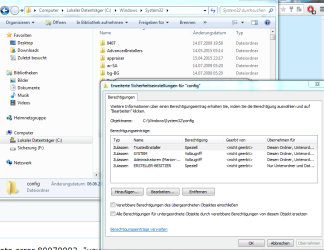
Please open Windows Explorer and navigate to the C:\Windows\System32 folder
right-click on the 'config' folder, and select Properties
Click on the Security tab, then the Advanced button

Take a screenshot, and post it
 

My Computer My Computer

At a glance

Win 7 x64 Home Premium (and x86 VirtualBox VM...i3 370M/i7 6500U8GB - finally :)/8GBit's an i3, dude!/dual Intel&nVidia
Computer type
Laptop
Computer Manufacturer/Model Number
Asus K52F or Lenovo B51-80
OS
Win 7 x64 Home Premium (and x86 VirtualBox VM)/Win10
CPU
i3 370M/i7 6500U
Motherboard
Asus/Lenovo
Memory
8GB - finally :)/8GB
Graphics Card(s)
it's an i3, dude!/dual Intel&nVidia
Sound Card
onboard
Monitor(s) Displays
15.6" built-in
Screen Resolution
1366x768/1920x1080
Hard Drives
750GB Seagate internal
Sundry external drives attached to other computers on the local network
1TB SSD on the Lenovo
PSU
n/a
Internet Speed
as much as I can get - usually on a dongle/phone, so <1MB/s
Antivirus
MSE/Defender
Browser
IE11/12/Edge/Chrome/FF(if I must)
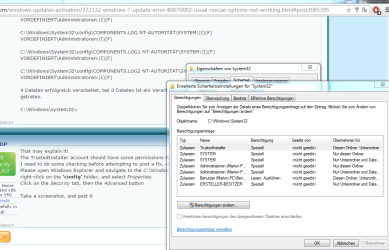
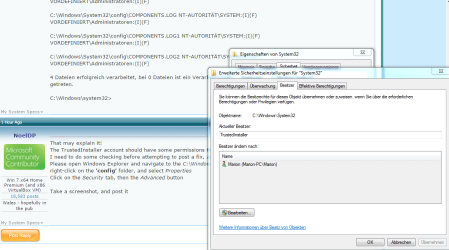
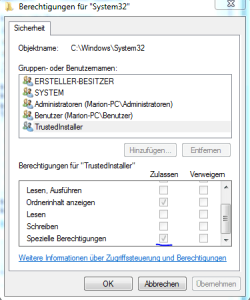
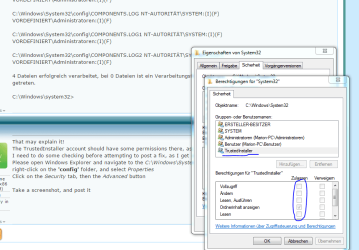
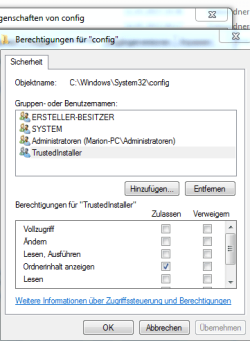
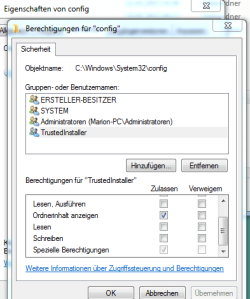
Trusted Installer does seem to only have read and "special" permissions here. User account has some, but nobody has full permissions.
 

Attachments

  • a.PNG
    a.PNG
    49.6 KB · Views: 1
  • b.PNG
    b.PNG
    43.7 KB · Views: 0
  • d.PNG
    d.PNG
    11.9 KB · Views: 9
  • c.PNG
    c.PNG
    39.6 KB · Views: 0

My Computer My Computer

At a glance

Windows 7 Home Premium x64
Computer type
Laptop
Computer Manufacturer/Model Number
Dell
OS
Windows 7 Home Premium x64
I actually asked for the permissions on the config folder rather than System32 ;)
All the above are OK - and it looks as if it's my machine that's a little odd, as I checked a fresh install in VM, and it looks like SYSTEM has ownership and full control, as does Administatoren - with no TrustedInstaller in sight on the COMPONENTS files.

back to the drawing board again :(

I'll see what I can come up with later and post back
 

My Computer My Computer

At a glance

Win 7 x64 Home Premium (and x86 VirtualBox VM...i3 370M/i7 6500U8GB - finally :)/8GBit's an i3, dude!/dual Intel&nVidia
Computer type
Laptop
Computer Manufacturer/Model Number
Asus K52F or Lenovo B51-80
OS
Win 7 x64 Home Premium (and x86 VirtualBox VM)/Win10
CPU
i3 370M/i7 6500U
Motherboard
Asus/Lenovo
Memory
8GB - finally :)/8GB
Graphics Card(s)
it's an i3, dude!/dual Intel&nVidia
Sound Card
onboard
Monitor(s) Displays
15.6" built-in
Screen Resolution
1366x768/1920x1080
Hard Drives
750GB Seagate internal
Sundry external drives attached to other computers on the local network
1TB SSD on the Lenovo
PSU
n/a
Internet Speed
as much as I can get - usually on a dongle/phone, so <1MB/s
Antivirus
MSE/Defender
Browser
IE11/12/Edge/Chrome/FF(if I must)
Ok so just to be complete.

Sry for long reaction time on my end.
 

Attachments

  • e.PNG
    e.PNG
    42.2 KB · Views: 0
  • f.PNG
    f.PNG
    13.9 KB · Views: 10
  • g.PNG
    g.PNG
    16.3 KB · Views: 10

My Computer My Computer

At a glance

Windows 7 Home Premium x64
Computer type
Laptop
Computer Manufacturer/Model Number
Dell
OS
Windows 7 Home Premium x64
No problem - we all have lives to lead!
That looks OK.
I'll have to have a think about what to do next.
 

My Computer My Computer

At a glance

Win 7 x64 Home Premium (and x86 VirtualBox VM...i3 370M/i7 6500U8GB - finally :)/8GBit's an i3, dude!/dual Intel&nVidia
Computer type
Laptop
Computer Manufacturer/Model Number
Asus K52F or Lenovo B51-80
OS
Win 7 x64 Home Premium (and x86 VirtualBox VM)/Win10
CPU
i3 370M/i7 6500U
Motherboard
Asus/Lenovo
Memory
8GB - finally :)/8GB
Graphics Card(s)
it's an i3, dude!/dual Intel&nVidia
Sound Card
onboard
Monitor(s) Displays
15.6" built-in
Screen Resolution
1366x768/1920x1080
Hard Drives
750GB Seagate internal
Sundry external drives attached to other computers on the local network
1TB SSD on the Lenovo
PSU
n/a
Internet Speed
as much as I can get - usually on a dongle/phone, so <1MB/s
Antivirus
MSE/Defender
Browser
IE11/12/Edge/Chrome/FF(if I must)
Shameless selfbump...
 

My Computer My Computer

At a glance

Windows 7 Home Premium x64
Computer type
Laptop
Computer Manufacturer/Model Number
Dell
OS
Windows 7 Home Premium x64
bruises accepted ;)
I have to say I really don't have too much of a clue here. :(
that doesn't mean I'm giving up - it simply means it's going to take a while!

I'll come back when/if I get a clue! ;)

Shout if it's not early enough - I have a lot of threads to deal with.
 

My Computer My Computer

At a glance

Win 7 x64 Home Premium (and x86 VirtualBox VM...i3 370M/i7 6500U8GB - finally :)/8GBit's an i3, dude!/dual Intel&nVidia
Computer type
Laptop
Computer Manufacturer/Model Number
Asus K52F or Lenovo B51-80
OS
Win 7 x64 Home Premium (and x86 VirtualBox VM)/Win10
CPU
i3 370M/i7 6500U
Motherboard
Asus/Lenovo
Memory
8GB - finally :)/8GB
Graphics Card(s)
it's an i3, dude!/dual Intel&nVidia
Sound Card
onboard
Monitor(s) Displays
15.6" built-in
Screen Resolution
1366x768/1920x1080
Hard Drives
750GB Seagate internal
Sundry external drives attached to other computers on the local network
1TB SSD on the Lenovo
PSU
n/a
Internet Speed
as much as I can get - usually on a dongle/phone, so <1MB/s
Antivirus
MSE/Defender
Browser
IE11/12/Edge/Chrome/FF(if I must)
Its not too big of a deal.

Actually, its my mother's machine whom I'm visiting right now, going to catch a plane back as early as tomorrow morning tho...
 

My Computer My Computer

At a glance

Windows 7 Home Premium x64
Computer type
Laptop
Computer Manufacturer/Model Number
Dell
OS
Windows 7 Home Premium x64
Back
Top