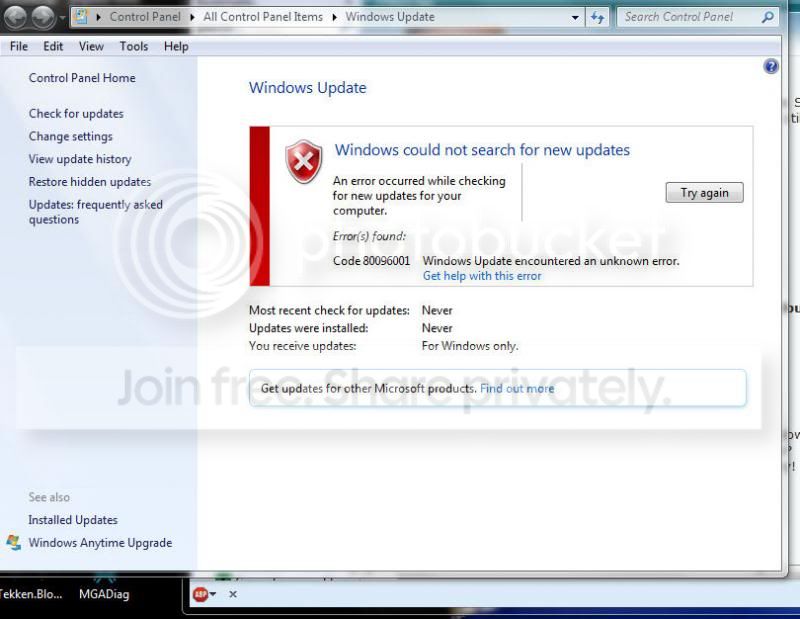
Solved Windows 7 Update fails to even find updates (error:

Dragonride

New member
Member
Local time
6:29 AM
Messages
40
I've only recently realised that my Windows 7 computer will not allow Windows Update to basically, run.

The last time it successfully ran was late August and every attempt since fails with Error No: 80096001

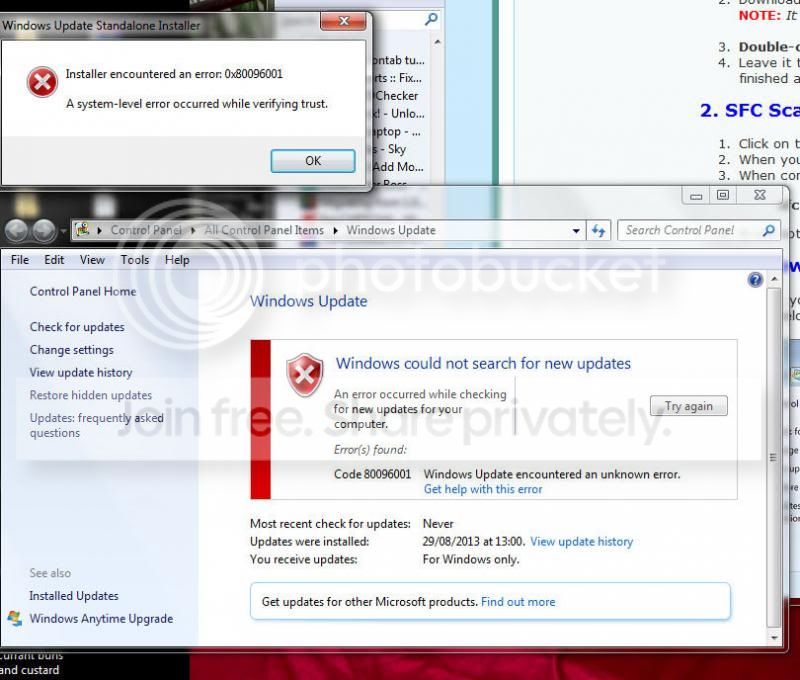
I cannot even run the SURT tool as requested by the Windows Update posting Instructions thread. Same error number in fact.

Image1_zps5f5a83ff.jpg


I have run the sfcscan as directed, and the logs are attached.

Once again, I look forward to some nice lady or gent offering help with thanks in advance.
 

My Computer My Computer

Computer type
PC/Desktop
Computer Manufacturer/Model Number
Acer Veriton
OS
Windows 7 Pro 32bit
CPU
Intel Core 2 Duo E7500
Memory
3Gb
Graphics Card(s)
ATI Radeon X1300/X1550 series
Hard Drives
lots
Antivirus
Bitdefender Total Internet Security 2014
Browser
Firefox 23.0.x
The SFC scan reports that it repaired a file -
Code:
 Line 83190: 2013-10-02 17:08:56, Info                  CSI    000001da [SR] Repairing 1 components
 Line 83191: 2013-10-02 17:08:56, Info                  CSI    000001db [SR] Beginning Verify and Repair transaction
 Line 83194: 2013-10-02 17:08:57, Info                  CSI    000001dd [SR] Repairing corrupted file [ml:520{260},l:46{23}]"\??\C:\Windows\System32"\[l:24{12}]"imageres.dll" from store
 Line 83203: 2013-10-02 17:08:57, Info                  CSI    000001df [SR] Repair complete
 Line 83204: 2013-10-02 17:08:57, Info                  CSI    000001e0 [SR] Committing transaction
 Line 83208: 2013-10-02 17:08:57, Info                  CSI    000001e4 [SR] Unable to complete Verify and Repair transaction because some of the files that need to be repaired are in use. A reboot is required to complete this operation.
 Line 83209: 2013-10-02 17:08:57, Info                  CSI    000001e5 [SR] Repairing 1 components
 Line 83210: 2013-10-02 17:08:57, Info                  CSI    000001e6 [SR] Beginning Verify and Repair transaction
 Line 83213: 2013-10-02 17:08:58, Info                  CSI    000001e8 [SR] Repairing corrupted file [ml:520{260},l:46{23}]"\??\C:\Windows\System32"\[l:24{12}]"imageres.dll" from store

However, I'm not convinced that the repair worked properly...

Please run another SFC scan - if it claims that all is well, please attempt to run the CheckSUR/SURT tool again, and see what happens. - post the results.
 

My Computer My Computer

Computer type
Laptop
Computer Manufacturer/Model Number
Asus K52F or Lenovo B51-80
OS
Win 7 x64 Home Premium (and x86 VirtualBox VM)/Win10
CPU
i3 370M/i7 6500U
Motherboard
Asus/Lenovo
Memory
8GB - finally :)/8GB
Graphics Card(s)
it's an i3, dude!/dual Intel&nVidia
Sound Card
onboard
Monitor(s) Displays
15.6" built-in
Screen Resolution
1366x768/1920x1080
Hard Drives
750GB Seagate internal
Sundry external drives attached to other computers on the local network
1TB SSD on the Lenovo
PSU
n/a
Internet Speed
as much as I can get - usually on a dongle/phone, so <1MB/s
Antivirus
MSE/Defender
Browser
IE11/12/Edge/Chrome/FF(if I must)
SFC reported no problems found, SURT again refused to run, same error pop up as before, System Level error while verifying trust.
 

My Computer My Computer

Computer type
PC/Desktop
Computer Manufacturer/Model Number
Acer Veriton
OS
Windows 7 Pro 32bit
CPU
Intel Core 2 Duo E7500
Memory
3Gb
Graphics Card(s)
ATI Radeon X1300/X1550 series
Hard Drives
lots
Antivirus
Bitdefender Total Internet Security 2014
Browser
Firefox 23.0.x

My Computer My Computer

Computer type
Laptop
Computer Manufacturer/Model Number
Asus K52F or Lenovo B51-80
OS
Win 7 x64 Home Premium (and x86 VirtualBox VM)/Win10
CPU
i3 370M/i7 6500U
Motherboard
Asus/Lenovo
Memory
8GB - finally :)/8GB
Graphics Card(s)
it's an i3, dude!/dual Intel&nVidia
Sound Card
onboard
Monitor(s) Displays
15.6" built-in
Screen Resolution
1366x768/1920x1080
Hard Drives
750GB Seagate internal
Sundry external drives attached to other computers on the local network
1TB SSD on the Lenovo
PSU
n/a
Internet Speed
as much as I can get - usually on a dongle/phone, so <1MB/s
Antivirus
MSE/Defender
Browser
IE11/12/Edge/Chrome/FF(if I must)

My Computer My Computer

Computer type
PC/Desktop
Computer Manufacturer/Model Number
Custom Build
OS
Windows 7 Home Premium 64 bit
CPU
Intel Core i7-4790
Motherboard
GA-Z87X-D3H
Memory
G.SKILL 8GB (2 x 4GB) DDR3 F3-10666CL9D-8GBNT
Graphics Card(s)
AMD Radeon R7 250
Sound Card
Realtek ALC892
Monitor(s) Displays
Samsung UN32EH5000, Dell 1703FPT
Screen Resolution
1920 x 1080, 1280 x 1024
Hard Drives
WD5003AZEX
WD10EZEX
Samsung HD103SJ
Samsung 128 GB 840 PRO
PSU
SeaSonic M12II SS-500GM
Case
Fractal Design Define R4
Cooling
Zalman CNPS9900ALED
Keyboard
Logitech K800
Mouse
Logitech M705
Internet Speed
16 Mbps
Antivirus
Avast
Browser
Firefox
Other Info
Bose Companion 2 Multimedia Speakers
FSS Log:

Farbar Service Scanner Version: 13-09-2013
Ran by David (administrator) on 04-10-2013 at 21:23:59
Running from "C:\Users\David\Downloads"
Microsoft Windows 7 Professional Service Pack 1 (X86)
Boot Mode: Normal
****************************************************************

Internet Services:
============

Connection Status:
==============
Localhost is accessible.
LAN connected.
Google IP is accessible.
Google.com is accessible.
Yahoo.com is accessible.


Windows Firewall:
=============

Firewall Disabled Policy:
==================


System Restore:
============

System Restore Disabled Policy:
========================


Action Center:
============


Windows Update:
============

Windows Autoupdate Disabled Policy:
============================


Windows Defender:
==============
WinDefend Service is not running. Checking service configuration:
The start type of WinDefend service is set to Demand. The default start type is Auto.
The ImagePath of WinDefend service is OK.
The ServiceDll of WinDefend service is OK.


Windows Defender Disabled Policy:
==========================
[HKEY_LOCAL_MACHINE\SOFTWARE\Microsoft\Windows Defender]
"DisableAntiSpyware"=DWORD:1


Other Services:
==============


File Check:
========
C:\Windows\system32\nsisvc.dll => MD5 is legit
C:\Windows\system32\Drivers\nsiproxy.sys => MD5 is legit
C:\Windows\system32\dhcpcore.dll => MD5 is legit
C:\Windows\system32\Drivers\afd.sys => MD5 is legit
C:\Windows\system32\Drivers\tdx.sys => MD5 is legit
C:\Windows\system32\Drivers\tcpip.sys => MD5 is legit
C:\Windows\system32\dnsrslvr.dll => MD5 is legit
C:\Windows\system32\mpssvc.dll => MD5 is legit
C:\Windows\system32\bfe.dll => MD5 is legit
C:\Windows\system32\Drivers\mpsdrv.sys => MD5 is legit
C:\Windows\system32\SDRSVC.dll => MD5 is legit
C:\Windows\system32\vssvc.exe => MD5 is legit
C:\Windows\system32\wscsvc.dll => MD5 is legit
C:\Windows\system32\wbem\WMIsvc.dll => MD5 is legit
C:\Windows\system32\wuaueng.dll => MD5 is legit
C:\Windows\system32\qmgr.dll => MD5 is legit
C:\Windows\system32\es.dll => MD5 is legit
C:\Windows\system32\cryptsvc.dll => MD5 is legit
C:\Program Files\Windows Defender\MpSvc.dll
[2013-07-10 10:57] - [2013-05-27 05:57] - 0680960 ____A (Microsoft Corporation) 082CF481F659FAE0DE51AD060881EB47

C:\Windows\system32\svchost.exe => MD5 is legit
C:\Windows\system32\rpcss.dll => MD5 is legit


**** End of log ****
 

My Computer My Computer

Computer type
PC/Desktop
Computer Manufacturer/Model Number
Acer Veriton
OS
Windows 7 Pro 32bit
CPU
Intel Core 2 Duo E7500
Memory
3Gb
Graphics Card(s)
ATI Radeon X1300/X1550 series
Hard Drives
lots
Antivirus
Bitdefender Total Internet Security 2014
Browser
Firefox 23.0.x
Let's try this - before you get into anything drastic....

In Windows Explorer..

Open WindowsExplorer (Computer)

Navigate to the C:\Windows folder

Find the System32 sub-folder and right-click on it

select Properties


Clear the 'blob'from the 'Read-only (Only applies to files infolder)' box by clicking on it until it's plain white.

Click on Apply.


Make sure thatthe radio button for 'Apply changes to thisfolder, subfolders and files' is set, and click OK.


Accept theAdministrator prompt. After a couple of seconds, you'll be told there is anerror - click on the 'Ignore all' button.


Wait for it tofinish - it could take a couple of minutes.


OK out, and exitWindows Explorer.


Reboot twice


Post a newMGADiag report.....

we need to see afull copy of the report produced by the MGADiag tool

(download andsave to desktop - http://go.microsoft.com/fwlink/?linkid=52012)

Once saved, run the tool.

Click on theContinue button, which will produce the report.

To copy the report to your response, click onthe Copy button in the tool (ignore any error messages at this point), and thenpaste (using either r-click/Paste, or Ctrl+V ) into your response.
 

My Computer My Computer

Computer type
Laptop
Computer Manufacturer/Model Number
Asus K52F or Lenovo B51-80
OS
Win 7 x64 Home Premium (and x86 VirtualBox VM)/Win10
CPU
i3 370M/i7 6500U
Motherboard
Asus/Lenovo
Memory
8GB - finally :)/8GB
Graphics Card(s)
it's an i3, dude!/dual Intel&nVidia
Sound Card
onboard
Monitor(s) Displays
15.6" built-in
Screen Resolution
1366x768/1920x1080
Hard Drives
750GB Seagate internal
Sundry external drives attached to other computers on the local network
1TB SSD on the Lenovo
PSU
n/a
Internet Speed
as much as I can get - usually on a dongle/phone, so <1MB/s
Antivirus
MSE/Defender
Browser
IE11/12/Edge/Chrome/FF(if I must)
MGADiag results:

Diagnostic Report (1.9.0027.0):
-----------------------------------------
Windows Validation Data-->

Validation Code: 0x8004FE21
Cached Online Validation Code: N/A, hr = 0xc004f012
Windows Product Key: *****-*****-GK4PY-FDWYH-7TP9F
Windows Product Key Hash: u3xU6PnmumgYLgUpnmbqEw9Q2OA=
Windows Product ID: 00371-OEM-8992671-00004
Windows Product ID Type: 2
Windows License Type: OEM SLP
Windows OS version: 6.1.7601.2.00010100.1.0.048
ID: {C126CE9C-9F29-4EEE-989C-B41831C202BA}(1)
Is Admin: Yes
TestCab: 0x0
LegitcheckControl ActiveX: N/A, hr = 0x80070002
Signed By: N/A, hr = 0x80070002
Product Name: Windows 7 Professional
Architecture: 0x00000000
Build lab: 7601.win7sp1_gdr.130505-1534
TTS Error:
Validation Diagnostic:
Resolution Status: N/A

Vista WgaER Data-->
ThreatID(s): N/A, hr = 0x80070002
Version: N/A, hr = 0x80070002

Windows XP Notifications Data-->
Cached Result: N/A, hr = 0x80070002
File Exists: No
Version: N/A, hr = 0x80070002
WgaTray.exe Signed By: N/A, hr = 0x80070002
WgaLogon.dll Signed By: N/A, hr = 0x80070002

OGA Notifications Data-->
Cached Result: N/A, hr = 0x80070002
Version: 2.0.48.0
OGAExec.exe Signed By: Microsoft
OGAAddin.dll Signed By: Microsoft

OGA Data-->
Office Status: 100 Genuine
Microsoft Office FrontPage 2003 - 100 Genuine
OGA Version: Registered, 2.0.48.0
Signed By: Microsoft
Office Diagnostics: 77F760FE-153-80070002_7E90FEE8-175-80070002_B4D0AA8B-604-645_B4D0AA8B-604-645_B4D0AA8B-604-645_025D1FF3-364-80041010_025D1FF3-229-80041010_025D1FF3-230-1_025D1FF3-517-80040154_025D1FF3-237-80040154_025D1FF3-238-2_025D1FF3-244-80070002_025D1FF3-258-3

Browser Data-->
Proxy settings: N/A
User Agent: Mozilla/4.0 (compatible; MSIE 8.0; Win32)
Default Browser: C:\Program Files\Mozilla Firefox\firefox.exe
Download signed ActiveX controls: Prompt
Download unsigned ActiveX controls: Disabled
Run ActiveX controls and plug-ins: Allowed
Initialize and script ActiveX controls not marked as safe: Disabled
Allow scripting of Internet Explorer Webbrowser control: Disabled
Active scripting: Allowed
Script ActiveX controls marked as safe for scripting: Allowed

File Scan Data-->

Other data-->
Office Details: <GenuineResults><MachineData><UGUID>{C126CE9C-9F29-4EEE-989C-B41831C202BA}</UGUID><Version>1.9.0027.0</Version><OS>6.1.7601.2.00010100.1.0.048</OS><Architecture>x32</Architecture><PKey>*****-*****-*****-*****-7TP9F</PKey><PID>00371-OEM-8992671-00004</PID><PIDType>2</PIDType><SID>S-1-5-21-392035571-2704842777-1394014257</SID><SYSTEM><Manufacturer>Acer</Manufacturer><Model>Veriton X275</Model></SYSTEM><BIOS><Manufacturer>Acer</Manufacturer><Version>P01-A1</Version><SMBIOSVersion major="2" minor="6"/><Date>20100227000000.000000+000</Date></BIOS><HWID>DCCA3607018400F8</HWID><UserLCID>0809</UserLCID><SystemLCID>0409</SystemLCID><TimeZone>GMT Standard Time(GMT+00:00)</TimeZone><iJoin>0</iJoin><SBID><stat>3</stat><msppid></msppid><name></name><model></model></SBID><OEM><OEMID>ACRSYS</OEMID><OEMTableID>ACRPRDCT</OEMTableID></OEM><GANotification><File Name="OGAAddin.dll" Version="2.0.48.0"/></GANotification></MachineData><Software><Office><Result>100</Result><Products><Product GUID="{90170409-6000-11D3-8CFE-0150048383C9}"><LegitResult>100</LegitResult><Name>Microsoft Office FrontPage 2003</Name><Ver>11</Ver><Val>5EA9C3672EB0500</Val><Hash>GZD+9sfb5ecL3RxyV4F75a86u2M=</Hash><Pid>72079-640-0000106-55098</Pid><PidType>14</PidType></Product></Products><Applications><App Id="17" Version="11" Result="100"/></Applications></Office></Software></GenuineResults>

Spsys.log Content: 0x80070002

Licensing Data-->
Software licensing service version: 6.1.7601.17514

Name: Windows(R) 7, Professional edition
Description: Windows Operating System - Windows(R) 7, OEM_SLP channel
Activation ID: 50e329f7-a5fa-46b2-85fd-f224e5da7764
Application ID: 55c92734-d682-4d71-983e-d6ec3f16059f
Extended PID: 00371-00178-926-700004-02-1033-7600.0000-0142010
Installation ID: 006572310144797041118271433776129092377394524893255820
Processor Certificate URL: http://go.microsoft.com/fwlink/?LinkID=88338
Machine Certificate URL: http://go.microsoft.com/fwlink/?LinkID=88339
Use License URL: http://go.microsoft.com/fwlink/?LinkID=88341
Product Key Certificate URL: http://go.microsoft.com/fwlink/?LinkID=88340
Partial Product Key: 7TP9F
License Status: Licensed
Remaining Windows rearm count: 3
Trusted time: 05/10/2013 08:37:30

Windows Activation Technologies-->
HrOffline: 0x8004FE21
HrOnline: N/A
HealthStatus: 0x000000000003EFFF
Event Time Stamp: N/A
ActiveX: Registered, Version: 7.1.7600.16395
Admin Service: Registered, Version: 7.1.7600.16395
HealthStatus Bitmask Output:
Tampered File: %systemroot%\system32\wat\watadminsvc.exe
Tampered File: %systemroot%\system32\wat\watweb.dll
Tampered File: %systemroot%\system32\wat\npwatweb.dll
Tampered File: %systemroot%\system32\wat\watux.exe
Tampered File: %systemroot%\system32\sppobjs.dll
Tampered File: %systemroot%\system32\sppc.dll|sppc.dll.mui
Tampered File: %systemroot%\system32\sppcext.dll|sppcext.dll.mui
Tampered File: %systemroot%\system32\sppwinob.dll
Tampered File: %systemroot%\system32\slc.dll|slc.dll.mui
Tampered File: %systemroot%\system32\slcext.dll|slcext.dll.mui
Tampered File: %systemroot%\system32\sppuinotify.dll|sppuinotify.dll.mui
Tampered File: %systemroot%\system32\slui.exe|slui.exe.mui|COM Registration
Tampered File: %systemroot%\system32\sppcomapi.dll|sppcomapi.dll.mui
Tampered File: %systemroot%\system32\sppcommdlg.dll|sppcommdlg.dll.mui
Tampered File: %systemroot%\system32\sppsvc.exe|sppsvc.exe.mui
Tampered File: %systemroot%\system32\drivers\spsys.sys
Tampered File: %systemroot%\system32\drivers\spldr.sys


HWID Data-->
N/A, hr = 0x8007000d

OEM Activation 1.0 Data-->
N/A

OEM Activation 2.0 Data-->
BIOS valid for OA 2.0: yes
Windows marker version: 0x20001
OEMID and OEMTableID Consistent: yes
BIOS Information:
ACPI Table Name OEMID Value OEMTableID Value
APIC ACRSYS APIC0818
FACP ACRSYS FACP0818
HPET ACRSYS OEMHPET
MCFG ACRSYS OEMMCFG
SLIC ACRSYS ACRPRDCT
OEMB ACRSYS OEMB0818
ASF! ACRSYS I865PASF
AWMI ACRSYS OEMB0818
SSDT DpgPmm CpuPm

 

My Computer My Computer

Computer type
PC/Desktop
Computer Manufacturer/Model Number
Acer Veriton
OS
Windows 7 Pro 32bit
CPU
Intel Core 2 Duo E7500
Memory
3Gb
Graphics Card(s)
ATI Radeon X1300/X1550 series
Hard Drives
lots
Antivirus
Bitdefender Total Internet Security 2014
Browser
Firefox 23.0.x

My Computer My Computer

Computer type
Laptop
Computer Manufacturer/Model Number
Asus K52F or Lenovo B51-80
OS
Win 7 x64 Home Premium (and x86 VirtualBox VM)/Win10
CPU
i3 370M/i7 6500U
Motherboard
Asus/Lenovo
Memory
8GB - finally :)/8GB
Graphics Card(s)
it's an i3, dude!/dual Intel&nVidia
Sound Card
onboard
Monitor(s) Displays
15.6" built-in
Screen Resolution
1366x768/1920x1080
Hard Drives
750GB Seagate internal
Sundry external drives attached to other computers on the local network
1TB SSD on the Lenovo
PSU
n/a
Internet Speed
as much as I can get - usually on a dongle/phone, so <1MB/s
Antivirus
MSE/Defender
Browser
IE11/12/Edge/Chrome/FF(if I must)
Got the right file, ran it, but got the error message "This computer does not meet the minimum requirements for installing the software."
 

My Computer My Computer

Computer type
PC/Desktop
Computer Manufacturer/Model Number
Acer Veriton
OS
Windows 7 Pro 32bit
CPU
Intel Core 2 Duo E7500
Memory
3Gb
Graphics Card(s)
ATI Radeon X1300/X1550 series
Hard Drives
lots
Antivirus
Bitdefender Total Internet Security 2014
Browser
Firefox 23.0.x

My Computer My Computer

Computer type
Laptop
Computer Manufacturer/Model Number
Asus K52F or Lenovo B51-80
OS
Win 7 x64 Home Premium (and x86 VirtualBox VM)/Win10
CPU
i3 370M/i7 6500U
Motherboard
Asus/Lenovo
Memory
8GB - finally :)/8GB
Graphics Card(s)
it's an i3, dude!/dual Intel&nVidia
Sound Card
onboard
Monitor(s) Displays
15.6" built-in
Screen Resolution
1366x768/1920x1080
Hard Drives
750GB Seagate internal
Sundry external drives attached to other computers on the local network
1TB SSD on the Lenovo
PSU
n/a
Internet Speed
as much as I can get - usually on a dongle/phone, so <1MB/s
Antivirus
MSE/Defender
Browser
IE11/12/Edge/Chrome/FF(if I must)

My Computer My Computer

Computer type
PC/Desktop
Computer Manufacturer/Model Number
Acer Veriton
OS
Windows 7 Pro 32bit
CPU
Intel Core 2 Duo E7500
Memory
3Gb
Graphics Card(s)
ATI Radeon X1300/X1550 series
Hard Drives
lots
Antivirus
Bitdefender Total Internet Security 2014
Browser
Firefox 23.0.x
OK - that's eliminated the obvious quick solution, then - now the less obvious ones...

Please run thefollowing commands in an Elevated Command Prompt


NET STOP CRYPTSVC
REN C:\WINDOWS\SYSTEM32\CATROOT2 CATROOT2OLD
NET START CRYPTSVC


once complete,leave the system alone for at least an hour to rebuild the database, thenreboot, and run another MGADiag report.
Note that this may delete your Update History - but all updates will remaininstalled, and can be viewed in the Installed Updates listing.
 

My Computer My Computer

Computer type
Laptop
Computer Manufacturer/Model Number
Asus K52F or Lenovo B51-80
OS
Win 7 x64 Home Premium (and x86 VirtualBox VM)/Win10
CPU
i3 370M/i7 6500U
Motherboard
Asus/Lenovo
Memory
8GB - finally :)/8GB
Graphics Card(s)
it's an i3, dude!/dual Intel&nVidia
Sound Card
onboard
Monitor(s) Displays
15.6" built-in
Screen Resolution
1366x768/1920x1080
Hard Drives
750GB Seagate internal
Sundry external drives attached to other computers on the local network
1TB SSD on the Lenovo
PSU
n/a
Internet Speed
as much as I can get - usually on a dongle/phone, so <1MB/s
Antivirus
MSE/Defender
Browser
IE11/12/Edge/Chrome/FF(if I must)
Latest MGAD report:
Diagnostic Report (1.9.0027.0):
-----------------------------------------
Windows Validation Data-->

Validation Code: 0x8004FE21
Cached Online Validation Code: N/A, hr = 0xc004f012
Windows Product Key: *****-*****-GK4PY-FDWYH-7TP9F
Windows Product Key Hash: u3xU6PnmumgYLgUpnmbqEw9Q2OA=
Windows Product ID: 00371-OEM-8992671-00004
Windows Product ID Type: 2
Windows License Type: OEM SLP
Windows OS version: 6.1.7601.2.00010100.1.0.048
ID: {C126CE9C-9F29-4EEE-989C-B41831C202BA}(3)
Is Admin: Yes
TestCab: 0x0
LegitcheckControl ActiveX: N/A, hr = 0x80070002
Signed By: N/A, hr = 0x80070002
Product Name: Windows 7 Professional
Architecture: 0x00000000
Build lab: 7601.win7sp1_gdr.130505-1534
TTS Error:
Validation Diagnostic:
Resolution Status: N/A

Vista WgaER Data-->
ThreatID(s): N/A, hr = 0x80070002
Version: N/A, hr = 0x80070002

Windows XP Notifications Data-->
Cached Result: N/A, hr = 0x80070002
File Exists: No
Version: N/A, hr = 0x80070002
WgaTray.exe Signed By: N/A, hr = 0x80070002
WgaLogon.dll Signed By: N/A, hr = 0x80070002

OGA Notifications Data-->
Cached Result: N/A, hr = 0x80070002
Version: 2.0.48.0
OGAExec.exe Signed By: Microsoft
OGAAddin.dll Signed By: Microsoft

OGA Data-->
Office Status: 100 Genuine
Microsoft Office FrontPage 2003 - 100 Genuine
OGA Version: Registered, 2.0.48.0
Signed By: Microsoft
Office Diagnostics: 77F760FE-153-80070002_7E90FEE8-175-80070002_B4D0AA8B-604-645_B4D0AA8B-604-645_B4D0AA8B-604-645_025D1FF3-364-80041010_025D1FF3-229-80041010_025D1FF3-230-1_025D1FF3-517-80040154_025D1FF3-237-80040154_025D1FF3-238-2_025D1FF3-244-80070002_025D1FF3-258-3

Browser Data-->
Proxy settings: N/A
User Agent: Mozilla/4.0 (compatible; MSIE 8.0; Win32)
Default Browser: C:\Program Files\Mozilla Firefox\firefox.exe
Download signed ActiveX controls: Prompt
Download unsigned ActiveX controls: Disabled
Run ActiveX controls and plug-ins: Allowed
Initialize and script ActiveX controls not marked as safe: Disabled
Allow scripting of Internet Explorer Webbrowser control: Disabled
Active scripting: Allowed
Script ActiveX controls marked as safe for scripting: Allowed

File Scan Data-->

Other data-->
Office Details: <GenuineResults><MachineData><UGUID>{C126CE9C-9F29-4EEE-989C-B41831C202BA}</UGUID><Version>1.9.0027.0</Version><OS>6.1.7601.2.00010100.1.0.048</OS><Architecture>x32</Architecture><PKey>*****-*****-*****-*****-7TP9F</PKey><PID>00371-OEM-8992671-00004</PID><PIDType>2</PIDType><SID>S-1-5-21-392035571-2704842777-1394014257</SID><SYSTEM><Manufacturer>Acer</Manufacturer><Model>Veriton X275</Model></SYSTEM><BIOS><Manufacturer>Acer</Manufacturer><Version>P01-A1</Version><SMBIOSVersion major="2" minor="6"/><Date>20100227000000.000000+000</Date></BIOS><HWID>DCCA3607018400F8</HWID><UserLCID>0809</UserLCID><SystemLCID>0409</SystemLCID><TimeZone>GMT Standard Time(GMT+00:00)</TimeZone><iJoin>0</iJoin><SBID><stat>3</stat><msppid></msppid><name></name><model></model></SBID><OEM><OEMID>ACRSYS</OEMID><OEMTableID>ACRPRDCT</OEMTableID></OEM><GANotification><File Name="OGAAddin.dll" Version="2.0.48.0"/></GANotification></MachineData><Software><Office><Result>100</Result><Products><Product GUID="{90170409-6000-11D3-8CFE-0150048383C9}"><LegitResult>100</LegitResult><Name>Microsoft Office FrontPage 2003</Name><Ver>11</Ver><Val>5EA9C3672EB0500</Val><Hash>GZD+9sfb5ecL3RxyV4F75a86u2M=</Hash><Pid>72079-640-0000106-55098</Pid><PidType>14</PidType></Product></Products><Applications><App Id="17" Version="11" Result="100"/></Applications></Office></Software></GenuineResults>

Spsys.log Content: 0x80070002

Licensing Data-->
Software licensing service version: 6.1.7601.17514

Name: Windows(R) 7, Professional edition
Description: Windows Operating System - Windows(R) 7, OEM_SLP channel
Activation ID: 50e329f7-a5fa-46b2-85fd-f224e5da7764
Application ID: 55c92734-d682-4d71-983e-d6ec3f16059f
Extended PID: 00371-00178-926-700004-02-1033-7600.0000-0142010
Installation ID: 006572310144797041118271433776129092377394524893255820
Processor Certificate URL: http://go.microsoft.com/fwlink/?LinkID=88338
Machine Certificate URL: http://go.microsoft.com/fwlink/?LinkID=88339
Use License URL: http://go.microsoft.com/fwlink/?LinkID=88341
Product Key Certificate URL: http://go.microsoft.com/fwlink/?LinkID=88340
Partial Product Key: 7TP9F
License Status: Licensed
Remaining Windows rearm count: 3
Trusted time: 05/10/2013 18:01:17

Windows Activation Technologies-->
HrOffline: 0x8004FE21
HrOnline: N/A
HealthStatus: 0x000000000003EFFF
Event Time Stamp: 10:5:2013 17:21
ActiveX: Registered, Version: 7.1.7600.16395
Admin Service: Registered, Version: 7.1.7600.16395
HealthStatus Bitmask Output:
Tampered File: %systemroot%\system32\wat\watadminsvc.exe
Tampered File: %systemroot%\system32\wat\watweb.dll
Tampered File: %systemroot%\system32\wat\npwatweb.dll
Tampered File: %systemroot%\system32\wat\watux.exe
Tampered File: %systemroot%\system32\sppobjs.dll
Tampered File: %systemroot%\system32\sppc.dll|sppc.dll.mui
Tampered File: %systemroot%\system32\sppcext.dll|sppcext.dll.mui
Tampered File: %systemroot%\system32\sppwinob.dll
Tampered File: %systemroot%\system32\slc.dll|slc.dll.mui
Tampered File: %systemroot%\system32\slcext.dll|slcext.dll.mui
Tampered File: %systemroot%\system32\sppuinotify.dll|sppuinotify.dll.mui
Tampered File: %systemroot%\system32\slui.exe|slui.exe.mui|COM Registration
Tampered File: %systemroot%\system32\sppcomapi.dll|sppcomapi.dll.mui
Tampered File: %systemroot%\system32\sppcommdlg.dll|sppcommdlg.dll.mui
Tampered File: %systemroot%\system32\sppsvc.exe|sppsvc.exe.mui
Tampered File: %systemroot%\system32\drivers\spsys.sys
Tampered File: %systemroot%\system32\drivers\spldr.sys


HWID Data-->
N/A, hr = 0x8007000d

OEM Activation 1.0 Data-->
N/A

OEM Activation 2.0 Data-->
BIOS valid for OA 2.0: yes
Windows marker version: 0x20001
OEMID and OEMTableID Consistent: yes
BIOS Information:
ACPI Table Name OEMID Value OEMTableID Value
APIC ACRSYS APIC0818
FACP ACRSYS FACP0818
HPET ACRSYS OEMHPET
MCFG ACRSYS OEMMCFG
SLIC ACRSYS ACRPRDCT
OEMB ACRSYS OEMB0818
ASF! ACRSYS I865PASF
AWMI ACRSYS OEMB0818
SSDT DpgPmm CpuPm
 

My Computer My Computer

Computer type
PC/Desktop
Computer Manufacturer/Model Number
Acer Veriton
OS
Windows 7 Pro 32bit
CPU
Intel Core 2 Duo E7500
Memory
3Gb
Graphics Card(s)
ATI Radeon X1300/X1550 series
Hard Drives
lots
Antivirus
Bitdefender Total Internet Security 2014
Browser
Firefox 23.0.x
Open a Command Prompt window and run the following commands
REGSVR32 WINTRUST.DLL


You should get Success popups.
reboot TWICE, and post another MGADiag report.
 

My Computer My Computer

Computer type
Laptop
Computer Manufacturer/Model Number
Asus K52F or Lenovo B51-80
OS
Win 7 x64 Home Premium (and x86 VirtualBox VM)/Win10
CPU
i3 370M/i7 6500U
Motherboard
Asus/Lenovo
Memory
8GB - finally :)/8GB
Graphics Card(s)
it's an i3, dude!/dual Intel&nVidia
Sound Card
onboard
Monitor(s) Displays
15.6" built-in
Screen Resolution
1366x768/1920x1080
Hard Drives
750GB Seagate internal
Sundry external drives attached to other computers on the local network
1TB SSD on the Lenovo
PSU
n/a
Internet Speed
as much as I can get - usually on a dongle/phone, so <1MB/s
Antivirus
MSE/Defender
Browser
IE11/12/Edge/Chrome/FF(if I must)
I can only see the one command, ran it, single pop up, rebooted, Windows failed Genuine Checks, Rebooted, no messages.

Ran MGAD:-

Diagnostic Report (1.9.0027.0):
-----------------------------------------
Windows Validation Data-->

Validation Code: 0x8004FE21
Cached Online Validation Code: N/A, hr = 0xc004f012
Windows Product Key: *****-*****-GK4PY-FDWYH-7TP9F
Windows Product Key Hash: u3xU6PnmumgYLgUpnmbqEw9Q2OA=
Windows Product ID: 00371-OEM-8992671-00004
Windows Product ID Type: 2
Windows License Type: OEM SLP
Windows OS version: 6.1.7601.2.00010100.1.0.048
ID: {C126CE9C-9F29-4EEE-989C-B41831C202BA}(3)
Is Admin: Yes
TestCab: 0x0
LegitcheckControl ActiveX: N/A, hr = 0x80070002
Signed By: N/A, hr = 0x80070002
Product Name: Windows 7 Professional
Architecture: 0x00000000
Build lab: 7601.win7sp1_gdr.130505-1534
TTS Error:
Validation Diagnostic:
Resolution Status: N/A

Vista WgaER Data-->
ThreatID(s): N/A, hr = 0x80070002
Version: N/A, hr = 0x80070002

Windows XP Notifications Data-->
Cached Result: N/A, hr = 0x80070002
File Exists: No
Version: N/A, hr = 0x80070002
WgaTray.exe Signed By: N/A, hr = 0x80070002
WgaLogon.dll Signed By: N/A, hr = 0x80070002

OGA Notifications Data-->
Cached Result: N/A, hr = 0x80070002
Version: 2.0.48.0
OGAExec.exe Signed By: Microsoft
OGAAddin.dll Signed By: Microsoft

OGA Data-->
Office Status: 100 Genuine
Microsoft Office FrontPage 2003 - 100 Genuine
OGA Version: Registered, 2.0.48.0
Signed By: Microsoft
Office Diagnostics: 77F760FE-153-80070002_7E90FEE8-175-80070002_B4D0AA8B-604-645_B4D0AA8B-604-645_B4D0AA8B-604-645_025D1FF3-364-80041010_025D1FF3-229-80041010_025D1FF3-230-1_025D1FF3-517-80040154_025D1FF3-237-80040154_025D1FF3-238-2_025D1FF3-244-80070002_025D1FF3-258-3

Browser Data-->
Proxy settings: N/A
User Agent: Mozilla/4.0 (compatible; MSIE 8.0; Win32)
Default Browser: C:\Program Files\Mozilla Firefox\firefox.exe
Download signed ActiveX controls: Prompt
Download unsigned ActiveX controls: Disabled
Run ActiveX controls and plug-ins: Allowed
Initialize and script ActiveX controls not marked as safe: Disabled
Allow scripting of Internet Explorer Webbrowser control: Disabled
Active scripting: Allowed
Script ActiveX controls marked as safe for scripting: Allowed

File Scan Data-->

Other data-->
Office Details: <GenuineResults><MachineData><UGUID>{C126CE9C-9F29-4EEE-989C-B41831C202BA}</UGUID><Version>1.9.0027.0</Version><OS>6.1.7601.2.00010100.1.0.048</OS><Architecture>x32</Architecture><PKey>*****-*****-*****-*****-7TP9F</PKey><PID>00371-OEM-8992671-00004</PID><PIDType>2</PIDType><SID>S-1-5-21-392035571-2704842777-1394014257</SID><SYSTEM><Manufacturer>Acer</Manufacturer><Model>Veriton X275</Model></SYSTEM><BIOS><Manufacturer>Acer</Manufacturer><Version>P01-A1</Version><SMBIOSVersion major="2" minor="6"/><Date>20100227000000.000000+000</Date></BIOS><HWID>DCCA3607018400F8</HWID><UserLCID>0809</UserLCID><SystemLCID>0409</SystemLCID><TimeZone>GMT Standard Time(GMT+00:00)</TimeZone><iJoin>0</iJoin><SBID><stat>3</stat><msppid></msppid><name></name><model></model></SBID><OEM><OEMID>ACRSYS</OEMID><OEMTableID>ACRPRDCT</OEMTableID></OEM><GANotification><File Name="OGAAddin.dll" Version="2.0.48.0"/></GANotification></MachineData><Software><Office><Result>100</Result><Products><Product GUID="{90170409-6000-11D3-8CFE-0150048383C9}"><LegitResult>100</LegitResult><Name>Microsoft Office FrontPage 2003</Name><Ver>11</Ver><Val>5EA9C3672EB0500</Val><Hash>GZD+9sfb5ecL3RxyV4F75a86u2M=</Hash><Pid>72079-640-0000106-55098</Pid><PidType>14</PidType></Product></Products><Applications><App Id="17" Version="11" Result="100"/></Applications></Office></Software></GenuineResults>

Spsys.log Content: 0x80070002

Licensing Data-->
Software licensing service version: 6.1.7601.17514

Name: Windows(R) 7, Professional edition
Description: Windows Operating System - Windows(R) 7, OEM_SLP channel
Activation ID: 50e329f7-a5fa-46b2-85fd-f224e5da7764
Application ID: 55c92734-d682-4d71-983e-d6ec3f16059f
Extended PID: 00371-00178-926-700004-02-1033-7600.0000-0142010
Installation ID: 006572310144797041118271433776129092377394524893255820
Processor Certificate URL: http://go.microsoft.com/fwlink/?LinkID=88338
Machine Certificate URL: http://go.microsoft.com/fwlink/?LinkID=88339
Use License URL: http://go.microsoft.com/fwlink/?LinkID=88341
Product Key Certificate URL: http://go.microsoft.com/fwlink/?LinkID=88340
Partial Product Key: 7TP9F
License Status: Licensed
Remaining Windows rearm count: 3
Trusted time: 06/10/2013 07:42:27

Windows Activation Technologies-->
HrOffline: 0x8004FE21
HrOnline: N/A
HealthStatus: 0x000000000003EFFF
Event Time Stamp: 10:5:2013 17:21
ActiveX: Registered, Version: 7.1.7600.16395
Admin Service: Registered, Version: 7.1.7600.16395
HealthStatus Bitmask Output:
Tampered File: %systemroot%\system32\wat\watadminsvc.exe
Tampered File: %systemroot%\system32\wat\watweb.dll
Tampered File: %systemroot%\system32\wat\npwatweb.dll
Tampered File: %systemroot%\system32\wat\watux.exe
Tampered File: %systemroot%\system32\sppobjs.dll
Tampered File: %systemroot%\system32\sppc.dll|sppc.dll.mui
Tampered File: %systemroot%\system32\sppcext.dll|sppcext.dll.mui
Tampered File: %systemroot%\system32\sppwinob.dll
Tampered File: %systemroot%\system32\slc.dll|slc.dll.mui
Tampered File: %systemroot%\system32\slcext.dll|slcext.dll.mui
Tampered File: %systemroot%\system32\sppuinotify.dll|sppuinotify.dll.mui
Tampered File: %systemroot%\system32\slui.exe|slui.exe.mui|COM Registration
Tampered File: %systemroot%\system32\sppcomapi.dll|sppcomapi.dll.mui
Tampered File: %systemroot%\system32\sppcommdlg.dll|sppcommdlg.dll.mui
Tampered File: %systemroot%\system32\sppsvc.exe|sppsvc.exe.mui
Tampered File: %systemroot%\system32\drivers\spsys.sys
Tampered File: %systemroot%\system32\drivers\spldr.sys


HWID Data-->
N/A, hr = 0x8007000d

OEM Activation 1.0 Data-->
N/A

OEM Activation 2.0 Data-->
BIOS valid for OA 2.0: yes
Windows marker version: 0x20001
OEMID and OEMTableID Consistent: yes
BIOS Information:
ACPI Table Name OEMID Value OEMTableID Value
APIC ACRSYS APIC0818
FACP ACRSYS FACP0818
HPET ACRSYS OEMHPET
MCFG ACRSYS OEMMCFG
SLIC ACRSYS ACRPRDCT
OEMB ACRSYS OEMB0818
ASF! ACRSYS I865PASF
AWMI ACRSYS OEMB0818
SSDT DpgPmm CpuPm
 

My Computer My Computer

Computer type
PC/Desktop
Computer Manufacturer/Model Number
Acer Veriton
OS
Windows 7 Pro 32bit
CPU
Intel Core 2 Duo E7500
Memory
3Gb
Graphics Card(s)
ATI Radeon X1300/X1550 series
Hard Drives
lots
Antivirus
Bitdefender Total Internet Security 2014
Browser
Firefox 23.0.x
OK - ....

Thiscould be due to corruption in the SoftwareDistribution folder - the problemwith that the conventional cure can lead to problems later on, ifnot handled properly, and you will lose your Update history (but the updateswill still be installed, and viewable in the Installed Updates listing).


Openan Elevated Command Prompt

Runthe following commands


NET STOP WUAUSERV

REN C:\WINDOWS\SoftwareDistribution SDOLD

NET START WUAUSERV


wait15 minutes, and reboot

thenwait 10 minutes, and open Windows Updates, and run a Check for Updates.
What error message do you get now?
(this WILL delete your update history! - but the updates are still installed)


My Computer My Computer

Computer type
Laptop
Computer Manufacturer/Model Number
Asus K52F or Lenovo B51-80
OS
Win 7 x64 Home Premium (and x86 VirtualBox VM)/Win10
CPU
i3 370M/i7 6500U
Motherboard
Asus/Lenovo
Memory
8GB - finally :)/8GB
Graphics Card(s)
it's an i3, dude!/dual Intel&nVidia
Sound Card
onboard
Monitor(s) Displays
15.6" built-in
Screen Resolution
1366x768/1920x1080
Hard Drives
750GB Seagate internal
Sundry external drives attached to other computers on the local network
1TB SSD on the Lenovo
PSU
n/a
Internet Speed
as much as I can get - usually on a dongle/phone, so <1MB/s
Antivirus
MSE/Defender
Browser
IE11/12/Edge/Chrome/FF(if I must)
Darn it! Unchanged!

update_zps4edcac56.jpg
 

My Computer My Computer

Computer type
PC/Desktop
Computer Manufacturer/Model Number
Acer Veriton
OS
Windows 7 Pro 32bit
CPU
Intel Core 2 Duo E7500
Memory
3Gb
Graphics Card(s)
ATI Radeon X1300/X1550 series
Hard Drives
lots
Antivirus
Bitdefender Total Internet Security 2014
Browser
Firefox 23.0.x
Pleaseopen Event Viewer

In theleft pane, navigate to the Windows Logs

right-clickon Applications and select 'Save all events as...' save as Apps.evtx

repeatfor the System logs - save as Sys.evtx

Compressboth files, and attach to your reply.
 

My Computer My Computer

Computer type
Laptop
Computer Manufacturer/Model Number
Asus K52F or Lenovo B51-80
OS
Win 7 x64 Home Premium (and x86 VirtualBox VM)/Win10
CPU
i3 370M/i7 6500U
Motherboard
Asus/Lenovo
Memory
8GB - finally :)/8GB
Graphics Card(s)
it's an i3, dude!/dual Intel&nVidia
Sound Card
onboard
Monitor(s) Displays
15.6" built-in
Screen Resolution
1366x768/1920x1080
Hard Drives
750GB Seagate internal
Sundry external drives attached to other computers on the local network
1TB SSD on the Lenovo
PSU
n/a
Internet Speed
as much as I can get - usually on a dongle/phone, so <1MB/s
Antivirus
MSE/Defender
Browser
IE11/12/Edge/Chrome/FF(if I must)

My Computer My Computer

Computer type
Laptop
Computer Manufacturer/Model Number
Asus K52F or Lenovo B51-80
OS
Win 7 x64 Home Premium (and x86 VirtualBox VM)/Win10
CPU
i3 370M/i7 6500U
Motherboard
Asus/Lenovo
Memory
8GB - finally :)/8GB
Graphics Card(s)
it's an i3, dude!/dual Intel&nVidia
Sound Card
onboard
Monitor(s) Displays
15.6" built-in
Screen Resolution
1366x768/1920x1080
Hard Drives
750GB Seagate internal
Sundry external drives attached to other computers on the local network
1TB SSD on the Lenovo
PSU
n/a
Internet Speed
as much as I can get - usually on a dongle/phone, so <1MB/s
Antivirus
MSE/Defender
Browser
IE11/12/Edge/Chrome/FF(if I must)
Back
Top