Windows 7 very slow start up and sluggish general performance

jeffmo

New member
Local time
11:53 AM
Messages
9
Hi all,

My Lenovo G570 (i5, 4GB ram) running on Windows 7 Home Premium had been running great up until last night...
It's now booting up really slowly and once it eventually has booted up it runs very slowly too (everything seems to be in slow motion i.e. if I click "computer" it opens up very slowly, almost like it's stuttering). I also can't play audio / video files (the files open but playback is broken / chopped up).
I've also noticed that one of my USB ports is no longer working (external hard drive lights up for a second when I plug it in, but then goes off and the drive is not recognised).
Browsing the net (Chrome) seems to be fine though, streaming audio and video is ok.

I've tried disabling all start up options when booting up, booting in Safe Mode with Networking, CHKDSK, virus scan, malewarebytes scan and a system restore to a few days ago but haven't had any joy.

I'm hoping someone on here might have a few suggestions for me to try.
Thanks!
 

My Computer My Computer

At a glance

Windows 7 Home Premium 64biti5 @ 2.50Ghz4gb
Computer type
Laptop
Computer Manufacturer/Model Number
Lenovo g570
OS
Windows 7 Home Premium 64bit
CPU
i5 @ 2.50Ghz
Memory
4gb
Antivirus
AVG
Browser
Chrome
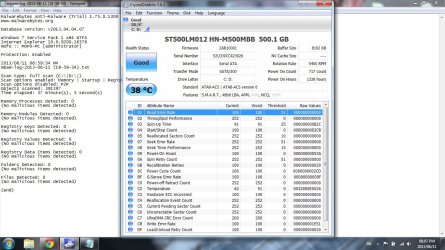
Check the s.m.a.r.t. attributes of the hard disk with crystak disk info, post screenshot, i bet it has damaged sectors and needs to be replaced.
 

My Computer My Computer

At a glance

Microsoft Windows 10 Professional / Windows 7...Intel i5-357016GB DDR3AMD Radeon HD 7850 2GB
Computer type
PC/Desktop
OS
Microsoft Windows 10 Professional / Windows 7 Professional
CPU
Intel i5-3570
Motherboard
Lenovo Mahobay
Memory
16GB DDR3
Graphics Card(s)
AMD Radeon HD 7850 2GB
Sound Card
(1) Realtek HD Audio (2) AMD HD Audio
Monitor(s) Displays
LG LS192WS
Screen Resolution
1440 x 900 @ 32bit color
Hard Drives
(1) SUV300S37A/120G (2) ST3500413AS SATA Disk Device AHCI mode enabled.
PSU
Corsair HX620
Case
Thermaltake V4 Black Edition
Cooling
Cooler Master Hyper 212 + Artic Silver 5 on CPU/GPU
Keyboard
Dell SK-8115
Mouse
Razer Copperhead with MAPED mat (awesome!)
Internet Speed
100 Mbps up/down
Browser
Chrome
Thanks very much for your response. I'll do as suggested and post a screenshot of the results a little later this evening.

Cheers.
 

My Computer My Computer

At a glance

Windows 7 Home Premium 64biti5 @ 2.50Ghz4gb
Computer type
Laptop
Computer Manufacturer/Model Number
Lenovo g570
OS
Windows 7 Home Premium 64bit
CPU
i5 @ 2.50Ghz
Memory
4gb
Antivirus
AVG
Browser
Chrome
Hi again...please see the attached screenshot. It doesn't mean much to me so any advice would be much appreciated.

Cheers.
 

Attachments

  • SMART.jpg
    SMART.jpg
    158.9 KB · Views: 15

My Computer My Computer

At a glance

Windows 7 Home Premium 64biti5 @ 2.50Ghz4gb
Computer type
Laptop
Computer Manufacturer/Model Number
Lenovo g570
OS
Windows 7 Home Premium 64bit
CPU
i5 @ 2.50Ghz
Memory
4gb
Antivirus
AVG
Browser
Chrome
Here's the data log info - encase that helps.
 

Attachments

My Computer My Computer

At a glance

Windows 7 Home Premium 64biti5 @ 2.50Ghz4gb
Computer type
Laptop
Computer Manufacturer/Model Number
Lenovo g570
OS
Windows 7 Home Premium 64bit
CPU
i5 @ 2.50Ghz
Memory
4gb
Antivirus
AVG
Browser
Chrome
Good, the disk seems fine.

Can you have a look at resource monitor? (type "resource monitor" in the Start searchbox), then at the tab about CPU and the tab about RAM, is there a specific entry gobbling more than 50% of CPU or 3-400 mb of RAM?

Also, what did you do "last night" (just before that happened)? Did you download anything?

If you installed something you can revert back by doing a system restore.
 

My Computer My Computer

At a glance

Win 7 Pro 64-bit 7601AMD Phenom 9650 QuadCore, revision DR-B35 GB yes I run 2x 2GB and 1x 1GB, different b...NVIDIA GeForce 9800 GT 512 Mb, unknown manufa...
Computer type
PC/Desktop
Computer Manufacturer/Model Number
custom built
OS
Win 7 Pro 64-bit 7601
CPU
AMD Phenom 9650 QuadCore, revision DR-B3
Motherboard
ASUS M4A78
Memory
5 GB yes I run 2x 2GB and 1x 1GB, different brand, spank me.
Graphics Card(s)
NVIDIA GeForce 9800 GT 512 Mb, unknown manufacturer.
Sound Card
Crappy Realtek Integrated Audio
Monitor(s) Displays
Fujitsu Siemens P19-3P
Screen Resolution
1280 x 1024 x 32 bits @ 60 Hz Oh yeah, 4:3 rocks!
Hard Drives
(1) MAXTOR S TM3320613AS SATA Disk Device (2) STM35004 18AS SATA Disk Device (3) TOSHIBA USB 2.5"-HDD
PSU
whatever, around 450w
Case
Scavenged from old company PC, 10+ years old
Cooling
CPU fan, GPU fan, case fan, nothing fancy
Keyboard
Microsoft, PS/2, white.
Mouse
Optical, logitec.
Internet Speed
effective max speeds: 70-ish kB/s down 30-ish kB/s up
Antivirus
Avira, free edition.
Browser
Firefox with FXChrome to make it look like Google Chrome :P
Other Info
Was discarded by previous owner due to "horrible performance".
Was running Win Xp from a IDE drive. Yeah. Was a pain.
SATA II drive and Win7 and it zips away! Yay!
Hi, thanks for your response and help.

CPU usage seems fine according to Resource Monitor.

Memory seems ok too (no individual applications using 300-400mb of RAM) although it does indicate that I'm using about half of my installed 4gb RAM - which does surprise me a bit (screenshot attached).

I hadn't downloaded anything before it started acting up - I had been streaming some sport and then closed the browser and shut the lid of the laptop, came back about an hour later and the one USB port wouldn't work, so I thought a restart would help, which is when I noticed the slow boot up speed and poor windows performance.

Thanks again.
 

Attachments

  • resource RAM.jpg
    resource RAM.jpg
    95.4 KB · Views: 9

My Computer My Computer

At a glance

Windows 7 Home Premium 64biti5 @ 2.50Ghz4gb
Computer type
Laptop
Computer Manufacturer/Model Number
Lenovo g570
OS
Windows 7 Home Premium 64bit
CPU
i5 @ 2.50Ghz
Memory
4gb
Antivirus
AVG
Browser
Chrome
Dunno, might have something to do with hibernation maybe? does your laptop hibernate when you close the lid and let it there for a while?

Try this tutorial to reset hibernation. Won't do any harm either way.
 

My Computer My Computer

At a glance

Win 7 Pro 64-bit 7601AMD Phenom 9650 QuadCore, revision DR-B35 GB yes I run 2x 2GB and 1x 1GB, different b...NVIDIA GeForce 9800 GT 512 Mb, unknown manufa...
Computer type
PC/Desktop
Computer Manufacturer/Model Number
custom built
OS
Win 7 Pro 64-bit 7601
CPU
AMD Phenom 9650 QuadCore, revision DR-B3
Motherboard
ASUS M4A78
Memory
5 GB yes I run 2x 2GB and 1x 1GB, different brand, spank me.
Graphics Card(s)
NVIDIA GeForce 9800 GT 512 Mb, unknown manufacturer.
Sound Card
Crappy Realtek Integrated Audio
Monitor(s) Displays
Fujitsu Siemens P19-3P
Screen Resolution
1280 x 1024 x 32 bits @ 60 Hz Oh yeah, 4:3 rocks!
Hard Drives
(1) MAXTOR S TM3320613AS SATA Disk Device (2) STM35004 18AS SATA Disk Device (3) TOSHIBA USB 2.5"-HDD
PSU
whatever, around 450w
Case
Scavenged from old company PC, 10+ years old
Cooling
CPU fan, GPU fan, case fan, nothing fancy
Keyboard
Microsoft, PS/2, white.
Mouse
Optical, logitec.
Internet Speed
effective max speeds: 70-ish kB/s down 30-ish kB/s up
Antivirus
Avira, free edition.
Browser
Firefox with FXChrome to make it look like Google Chrome :P
Other Info
Was discarded by previous owner due to "horrible performance".
Was running Win Xp from a IDE drive. Yeah. Was a pain.
SATA II drive and Win7 and it zips away! Yay!
Yes, when I close the lid it hibernates, but it's never been an issue before. Thanks for the suggestion, will try it this evening.
 

My Computer My Computer

At a glance

Windows 7 Home Premium 64biti5 @ 2.50Ghz4gb
Computer type
Laptop
Computer Manufacturer/Model Number
Lenovo g570
OS
Windows 7 Home Premium 64bit
CPU
i5 @ 2.50Ghz
Memory
4gb
Antivirus
AVG
Browser
Chrome

My Computer My Computer

At a glance

Windows 10x64 Build 1709Intel i7 7700HQ Kaby Lake16 GB DDR4 @2400Nvidia Geforce GTX 1060
Computer type
Laptop
Computer Manufacturer/Model Number
MSI GE72VR Apache Pro-416
OS
Windows 10x64 Build 1709
CPU
Intel i7 7700HQ Kaby Lake
Motherboard
Micro-Star Intl. MS-179B (U3C1)
Memory
16 GB DDR4 @2400
Graphics Card(s)
Nvidia Geforce GTX 1060
Screen Resolution
1920x1080 120Hz
Hard Drives
256 GB Nvme M.2 SSD

1TB HDD@7200
Cooling
Cooler Blast 4
Keyboard
Steel Series
Antivirus
Bit Defender Free
Browser
Edge
Thanks very much - I'll give it a go this evening...

And yes, I ran Avast and Malwarebytes and both came up empty...
 

My Computer My Computer

At a glance

Windows 7 Home Premium 64biti5 @ 2.50Ghz4gb
Computer type
Laptop
Computer Manufacturer/Model Number
Lenovo g570
OS
Windows 7 Home Premium 64bit
CPU
i5 @ 2.50Ghz
Memory
4gb
Antivirus
AVG
Browser
Chrome
Ran a sfc/scannow - no irregularities found
Also reset hibernation, but no luck with that either...

The machine is still under warranty so I guess I'll have to take it back to the reseller - it's just that the idea of not having my laptop for what I assume will be a fair amount of time is not very appealing...

Thanks for your suggestions regardless...
 

My Computer My Computer

At a glance

Windows 7 Home Premium 64biti5 @ 2.50Ghz4gb
Computer type
Laptop
Computer Manufacturer/Model Number
Lenovo g570
OS
Windows 7 Home Premium 64bit
CPU
i5 @ 2.50Ghz
Memory
4gb
Antivirus
AVG
Browser
Chrome
jeffmo,
Exchanging the machine is certainly not a bad idea and I would probably go that route myself. Here is something to keep in mind if you feel like you need another project to soak up some more time. I have had a few cases where a hard drive will cause a system to bog down similar to what you are describing. In my cases the drive passed even the extended testing and no errors were found in the event viewer. I suspect the reason for this apparent conflict is that the testing programs are looking for defects on the platter and defects that otherwise result in errors. Some hard drive defects are due to the electronics in the drive and the result is that the drive simply becomes unavailable periodically but does not generate read or write errors. That can bog things down pretty seriously while still passing extended testing. In the most recent case, the drive was tested multiple times and always passes all tests. When all else failed I was still suspicious of the hard drive (why is a long story). I used windows 7 back up to create an image of the hard drive on an external drive. Then I installed an older but known good drive in the computer and restored the image to that drive. This solved the problem without losing any programs or functionality. Only the hard drive was changed. It may still be best to return the machine especially if it has a bad drive. I just wanted to point this out if only to complete the picture. Good luck!
 

My Computer My Computer

At a glance

Windows 7 professional 64 biti7-870G.Skill F3-10666CL9D-8GBRL; (8GB)Radeon HD4670
Computer type
PC/Desktop
Computer Manufacturer/Model Number
Custom Build
OS
Windows 7 professional 64 bit
CPU
i7-870
Motherboard
Gigabyte GA-P55-USB3 (rev 2)
Memory
G.Skill F3-10666CL9D-8GBRL; (8GB)
Graphics Card(s)
Radeon HD4670
Sound Card
on board
Monitor(s) Displays
Dell U2311H plus ASUS PB238
Screen Resolution
1080P (dual monitors)
Hard Drives
VelociRaptor WD1500HLHX 150GB (system)
2TB Samsung spinpoint (data)
596GB WD caviar blue (data)
PSU
FSP AS400 400W ATX2.31/EPS2.92
Case
Antec Sonata III 500
Cooling
CPU cooled by Rosewill HSF RCX-Z90-CP
Keyboard
Microsoft ergonomic PS-2
Mouse
Logitech M510
Internet Speed
very fast via cable
Antivirus
Microsoft Security Essentials
Browser
Chrome and IE10
Other Info
Also have hauppauge TV Card HVR-1600
CPU, case and GPU Fans are controlled by SpeedFan.
Hi Tweakit - thanks so much for your response. It is a very strange issue indeed. I'm not quite sure that I trust myself enough with swapping hard drives in the machine as you've suggested - sounds like a good option, but I guess I should check what my warranty covers first.
I do appreciate your time though, so thanks again for the info you've provided.

Cheers.
 

My Computer My Computer

At a glance

Windows 7 Home Premium 64biti5 @ 2.50Ghz4gb
Computer type
Laptop
Computer Manufacturer/Model Number
Lenovo g570
OS
Windows 7 Home Premium 64bit
CPU
i5 @ 2.50Ghz
Memory
4gb
Antivirus
AVG
Browser
Chrome
Back
Top