Solved Windows 7 w/Raid 1 Re-install

Steve C

New member
Local time
9:04 PM
Messages
5
Hi folks,

I am about to do a re-install of Windows 7 on my non-raid primary hdd. I have 2x 2TB data disks that are configured as Raid 1 and Windows is managing these drives. How do I go about preserving the data on the raid drives, as I'm assuming that a fresh install of Windows will no longer recognize them as raid drives?

Thanks,
Steve
 

My Computer

OS
Windows 7 Ultimate x64
I'd just like to double-check : Is this a hardware RAID (configured in the BIOS) or software RAID? Are the disks formatted as logical or primary partitions?

http://www.sevenforums.com/tutorials/274797-disk-management-post-screen-capture-image.html

I did a similar thing not that long ago. In my case I wanted to perform a clean install on my SSD, but retain all my data on my hardware-based RAID0 and RAID5, which were on other disks.

All I did was unplug the HDD's comprising the RAID arrays, did the clean install to the SSD, and then reattached the RAID disks and everything was exactly as I had it before the clean install.

I'm not sure about a software-managed RAID though. To be 100% safe, back up the data to an external disk so it can be copied back if needed.

Regards,
Golden
 

My Computer

Computer type
PC/Desktop
Computer Manufacturer/Model Number
Golden Mk. I.4
OS
Windows 10 Pro x64 ; Xubuntu x64
CPU
Intel i7 860 @ 2.80 GHz O/C'ed to 4.0GHz
Motherboard
Gigabyte P55A-UD3R Rev.1. Award BIOS F13
Memory
16GB Corsair Vengance DDR3 @ 661 MHz Dual Channel (9-9-9-24)
Graphics Card(s)
EVGA NVidia GTX 560 1024MB
Sound Card
Realtek Integrated
Monitor(s) Displays
Dual Samsung SyncMaster 2494HS
Screen Resolution
1920*1080 and 1920*1080
Hard Drives
1*Samsung 840 EVO 120GB SSD;
1*OCZ Vertex 2 60GB SSD;
2*Samsung F3 SpinPoint 1TB in RAID0;
1*Samsung F1 SpinPoint 1TB;
2*Western Digital 1TB External USB 3.0
1*Western Digital 500GB External USB 3.0
1*Seagate 500GB External USB 2.0
PSU
Thermaltake ToughPower QFan 750W
Case
Thermaltake Element S VK60001W2Z
Cooling
Corsair H60 Water Cooling, 2*230mm and 2*80mm case fans
Keyboard
Logitech G110
Mouse
Logitech MX518
I'd just like to double-check : Is this a hardware RAID (configured in the BIOS) or software RAID? Are the disks formatted as logical or primary partitions?

This is a software raid. Since my motherboard does have an Intel Matrix Manager I was thinking of using it this time around when I do re-install Windows. Could it be possible to convert the raid to hardware controlled at this point without losing any data on the drives, or does the preparation of the disks wipe them clean?
 

My Computer

OS
Windows 7 Ultimate x64

My Computer

Computer type
Laptop
Computer Manufacturer/Model Number
ACER ASPIRE 5742G
OS
Microsoft Windows 7 Home Premium 64-bits 7601 Multiprocessor Free Service Pack 1
CPU
Intel(R) Core(TM) i3 CPU M 370 @ 2.40GHz
Motherboard
Acer Aspire 5742G
Memory
4,00 GB
Graphics Card(s)
ATI Mobility Radeon HD 5400 Series
Sound Card
(1) AMD High Definition Audio Device (2) Realtek High Defi
Screen Resolution
1366 x 768 x 32 bits (4294967296 colors) @ 60 Hz
Hard Drives
WDC WD5000BEVT-22ZAT0
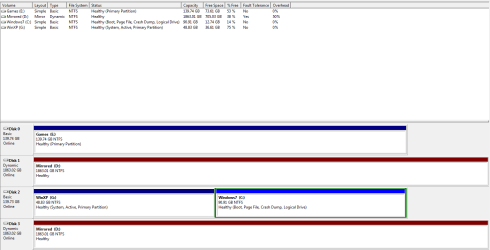
Here is a screenshot of my disk management..
 

Attachments

  • Capture.PNG
    Capture.PNG
    17.2 KB · Views: 7

My Computer

OS
Windows 7 Ultimate x64
First break the mirror.

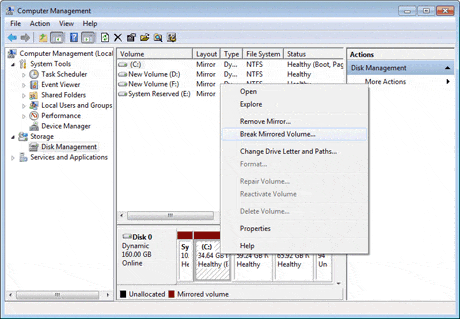
1. Right click "My Computer" and choose "Manage" -> "Storage" -> "Disk Management", right click the mirrored volumes and choose "Break Mirrored Volume" to break mirrored volumes or choose "Remove Mirror" to remove mirror. If the boot/system partition is on the mirrored volumes, you can only choose "Remove Mirror" to remove mirror. Please backup your important data before this operation.
convert-dynamic-to-basic-5-b.gif


Post screenshot of disk management afterwards

If all is fine... so you have 2 disks not mirrored. change drive letter of one of the volumes. So one volume is D other one is K for example.

Then make thos 2 disks basic instead of dynamic. http://www.sevenforums.com/tutorials/26829-convert-dynamic-disk-basic-disk.html

Post screenshot of disk management afterwards
 

My Computer

Computer type
Laptop
Computer Manufacturer/Model Number
ACER ASPIRE 5742G
OS
Microsoft Windows 7 Home Premium 64-bits 7601 Multiprocessor Free Service Pack 1
CPU
Intel(R) Core(TM) i3 CPU M 370 @ 2.40GHz
Motherboard
Acer Aspire 5742G
Memory
4,00 GB
Graphics Card(s)
ATI Mobility Radeon HD 5400 Series
Sound Card
(1) AMD High Definition Audio Device (2) Realtek High Defi
Screen Resolution
1366 x 768 x 32 bits (4294967296 colors) @ 60 Hz
Hard Drives
WDC WD5000BEVT-22ZAT0
This is something I wanted to avoid. Right now I have 1.2 TB of data that I would need to backup with no real solution of doing so. In theory, breaking the volumes shouldn't affect the data and backing up is just a safeguard?
 

My Computer

OS
Windows 7 Ultimate x64
This is something I wanted to avoid. Right now I have 1.2 TB of data that I would need to backup with no real solution of doing so. In theory, breaking the volumes shouldn't affect the data and backing up is just a safeguard?
It's safe. But always make backup first when doing tricky things.
 

My Computer

Computer type
Laptop
Computer Manufacturer/Model Number
ACER ASPIRE 5742G
OS
Microsoft Windows 7 Home Premium 64-bits 7601 Multiprocessor Free Service Pack 1
CPU
Intel(R) Core(TM) i3 CPU M 370 @ 2.40GHz
Motherboard
Acer Aspire 5742G
Memory
4,00 GB
Graphics Card(s)
ATI Mobility Radeon HD 5400 Series
Sound Card
(1) AMD High Definition Audio Device (2) Realtek High Defi
Screen Resolution
1366 x 768 x 32 bits (4294967296 colors) @ 60 Hz
Hard Drives
WDC WD5000BEVT-22ZAT0
Thanks very much for all your help gentlemen.
 

My Computer

OS
Windows 7 Ultimate x64
Back
Top